Sow for professionals
A Plant Database for Landscape Designers, With Live Nursery Prices on Every Record
A plant database earns its place when it answers the three questions a designer asks in order: will it live here, how big does it get, and what does it cost this week. Sow's catalog of more than 12,000 outdoor species and cultivars carries all three on every record, and because it is the same catalog the design tools draw from, the plants you select become the plant list, the schedule and the proposal without being retyped.
What is in every plant record
Hardiness zone, sun and soil requirements, mature height and spread, bloom start and finish, and care, with the botanical name and the common name side by side so the nursery and the client are reading the same line. Companion data is drawn from tens of thousands of real designs made in Sow, so when you open a plant you can see what it has actually been planted alongside rather than a textbook pairing. And every record carries current pricing across the nurseries we track, re-checked daily, with a note when a plant has dropped in price.
Filters that match how you select plants
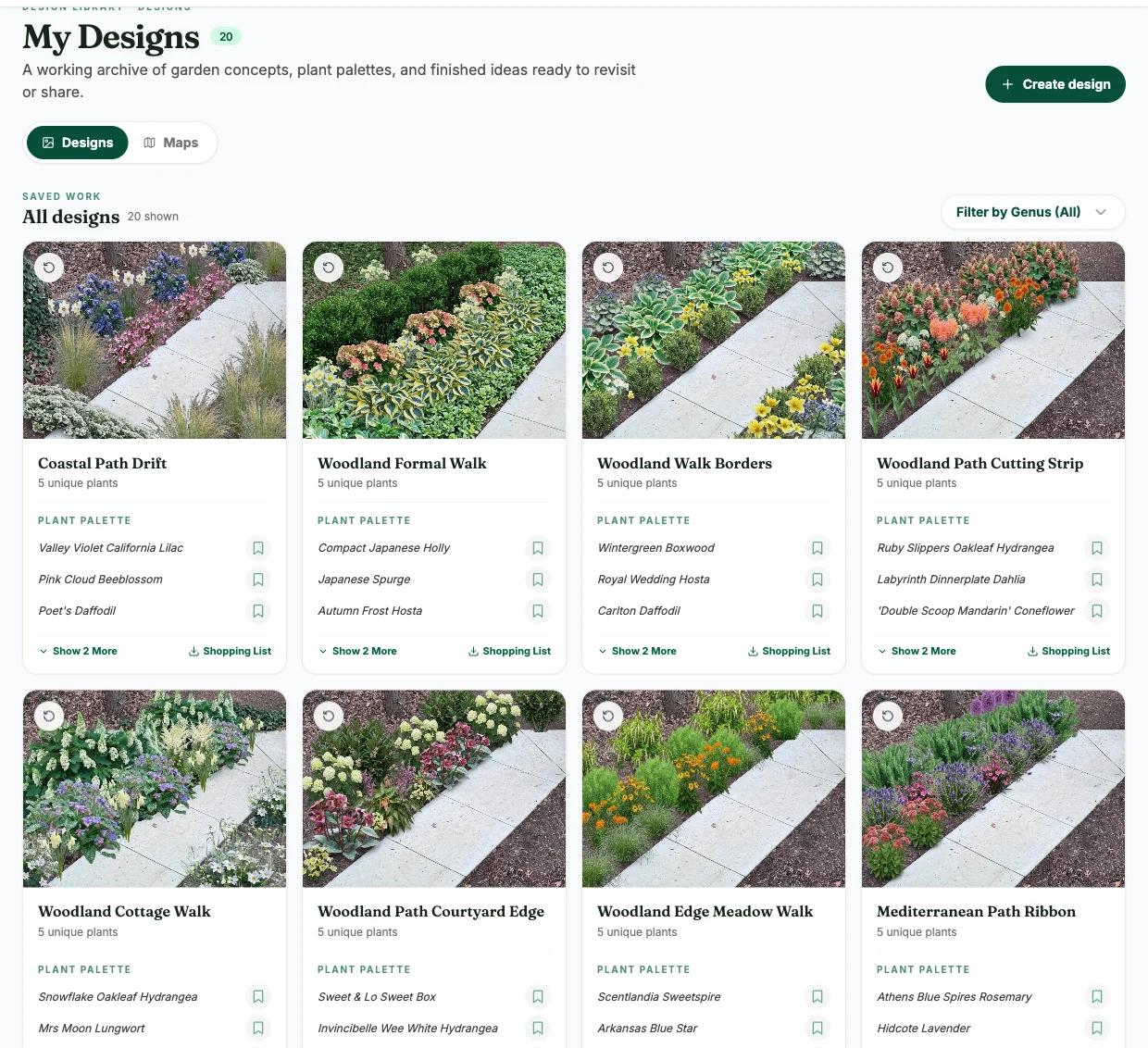
In the web Design Studio library the quick filters are Native, Full Sun, Shade, Deer Resistant, Drought Tolerant, Award Winners, On Sale, Low Maintenance, Pollinators and Hummingbirds, and you can browse by genus, by curated collection or by plant type. Help Me Choose takes a style, a zip code and the roles you need filled, structure, theme perennials, spring bulbs, summer and autumn bloomers, matrix plants, together with a sunlight preference, and returns candidates for the site. In the phone app each space carries its sun and zone, so the plants offered for a bed already suit the light and the winter it will face.
From the database to the schedule
Selection is only half the job; the plants have to end up on paper with quantities and prices. Place them in a design and the plant list writes itself with botanical names and counts. Build a planting plan and each bed lists its species with a quantity, a unit price you can edit to match your supplier's quote, and a line cost, subtotalled per bed and totalled for the plan, then exported as a PDF. On Pro+ the same lines flow into a proposal the client approves in a browser.
How it compares to Horticopia-style databases and Land F/X
A Horticopia-style reference database is built for looking plants up: deep horticultural records, photographs and printouts for a client, with the design happening in another program. Land F/X is a planting add-on for AutoCAD, so its plant data lives inside a CAD workflow built for construction documents. Sow's catalog is attached to the design itself, on the phone and in the browser, with live pricing on every line, and it is not a CAD tool. If you draft in AutoCAD, Land F/X is the native route. If you want a reference library with no design attached, a Horticopia-style database does that job.
What you can hand a client
Client brief
Capture the site, the budget, the style, and what the client actually asked for — in one shared place instead of a text thread.
Proposal
Turn a design into a proposal with the plant schedule already filled in from the plants you placed. Export a branded PDF.
Presentation
Walk a client through the design with plant detail they can see and understand, then leave them a PDF that still makes sense a week later.
Planting plan
A real plan with correct spacing and mature sizes — not a mood board. Export it or hand it to whoever installs it.
All included in Pro+ ($99.99/yr), with branded PDF export throughout.
Capture it on site. It is already on your desk.
Everything you do in the field lands in your dashboard the moment you do it. The photos you take at the walkthrough, the designs you generate in the driveway, the plants you save, the ideas you scribble down between jobs, the boards you shared with the client — all of it is on the bigger screen when you get back, ready to refine.
Shoot now, design later
Photograph the site while you are standing in it. The photos are waiting on the desktop, attached to the right project, when you have time to work them up properly.
Rough it in the driveway, refine it at the desk
Generate a concept while the client is watching, then open the same design on a large screen to place plants precisely, adjust spacing, and get the palette right.
One project, both screens
There is no export step and no second copy. The phone and the web studio are the same project — whichever you touch last is simply the current one.
Share from wherever you are
Send a board to a client from the truck or from the office. What they see is the latest version either way.
The plant data behind every design
You do not have to take our word for the catalog — it is published. Over 12,000 outdoor species with hardiness, mature size, bloom timing, and prices we re-check daily against the nurseries we track.
Questions from professionals
What does Sow Pro+ cost?
$99.99 a year ($19.99/month) — the whole professional toolkit, including the client tools: boards, briefs, proposals, presentations, and version-bound approvals.
Can I start on my phone and finish on my desktop?
Yes, and that is the normal way to work. Photograph and design the site on your phone while you are standing in the yard; the photos, designs, saved plants and shared boards are already in your desktop dashboard when you sit down. Same project, bigger screen — no export step.
Do clients need to install anything?
No. Client boards open in a browser from a link — the client reads the proposal, comments, and approves a version without installing an app.
Does Sow handle invoicing, scheduling, or job costing?
No. Sow covers design through client sign-off. It does not do invoicing and job costing, crew scheduling and dispatch, a full crm, irrigation or hardscape cad engineering — it is built to sit alongside whatever you already run the business on.