
What does an AI landscape design app actually do?
They all redraw your photo. What matters is what comes after: named plants, a zone check, edits and a list you can buy from.
Every app on this page takes a photo of your yard and returns a new picture of the same yard with planting added. Some ask for a style first, some ask for your zone and sunlight, some infer those from your location. The picture comes back in anywhere from half a minute to a few minutes.
That part is now table stakes. Five of the seven tools ranked here do it, and the two that do not quite fit (Planner 5D, whose generator is built for interiors, and the manual placement apps like iScape that we left out) are not really the same category.
What separates them is everything after the picture. Does the app tell you what the plants are, with botanical names you can take to a nursery? Did it check those plants against your hardiness zone and the light in that bed, or did it paint whatever looks good? Can you change one plant without regenerating the whole image?
Is there a list with quantities, a planting plan, prices, anything that gets you from a convincing render to a Saturday at the garden center?
That is the lens for this roundup. We did not score render beauty out of ten; the renders from the two tools we ran were both convincing enough to show a partner. We scored what you can do with the result. The checks, in the order they matter:
- Named plants: common and botanical names for every plant in the picture, not a mood board.
- Zone and sun: does it ask for, infer, or ignore your hardiness zone and the light in the bed?
- Mature size and spacing: will the plants in the picture still fit the bed in five years?
- Editability: can you remove, swap, or move one plant after generation?
- A list you can buy from: quantities, and ideally prices.
- A planting plan: a top-down layout, not only a perspective image.
- What free gets you, and where the watermark goes.
Which AI landscape design apps did we run on the same yard?
We ran Neighborbrite and Sow hands-on on one Raleigh yard. The other five are ranked from their own pages.
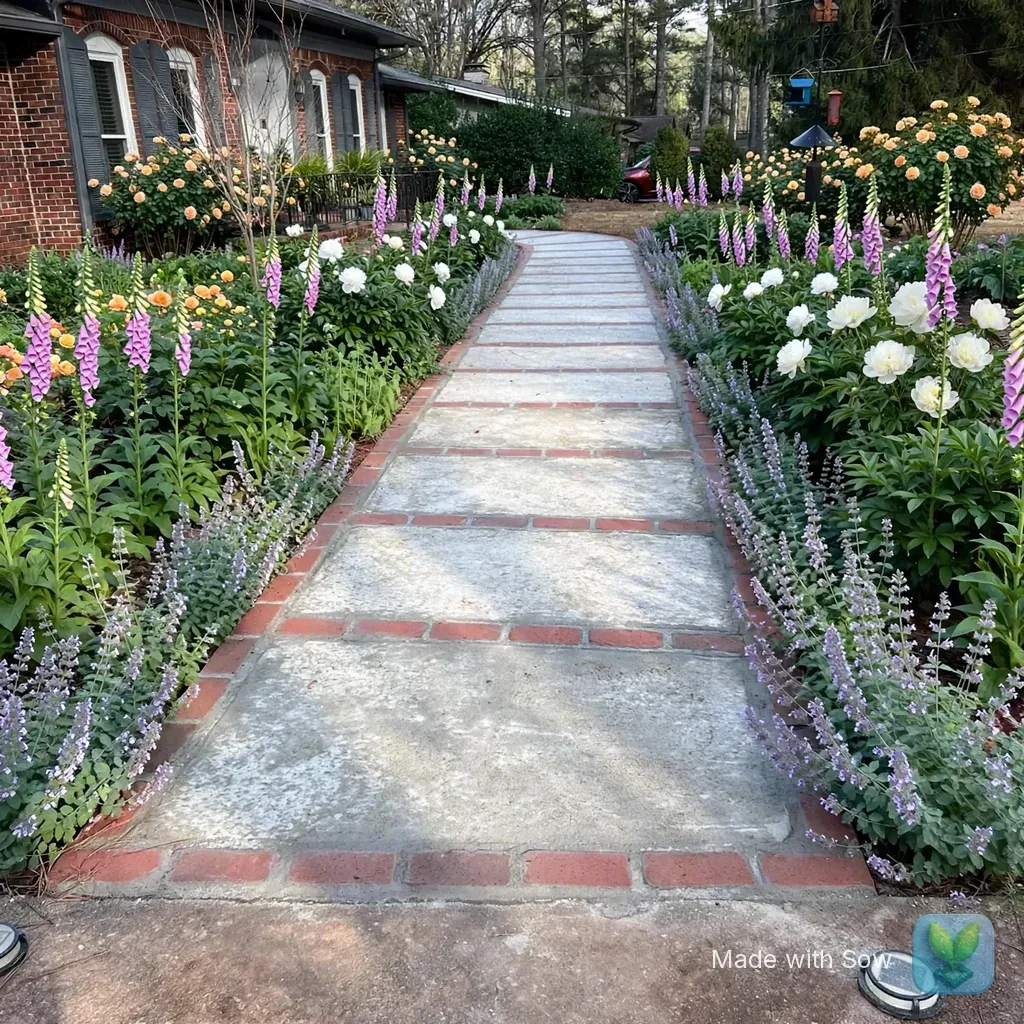
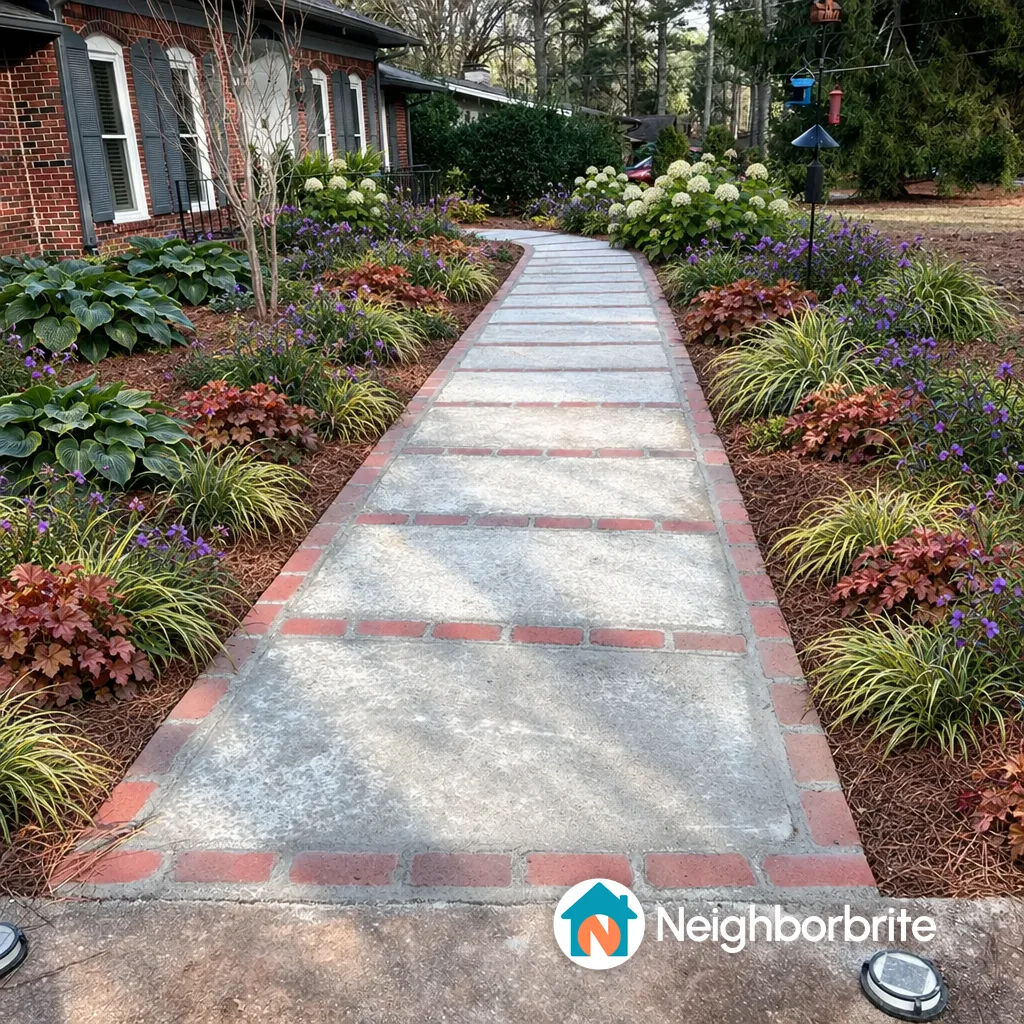
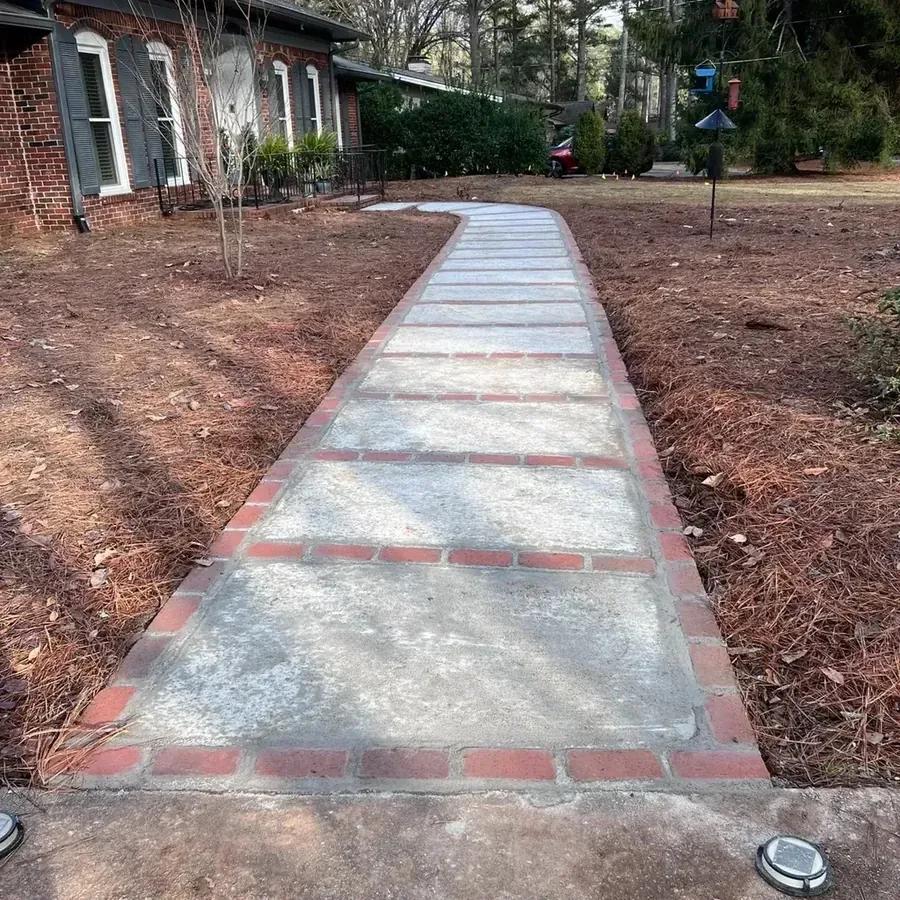
Two, properly. Neighborbrite on its free web tier and Sow on a fresh free web account, then Sow again on an iPhone to capture the editing and planting-plan screens that only exist in the app. Both test photos are in this section. The front yard is deliberately ordinary: a brick ranch, a concrete and brick walkway, two bare pine-straw beds under pines, part sun. If an app can make this look planted and tell you what to buy, it can handle most front yards.
Hadaa, DreamzAR, Gardenly, OutdoorBrite and Planner 5D are paid products with no free render of your own yard (Planner 5D has a free tier, but its generator is interior-first). For those five, every fact on this page comes from their own pricing and feature pages, checked October 12, 2026, and anything we could not confirm is marked "Unverified" in the table rather than guessed.
The three App Store apps that rank for these searches on their names alone, Yard AI, AI Garden Design and Garden AI, are listed at the end but not ranked. They are App Store listings we could not install on a simulator. They have their own page, linked at the bottom.
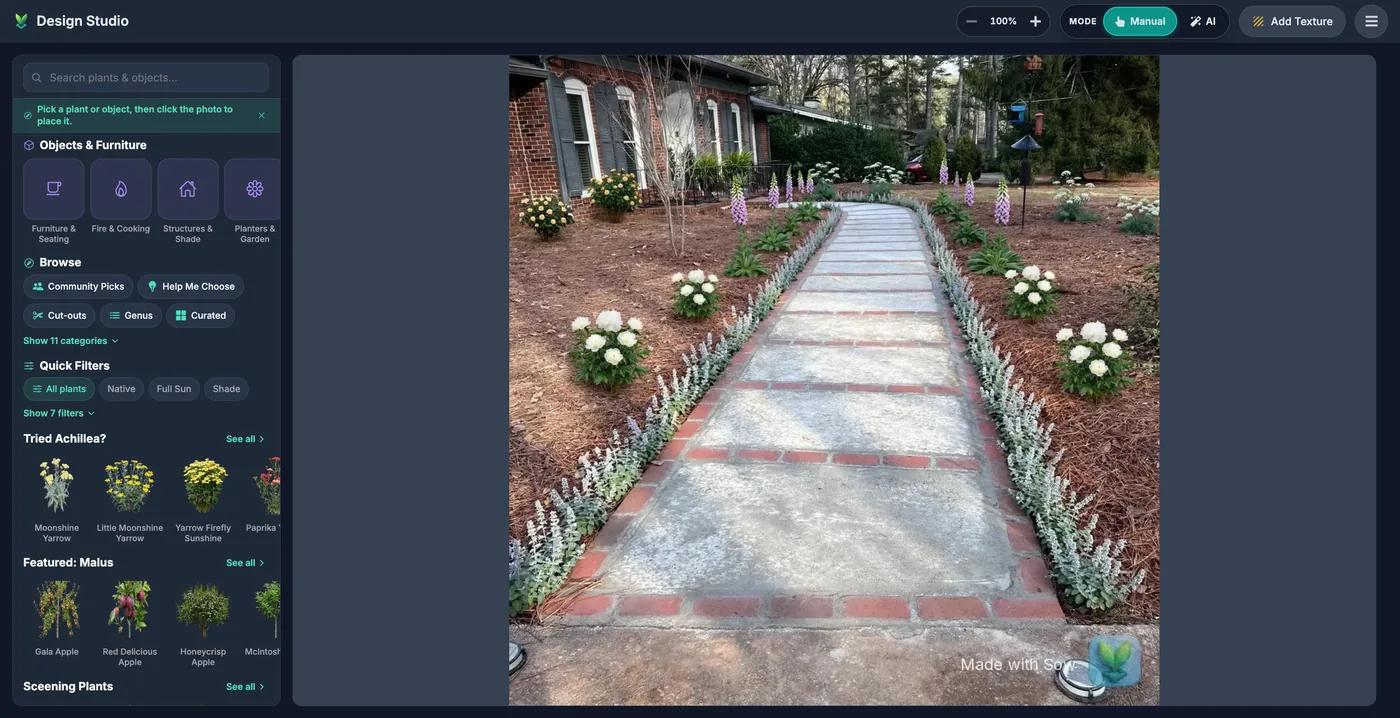
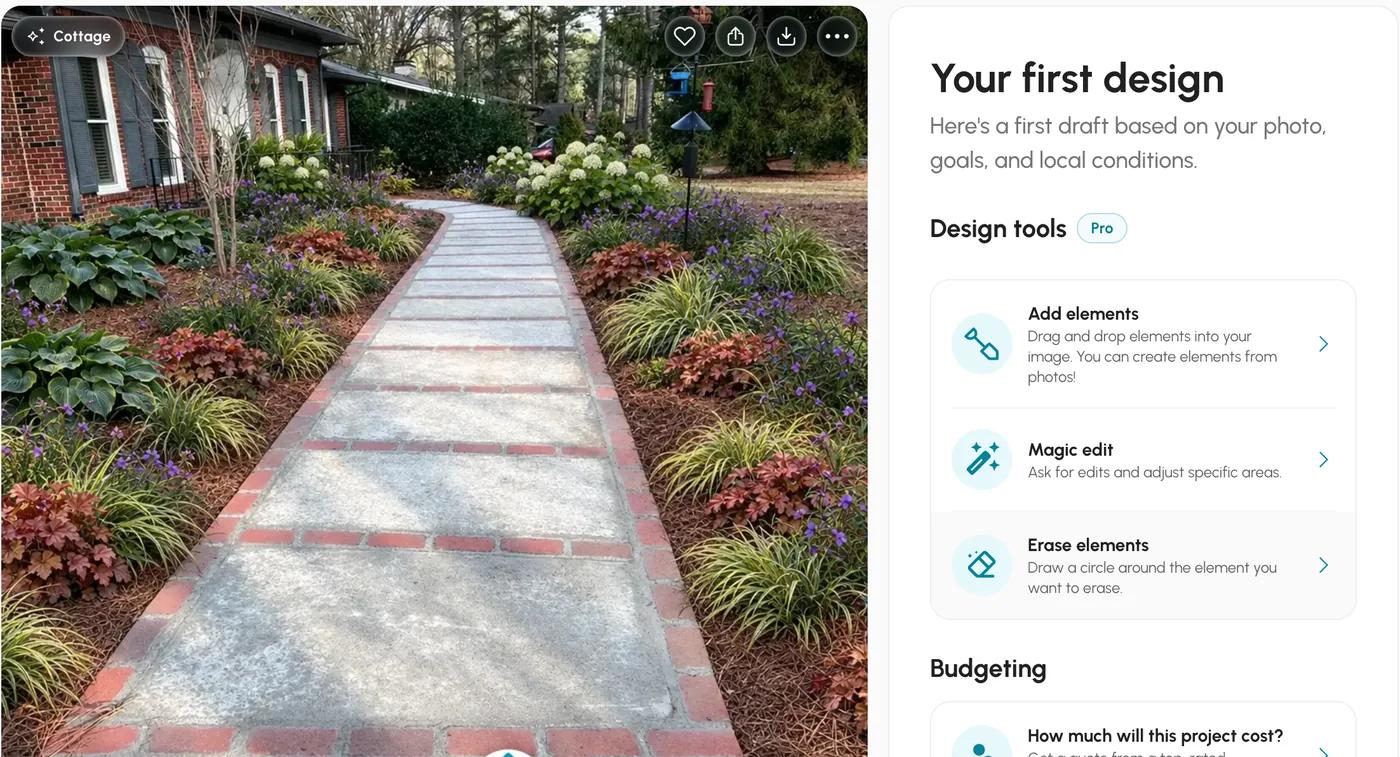
Both front-yard results kept the house, the walkway, the pine straw and the bird feeder, and both put a cottage border on each side of the path. Neighborbrite planted it more densely with hostas, coral bells and sedges; Sow planted it more sparsely with foxglove spires, white peonies and a yellow rose by the house. Neither touched the lawn.
Both carry a watermark in the bottom right on the free tier, and both came back at 1024 by 1024 pixels.
Which AI landscape design apps name real plants and check your zone?
Almost all name real plants. Fewer check your zone, fewer still publish mature size, and only some let you edit one plant.
Tap or hover any cell for the note behind it.
| Feature | Sow | Neighborbrite | Hadaa | DreamzAR | Gardenly | OutdoorBrite | Planner 5D |
|---|---|---|---|---|---|---|---|
| Plants are real, named species | Yes | Yes | Yes | Yes | Yes | Partly | No |
| Checks hardiness zone or climate | Yes | Partly | Yes | Partly | Yes | Partly | No |
| Mature size and spacing data | Yes | Unverified | Unverified | Partly | Unverified | Unverified | No |
| Move or swap individual plants after generation | Yes | Partly | No | Yes | Partly | Partly | Yes |
| Drag-and-drop editor for plants, objects and paving | Yes | Partly | No | Yes | Unverified | No | Yes |
| Top-down planting plan or layout | Yes | No | Yes | No | No | No | Partly |
| Grid bed planner with companion planting | Yes | No | No | No | No | No | No |
| Plant list or shopping list | Yes | Yes | Yes | Unverified | Yes | Partly | No |
| Diagnoses a sick plant from a photo | Yes | No | No | No | No | No | No |
| Measures the sun a spot gets | Yes | No | No | No | No | No | No |
Real plants
Every tool except Planner 5D names them in some form.
Zone
Sow, Hadaa and Gardenly state a zone check. Neighborbrite showed zone 8a while it worked but does not say what it checks.
Mature size
Sow carries height and spread on every plant, and DreamzAR says it has growth data. Nobody else publishes it.
Editing
Sow, DreamzAR and Planner 5D have drag-and-drop editors, and Sow also swaps one species at a time on a generated design. Neighborbrite, Gardenly and OutdoorBrite regenerate; Hadaa is one-shot.
Are AI yard design apps accurate?
The plants were real and the zone was right. Light was the weak spot, so set the sun yourself.
Accurate enough to be useful, and not accurate enough to trust blindly. Here is what the two hands-on runs showed, with the screenshots, because this is the question people ask most and the one most roundups wave away.
Real plants
Yes, from both tools. Neighborbrite's front-yard palette was five named cultivars, Annabelle hydrangea, Concord Grape spiderwort, Northern Exposure Sienna coral bells, Evergold sedge and Big Daddy hosta, with botanical names on the list (Hydrangea arborescens 'Annabelle', Carex hachijoensis 'Evergold' and so on).
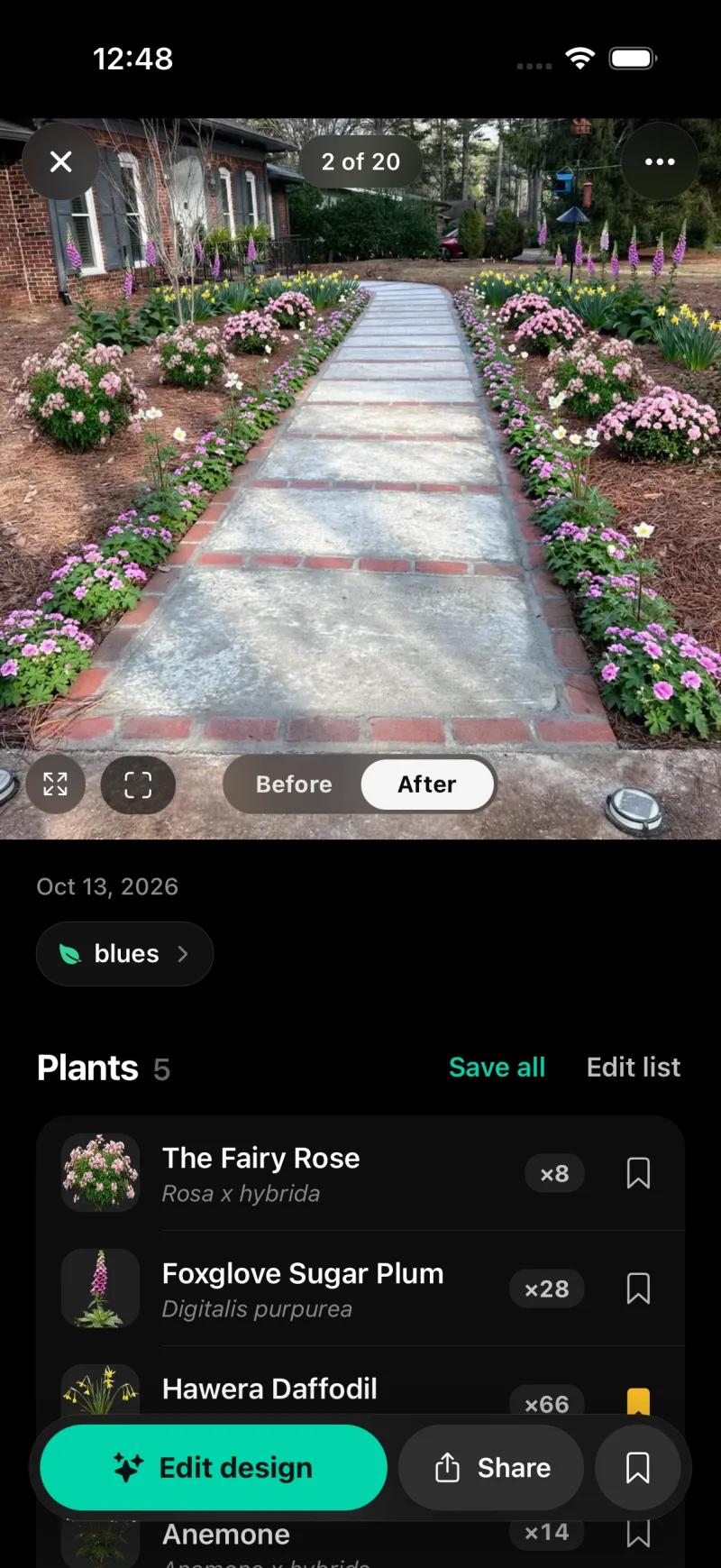
Sow on the web returned five named plants linked to catalog pages: Buff Beauty rose, Duchesse de Nemours peony, Camelot Lavender foxglove, Baltic parsley and Snowflake catmint. Sow on the iPhone returned five species with botanical names and counts: The Fairy Rose (Rosa x hybrida) x8, Foxglove Sugar Plum (Digitalis purpurea) x28, Hawera Daffodil x66, Anemone x14, and one more. Nobody invented a plant.
Zone
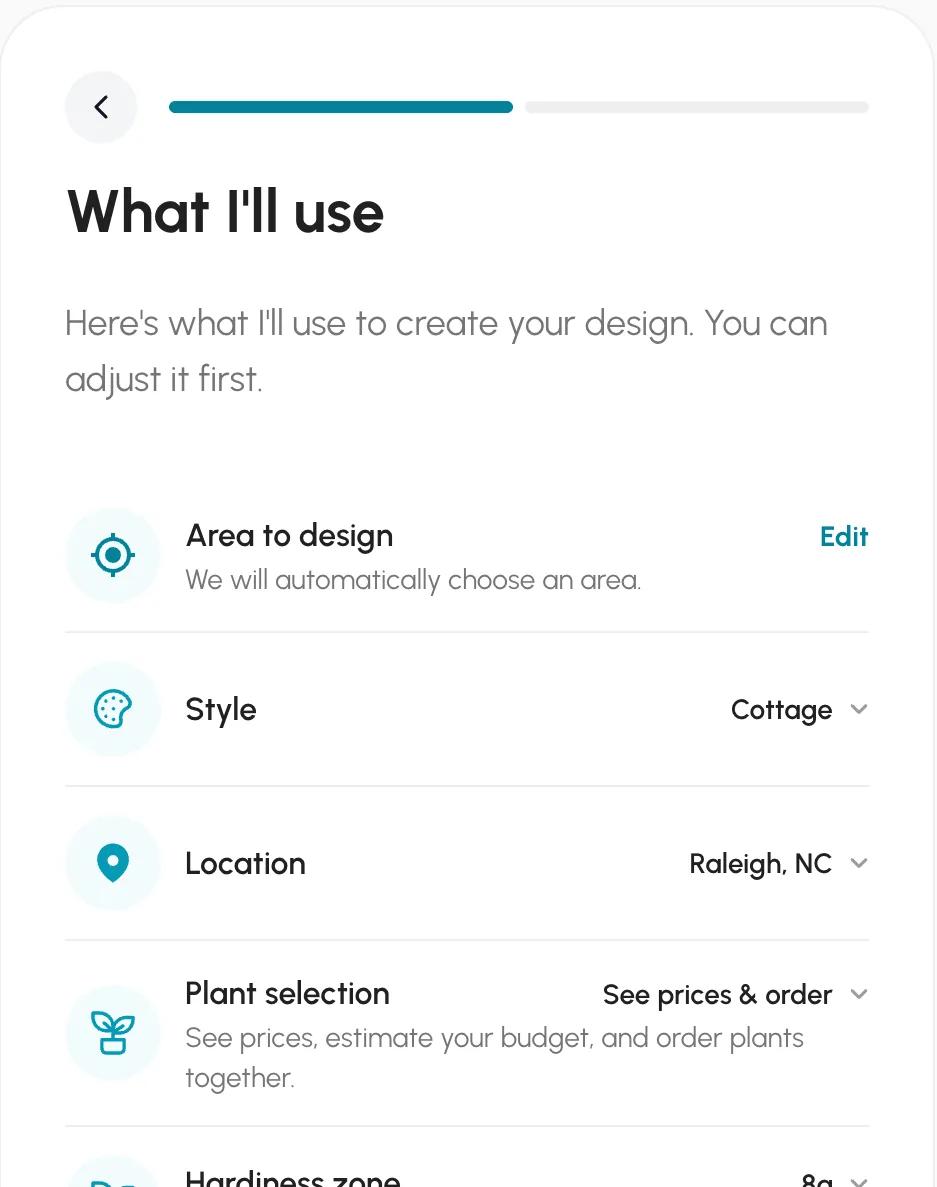
Neighborbrite inferred Raleigh from our connection and put zone 8a on the confirm screen, which is correct for this address on the 2023 map. Sow on the iPhone starts from a saved space that already carries the zone and the light, so the design began at zone 8a, part sun. On the web, every Sow plant links to a catalog page with its zone range.
Sun is where Neighborbrite slipped. It guessed "Full sun" for a bed the photo shows under pine trees. We changed it to partial sun before generating, and the palette it then chose (hydrangea, hosta, coral bells, sedge) is sensible for part shade in 8a. Had we clicked through, it would have planted a sunny border in the shade.
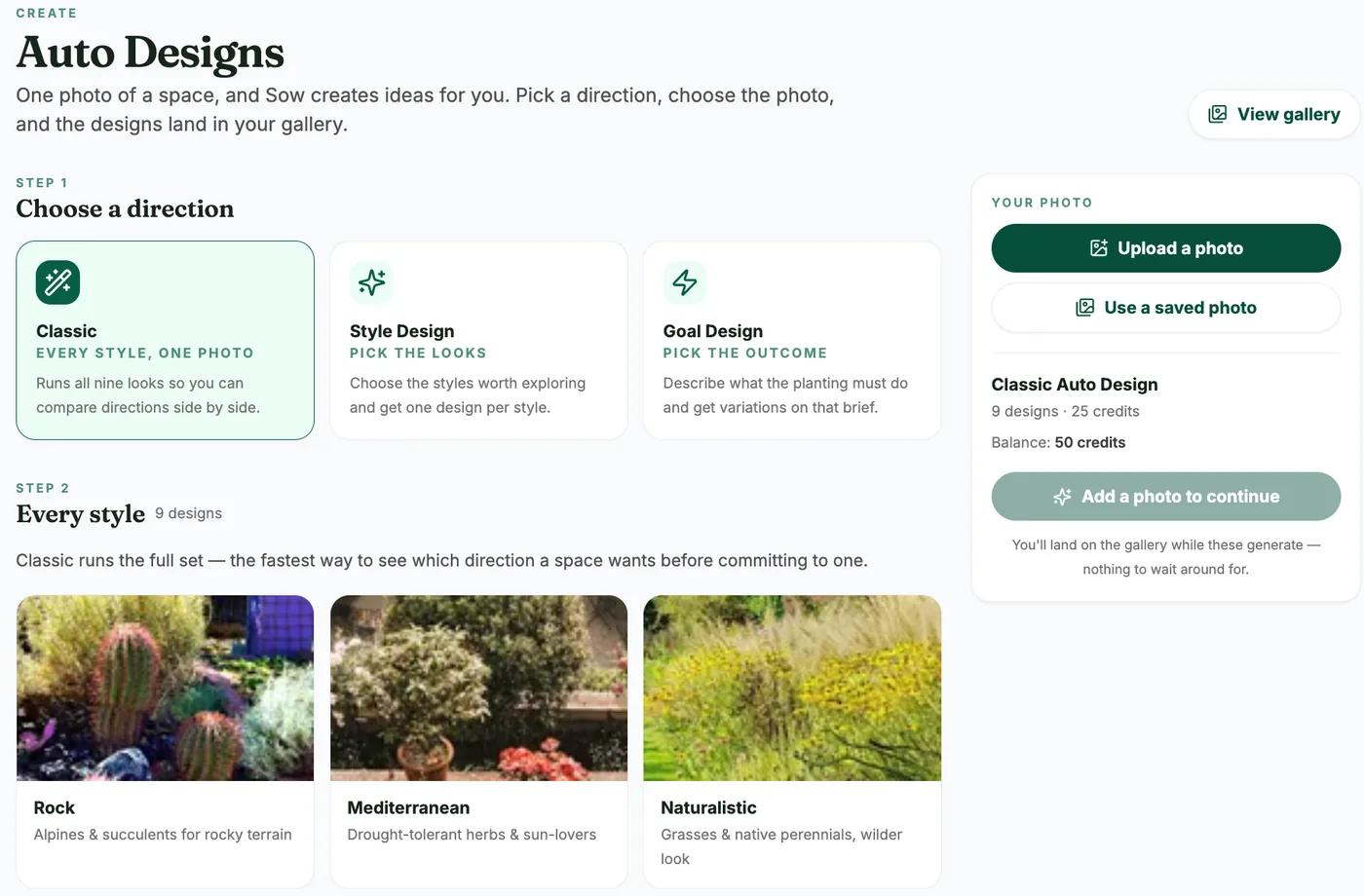
Sow's mobile Auto Design sheet has a sun chip pre-filled from the space, and with Part sun set it chose foxglove, anemone and daffodil.
Quantities and sizes. Neighborbrite's list gave quantities (41 plants in total) and prices, but no mature sizes or spacing, so you cannot tell from it whether 15 spiderworts fit. Sow's mobile result gave quantities per species, and each species opens to its catalog entry with mature size. Sow's web Shopping List PDF gives quantities and prices too, and like Neighborbrite's list it leaves mature size and spacing to the plant pages.
So the honest answer to "are they accurate": the plants are real, and the zone is handled by the tools that ask for it. The weak point in October 2026 is light. Set it yourself, in any app, before you generate, and read the plant list rather than trusting the picture.
| Tool | Plants | Kinds of plants | Beyond plants | What each plant carries |
|---|---|---|---|---|
| Sow | 12,000+outdoor species and named cultivars |
| 150 objects in 12 groups (furniture, fire pits, fences, lighting, water features and more) and 93 surfaces (lawn, mulch, gravel, pavers, decking and more) | Zone, sun, mature height and width, bloom time, monthly care, native status, deer and drought tolerance, and a nursery price where one is listed |
| Neighborbrite | 5,000+per its site | Not stated | Pergolas, fire pits, fencing, water features and more, per its site; placing them is a Pro feature | Common and botanical name, hardiness zone and sun, with a Nature Hills price; no mature size |
| Hadaa | Not stated | Not stated | Not stated | Filtered to species that survive your climate, by USDA zone, water and sun, per its site |
| DreamzAR | 2,000+plants and garden features together, per its site |
| Outdoor furniture, pools, patios, walkways, pergolas, fences, fountains, planters, lighting and statues, plus 50+ paving patterns | Care, sunlight, water needs and growth, per its site; its FAQ says it does not know your USDA hardiness zone |
| Gardenly | Not stated"a vast database of plants", per its site | Not stated | Not stated | Common and scientific name, a buy link, and picks for your climate zone, per its site |
| OutdoorBrite | Not statedits site describes a library of design styles, not plants | Not stated | Not stated | Not stated |
| Planner 5D | No named speciesgeneric plant symbols | Not stated | 10K+ catalog items, mostly furniture and decor, plus patios and decks; half the furniture catalog on free | No species, zone or climate data |
How much do AI landscape design apps cost?
From free to $149 a month. Sow Pro is $39.99 a year on the web and Gardenly is $54 a year.
Prices checked October 2026 on each vendor's own pricing page or in-app billing screen. Sow's web price is lower than its App Store price, and both are shown.
| Tool | Free | Paid | Checked |
|---|---|---|---|
| Sow | Yes | Pro from $39.99 a year on the web ($59.99 through the App Store); Pro+ $99.99 a year | Oct 12, 2026 |
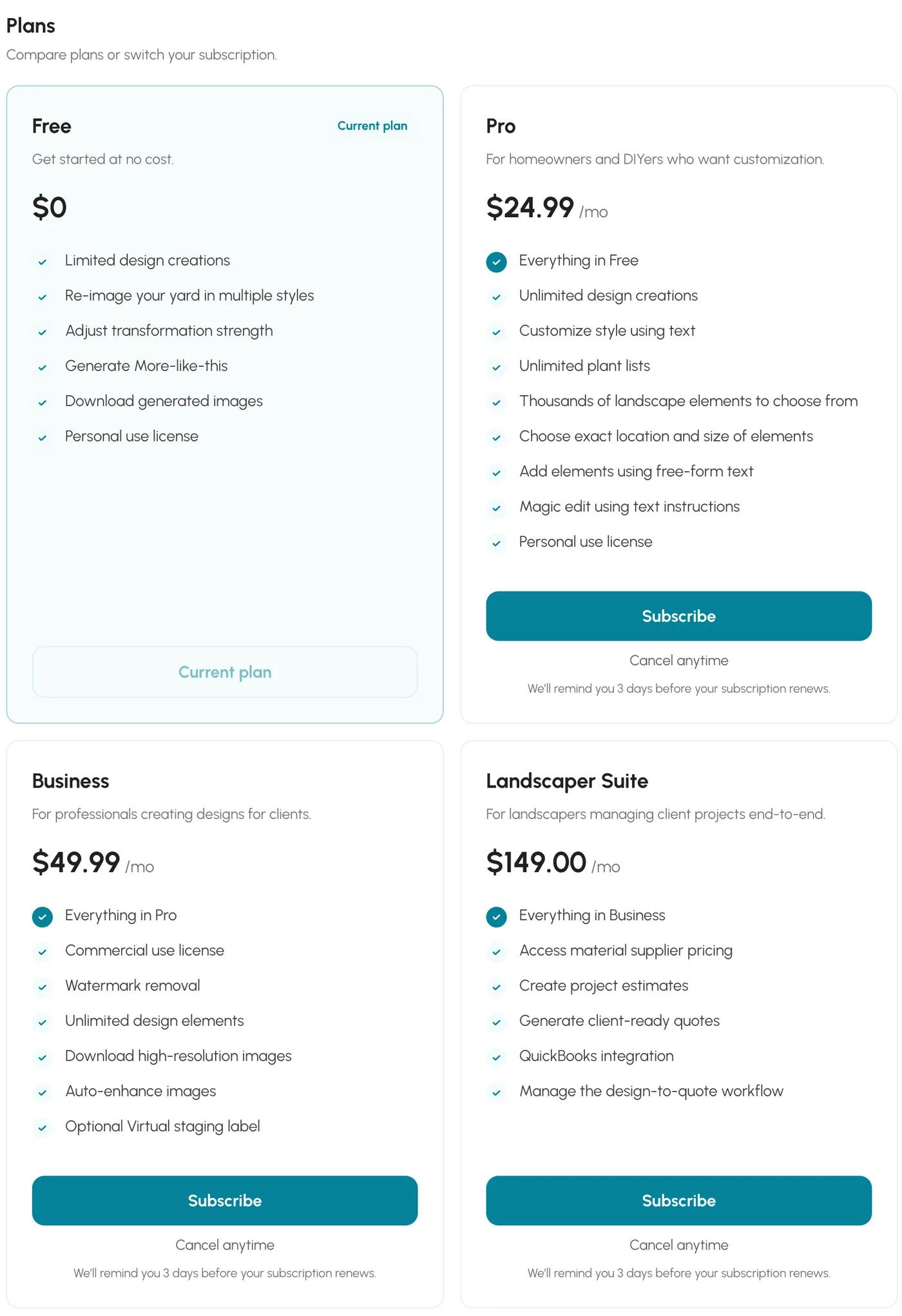
| Neighborbrite | Yes | Pro $24.99 a month; Business $49.99 a month | Oct 13, 2026 |
| Hadaa | No free tier | $12 per render, or $9 each for three or more | Oct 12, 2026 |
| DreamzAR | No free tier | $19.99 a month or $199 a year | Oct 12, 2026 |
| Gardenly | No free tier | $54 or $84 a year | Oct 12, 2026 |
| OutdoorBrite | No free tier | $29 to $149 a month | Oct 12, 2026 |
| Planner 5D | Yes | Premium $19.99 a month or $59.99 a year; Professional $49.99 a month or $399.99 a year | Oct 12, 2026 |
The spread is wide. At the low end, Sow Pro at $39.99 a year on the web ($59.99 a year through the App Store) and Gardenly at $54 a year are the cheapest ways to get unlimited photo redesigns with a plant list.
Hadaa charges per render, $12 for one and $9 each for three or more, which is the cheapest route if you want exactly one yard done once and the most expensive if you iterate. DreamzAR is $19.99 a month or $199 a year with no free tier.
Neighborbrite has a limited free tier with a watermark; its Pro plan at $24.99 a month keeps the watermark, and only Business at $49.99 a month removes it. OutdoorBrite starts at $29 a month ($276 a year) and goes to $149 a month, with no free trial.
Planner 5D has a free tier with half its catalog and Premium at $59.99 a year.
Two things to notice before you pay. A monthly price that looks small is not small over a season: Neighborbrite Pro is $299.88 over twelve months paid monthly (no annual price is shown), against Sow Pro at $39.99 or Gardenly at $54 for a year. And watermark removal is not always where you expect it.
On Neighborbrite it is a Business feature, not a Pro one. On Sow it comes with Pro.
Is there a free AI landscape design app?
Yes. Sow gives 10 free designs plus more for taking part, and Neighborbrite gives four a day.
Yes, two. Sow gives everyone 10 free designs to start and keeps giving free designs for taking part: posting a design earns 25 credits (five designs), a referral 100, and challenges and helpful answers earn credits too. Neighborbrite's limited free tier gives four designs a day, downloads allowed, a plant list with prices on the first design, and a watermark on every image.
Planner 5D has a free tier with unlimited projects and half the catalog, but the catalog has no plant species, zone or climate data, so what you get free is a 3D model with generic plant objects, not a planting design.
DreamYard and Gendo both rank at or near the top for the free-AI searches, with pages titled "DreamYard: #1 Free AI Landscape Design, No Subscription" and "Free AI Landscape Design Generator Online". Treat those titles as claims until you have tried them.
If you do not need a picture at all and want a scaled plan you can hand to a nursery, Klora gives you one complete property design free, with no account, then charges $24 or $69 a year, with a 1,422-species library that carries sun and zone data.
Nothing is generated for you; you draw the beds and place the plants over an aerial of your lot. It is not an AI app, which is why it is not ranked here, but it is the best free planning tool we tested.
The free-tier question most people are really asking is "will I get a watermark?" Yes, on every free AI tool we tested, and on Neighborbrite's paid Pro tier as well.
Can you edit the design after the AI generates it?
Sow edits one species at a time on mobile. Most of the others regenerate the whole picture.
This is the question that separates a design tool from an image generator, and the answers differ more than the marketing suggests.
Sow, on mobile
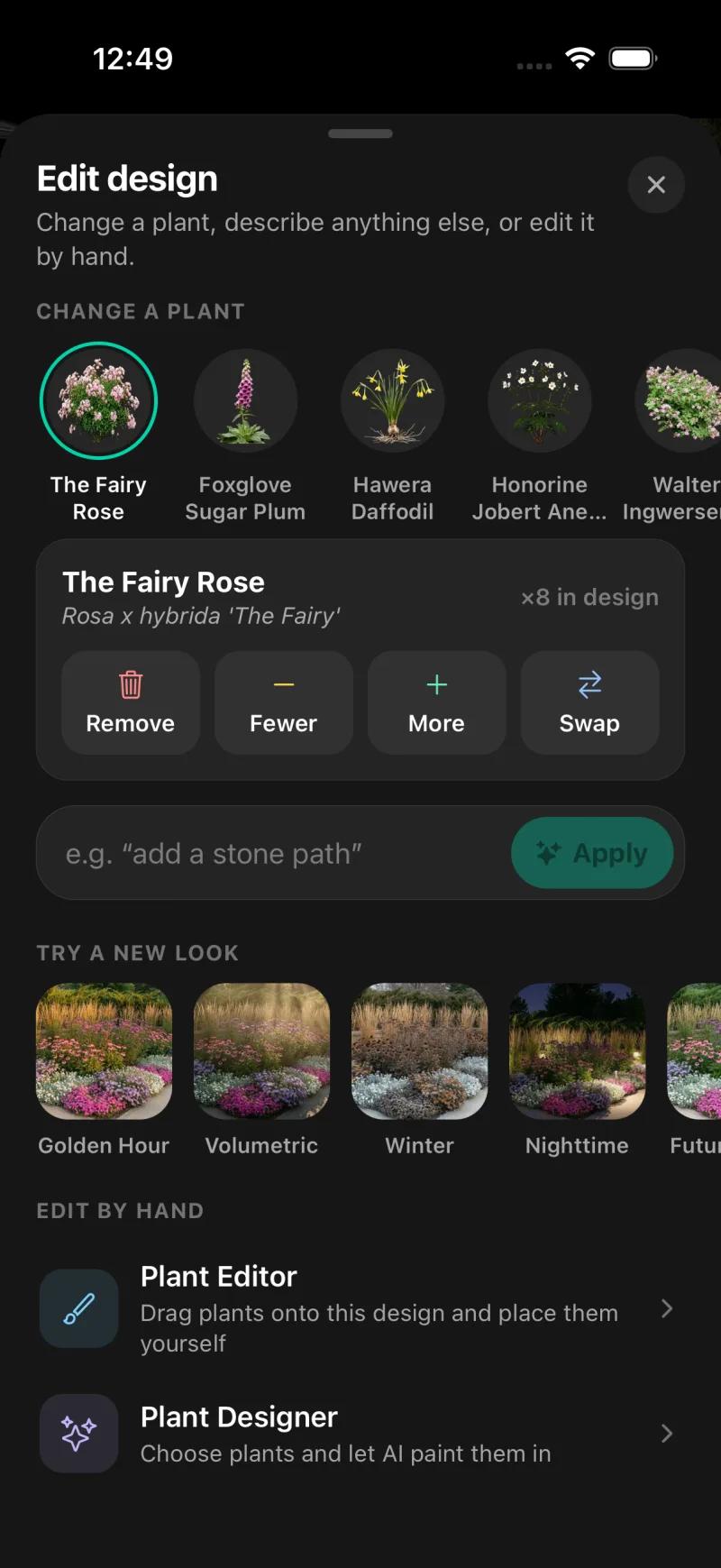
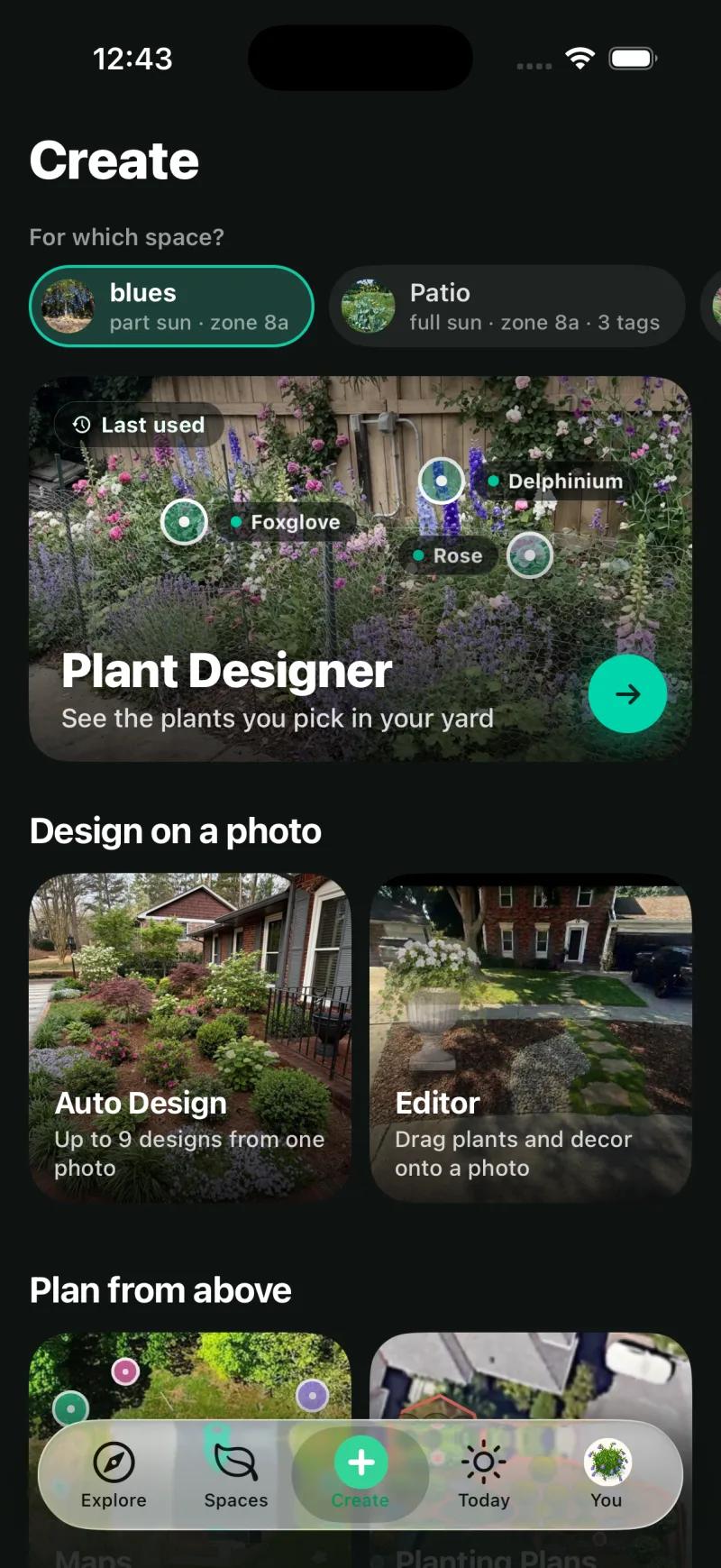
Every generated species can be removed, counted up or down, or swapped, and the Plant Editor lets you drag plants, furniture and paving by hand. Tap The Fairy Rose in the plant list and you get Remove, Fewer, More and Swap, with the count in this design shown.
The Edit design sheet also takes a free-text instruction ("add a stone path"), offers restyles (Golden Hour, Volumetric, Winter, Nighttime, Future growth) and opens the Plant Designer. On the web, Design Studio opens the render for manual placement over it, with a plant and object library and quick filters for native, full sun, shade and deer resistance.
We could not confirm that individual generated plants are movable objects on the web; that is the mobile Plant Editor's job, and the table says "Yes" on the strength of mobile.
Neighborbrite
Edits on the free tier are regenerations. Generate again, choose another style, or go back and change the plan text before the image is drawn. The tools that touch the picture itself, Add elements, Magic edit, Erase elements and text changes, carry a Pro badge at $24.99 a month, and even then they edit the image rather than named plant objects.
DreamzAR advertises a drag-and-drop 2D editor on the photo and chat-based refinement. Hadaa is explicit that renders are one-shot: to change the design you buy another render. Gardenly and OutdoorBrite describe edits as regeneration, in OutdoorBrite's words "change plants, paving and layout". Planner 5D is fully editable because it is a 3D modeler, but what you are moving is a generic plant object with no species attached.
Which app takes you from a picture to a planting plan and a shopping list?
Neighborbrite and Sow give priced plant lists. Sow adds a per-bed planting plan, and Hadaa sells a blueprint per render.
A render is a decision aid. A plan is what you build from. Here is what each tool hands you after the picture.
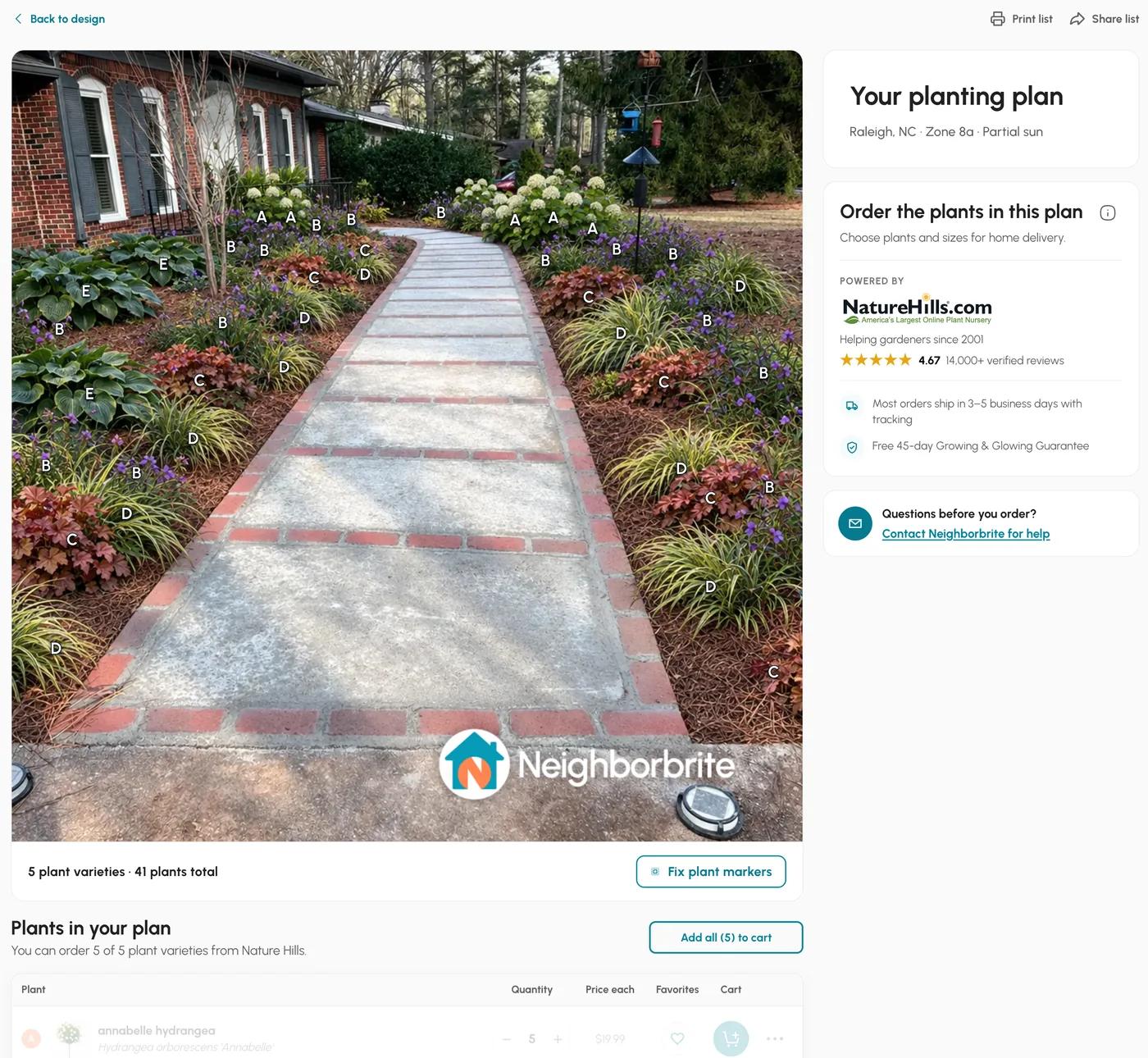
Neighborbrite gave us a plant list with the first free design: 5 varieties, 41 plants, with Nature Hills prices (Hydrangea arborescens 'Annabelle' x5 at $19.99 each, Heuchera 'Northern Exposure Sienna' x8 at $43.86, Hosta 'Big Daddy' x3 at $32.85, and so on) for a total of about $1,049 before shipping. That is genuinely useful.
The button that opens it carries a Pro badge, and we could not confirm that the list stays free after the first design. There is no top-down plan and no mature-size data.
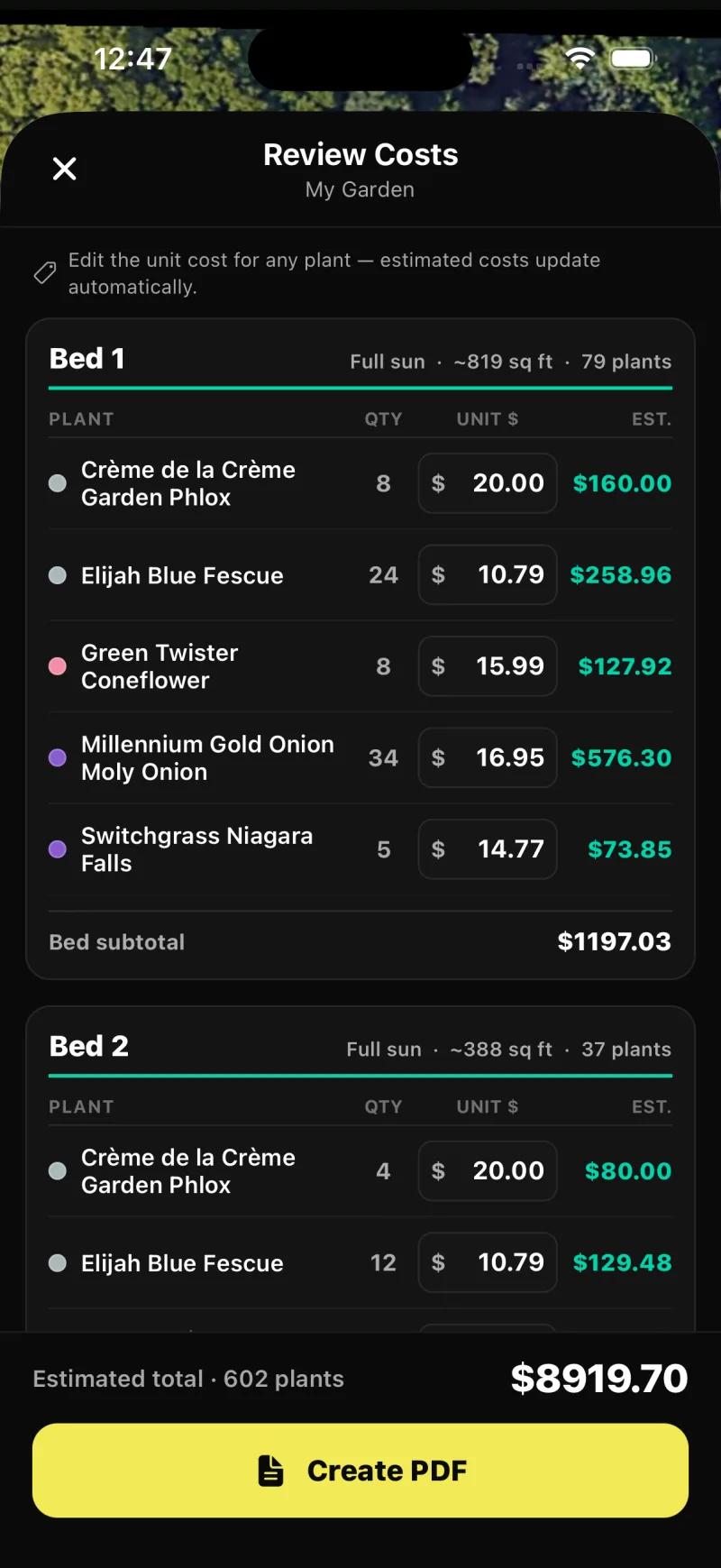
Sow on the web gives a Shopping List PDF that is a plant schedule: one row per species with its quantity, a unit price and a line total, and an estimated total at the bottom.
The unit price is the lowest price listed by the online nurseries Sow tracks, shown as "from", and Sow is not paid by any of them; where a species has no current listing the PDF uses a typical price for that plant type and marks it "est.", and a species with neither is shown as "no listing" and left out of the total.
On our backyard design, "Romantic Cottage Haven", that was 5 species, 39 plants and an estimated total of $644.74, with three species priced from listings (October Skies aster from $11.99, Dwarf Lady's Mantle from $10.80) and two marked est. Two things to know: the lowest listed price is usually for the smallest pot, and the PDF does not show mature size or spacing, which are on each plant page.
The per-bed plan with an editable unit price per species lives in Planting Plans on mobile: the app finds beds on a satellite view of your address, fills each one, and the Review Costs screen lists every species per bed with quantity, an editable unit price and a subtotal before you export the PDF.
On our test account that was 17 beds across its spaces, with an estimated total of $8,919.70 for 602 plants on one plan. A Sow design on mobile also shows quantities per species right on the result.
Sow also checks 18 online nurseries every day for prices and deals, and every plant in a design links straight to where you can buy it at the lowest price it found.
Hadaa's whole pitch is this step. A planting guide in which every plant is verified against your USDA zone, with botanical names and quantities, a contractor blueprint with plant placement, path widths and material volumes, and a bill of quantities, per render. On paper it is the most complete single deliverable in the group. Gardenly includes a climate-zone plant list and a shopping list. OutdoorBrite includes a plant list on its Plus and Pro plans only. DreamzAR and Planner 5D do not publish a shopping list feature, and neither has a planting plan.
1. Sow: is it the best AI landscape design app?
Yes, if you plan to plant it: real species, per-plant edits and a priced plan. No AR or 3D.
For a homeowner who wants to plant the result, yes, with the obvious caveat that this is our app and you should weigh that.
The case rests on four things we can show rather than claim: every plant in a design is a real species from a 12,000+ catalog with zone, sun, mature size, bloom and care data; the design stays editable plant by plant on mobile, and the Editor lets you place plants, furniture and paving yourself; the same project carries on into a planting plan with quantities and prices, care reminders after planting and live nursery prices; and it runs on iPhone, Android and the web with one account. Sow has 95,000+ designs and 40,000+ gardeners behind those numbers.
The hands-on run
A fresh web signup took about 10 seconds. Style Design with Cottage cost 5 credits. The front-yard render itself took well under a minute, though the gallery showed it 90 to 150 seconds after submit because the page polls rather than streams. The result kept the house, walkway and bird feeder and placed five named plants linked to catalog pages.
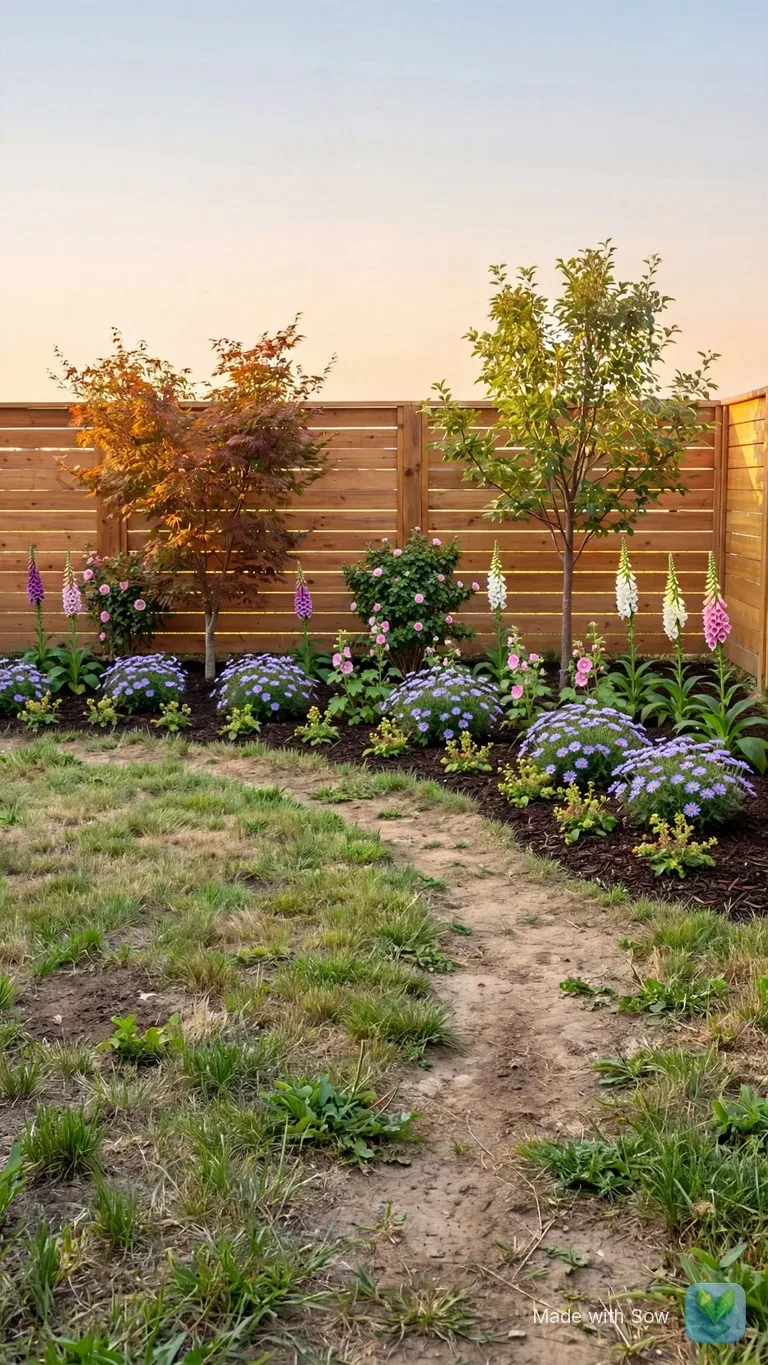
The backyard run came back in about 90 seconds with a continuous mulched bed of roses, foxgloves and catmint along the fence and the lawn left as photographed.
On the iPhone the same front-yard photo came back in under three and a half minutes end to end, with botanical names and quantities, and the sun chip, pre-filled from the space, steered it to part-sun plants.
Where it loses
No AR, no 3D walkthrough, no hardscape CAD or construction documents. Weather-aware care is US-only and the catalog is outdoor plants only. Free designs beyond the first 10 are earned by taking part, rather than refilled daily as Neighborbrite's are.
The web Shopping List PDF prices each species at the lowest listed nursery price, often the smallest pot, and does not show mature size or spacing. Sow is free to start; Pro from $39.99 a year on the web ($59.99 a year through the App Store); Pro+ $99.99 a year.
Sow: what works
- Ten free designs for everyone to start, and unlimited more for taking part in the app (posting, referrals, challenges), with real plants in every one
- Every plant in a design is a real species with zone, sun, mature size, bloom, and care data (12,000+ catalog)
- Designs stay editable plant by plant instead of being a one-shot image
- A drag-and-drop Editor for placing plants, furniture and paving by hand, from a blank photo or on top of a generated design
- A grid bed planner, a top-down map of your yard, Plant Doctor and a sunlight meter in the same app
- Planting plans, care after planting, and live nursery prices in the same project
- Same project on iPhone, Android, and the web
Sow: what falls short
- No AR or 3D walkthrough
- No hardscape CAD or construction documents
- Outdoor plants only; weather-aware care is US-only
- Free designs beyond the first 10 are earned by taking part (posting, referrals, challenges)
- The web Shopping List PDF prices each species at the lowest listed nursery price (often the smallest pot) and does not show mature size or spacing
2. Neighborbrite: how good is the free tier?
Very good: named cultivars, a priced list and four free designs a day. The watermark stays unless you pay $49.99 a month.
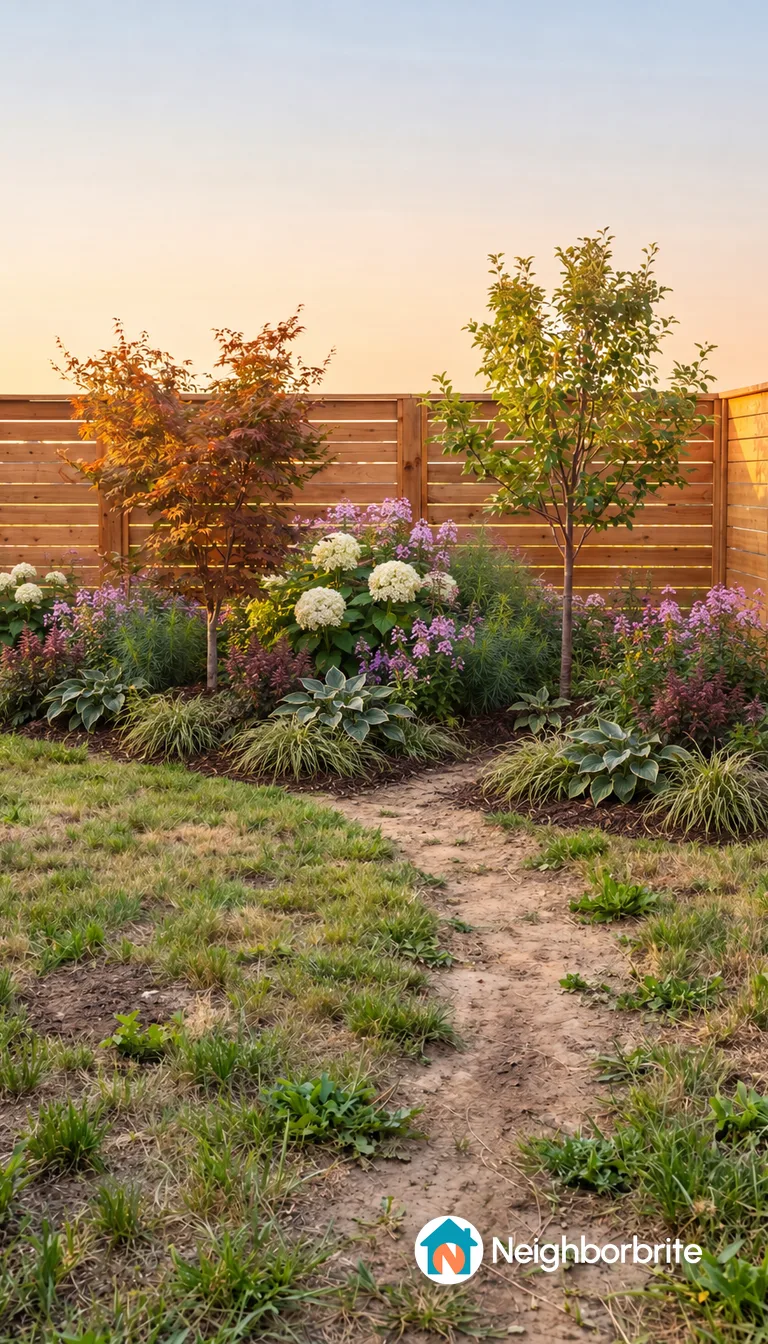
Very good. Neighborbrite is the tool most homeowners try first, and after running it we understand why. Signup is an emailed code with no password, about a minute to the first screen.
It inferred our location and zone, offered 18 styles plus a designer's choice, wrote a short design plan with a five-plant palette in about 60 seconds, let us edit that plan in text before drawing anything, and produced the image in about 33 seconds.
The first design came with a plant list: botanical names, quantities, prices from a nursery partner, print and share buttons, and the header "Raleigh, NC, Zone 8a, Partial sun".
The site claims 800K+ registered users, 20M+ designs, 170+ countries and 5,000+ plants. Prices checked October 13, 2026 on the in-app billing page: Free at $0, Pro at $24.99 a month, Business at $49.99 a month.
Where it loses. The watermark stays on Free and on Pro; only Business removes it. Plants are not individually editable objects; the per-element tools are Pro and they work on the image. The plant list has no mature size or spacing. There is no planting plan, no care after planting and no price tracking, so the relationship ends at the list. Four designs a day on free. And it guessed full sun for a bed under pines, so check that setting before you generate.
Neighborbrite: what works
- A limited free tier to try it, and the first design came with a priced plant list
- Fast: text plan in about 60 seconds, image in about 35 seconds
- Named cultivars with botanical names, zone and sun shown
- Web and both app stores
Neighborbrite: what falls short
- Watermark on free and Pro; only Business ($49.99 a month) removes it
- Plants are not individually editable objects; edits are regenerations or Pro text edits
- No mature-size or spacing data in the plant list
- No planting plan, care reminders, or price tracking after the list
- 4 designs a day on free
3. Hadaa: is a $12 render with a blueprint worth more than a subscription?
The cheapest route to one document for a contractor. Every change is another render.
Everything here is from hadaa.app, checked October 12, 2026. Hadaa is web-only and charges per render, $12 for one or $9 each for three or more, with no subscription.
For that you get a redesign plus a planting guide in which every plant is verified against your USDA zone, with botanical names and quantities, a contractor blueprint with plant placement, path widths and material volumes, and a bill of quantities. The site claims 250,000+ users; we could not verify that figure.
The trade is clear. If you want one yard done once, with a document you could hand to a landscaper, Hadaa is the cheapest route to that document in this list. If you want to iterate, every change is another render, and renders are one-shot: nothing is editable plant by plant afterwards. Mature-size data is not stated.
There is no app; the site mentions a Play listing, but the product is the browser.
Hadaa: what works
- Zone-verified plant list with quantities
- Blueprint and bill of quantities
- No subscription
Hadaa: what falls short
- One-shot renders, not editable plant by plant
- Web only
- Per-project cost adds up when iterating
4. DreamzAR: is the AR walkthrough worth $199 a year?
The pick for an AR walkthrough, but you pay $199 a year before you see your own yard.
Facts from dreamzar.app, checked October 12, 2026. DreamzAR is the one app in this group that combines a photo redesign with a drag-and-drop 2D editor on the photo, chat-based refinement and a 3D AR walkthrough, on iOS, Android and the web. Its library is 2,000+ plants and garden features, and the site says every plant includes care information, growth data and regional compatibility.
The price is the catch. $19.99 a month or $199 a year, and no free tier, so you pay before you see a single render of your own yard. We could not confirm whether a free trial exists, how deep the zone and size data goes, or whether there is a shopping list or a PDF export. There is no planting plan, no care after planting and no prices. If walking through the design in AR on your phone is the feature you want, this is the app for it; Sow does not do that.
DreamzAR: what works
- AR walkthrough
- Drag-and-drop 2D editor on the photo
- Chat-based refinement
- All three platforms
DreamzAR: what falls short
- No free tier
- $199 a year
- 2,000 plants versus 12,000
- No planting plan, care, or prices
5. Gardenly: is a $54 a year AI garden design app good enough?
A low-cost annual plan at $54, with a zone plant list. No free tier and no Android app.
Facts from gardenly.app, checked October 12, 2026. Gardenly is $54 a year for Starter ($4.50 a month equivalent, with a 7-day money-back period) or $84 a year for Pro, with no free tier. It runs on the web and iPhone, with no Android app.
The site promises photo redesigns in under 30 seconds, 27+ styles, plant recommendations for your climate zone and a shopping list, and claims 10,000+ designs and 750+ users.
At $54 a year it is the cheapest annual plan here after Sow's $39.99 web price, and a climate-zone plant list plus a shopping list cover two of the checks that matter. What we could not confirm: editability (the site describes regeneration rather than object editing), the depth of the plant data, and the quality of the iPhone app.
The user base is small by its own numbers. No planting plan, no care, no prices.
Gardenly: what works
- Cheap
- Climate-zone plant list and shopping list
- Fast renders
Gardenly: what falls short
- No free tier
- No Android app
- Not editable plant by plant
- Small user base
6. OutdoorBrite: why is it in every search result, and is it worth $29 a month?
High-resolution renders priced for businesses, from $29 a month with no trial.
Facts from outdoorbrite.com, checked October 12, 2026. If you have searched for anything in this category you have seen OutdoorBrite: it publishes a "best X 2026" page for every modifier and an alternatives page for every rival, which is why it ranks.
The product is a web-only redesign tool on three monthly plans: Starter at $29 a month for 25 redesigns in HD ($276 a year), Plus at $49 for 100 at 2K ($468 a year), Pro at $149 for 200 at 4K ($1,428 a year). No free trial.
High-resolution output is the strength. A plant list, with plants picked for your region, appears only on Plus and Pro. Editing is by regeneration. We could not confirm render quality or how plants are named on our test yard.
For a homeowner doing one yard, $29 a month for 25 redesigns is hard to justify against Neighborbrite Pro at $24.99 a month or Sow at $39.99 a year; for someone producing many renders at 4K it may make sense.
OutdoorBrite: what works
- High-resolution renders
- Regional plant lists on higher plans
OutdoorBrite: what falls short
- No free trial
- Expensive for a homeowner
- Web only
- No care, prices, or planting plan
7. Planner 5D: it ranks for AI garden design, but can it design a garden?
A strong free 3D modeler, but its plants have no species, so it cannot plan a garden.
Facts from planner5d.com, checked October 12, 2026. Planner 5D ranks second for "ai garden design" with a page titled "AI Landscape Design Generator", and first for several landscape terms, which is why it is on this list at all.
It is a 2D and 3D home and floor-plan tool on every platform (web, iOS, Android, Mac, Windows): free with unlimited projects and half the catalog, Premium at $19.99 a month or $59.99 a year with 100 or 1,200 AI credits, Professional at $49.99 a month or $399.99 a year with 4K renders. An estimated $750K a month in revenue, per ScreensDesign for September 2026.
Its AI generator is interior-first. The product is built for rooms and floor plans, and landscape output from a photo of your yard is something we could not verify. More fundamentally, the outdoor catalog is generic furniture and plant objects: no species, no hardiness zone, no climate data, no spacing data.
You can draw a 2D outdoor layout and walk through it in 3D, which nothing else in this list does as well, but the plants in it are shapes. Rank it first for 3D and hardscape layout, last for planting.
Planner 5D: what works
- Real 3D with walkthroughs
- Floor plans and hardscape layout
- Every platform
- Generous free tier
Planner 5D: what falls short
- No plant species, hardiness, or climate data
- Built for interiors first
- No planting plan, care, or prices
What about the Yard AI, AI Garden Design and Garden AI apps in the App Store?
Their listings do not say whether plants are named or zones checked, so try before you pay.
Three keyword-named apps rank for these searches as App Store listings rather than as websites: Yard AI: Backyard Design, AI Garden Design: Landscape AI, and Garden AI: Landscape Design.
AI Garden Design: Landscape AI sat at positions 6 to 8 for "ai landscape design", "ai landscape design app" and "ai yard design free" when we pulled the results on October 12, 2026; Garden AI: Landscape Design was fourth for "landscape design ai free", and a Google Play listing for it appeared on the "ai landscape design app" page.
ScreensDesign, a third-party app-intelligence service, puts their monthly revenue at an estimated $15K, $70K and $30K (September 2026 estimates). Whether they name plants or check zone is not something a listing tells you. They get a fuller treatment, and a checklist for trying them, in our AI yard design apps review.
Three web generators also rank on these searches and are listed here without a rank. DreamYard holds first place for "ai landscape design app" and "ai yard design free" with a page titled "DreamYard: #1 Free AI Landscape Design, No Subscription", and also publishes its own "Top 12 Best Free AI Landscape Design App Options in 2026".
Gendo is first for "ai landscape design" with "Free AI Landscape Design Generator Online". Remodel AI ranks second and third with a roundup titled "Best AI landscape design apps in 2026" and another on free apps with no credit card. All three are cited by Google's AI Overview on these searches.
Can ChatGPT replace an AI landscape design app?
No. It redrew our house, named no plants, and rewrote the whole picture when we asked to move one plant.
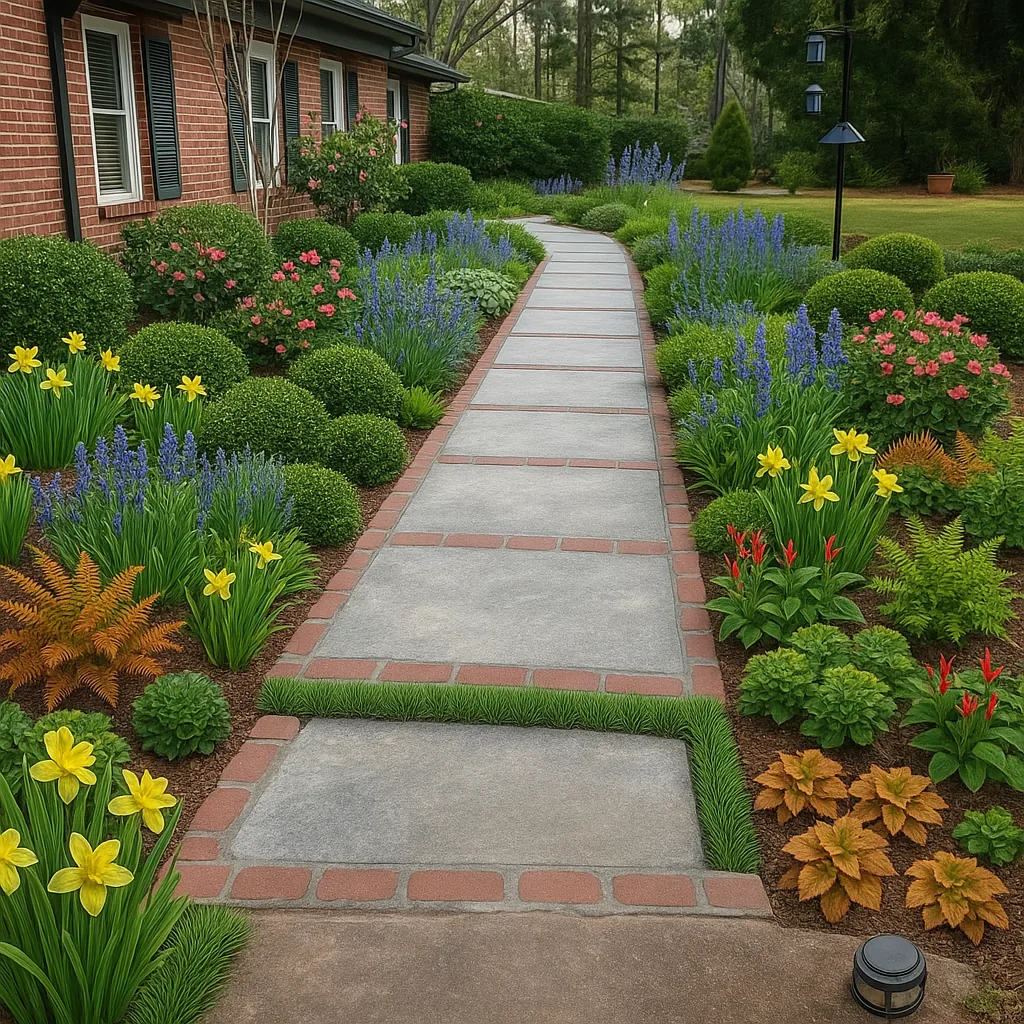
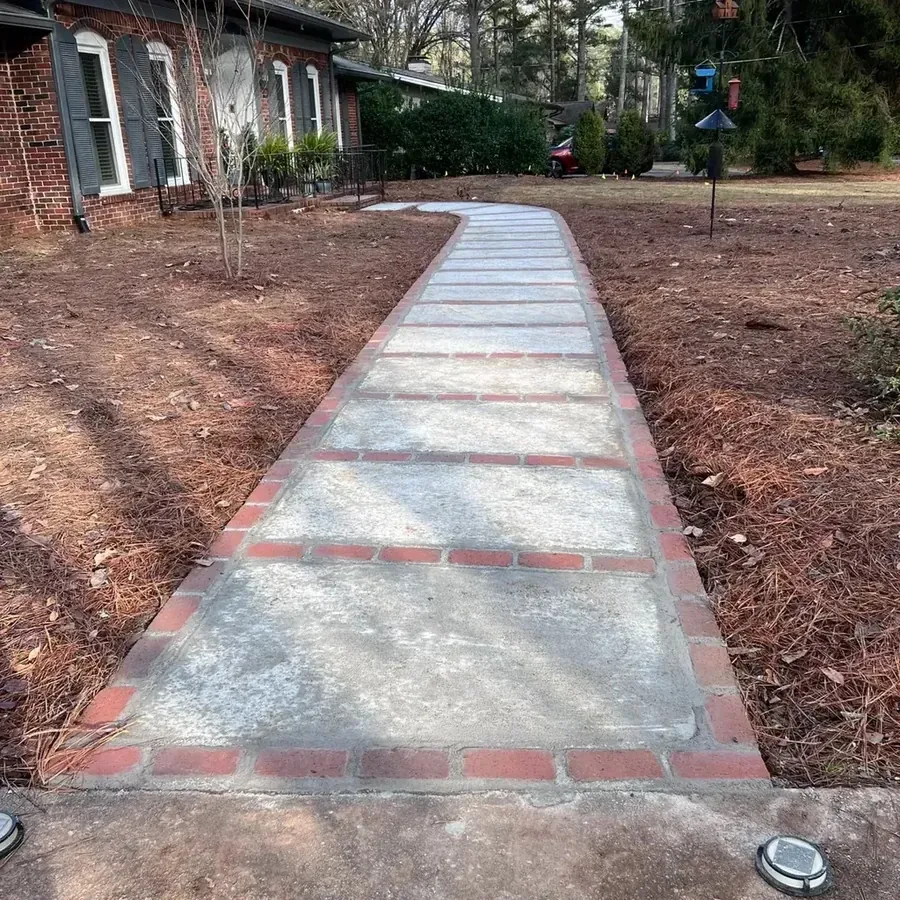
ChatGPT is the tool most people try first, so we gave it our front-yard photo too. It wrote a good plant list in 63 seconds: eleven real plants with spacing and a budget. Then we asked it to picture that list on the photo.
Drag the slider. The porch is gone, the walkway runs straight to a lawn, and none of the plants is named. Asked to move one camellia and change nothing else, it redrew the scene; sent the same request twice, it drew two different gardens.
There is no plant library behind it, nothing to drag, no top-down plan with real quantities, no live prices and no care after planting. Our ChatGPT page has every picture and the full list of gaps.
What is the difference between an AI landscape design app and a regular one?
Regular apps make you place every plant; AI apps compose the planting for you. The better ones now let you do both.
Who does what
A tool is listed only where it does the job fully. Same checks as the table.
Redraws your photo
- Sow
- Neighborbrite
- Hadaa
- DreamzAR
- Gardenly
- OutdoorBrite
Lets you place things by hand
- Sow
- DreamzAR
- Planner 5D
Plans the beds from above
- Sow
- Hadaa
Hands you a plant list
- Sow
- Neighborbrite
- Hadaa
- Gardenly
Helps after planting
- Sow
AR, 3D or construction
- DreamzAR
- Planner 5D
A regular landscape design app, iScape being the long-running example, gives you a library of objects and plants and you place each one over your photo or onto a plan by hand. An AI landscape design app reads the photo and composes the planting for you, then, in the better ones, tells you what it planted.
The first gives you control from the start and asks for hours; the second gives you a result in a minute and asks you to check it.
The apps worth paying for are converging. DreamzAR adds a manual editor after the generation. Sow adds per-species controls after it, and its Editor works with no generation at all: start from a plain photo and place every plant, bench and paver yourself.
If you want AR mock-ups built by hand, iScape is still the tool to look at: its pricing page lists Pro at $29.99 a month or $299.99 a year with 2D and 3D design marked iOS-only, and it has no generated redesign.
Which AI landscape design app should you pick?
Pick by what you walk away with: a plantable plan, a quick picture, a contractor document or an AR view.
Pick by what you want to walk away with, not by the prettiest render on a marketing page.
Choose Sow if
- you want to plant the result and need names, zone, mature size, quantities and prices
- you want to change one plant without redrawing the picture
- you want the same project on your phone and in a browser
Choose Neighborbrite if
- you want to see your yard redesigned today for nothing
- four watermarked designs a day is enough
- you are happy to regenerate rather than edit
Choose Hadaa if
- you want one render with a blueprint and a bill of quantities to hand to a contractor
- you would rather pay $12 once than subscribe
Choose DreamzAR if
- an AR walkthrough on your phone is the feature you care about
- you will pay $199 a year without a free tier to try first
Choose Gardenly if
- you want a low-cost annual plan with a zone-aware plant list
- you are on iPhone or the web, not Android
Choose OutdoorBrite if
- you need many high-resolution renders a month
- you are a business, not a homeowner doing one yard
Choose Planner 5D if
- you want a 3D model of the whole property with hardscape
- plant species do not matter yet
The ranking, then the generators that rank in search
1. Sow
Best for designing your real yard with plants that will live, then planting itPhoto redesign with five named, catalog-linked plants in under a minute on the web and under three and a half minutes on the iPhone; per-species Remove, Fewer, More and Swap on mobile; planting plans with quantities and prices. No AR, no 3D. 10 free designs to start, more for taking part.
2. Neighborbrite
Best for a free redesign of your yard todayFast and honest about its plants, on a limited free tier: a five-cultivar palette in about 60 seconds, the image in about 33, and a priced 41-plant list on the first design. Watermark on free and Pro; edits are regenerations; no sizes, plan or care.
3. Hadaa
Best for one yard, one render, one document for a contractor$12 a render buys a zone-verified planting guide with quantities, a contractor blueprint and a bill of quantities, per the site. One-shot: no editing after the render, and each change is another purchase.
4. DreamzAR
Best for walking through the design in AR before you digThe only app here with an AR walkthrough plus a 2D editor on the photo, on all three platforms. $19.99 a month or $199 a year, no free tier, 2,000+ plants, and no planting plan, care or prices.
5. Gardenly
Best for a low-cost annual plan with a zone-aware plant list$54 a year, renders in under 30 seconds per the site, a climate-zone plant list and a shopping list. No free tier, no Android app, editing by regeneration, and 750+ users by its own count.
6. OutdoorBrite
Best for high-volume, high-resolution renders for a businessWeb-only, $29 to $149 a month with no free trial, high-resolution output, and a regional plant list only on the $49 and $149 plans. Ranks everywhere because it publishes a page for every search.
7. Planner 5D
Best for 3D and hardscape layout when plant species do not matter yetA strong free 2D and 3D modeler on every platform whose AI generator is interior-first and whose outdoor catalog has no species, zone or spacing data. Ranks second for "ai garden design" without being able to plant one.
8. Yard AI: Backyard Design
An App Store generator with an estimated $15K a month in revenue (ScreensDesign, September 2026). Whether plants are named or zone is checked is not stated on the listing.
9. AI Garden Design: Landscape AI
The App Store listing that ranks sixth to eighth across the AI landscape searches; an estimated $70K a month (ScreensDesign, September 2026). Plant naming and zone checking unverified.
10. Garden AI: Landscape Design
Fourth for "landscape design ai free" as an App Store listing, with a Google Play listing also appearing; an estimated $30K a month (ScreensDesign, September 2026). Plant naming and zone checking unverified.
11. DreamYard
A web generator that ranks first for "ai landscape design app" and "ai yard design free" with the title "#1 Free AI Landscape Design, No Subscription", and is cited by the AI Overview. What free includes is unverified.
12. Gendo
A web generator that ranks first for "ai landscape design" as "Free AI Landscape Design Generator Online" and is cited by the AI Overview. Plant naming, zone and watermark unverified.
13. Remodel AI
A web generator that ranks second and third on these searches with its own "Best AI landscape design apps in 2026" roundup and a free-apps list.
The bottom line
On October 13, 2026, with one real yard and two real runs, the ranking is Sow first and Neighborbrite second, for different people. Sow if you intend to plant what you see and want names, zone, mature size, per-species editing, a planting plan and prices in one project. Neighborbrite if you want a fast, named-plant redesign today and do not mind a watermark, a monthly plan or regenerating to change it.
Below those two, the order is about what you can verify. Hadaa's per-render blueprint and DreamzAR's AR walkthrough are real differentiators. Gardenly is cheap and plausible. OutdoorBrite is priced for businesses. Planner 5D is excellent at the thing it does, which is not planting.
Whatever you pick, set the sunlight yourself before you generate, open the plant list before you fall for the picture, and check where the watermark goes before you pay. Those three habits matter more than the ranking.
Questions people ask
What is the best AI landscape design app?
For designing a yard you intend to plant, Sow: it redesigns your photo with real, zone-checked species from a 12,000+ catalog, lets you remove, re-count or swap any species on mobile, and carries the design into a planting plan with quantities and prices. For a quick redesign on a monthly plan with a limited free tier, Neighborbrite. For AR, DreamzAR. For 3D and hardscape, Planner 5D. None of these does construction drawings.
Is there a free AI landscape design app?
Yes. Neighborbrite gives four designs a day free with named plants and a watermark, and the first design in our test came with a priced plant list. Sow gives 10 free designs to start and more for taking part (posting a design earns 25 credits, a referral 100), watermarked. Planner 5D has a free tier but no plant species data. DreamYard and Gendo advertise free generators too.
Can AI design my yard from a photo?
Yes. Neighborbrite and Sow both took our front-yard photo and returned a planted version of the same yard, house and walkway intact, in about 33 seconds (Neighborbrite, after a 60-second plan) and under a minute of render time (Sow). Both named the plants they used. What differs is what you can do afterwards: Sow keeps each species editable and adds a planting plan; Neighborbrite regenerates.
Are AI yard design apps accurate?
The plants were real in every result we saw, and both tools we ran handled zone 8a correctly. Neighborbrite guessed full sun for a bed under pines until we corrected it; Sow's mobile flow, which has a sun chip, chose part-sun plants. Check the sun setting before you generate.
Do free AI garden apps add watermarks?
Every free tier we tested does. Neighborbrite watermarks free and Pro images; only its Business plan at $49.99 a month removes it. Sow watermarks free designs; Pro removes it. We could not confirm watermark behaviour on DreamYard, Gendo or Planner 5D exports.
Do free apps suggest plants that survive my climate?
Neighborbrite inferred zone 8a from our location and matched plants to it on the free tier. Sow checks zone through the plant catalog and, on mobile, the saved space's zone and sun. Planner 5D has no climate data at all. Hadaa and Gardenly state a zone check on their sites but have no free tier.
Can ChatGPT do landscape design?
It can write a plant list: in our test it named eleven real plants with spacing and a budget for our front yard. When we asked it to draw the design, the porch vanished, the walkway changed shape and no plant was named, and asking to move one plant redrew the whole scene. No plant library, no drag and drop, no real planting plan, no care after planting. Our ChatGPT page shows every picture.
Is iScape really free?
iScape's pricing page lists a free tier with a limited database and reduced access to plants, hardscapes and products; Pro is $29.99 a month or $299.99 a year, and 2D and 3D design are marked iOS-only. It is a manual placement app rather than an AI generator.
How do I use AI to landscape my yard?
Take one photo of the area in flat light, set your location, zone and the real sunlight before generating, pick a style, and then read the plant list rather than the picture. Check each plant's mature size against the bed, swap anything that will not fit, and get quantities before you shop. In Sow that is one project; in most other apps it is the plant list plus your own notes.
What is the difference between an AI landscape design app and a regular one?
A regular app like iScape gives you a library and you place every object by hand over your photo. An AI app reads the photo and composes the planting for you, then the better ones name what they planted and let you edit it. The first costs hours and gives control; the second costs a minute and needs checking. Sow does both: Auto Design composes the planting, and the Editor leaves every placement to you.
Is there a free AI backyard design app?
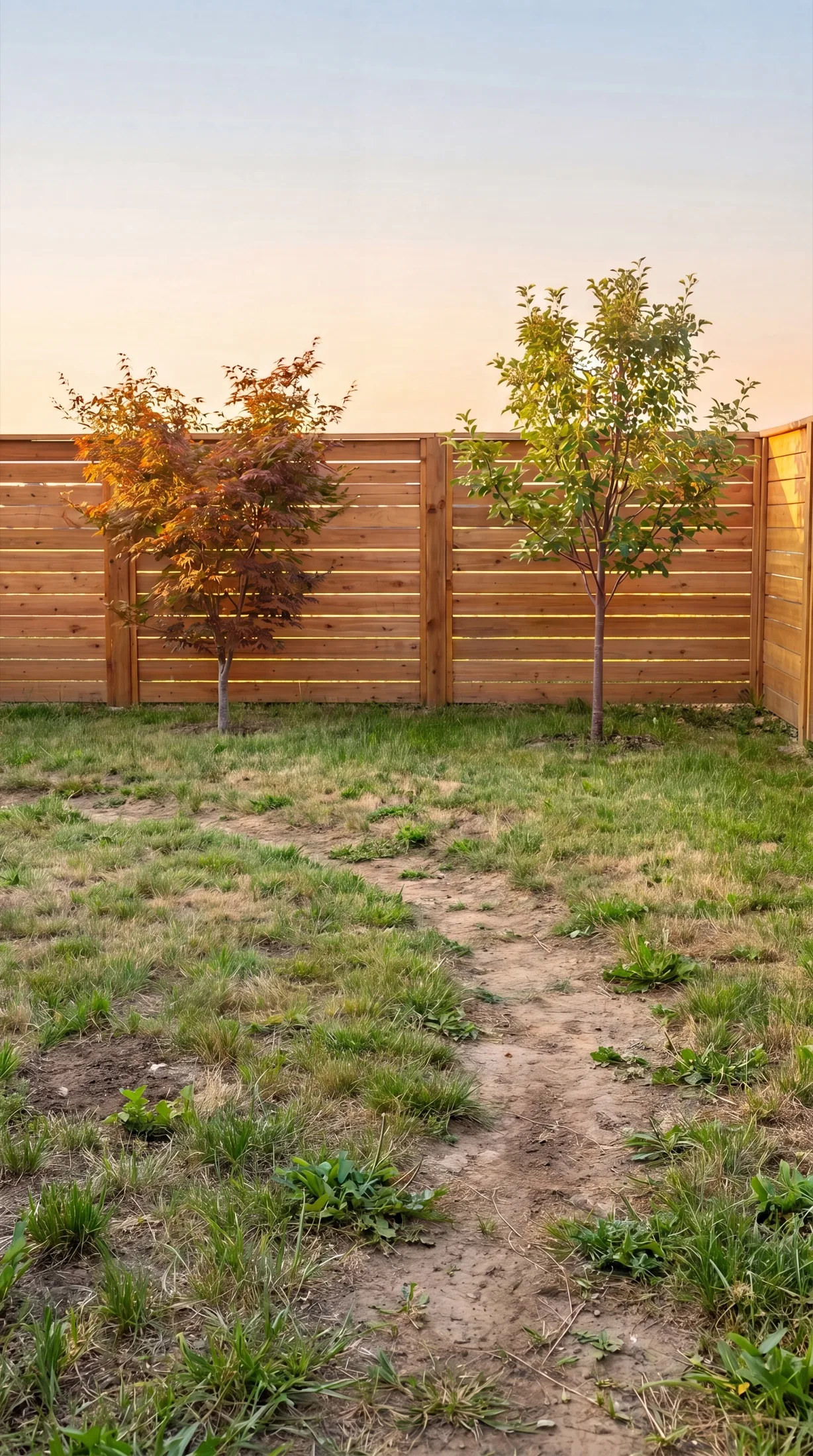
Neighborbrite, which also did our backyard photo on the free tier: a six-plant palette in about 30 seconds and the image about 30 seconds later, with the fence and trees kept and beds added along the fence. Sow did it free too, as one of its 10 starting designs. Both left the patchy lawn as photographed.
What is the best free website to create a landscape plan for my backyard?
If you want a scaled plan rather than a picture, Klora: one complete property design free with no account, then $24 or $69 a year, aerial imagery of your lot imported in about 30 seconds, and a 1,422-species library with sun and zone data. It generates nothing for you; you draw beds and place plants. Sow's Planting Plans on mobile do the bed-finding and filling for you.
Keep comparing
- Ranked and testedBest landscape design appsRead
- Free tiers, testedBest free landscape design appsRead
- Honest reviewAI yard design apps reviewRead
- Hands-on answerCan ChatGPT design a landscape?Read
- Hands-on reviewNeighborbrite review (2026)Read
- Honest reviewDreamzAR review (2026)Read
- HubAll comparisonsBrowse
Design your yard from a photo, free
Upload one photo. Sow places real plants that suit your zone and light, names every one with its botanical name, and keeps each species editable. Your first 10 designs are free.
We make SowTested October 13, 2026Same yard photos for every tool we ranWe paid nothing for the testsHow we tested
How we tested
- Test subject: a brick ranch front walkway in Raleigh, NC (zone 8a, part sun under pines, bare pine-straw beds) and a fenced backyard with a patchy lawn; the same two photos and the same brief (cottage style, low maintenance, keep the walkway and the fence) went to every tool we could run.
- What we paid: nothing; Neighborbrite free tier, a fresh free Sow account on the web, and an existing Sow Pro+ test account on an iPhone 17 Pro simulator for the mobile editing and planting-plan screens.
- Uploaded the front-yard photo, chose Cottage, set partial sun where the tool allowed it, generated, and saved the result at full size.
- Opened whatever plant list the tool produced and recorded names, botanical names, quantities, prices, and whether zone or sun was shown.
- Tried to change one plant after generation and noted what the free tier allowed.
- Repeated with the backyard photo.
- Checked every price on the vendor pricing page or in-app billing screen on October 12 and 13, 2026. Tools we could not run (Hadaa, DreamzAR, Gardenly, OutdoorBrite, Planner 5D and the App Store generators) are described from their official pages only.
Read it the way you would read any maker's comparison
This page is written by the Sow team. We show our work in the screenshots and say where Sow is not the right answer.
Where Sow loses here
- no AR view and no 3D walkthrough (DreamzAR and Planner 5D have them)
- no hardscape CAD or construction documents
- weather-aware care is US-only, and the catalog is outdoor plants only
- the web Shopping List PDF prices each species at the lowest listed nursery price (often the smallest pot) and does not show mature size or spacing
Spotted a change? Email [email protected] and we will re-test and correct the page.