
What is iScape, and who is it for?
A long-running placement app: you drag plants and hardscape onto your photo. Good if you know what you want.
iScape is the long-running mobile landscape app. It was released in 2011, older than almost everything else in this category, and it is on both app stores. The idea is simple: take a photo of your yard, then drag plants, hardscape, furniture and products from a library onto the photo until it looks the way you want.
On iPhone there is also an AR mode that lets you see objects placed in the camera view, and a 2D and 3D design mode that iScape's pricing page marks as iOS only.
That makes iScape a different animal from the photo-redesign tools that have appeared in the last few years. Neighborbrite, DreamzAR and Sow all take your photo and draw a planted version of it for you. iScape does not. Every plant and every paver is something you chose and placed.
For some people that is the whole point: you keep control and the result is exactly what you put there. For others it is the reason they give up after twenty minutes.
Two groups, in our reading of its materials. Homeowners who already know roughly what they want and would rather compose a mockup than be handed one. And landscape professionals who need a quick visual for a client and a proposal to go with it; iScape Pro includes a proposal tool, and the pricing page has an Enterprise tier that asks you to contact sales.
What it is not for is anyone who wants help deciding what to plant. iScape's plant library has named plants, but it does not check a plant against your zone or climate for you, and we could not confirm how much sun or mature-size data sits behind each one. Hold that thought; it comes back in the comparison.
Is iScape free?
Partly. The free tier is a limited database, and we could not confirm where the paywall sits.
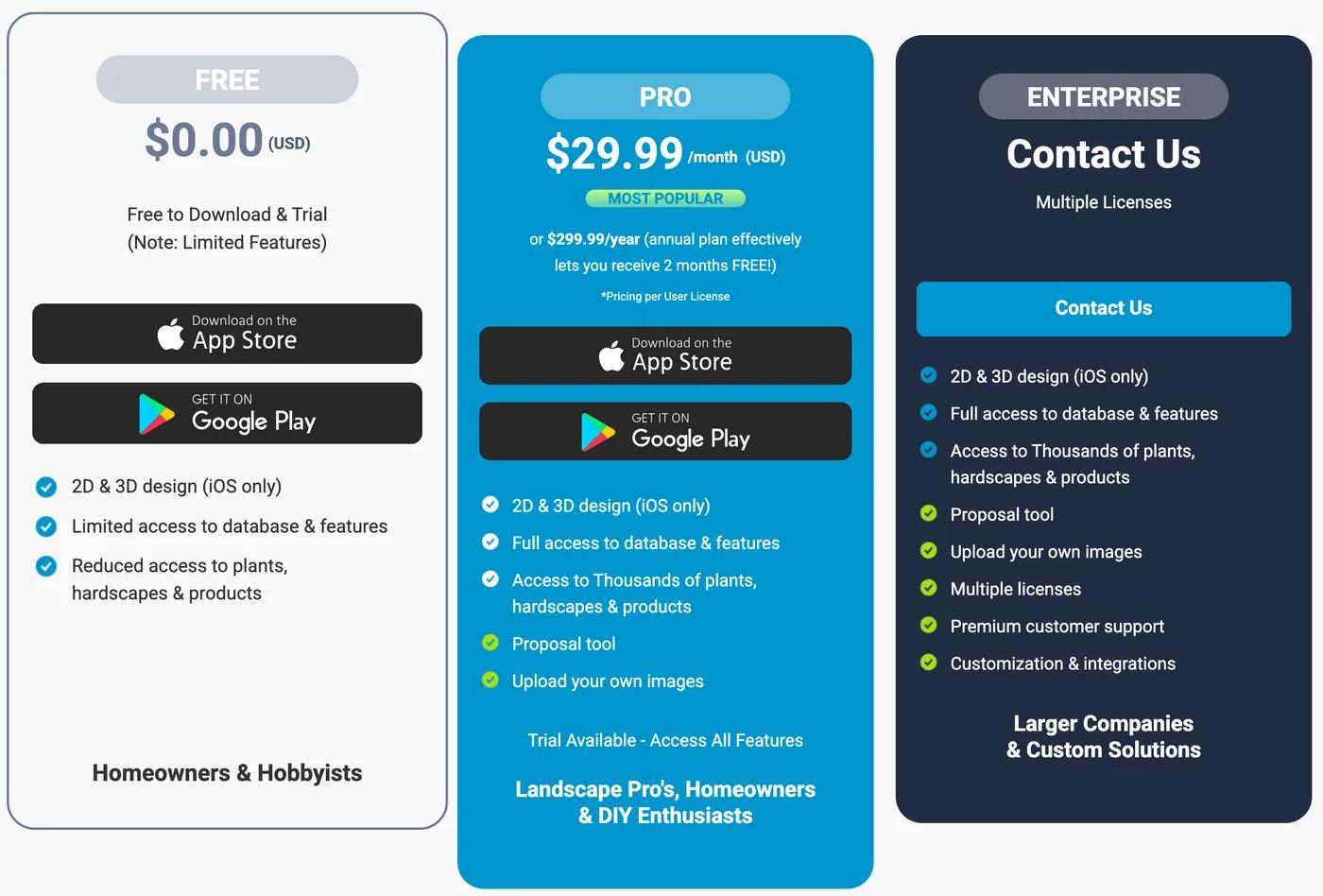
Yes, there is a Free tier, and no, it is not the full app. iScape's pricing page describes Free as a limited database with reduced access to plants, hardscapes and products. Pro removes those limits and adds the proposal tool.
That is the whole of what the page tells you, and it is why "Is iScape really free?" shows up in Google's People Also Ask box on 12 of the 41 landscape-app searches we pulled in October 2026. People install it expecting a free design tool and hit the paywall somewhere in the middle.
The pricing page does not say exactly where that paywall sits, or whether free exports carry a watermark. "Limited database" and "reduced access" are the vendor's own words, and vendors do not usually understate their free tiers.
If "free" is the thing you care about, two tools we did test are worth knowing about. Neighborbrite let us make four designs a day for nothing, with a watermark, and the first design came with a priced plant list. Sow gives 10 free designs to start and more for taking part. Neighborbrite draws the yard for you.
Sow can draw it for you, or open its Editor so you place everything yourself, as you would in iScape.
- Free tier: yes, with a limited database and reduced access to plants, hardscapes and products (iScape's wording).
- Watermark on free exports: we could not confirm either way.
- Pro: $29.99 a month or $299.99 a year. Enterprise: contact sales.
How much does iScape Pro cost?
$29.99 a month or $299.99 a year. Monthly for a year is $359.88.
iScape Pro is $29.99 a month or $299.99 a year, from the official pricing page we captured on October 13, 2026. There is also an Enterprise tier with no published price. The screenshot at the top of this page is that page.
The number to notice is the gap between the two Pro prices. Paying month to month for a year costs $359.88. The annual plan is $299.99. If you only need iScape for one project in spring, the monthly plan makes sense.
If you expect to use it through a whole season, the annual plan is the cheaper way in, and it is still, by some distance, the most expensive subscription among the mainstream landscape apps we cover; the pricing table further down has the others.
What Pro buys you, per the pricing page: the full plant, hardscape and product database, the proposal tool, and the 2D and 3D design mode, which is marked iOS only on every tier. The page does not list a plant count or say what "full" means in numbers, so we have not put one here.
Is iScape only on iPhone?
No, but its 2D, 3D and AR design are iPhone only, and there is no browser version.
No, but the best parts are. iScape is on both the App Store and Google Play, and its site describes itself as a landscape design app for iOS and Android. The pricing page, though, puts "2D & 3D design (iOS only)" against every tier, Free included, and the AR mode is an iOS feature.
So an Android user gets the photo-based placement tool and the library, and not the 2D and 3D design mode or the AR view.
The pricing page does not spell out what Android includes beyond that iOS-only note. If you are on Android and the AR or 3D view is what drew you to iScape, read the Play listing carefully before you pay. DreamzAR describes its AR walkthrough on iOS, Android and the web. Sow has no AR at all, on any platform.
There is no browser version of iScape. If you want to work on a bigger screen, that rules it out; Neighborbrite, DreamzAR, Planner 5D, Klora and Sow all run in a browser.
What does iScape do well?
Precise manual placement, a deep hardscape library, AR on iPhone and a proposal tool for pros.
Credit where it is due, from iScape's own materials and its long run in the category.
- Manual placement over your photo. You decide where every plant, path and planter goes. If you have a specific picture in your head, a placement tool gets you there more precisely than a generator that interprets a brief.
- An established object and hardscape library, built up since 2011. For mocking up a patio or a retaining wall on a photo, this is iScape's home ground. Sow's Editor covers similar ground, with 12 object categories from furniture and lighting to fences, pools and water features, and surfaces from lawn and mulch to pavers and decking, but no CAD and no construction documents.
- AR on iPhone. Seeing a tree or a fire pit at scale through the camera, in your actual yard, is something no flat render does. Sow does not offer it. If AR matters to you, iScape on iOS is one of the few mainstream options.
- A proposal tool for pros. Pro includes a proposal tool, and there is an Enterprise tier. For a small landscaping business that wants to turn a mockup into a document for a client from the same device, that is a real workflow. Sow's client proposals, boards and presentations are on the Pro+ tier at $99.99 a year.
- Both app stores: iOS and Android.
| Tool | Plants | Kinds of plants | Beyond plants | What each plant carries |
|---|---|---|---|---|
| Sow | 12,000+outdoor species and named cultivars |
| 150 objects in 12 groups (furniture, fire pits, fences, lighting, water features and more) and 93 surfaces (lawn, mulch, gravel, pavers, decking and more) | Zone, sun, mature height and width, bloom time, monthly care, native status, deer and drought tolerance, and a nursery price where one is listed |
| iScape | Thousandsof plants, hardscapes and products on Pro, per its pricing page; reduced access on free | Not stated | Pavers, furniture and other hardscape elements, in the same library | Plant names; no hardiness zone or climate check |
| Neighborbrite | 5,000+per its site | Not stated | Pergolas, fire pits, fencing, water features and more, per its site; placing them is a Pro feature | Common and botanical name, hardiness zone and sun, with a Nature Hills price; no mature size |
iScape: what works
- Established object and hardscape library
- AR visualization on iOS
- Proposal tool for pros
- Both app stores
iScape: what falls short
- Monthly price ($359.88 a year month-to-month)
- 3D and AR are iOS-only
- No generated redesign; you place every object
- No hardiness zone or climate check
- No care, prices, or plant ID after the design
What does iScape not do?
It does not design for you, check your zone or climate, or help after the mockup.
This is the part the pricing page and the store screenshots do not tell you, and the part that decides whether iScape is the right tool for you.
- It does not generate a redesign. You place every object. If you want to upload a photo and see a planted version of your yard in a minute or two, look at Neighborbrite, DreamzAR or Sow instead.
- It does not check plants against your zone or climate. The library has named plants, but nothing warns you when one will not survive your winter. Mature-size data we could not confirm, so the table marks it unverified.
- It does not follow up after the design. No care reminders, no live nursery prices, no plant identification by camera. Once the mockup is done, iScape is done. That matters more than it sounds, because the mockup is the easy part; keeping the plants alive and knowing what to buy is where most yard projects go wrong.
- It does not run in a browser. iOS and Android only.
- It does not treat Android equally. 2D and 3D design and AR are iOS only, by iScape's own pricing page.
- Its plant list depth is unverified. iScape has a plant list feature and PDF export, and Pro has a proposal tool, but we could not confirm what a plant list contains (quantities, sizes, prices) without installing the app.
None of these are hidden flaws. They are the natural shape of a placement tool. But they are the reason a lot of homeowners download iScape, spend an evening dragging shrubs around, and end up no closer to knowing what to plant.
iScape vs Sow: what does each actually do?
Both let you compose your photo by hand. Sow can also draw the first version for you; iScape adds AR and 3D on iPhone.
Who does what
A tool is listed only where it does the job fully. Same checks as the table.
Redraws your photo
- Sow
- Neighborbrite
Lets you place things by hand
- Sow
- iScape
Plans the beds from above
- Sow
Hands you a plant list
- Sow
- iScape
- Neighborbrite
Helps after planting
- Sow
AR, 3D or construction
- iScape
Both start from a photo of your yard, and both let you compose it by hand: iScape from its library, Sow in its Editor, dragging in plants, furniture, lighting and paving. The difference is what sits around that editor.
Sow can also read the photo and draw a planted version for you first, using real species from a catalog of 12,000+ plants, each with zone, sun, mature size, bloom and care data, and then keep that design editable.
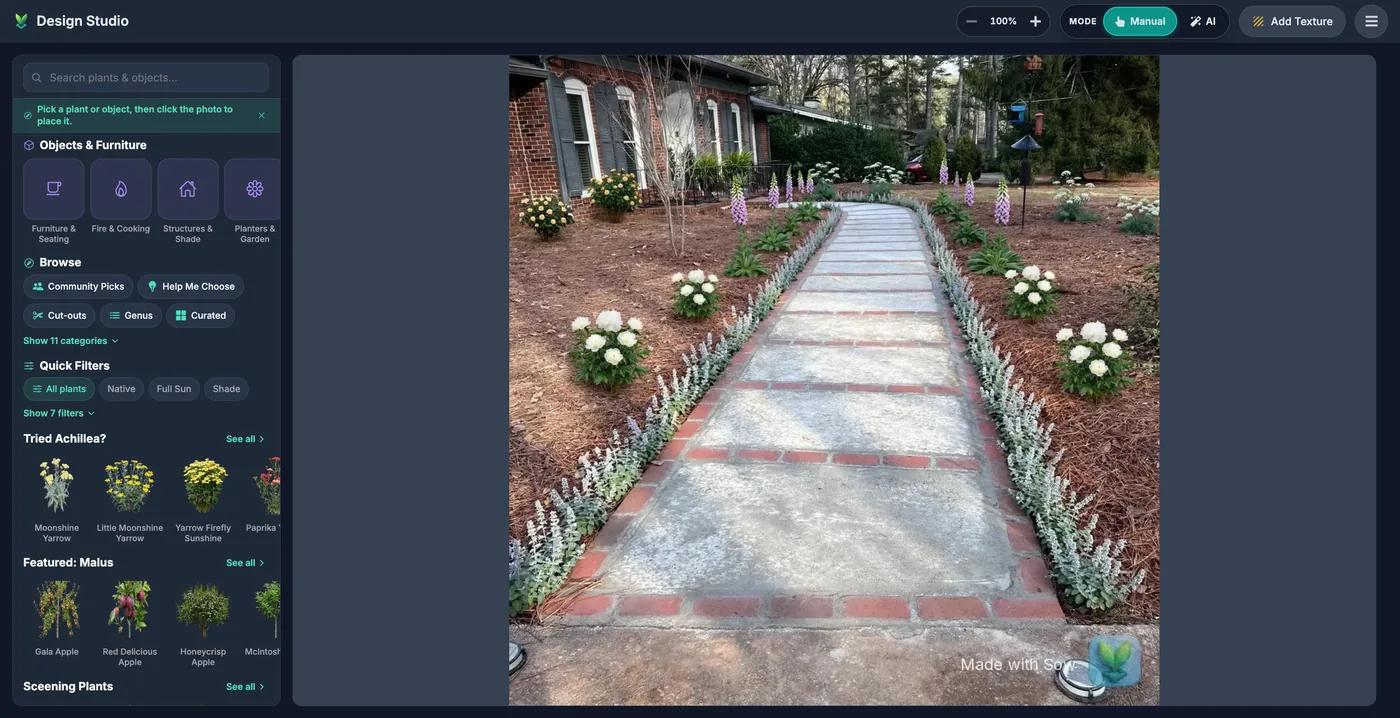
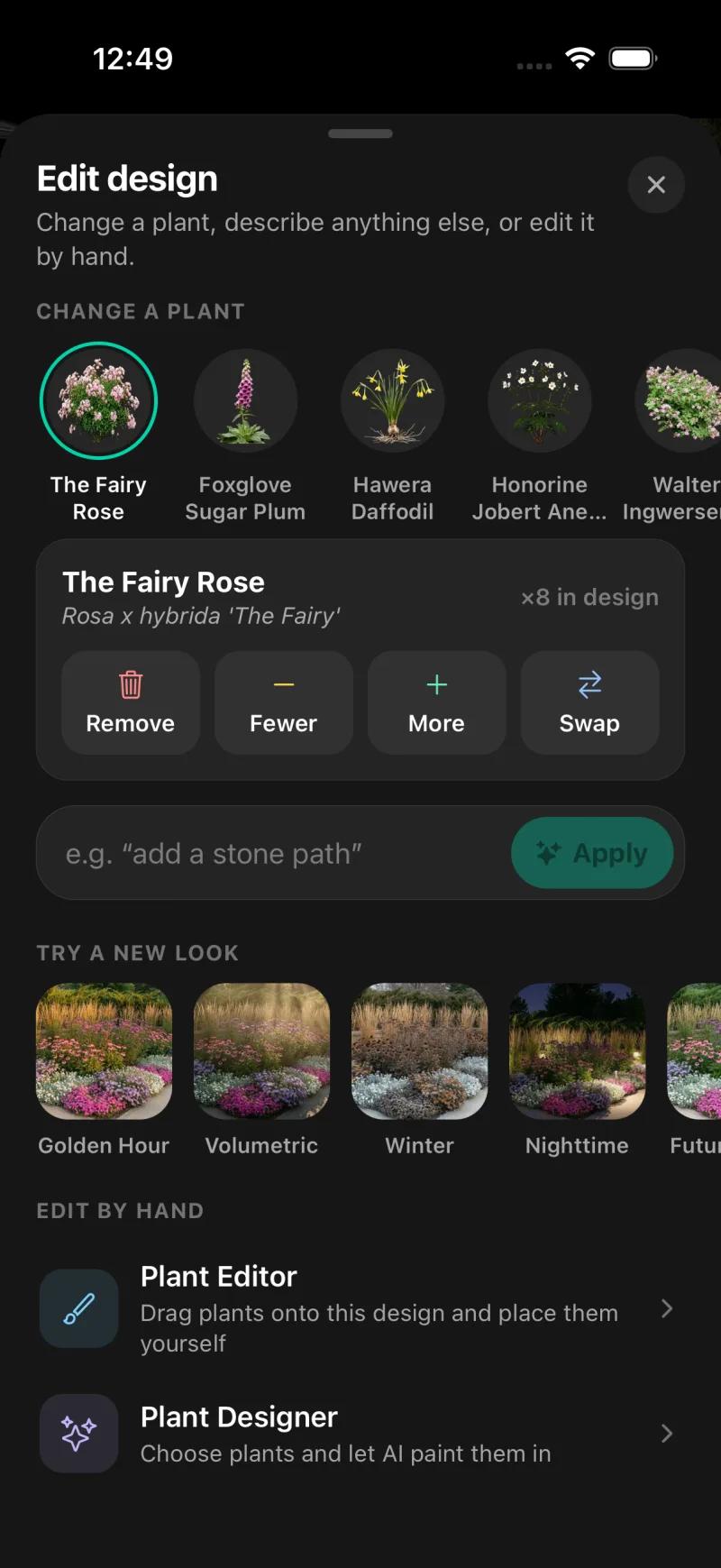
On mobile, every generated species can be removed, counted up or down, or swapped, and the Plant Editor lets you drag in plants, furniture, lighting and paving by hand, on a generated design or a plain photo; on the web, Design Studio places plants and objects over the render.
Here is what that looked like on our test yard. We gave the iPhone app the front-walkway photo with Cottage style and part sun (pre-filled from the saved space).
It came back with both borders planted and a plant list of five species with botanical names and quantities: The Fairy Rose x8, Foxglove Sugar Plum x28, Hawera Daffodil x66, Anemone x14 and one more. Tapping any species offers Remove, Fewer, More or Swap.
Planting Plans, on the Pro tier, found beds on the satellite view of a saved address and produced a priced schedule: in the plan we captured, 602 plants at an estimated $8,919.70, with an editable unit price per species.
That is the thing iScape has no equivalent of: a plant schedule with quantities and prices generated from the design, not typed in.
And here is what Sow does not have that iScape does. No AR. No 3D. No hardscape CAD or construction documents. Weather-aware care is US-only. Outdoor plants only.
On the web, the design "Shopping List" PDF prices each species at the lowest listed nursery price (often the smallest pot) and does not show mature size or spacing; the per-bed schedule with an editable unit price lives in Planting Plans on mobile.
| Feature | Sow | iScape | Neighborbrite |
|---|---|---|---|
| Redesigns a photo of your own yard | Yes | Partly | Yes |
| Plants are real, named species | Yes | Partly | Yes |
| Checks hardiness zone or climate | Yes | No | Partly |
| Mature size and spacing data | Yes | Unverified | Unverified |
| Move or swap individual plants after generation | Yes | Yes | Partly |
| Drag-and-drop editor for plants, objects and paving | Yes | Yes | Partly |
| Top-down planting plan or layout | Yes | Partly | No |
| Grid bed planner with companion planting | Yes | No | No |
| Plant list or shopping list | Yes | Yes | Yes |
| Live nursery prices | Yes | No | No |
| Care reminders after planting | Yes | No | No |
| Plant identification by camera | Yes | No | Yes |
| Diagnoses a sick plant from a photo | Yes | No | No |
| Measures the sun a spot gets | Yes | No | No |
| AR view | No | Yes | No |
| 3D model or walkthrough | No | Partly | No |
| Hardscape and construction tools | Partly | Yes | No |
| Client proposals and presentations | Yes | Yes | No |
| PDF export | Yes | Yes | Unverified |
| Free tier | Yes | Yes | Yes |
| Watermark on free output | Yes | Unverified | Unverified |
| Works in a browser | Yes | No | Yes |
| iPhone app | Yes | Yes | Yes |
| Android app | Yes | Yes | Yes |
Neighborbrite is in the table as the reference point we tested; its full review is linked below. Every iScape cell marked Unverified is something its public pages do not state.
iScape vs Sow: what does a year cost?
iScape Pro is $299.99 a year. Sow Pro is $39.99 a year on the web.
A year of iScape Pro is $299.99 paid annually or $359.88 paid monthly. Sow is free to start; Pro from $39.99 a year on the web ($59.99 a year through the App Store); Pro+ $99.99 a year.
Neighborbrite is $24.99 a month for Pro, with a limited free tier of 4 watermarked designs a day, and only removes the watermark on Business at $49.99 a month. The Sow prices shown are web prices.
One caveat on the Sow side so the table is not read as a clean win: Planting Plans, the priced schedule, is a Pro feature, not a free one.
| Tool | Free | Paid | Checked |
|---|---|---|---|
| Sow | Yes | Pro from $39.99 a year on the web ($59.99 through the App Store); Pro+ $99.99 a year | Oct 12, 2026 |
| iScape | Yes | Pro $29.99 a month or $299.99 a year | Oct 12, 2026 |
| Neighborbrite | Yes | Pro $24.99 a month; Business $49.99 a month | Oct 13, 2026 |
Choose iScape if
- You want to compose the picture yourself, object by object, rather than be handed a design.
- You are mocking up hardscape, furniture or products on a photo, where iScape's library is the draw.
- You are on iPhone and want to see things at scale in AR.
- You are a pro who needs a quick visual and a proposal from one app, and $299.99 a year is a business expense.
Choose Sow if
- You want a planted version of your yard from one photo in a few minutes, with every plant a real species.
- You want each plant checked against your hardiness zone and light, with mature size so things fit.
- You want to change your mind afterwards: swap a species, count it up or down, or drag plants by hand.
- You want the design to carry on into a planting plan with quantities and prices, and care after you plant (US weather-aware care).
- You use more than one device; the same project is on iPhone, Android and the web.
If what you actually need is both, there is no shame in it. Use Sow to decide what to plant and where, then use iScape to mock up the patio.
What do reviewers say about iScape?
People mostly ask whether it is really free and why Android gets less.
We have not read every review of iScape, and we will not quote any we have not read, so this section is narrower than you might expect.
Search for "iscape review" and the first page is mostly iScape's own site, its App Store listing, Reddit threads and a roundup or two. Two themes line up with what iScape's own pricing page shows, and they are the ones to weigh.
- Price. "Is iScape really free?" appears in Google's People Also Ask box on 12 of the 41 landscape-app searches we pulled in October 2026. That many people asking means the Free tier is not answering the question for them. At $29.99 a month, iScape Pro is the most expensive mainstream landscape app subscription we cover, and paying monthly for a year comes to $359.88.
- The iOS and Android split. A Reddit thread titled "iScape or YARD App for Android Alternatives?" ranks in the top ten for "iscape review". Given that 2D, 3D and AR are iOS only on the pricing page, that is not surprising.
We did not find any independent test of iScape on a real yard against other tools, and we are not going to claim one.
The best iScape alternatives
Sow
Best for designing your real yard with plants that will liveUpload the photo and get a planted design back in minutes, or place every plant and paver yourself in the Editor, with every plant a real species from a catalog of 12,000+ plants, checked against your zone and light. Editable afterwards, with a planting plan, care and prices. No AR, no 3D, no hardscape CAD. Free to start; Pro from $39.99 a year on the web.
Neighborbrite
Best for a quick first look at your yard, plantedThe free alternative. We tested it on the same yard: four designs a day on the free tier, a text plan in about 60 seconds and an image in about 33, with real named cultivars and zone and sun shown. The first design came with a priced plant list. Watermark on Free and Pro; only Business at $49.99 a month removes it.
DreamzAR
Best for AR plus a generated design, on Android tooThe closest thing to iScape with a generated redesign: DreamzAR's site describes a photo redesign, a drag-and-drop 2D editor on the photo, chat refinement and an AR walkthrough, on iOS, Android and the web. $19.99 a month or $199 a year, with no free tier on the page.
Planner 5D
Best for 3D walkthroughs and floor-plan style layoutsIf 3D is why you were looking at iScape, Planner 5D is the fuller 3D tool: floor plans, walkthroughs and hardscape layout on every platform, with a free tier. It has no plant species, hardiness or climate data at all, so it is a modelling tool, not a planting one.
Hadaa
Best for one paid render with a blueprint, no subscriptionWeb-only, pay per render: $12 for one, $9 each for three or more, with no subscription. Its site describes a zone-verified plant list with quantities and a contractor blueprint. One-shot renders that are not editable plant by plant.
Klora
Best for drawing a real plan to scale yourselfA free browser planting-plan tool we tested on the same address. It pulls aerial imagery and parcel lines in about 30 seconds and lets you draw beds and place real species (1,422 in its library) with zone and sun data, with season and growth-stage views. Nothing is generated and there is no photo render. Free for one design; $24 pass or $69 a year.
The bottom line
iScape is a good placement tool with a long history, a deep object library, AR on iPhone and a proposal tool for pros. It is also $29.99 a month or $299.99 a year, iOS-first in its best features, and silent after the mockup: no zone or climate check, no care, no prices.
If you know what you want and need to see it on your photo, especially hardscape, iScape earns its place. If you want to know what to plant, and want the design to stay alive after you plant it, try the photo-redesign tools first. Neighborbrite is good, on a monthly plan with a limited free tier. Sow draws the yard with real, zone-checked plants you can edit one by one, or lets you place them yourself, and carries it through to a planting plan, from $39.99 a year on the web.
Questions people ask
Is iScape really free?
There is a Free tier, but iScape's own pricing page describes it as a limited database with reduced access to plants, hardscapes and products. Pro, at $29.99 a month or $299.99 a year, removes those limits.
Can you use iScape for free?
You can install it and use the Free tier. How much of a real design you can finish before you are asked to upgrade is something we could not confirm without installing the app, and iScape's page does not spell it out.
How much does iScape Pro cost?
$29.99 a month or $299.99 a year, from the official pricing page checked October 2026. Paying monthly for a full year comes to $359.88. There is also an Enterprise tier priced by contacting sales.
Is iScape only on iPhone?
No. iScape is on the App Store and Google Play. But its pricing page marks 2D and 3D design as iOS only on every tier, and AR is an iOS feature, so Android gets the photo placement tool and the library without those.
Does iScape have AI?
Not in the sense of generating a redesign from your photo. iScape's materials describe a placement tool: you drag plants and objects onto a photo, with AR on iPhone. Tools that draw the yard for you include Neighborbrite, DreamzAR and Sow.
How do you use the iScape app?
From its official description: photograph your yard, then place plants, hardscape and products from the library onto the photo. On iPhone you can also view objects in AR and work in the 2D and 3D design mode.
What are the best iScape alternatives?
It depends on what you wanted from iScape. For a generated design from your photo: Sow (real zone-checked plants, editable, from $39.99 a year on the web) or Neighborbrite (free, 4 designs a day, watermarked). For AR with a generated design: DreamzAR ($199 a year). For 3D: Planner 5D. For a scaled planting plan drawn by hand: Klora, with one free design.
Is there a free alternative to iScape?
Sow gives 10 free designs to start and more for taking part. Neighborbrite gives 4 a day with a watermark, and the first design came with a priced plant list. Klora gives one free design with no account, then $24 or $69 a year.
Does iScape tell you if a plant will survive in your zone?
No. iScape's library lists named plants, but it does not check a plant against your hardiness zone or climate. Sow showed zone and sun per plant in our test, and Klora's library carries zone and sun data for each species.
Is iScape worth $299.99 a year?
For a professional who mocks up hardscape on client photos and sends proposals from the same app, the price is a business tool. For a homeowner designing one yard, it is hard to justify against a free Neighborbrite design or Sow Pro at $39.99 a year on the web, unless AR on iPhone is the feature you cannot do without.
Keep comparing
- Ranked and testedBest landscape design appsRead
- Free tiers, testedBest free landscape design appsRead
- Hands-on reviewNeighborbrite review (2026)Read
- Honest reviewDreamzAR review (2026)Read
- Honest reviewPlanner 5D for landscape designRead
- Straight answerLandscape designer cost vs an appRead
- HubAll comparisonsBrowse
See your yard planted, from one photo
Upload a photo of your yard. Sow draws it planted with real species that suit your zone and light, names every one, and lets you change any of them. Free to start.
We make SowiScape described from its own pages, not installedWe paid nothing for the testsHow we tested
How we tested
- Test subject: Sow only: a brick ranch front walkway in Raleigh, NC (zone 8a, part sun) and a fenced backyard. iScape was not installed, so it did not receive the photos.
- What we paid: nothing; a free Sow web account and a Sow iPhone test account.
- iScape was not installed or tested hands-on. Everything about iScape on this page comes from its official pricing page (captured October 13, 2026) and its public website and app-store descriptions. This page compares iScape's published materials with our own Sow test, not two hands-on tests.
- Sow was tested on October 13, 2026: a fresh free account on the web (Auto Designs, Style Design, Cottage) and the iPhone app (Auto Design, Edit design, Planting Plans) with the same two photos.
- The feature table marks anything we could not confirm for iScape as Unverified rather than guessing in either direction.
Read it the way you would read any maker's comparison
This page is written by the Sow team. We show our work in the screenshots and say where Sow is not the right answer.
Where Sow loses here
- no AR view and no 3D
- no hardscape CAD or construction documents
- nothing like iScape's object and product library for furniture and hardscape mockups
Spotted a change? Email [email protected] and we will re-test and correct the page.