
How much does Yardzen cost?
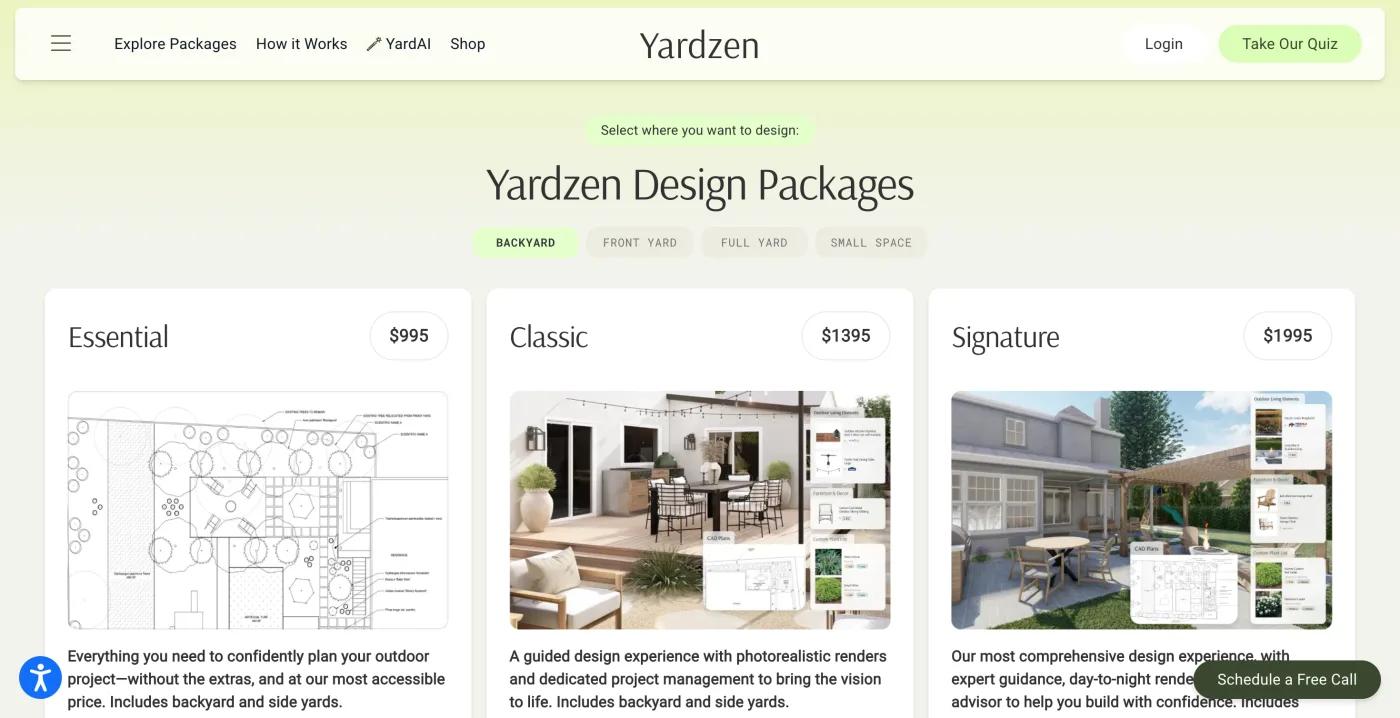
$995, $1,395 or $1,995 for a backyard, paid once. Plants, materials and installation are extra.
Yardzen sells design packages, not a subscription. For a backyard, the three tiers on its packages page are Backyard Essential at $995, Backyard Classic at $1,395, and Backyard Signature at $1,995, each paid once. All three cover the backyard; the tiers differ in deliverables, with photorealistic renders and a cost advisor in the higher tiers.
The same page sells front-yard, full-yard and small-space packages. We saw them listed but did not record their prices, so do not assume they match the backyard figures. Yardzen also publishes a fee schedule page, which is where to look for anything beyond the base package.
Those figures are the design fee only. The price does not include plants, materials, or anyone to install the design. If you are comparing Yardzen with an app, the honest comparison is design fee against design fee, and then a separate line for the build, which you pay for either way.
Two more things before you treat the price as the whole story. Yardzen's own site holds five of the ten Google results for "yardzen cost", so the current number is easy to confirm from the source and may have moved since we checked.
And the fee buys a plan you cannot edit yourself afterwards: changes go back through the designer within whatever revision allowance your package includes, which Yardzen did not state in a form we could verify.
| Tool | Free | Paid | Checked |
|---|---|---|---|
| Sow | Yes | Pro from $39.99 a year on the web ($59.99 through the App Store); Pro+ $99.99 a year | Oct 12, 2026 |
| Yardzen | No free tier | $995 to $1,995 per backyard package | Oct 12, 2026 |
| Neighborbrite | Yes | Pro $24.99 a month; Business $49.99 a month | Oct 13, 2026 |
The table shows list prices on the date each was checked. Sow's figure is the web price; through the App Store, Pro is $59.99 a year. Sow and Neighborbrite are both free to start, which matters for the arithmetic further down this page.
What do you get with a Yardzen package?
A designer-made plan and renders, hardscape, permit-ready plans and contractor matching. Nothing you can edit yourself.
We did not buy a package, so this section describes the deliverables as Yardzen describes them, not as we received them.
Every package produces a design made by a person. You upload photos of the yard, answer a survey about how you use the space and what you like, and a Yardzen designer returns a plan and renders.
The plan is a real planting plan with named species chosen with your climate and their mature size in mind, plus a plant list, delivered as files you keep. Higher tiers add photorealistic renders and a cost advisor, which Yardzen positions as help with budgeting the build.
The deliverables go beyond planting. Yardzen covers full hardscape (patios, paths, walls, structures), produces plans intended to be permit-ready, and matches you with contractors from its network to build the design. This is the part no app on this page offers, and it is the strongest reason to pay the fee.
What the package does not include, by Yardzen's own description and our reading of it: nothing to iterate yourself after delivery, no care reminders once the plants are in, and no price tracking for the plants. A revision is a message to the designer, not a drag on a screen.
The feature table lists a 3D element as "Partly" because Yardzen's renders are not a model you can walk through yourself, as far as its pages describe.
- Designer-made plan and renders from your photos and survey, at every tier
- Named plant species chosen for your zone, with a plant list, at every tier
- Photorealistic renders and a cost advisor in the higher tiers
- Hardscape design, permit-ready plans, and contractor matching
- Not included: installation, plants, materials, or any self-serve editing after delivery
How long does Yardzen take, and how many revisions do you get?
We could not confirm either. Ask Yardzen in writing before you pay.
We could not confirm either. Yardzen describes its process as sending a design back in weeks, and its packages carry a revision allowance, but we did not find turnaround or revision counts per package stated in a form we could verify, and we did not go through the process ourselves.
Treat anything you read elsewhere that gives a number of days or rounds as that reviewer's experience with their package at the time, not a guarantee.
This matters more than it sounds. With an app, a change is a tap and the result is back in under a minute. With a service, a change is a message, a wait, and a new file, and the package caps how many of those you get.
If you are the kind of person who wants to see nine versions before choosing, a service billed per package will feel slow. That is not a knock on Yardzen; it is what a person-in-the-loop product costs in time.
Before you pay, ask Yardzen three questions in writing: how many revision rounds your package includes, what counts as a round, and the current turnaround for your package. Those answers will be more useful than any review, including this one.
What do Yardzen's reviews actually tell you?
That many people bought a package and liked the files. Not how the yards turned out.
Yardzen's homepage shows a high review score from a very large number of reviews. That is a large number, and it tells you two true things: a lot of people have bought a package, and most of them rated the experience highly at the moment they were asked.
Yardzen has also been covered by the Wall Street Journal, Southern Living, Better Homes & Gardens, and Architectural Digest, which tells you the company is established, not that your yard will turn out well.
What the figure does not tell you. The reviews are collected and displayed by Yardzen on its own site, so you cannot see how they were gathered, which packages they cover, or how many were written after the yard was built rather than when the renders arrived. A render is easy to love. The test of a landscape design is three summers later, and self-hosted review widgets rarely capture that.
Trustpilot pages for yardzen.com appear in Google results for "is yardzen worth it" and "yardzen alternative"; we did not pull a score from them for this page, and you should read them yourself. So do the Reddit and Facebook threads that rank for the same searches, where people ask whether to hire a local designer or use Yardzen.
The existence of those threads is itself useful: the question is live, and the answer depends on the yard.
How to read any Yardzen review, including this one: look for whether the writer built the design, how the build cost compared with the renders, and how the plants did. A review written the week the files arrived can only tell you about the files.
Is Yardzen worth it?
Yes for construction and permits. No for planting beds you could design in an evening.
Yes, for one kind of project; no, for another. The dividing line is hardscape and permits, not budget.
Pay for Yardzen when the project involves construction. A new patio, a retaining wall, a grading change, an outdoor kitchen, or anything a permit office or a contractor needs drawings for is exactly what a designer-made, permit-ready plan is for.
Contractor matching then saves you the slowest part of a build, which is finding someone who will quote from a plan instead of a conversation. If you were going to hire a designer anyway, $995 to $1,995 for the design phase is a documented, published price, which is more than most local designers put on a website.
Do it yourself when the project is planting-first. Beds along a fence, a front walkway, a replacement for a dead foundation planting, a backyard border: these need the right plants in the right places, and that is a problem the better apps now handle for free or for $39.99 a year, with named species checked against your zone and light.
You can see the result tonight, change it tomorrow, and keep the plan alive through planting, care, and shopping. A $995 package is hard to justify for a bed you could design in an evening and plant on a Saturday.
The middle case, a planting project with a small amount of hardscape such as a gravel path or a mulched edge, is the one to think about.
Sow places paving, mulch, gravel, fences, structures and water features as design elements on the photo, but it does not produce CAD or construction documents, so a contractor would be working from a picture, not a drawing. For a path, that is often enough. For a wall, it is not.
- Worth it: patios, walls, grading, drainage, outdoor structures, anything that needs a permit or a contractor quote from drawings
- Worth it: you want a person to make the decisions and you will not want more revisions than the package allows
- Not worth it: planting beds, borders, foundation plantings, a front walkway, a fence line
- Not worth it: you want to try several looks, change plants after seeing them, or keep editing after install
- Unclear: small hardscape plus planting; decide by whether the builder needs a drawing or a photo
What does Yardzen cost over one and three years, next to the DIY apps?
One Essential package costs more than 24 years of Sow Pro on the web.
The arithmetic below uses only published prices, checked October 2026. It does not estimate plants, materials, or labor, because those depend on your yard and are the same whichever way you design it.
Year one. Yardzen Backyard Essential is $995, Classic is $1,395, Signature is $1,995. Sow free is $0. Sow Pro on the web is $39.99 for the year ($59.99 through the App Store). Neighborbrite's free tier is $0, with Pro at $24.99 a month. The gap between the cheapest Yardzen package and a year of Sow Pro is $955.01.
Three years. Yardzen is a one-time fee, so the three-year figure is still $995, $1,395 or $1,995, unless you buy another package for a second area or a redesign. Sow Pro on the web is $39.99 three times, which is $119.97; through the App Store it is $179.97.
Sow free and Neighborbrite free stay at $0, with the free-tier limits described below. Put another way, one Essential package costs more than 24 years of Sow Pro on the web, since 24 years at $39.99 is $959.76.
If you want Neighborbrite without the daily cap, its Pro plan is $24.99 a month, which is $299.88 over a year and $899.64 over three if you keep it running; the watermark stays on Pro and only lifts on Business at $49.99 a month.
Few people keep a design subscription running for three years, so the fair comparison is a free tier for a quick look and a single paid year for a real project.
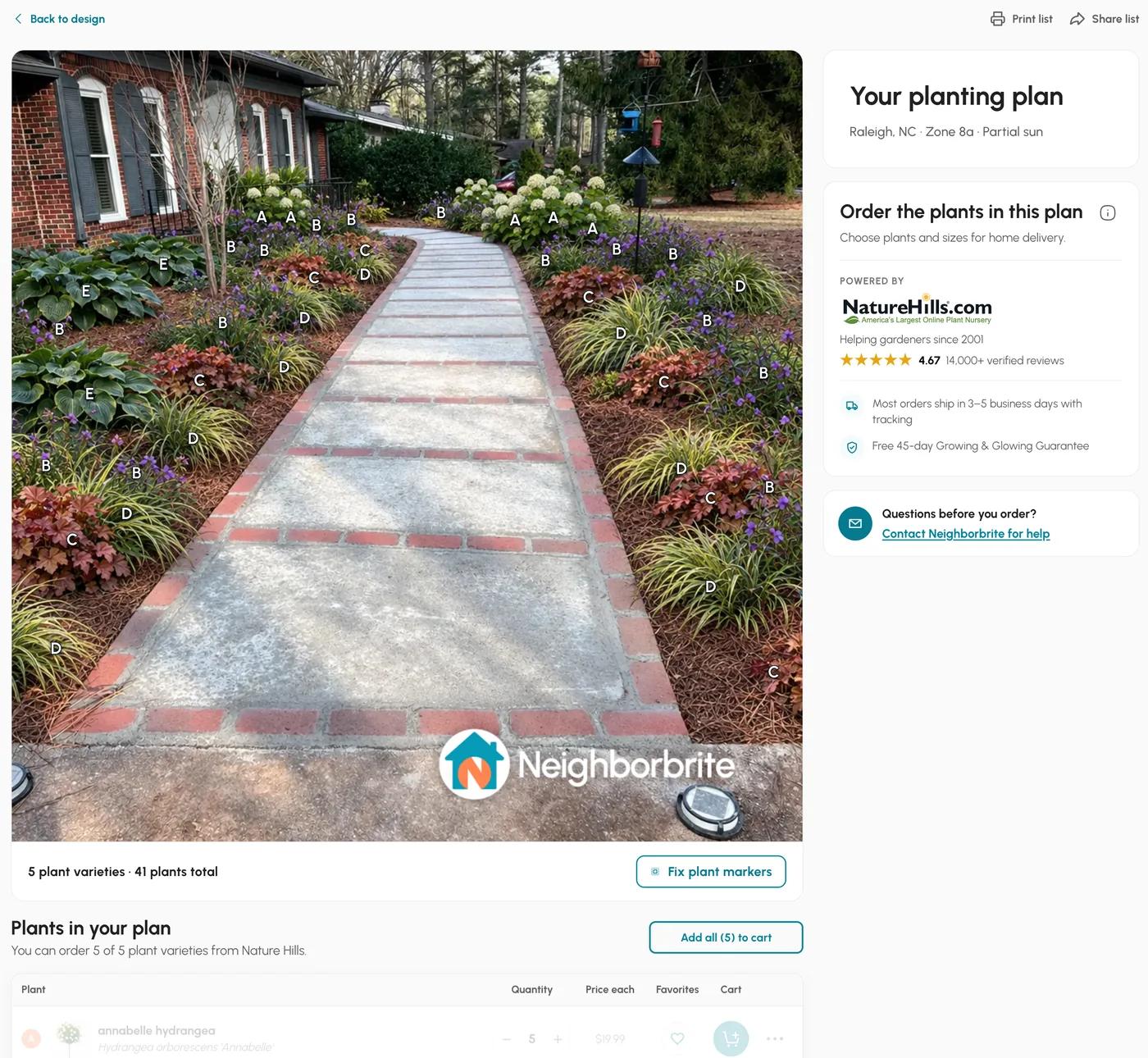
What "free" buys you differs. Neighborbrite's free tier gave us 4 designs a day, a watermark on every image, and, on the first design, a full plant list with prices: 5 varieties, 41 plants, about $1,049 at its nursery partner's prices.
Sow free gives 10 designs to start and more for taking part (posting a design earns 25 credits, a referral 100). Either is a far cheaper honest way than any package to see what a planted version of your yard looks like.
- Yardzen Backyard Essential: $995 in year one, $995 over three years (one package, no renewals)
- Yardzen Backyard Classic: $1,395 in year one, $1,395 over three years
- Yardzen Backyard Signature: $1,995 in year one, $1,995 over three years
- Sow free: $0 and $0, with the free-tier limits above
- Sow Pro, web: $39.99 in year one, $119.97 over three years ($59.99 and $179.97 through the App Store)
- Neighborbrite free tier: $0 and $0, 4 watermarked designs a day; Pro is $24.99 a month
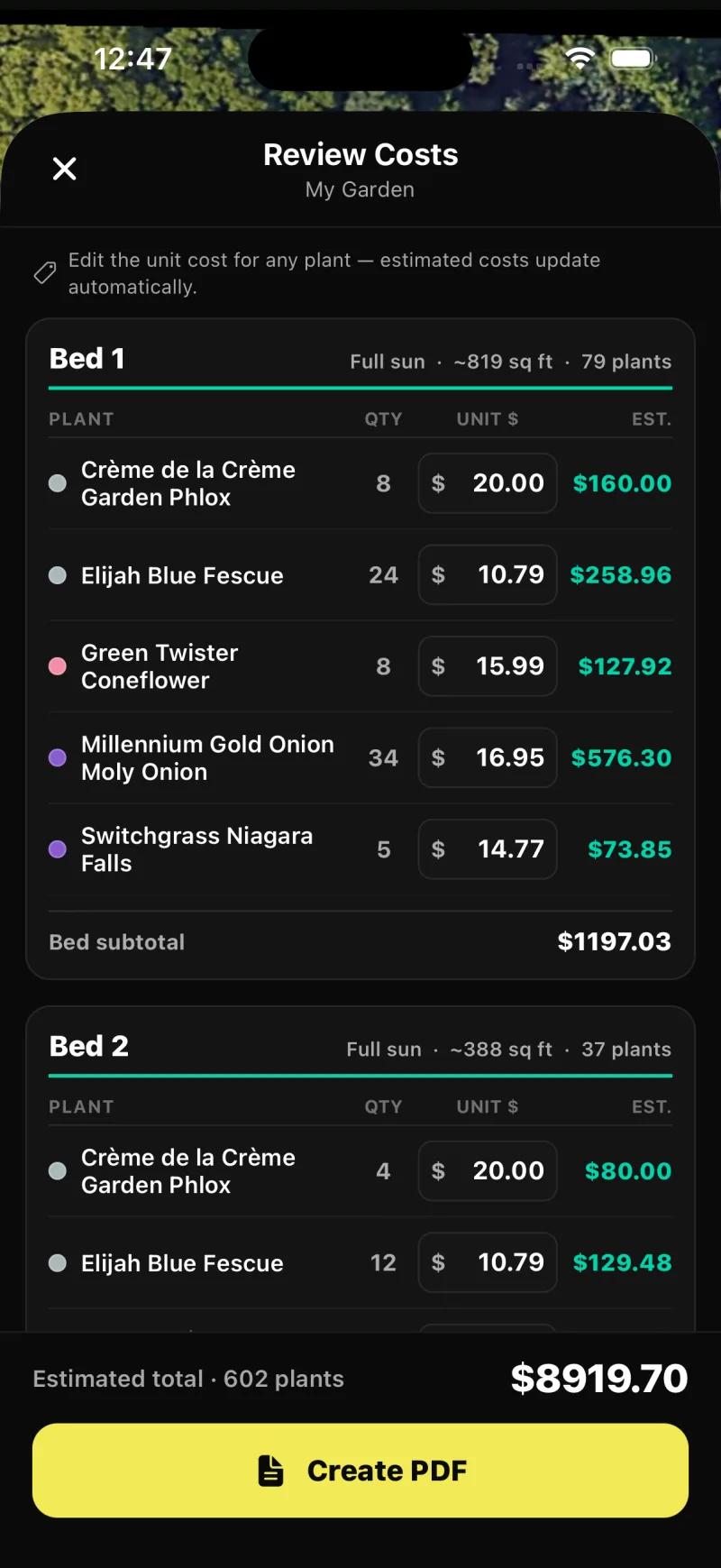
Two screenshots to make "priced" concrete. Neighborbrite's free plant list came with quantities and prices from the one nursery partner it sells through.
Sow's per-bed priced schedule lives in Planting Plans on the iPhone app, where each bed lists quantity and an editable unit price per species with a total at the bottom; the web design "Shopping List" PDF gives a quantity, a unit price and a line total per species with an estimated total, the unit price being the lowest listed across the online nurseries Sow tracks (usually the smallest pot), and neither list shows mature size or spacing.
Does Yardzen build the yard? You still need a contractor
No. The build is a separate contract, and it costs more than the design.
No. A Yardzen package ends with a plan, renders, and, in the higher tiers, a cost advisor to help you budget the build. The build itself is a separate contract with a separate company. Yardzen's contractor matching introduces you to builders from its network, which is a real convenience, but the quote, the schedule, and the invoice are between you and the contractor.
This is the most common source of disappointment in reviews of design services of any kind, so it is worth saying plainly: the design fee is the smallest line on a landscape project. Whatever you pay to design, you will pay more to build.
We do not publish build-cost estimates on this page because we have no verified data for your area, and neither does anyone else who has not seen your yard. Get the design, get two or three quotes against it, and treat the cost advisor as a starting point for that conversation rather than a price.
The same is true if you design with an app. A Sow planting plan with a priced plant schedule tells you what the plants cost at the quantities you chose; it does not tell you what a crew charges to prepare the beds and plant them.
The difference is that for a planting-only project you can do that work yourself over a few weekends, which you cannot do with a retaining wall.
Yardzen vs Sow: which should you use?
Yardzen for a person, hardscape and permits. Sow for a planting design you can change yourself, tonight.
Who does what
A tool is listed only where it does the job fully. Same checks as the table.
Redraws your photo
- Sow
- Yardzen
- Neighborbrite
Lets you place things by hand
- Sow
Plans the beds from above
- Sow
- Yardzen
Hands you a plant list
- Sow
- Yardzen
- Neighborbrite
Helps after planting
- Sow
AR, 3D or construction
- Yardzen
These are different products for different jobs, so the table below has a lot of honest "No" cells on both sides. Yardzen gives you a person, hardscape, permit-ready plans, and contractor matching.
Sow gives you a design from your own photo in minutes, every plant a real species with zone, sun, mature size, bloom and care data from a 12,000+ catalog, a planting plan, care after planting, and live nursery prices, with the same project on iPhone, Android, and the web.
Editability is the practical difference day to day. On Yardzen, changes go back through the designer within your package allowance. On Sow, on mobile, every generated species can be removed, counted up or down, or swapped, and the Plant Editor lets you drag in plants, furniture, lighting and paving by hand, on a generated design or a plain photo; on the web, Design Studio places plants and objects over the render.
Where Sow falls short against a service. No AR, no 3D walkthrough, no hardscape CAD or construction documents, outdoor plants only, and weather-aware care is US-only. If the project needs drawings a contractor can build from, Sow is the wrong tool and Yardzen is a reasonable one.
| Feature | Sow | Yardzen | Neighborbrite |
|---|---|---|---|
| Redesigns a photo of your own yard | Yes | Yes | Yes |
| Plants are real, named species | Yes | Yes | Yes |
| Checks hardiness zone or climate | Yes | Yes | Partly |
| Mature size and spacing data | Yes | Yes | Unverified |
| Move or swap individual plants after generation | Yes | No | Partly |
| Drag-and-drop editor for plants, objects and paving | Yes | No | Partly |
| Top-down planting plan or layout | Yes | Yes | No |
| Grid bed planner with companion planting | Yes | No | No |
| Plant list or shopping list | Yes | Yes | Yes |
| Live nursery prices | Yes | No | No |
| Care reminders after planting | Yes | No | No |
| Diagnoses a sick plant from a photo | Yes | No | No |
| Measures the sun a spot gets | Yes | No | No |
| AR view | No | No | No |
| 3D model or walkthrough | No | Partly | No |
| Hardscape and construction tools | Partly | Yes | No |
| PDF export | Yes | Yes | Unverified |
| Free tier | Yes | No | Yes |
| Works in a browser | Yes | Yes | Yes |
| iPhone app | Yes | Unverified | Yes |
| Android app | Yes | No | Yes |
Choose Yardzen if
- The project includes a patio, wall, grading, drainage, or structure that needs permit-ready drawings
- You want a person to make the design decisions and you will accept their turnaround
- You want to be matched with a contractor rather than find one yourself
- The whole project budget is large enough that $995 to $1,995 for design is a small share of it
Choose Sow if
- The project is planting: beds, borders, a walkway, a fence line, a foundation planting
- You want to see a planted version of your own photo tonight and change plants one by one
- You want the plan to keep working after install, with care reminders and nursery prices
- You want to try it free before paying $39.99 a year on the web
What can you do yourself before paying $995?
A free photo design of your yard in under two minutes, with named plants and quantities.
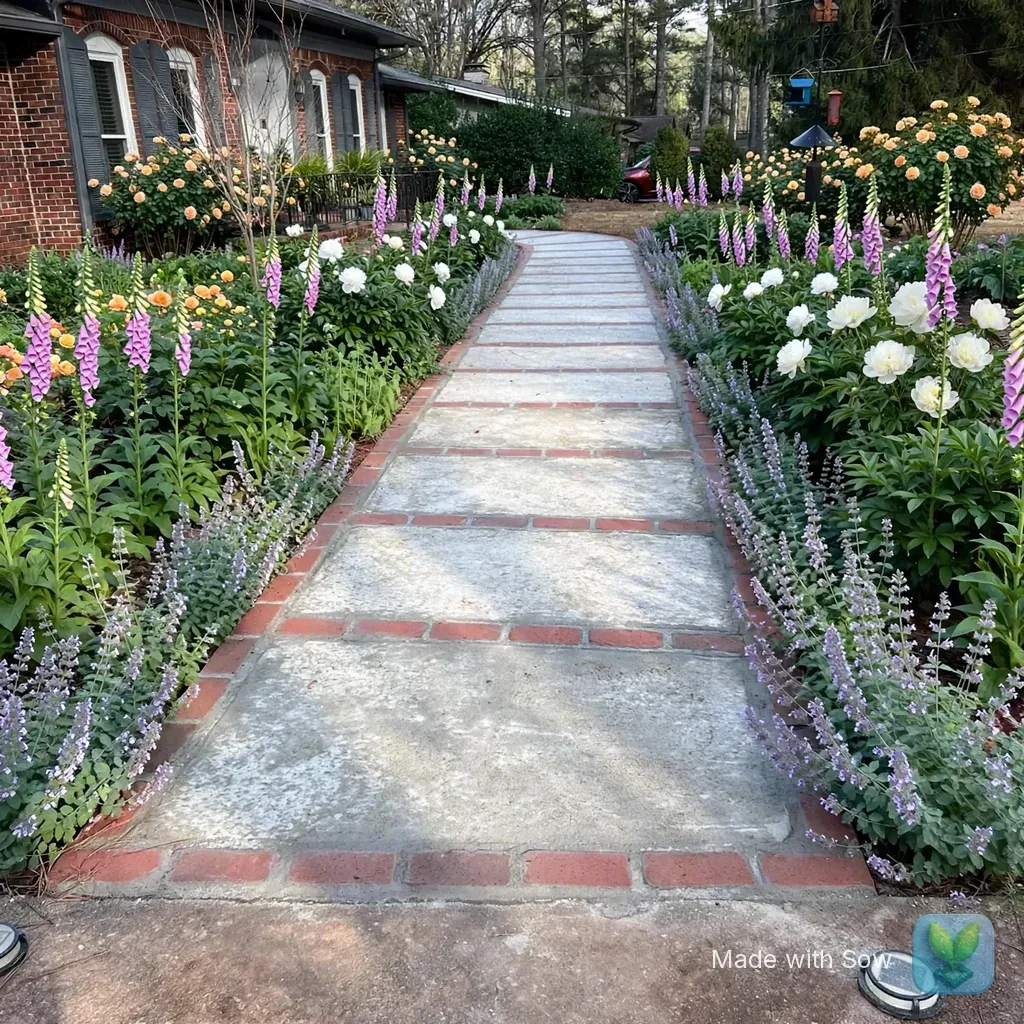
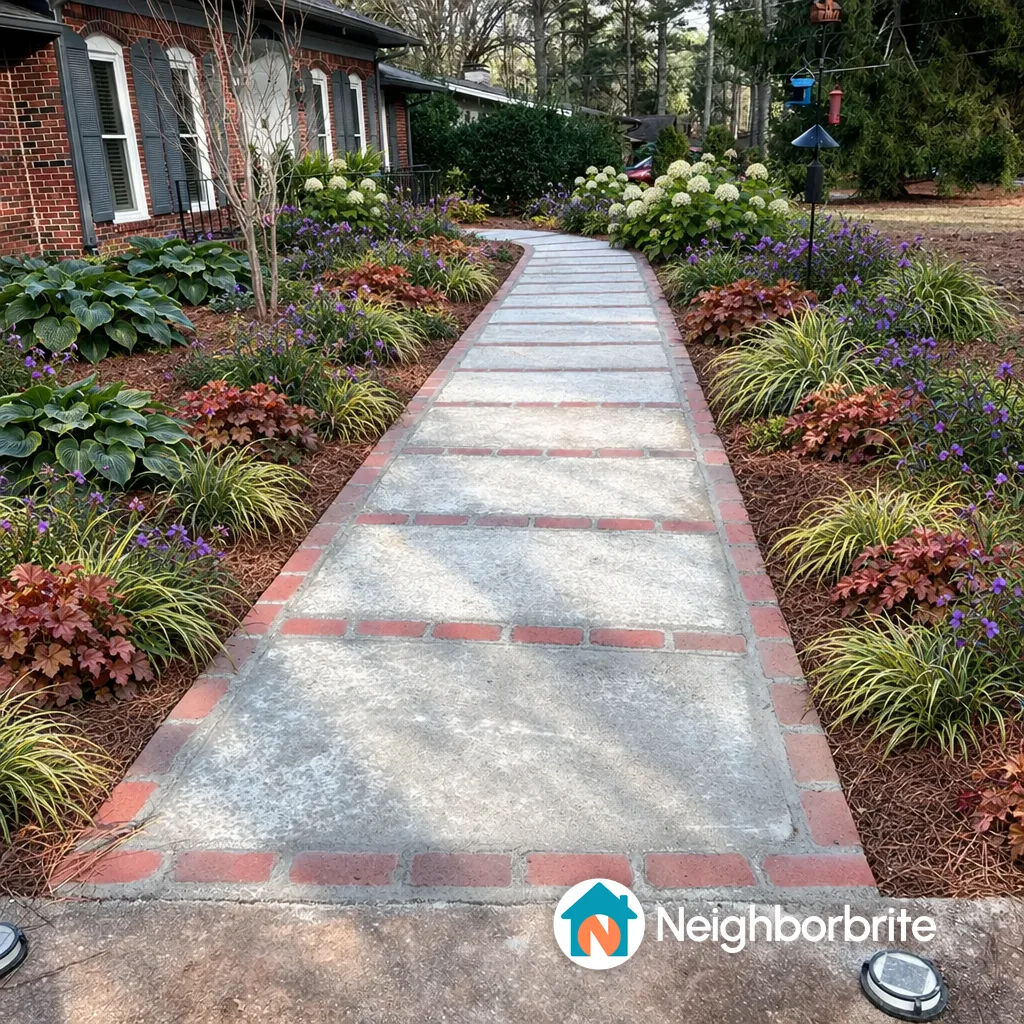
Quite a lot, and it costs nothing to find out. We ran the same front-yard photo, a brick ranch with bare beds either side of the walkway in Raleigh, NC, through Neighborbrite and Sow on their free tiers on October 13, 2026.
Neighborbrite wrote a five-plant plan in about 60 seconds and drew the design in about 33 seconds; Sow's render on the web took under a minute, and the gallery showed it 90 to 150 seconds after submitting. Both kept the house and walkway, both named real plants, both watermarked the free image.
Neither result is a Yardzen plan. There is no site survey, no hardscape, nothing a permit office would accept. But for a planting-first project it is a credible starting point in a few minutes, and the mobile app takes it further, as the next screenshots show.
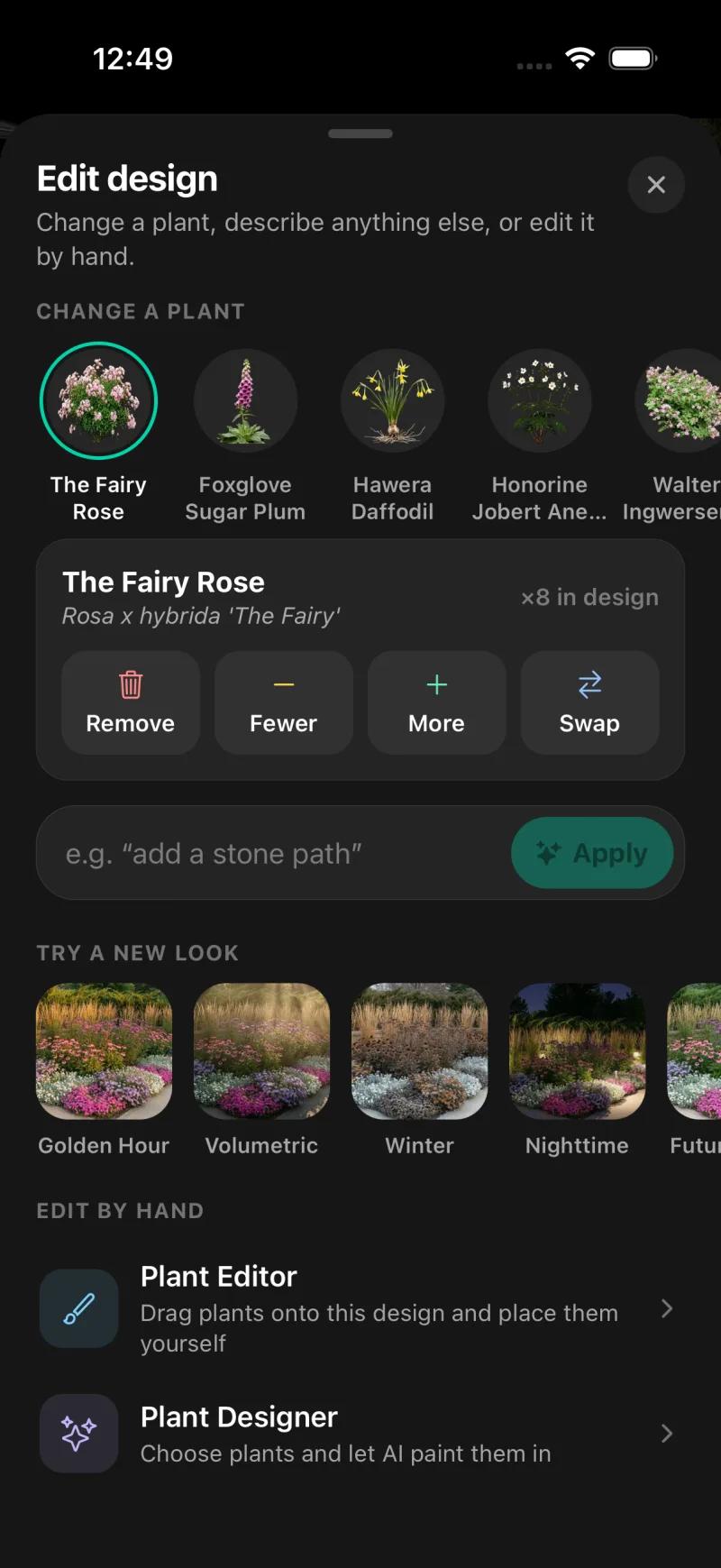
On Sow's iPhone app the same front yard came back with five species carrying botanical names and quantities (The Fairy Rose x8, Foxglove Sugar Plum x28, Hawera Daffodil x66, Anemone x14, plus one more), and tapping any of them offers Remove, Fewer, More, or Swap.
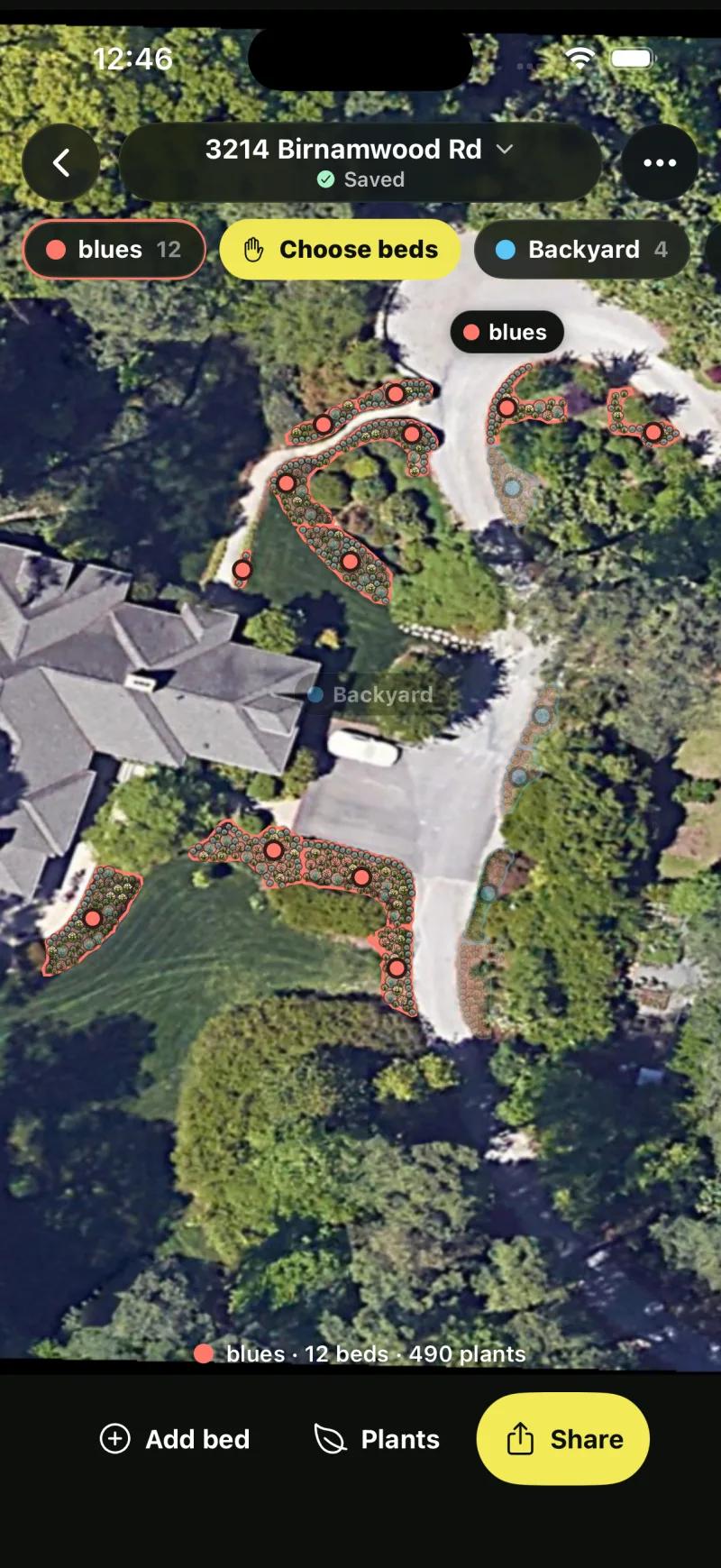
Planting Plans then lays beds out on a satellite view of the property; the test plan covered 17 beds across its spaces, with a per-bed editor showing area, sun, and plant counts.
If you later decide the project needs a designer, you arrive at that conversation with a plant palette you already like, images of the looks you rejected, and a sense of quantities. Designers tend to prefer that client to the one with a folder of inspiration photos. And if you never hire anyone, the plan moves on to planting, care, and prices without a second purchase beyond Pro.
Does Yardzen have an app?
One is listed in search results. We could not verify what it does.
A Yardzen app appears in search results. Yardzen's product as described on its site is delivered through the web. If an app matters to you, open the listing yourself and read its most recent reviews before assuming it replaces the package.
Alternatives to Yardzen: DIY apps and other services
Sow
Best for designing beds and borders from a photo and keeping the plan alive after plantingThe planting-first DIY option. Upload a photo and get a design with real, zone-checked species you can remove, recount or swap one by one on mobile, then a planting plan with quantities and prices, care reminders, and the same project on iPhone, Android, and the web. Free to start; Pro from $39.99 a year on the web. No hardscape CAD, no 3D, no AR.
Neighborbrite
Best for a quick first look at a planted version of your yardA free tier of 4 designs a day that resets daily, a written plan with named cultivars in about 60 seconds, an image in about 33, and on the first design a plant list with quantities and nursery prices. The watermark stays on free and on Pro at $24.99 a month; only Business at $49.99 a month removes it. Plants are not individually editable objects.
DreamzAR
Best for walking through a design in AR before committingPhoto redesign plus a 2D editor and an AR walkthrough, $19.99 a month or $199 a year with no free tier. Its site says every plant includes care information, growth data and regional compatibility, from a catalog of 2,000+ plants and garden features.
Hadaa
Best for a single priced plan to hand a contractor, without a subscriptionPay per render instead of a subscription: $12 for one, $9 each for three or more. Its site promises a plant list verified against your USDA zone, with quantities, and a contractor blueprint with plant placement, path widths and material volumes, which is the closest an app gets to a Yardzen-style handoff. Renders are one-shot rather than editable plant by plant, and it is web only.
Klora
Best for a scaled plan you draw yourselfA free, no-account browser tool for drawing a real planting plan to scale over aerial imagery of your address, with 1,422 species carrying sun, deer and pollinator icons and a view of the plan at year 1, 5, 10 and mature. Nothing is generated for you, there is no photo render, and PDF export needs the $24 pass or $69 a year. We tested it with the Raleigh address.
Tilly
Best for a second quote on a designer-made planAnother online landscape design service. Compare its current offer with Yardzen's on its own site before choosing between them.
Shrubhub
Best for a second online-service quoteAnother online design service. Read its current package page and independent reviews before weighing it against Yardzen.
A local designer through the APLD directory
Best for complex sites, drainage, and projects where someone should stand in the yardThe Association of Professional Landscape Designers keeps a searchable member directory. A local designer can walk your site, see the drainage and the neighbor's tree, and often oversee the build, which no online service does. Fees vary by designer and region; ask for a fee schedule before the first meeting.
The bottom line
Yardzen is a credible way to buy a designer-made, permit-ready landscape plan for a published price, $995 to $1,995 for a backyard as of October 2026, with hardscape and contractor matching that no app provides. Its turnaround and revision terms are not something we could verify, and its review score is a self-hosted figure that says more about volume than about built results.
For a planting-first project, the better first move is free: run your photo through Neighborbrite or Sow tonight, see what a planted version looks like, and only then decide whether you need a person, a drawing, and a contractor. If you do, Yardzen is a reasonable place to get all three. If you do not, Sow keeps the design editable plant by plant and carries it through planting, care, and prices for $39.99 a year on the web.
Questions people ask
How much does Yardzen cost?
$995 for Backyard Essential, $1,395 for Backyard Classic, and $1,995 for Backyard Signature, each a one-time fee, as published on yardzen.com in October 2026. Front-yard, full-yard and small-space packages are sold too; we did not record their prices. Installation, plants and materials are extra.
Is Yardzen worth the money?
For a project with hardscape, grading, or permits, where you need drawings a contractor can build from and want to be matched with one, a published $995 to $1,995 design fee is reasonable. For planting beds, borders, or a front walkway, an app gets you a credible design tonight for free or $39.99 a year, with plants you can change yourself, so the package is hard to justify.
Does Yardzen cost money, or is there a free version?
There is no free tier. Every Yardzen package is paid, from $995 for a backyard. If you want a free look at your yard redesigned, Neighborbrite's free tier gives 4 watermarked designs a day and Sow's free account gives 10 designs with named plants to start, and more for taking part.
What are some alternatives to Yardzen?
For doing it yourself: Sow (photo redesign with real, zone-checked plants you can edit, plus planting plans, care and prices), Neighborbrite (4 free designs a day), DreamzAR (AR walkthrough, $199 a year), Hadaa (pay per render with a contractor blueprint), and Klora (free scaled planting plans). For another person-made design, Tilly and Shrubhub are other online design services, and the APLD directory lists local designers who can visit the site.
How does Yardzen work?
You buy a package, upload photos of your yard, and complete a survey about how you use the space and what you like. A Yardzen designer produces a plan and renders; higher tiers add photorealistic renders and a cost advisor. Revisions go through the designer within the package allowance, and Yardzen can match you with a contractor to build the result. Turnaround per package is something we could not verify.
Does Yardzen have an app?
A Yardzen app appears in search results. The service as described on yardzen.com is delivered through the web. Check the listing and its recent reviews before assuming the app replaces a package.
Does Yardzen install the design?
No. A package ends with the plan and renders. Yardzen can match you with contractors from its network, but the build is a separate contract between you and the builder, and the design fee does not include plants, materials, or labor.
How long does Yardzen take?
Yardzen describes delivery in weeks, but we could not verify the turnaround for each package and we did not go through the process ourselves. Ask for the current turnaround and the revision allowance in writing before you pay.
What is the best free landscape design software?
For a free redesign of a photo of your yard, Sow gives 10 designs to start and more for taking part, and Neighborbrite's limited free tier gives 4 a day with a plant list on the first design, both watermarked. For a free scaled planting plan you draw yourself, Klora needs no account and has 1,422 species. Sow's designs use named, zone-checked plants. None of the three replaces a designer for hardscape or permits.
What is the average cost of a backyard makeover?
We do not publish an average because we have no verified figure, and the honest answer depends on whether "makeover" means plants or construction. The one design price we can document is Yardzen's, $995 to $1,995 for a backyard package, before any build. For a planting-only project, the plant cost is whatever the schedule says: our front-yard test on Neighborbrite priced 41 plants at about $1,049, and Sow's Planting Plans tool prices each bed from the quantities you set.
Keep comparing
- Straight answerLandscape designer cost vs an appRead
- Hands-on reviewNeighborbrite review (2026)Read
- Ranked and testedBest landscape design appsRead
- Free tiers, testedBest free landscape design appsRead
- Honest reviewDreamzAR review (2026)Read
- Tested roundupBest AI landscape design appsRead
- HubAll comparisonsBrowse
See your yard planted before you pay for a designer
Upload one photo. Sow places real plants that suit your zone and light, names every one, and keeps the design editable plant by plant. Free to start.
We make SowTested October 13, 2026Yardzen described from its own pages, no package boughtWe paid nothing for the testsHow we tested
How we tested
- Test subject: a brick ranch front walkway in Raleigh, NC (zone 8a, part sun) and a fenced backyard; the same two photos went to the DIY tools.
- What we paid: nothing. Yardzen's prices, deliverables and review count are quoted from yardzen.com as of October 12, 2026. Neighborbrite ran on its free tier and Sow on a free web account plus the iPhone app.
- Read Yardzen's package pages and homepage and recorded the three backyard prices, the review count, and the deliverables as described there. Turnaround and revision terms are not stated as fact on this page because we could not confirm them.
- Ran the front-yard and backyard photos through Neighborbrite free (cottage style, Raleigh, zone 8a, partial sun) and recorded timings, plant names, and the plant list that came with the first design.
- Ran the same photos through Sow on the web (Style Design, Cottage) and on the iPhone app (Auto Design, Cottage, part sun), then opened the per-plant controls and the Planting Plans cost review.
- Did the one-year and three-year arithmetic from published prices only. No build, labor, or plant costs are estimated anywhere on this page.
Read it the way you would read any maker's comparison
This page is written by the Sow team. We show our work in the screenshots and say where Sow is not the right answer.
Where Sow loses here
- no human designer making decisions for you
- no permit-ready plans, construction documents, or hardscape CAD
- no contractor matching
- no 3D walkthrough or AR
Spotted a change? Email [email protected] and we will re-test and correct the page.