
What did we ask ChatGPT, and what came back?
A written plan in 63 seconds: eleven named plants, quantities, spacing and a budget. Then we asked it for pictures.
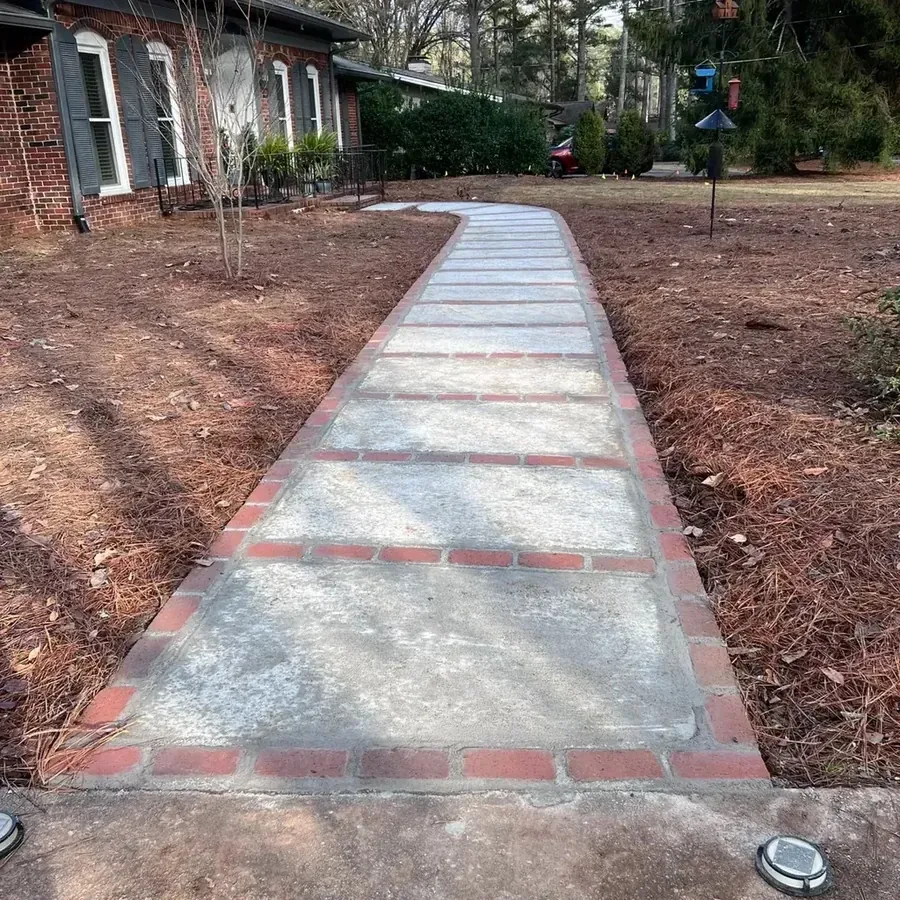
We gave ChatGPT the photo above and the brief in the box: Raleigh, zone 8a, part sun under pines, cottage style, low maintenance, keep the walkway, and five deliverables. The reply took 63 seconds.
It opened by restating the site. "You're in Zone 8a with 4-6 hours of sun and dry, acidic soil under pines." The soil was its inference; we had not mentioned it. Then it declared its assumptions: "Walkway length: about 36 ft; planting depth each side: about 5 ft." It could see the photo. It could not measure it.
The plant list, for both sides combined, was eleven kinds of plant: 6 Ilex vomitoria 'Schilling's Dwarf' (dwarf yaupon holly), 4 Camellia sasanqua 'Shi-Shi Gashira', 120 Ophiopogon japonicus 'Nana' (dwarf mondo grass), 6 Amsonia hubrichtii, 4 Baptisia australis, 12 Helleborus x hybridus, 18 Heuchera villosa 'Caramel', 16 Hemerocallis 'Happy Returns', 12 Dryopteris erythrosora (autumn fern), 12 Spigelia marilandica and 150 Narcissus bulbs.
That is 360 plants and bulbs by our count, with a pot size for each and an itemised budget of "about $2,200-$2,500".
The fifth deliverable, "show me what it would look like", came back as a diagram drawn in letters (Y for yaupon, C for camellia and so on) and a month-by-month description of what would be in bloom. So we asked ChatGPT for an actual picture: the same photo, planted with its eleven plants. The next three sections show what it drew.
What happened when ChatGPT drew our yard?
A pretty garden on a different house. The porch is gone, the walkway is redrawn, and not one plant in the picture is named.
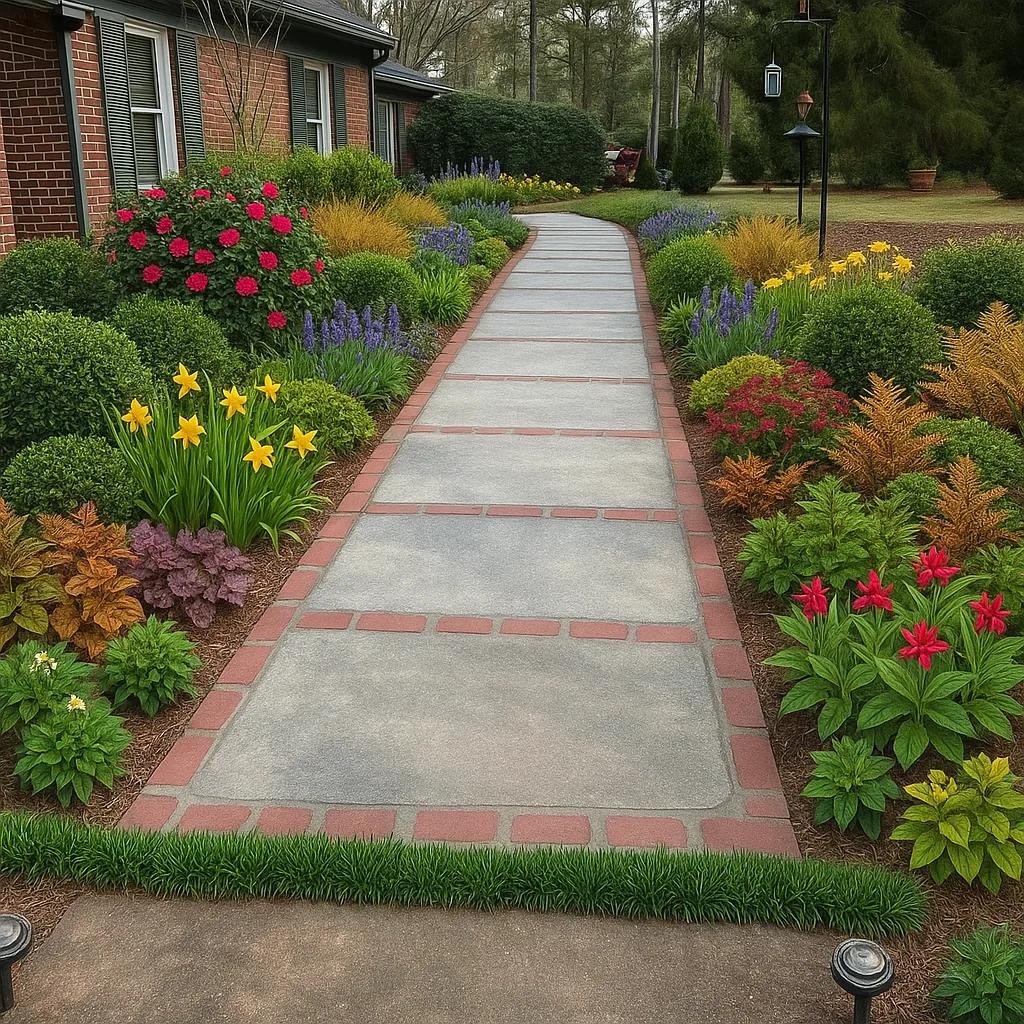
The picture at the top of this page is the result, and it is attractive at a glance. Drag the slider and the problems show. The porch, its railing and its pots are gone, replaced by more wall and more windows. The walkway no longer bends toward the door; it runs straight back to a lawn.
A strip of grass is drawn across the path itself. The bird feeders on the post became lanterns, and the pine straw became dark mulch.
We had asked it to keep the walkway and the house exactly as they are. ChatGPT does not edit your photo; it paints a new one that resembles it, and the parts you care about can change with everything else.
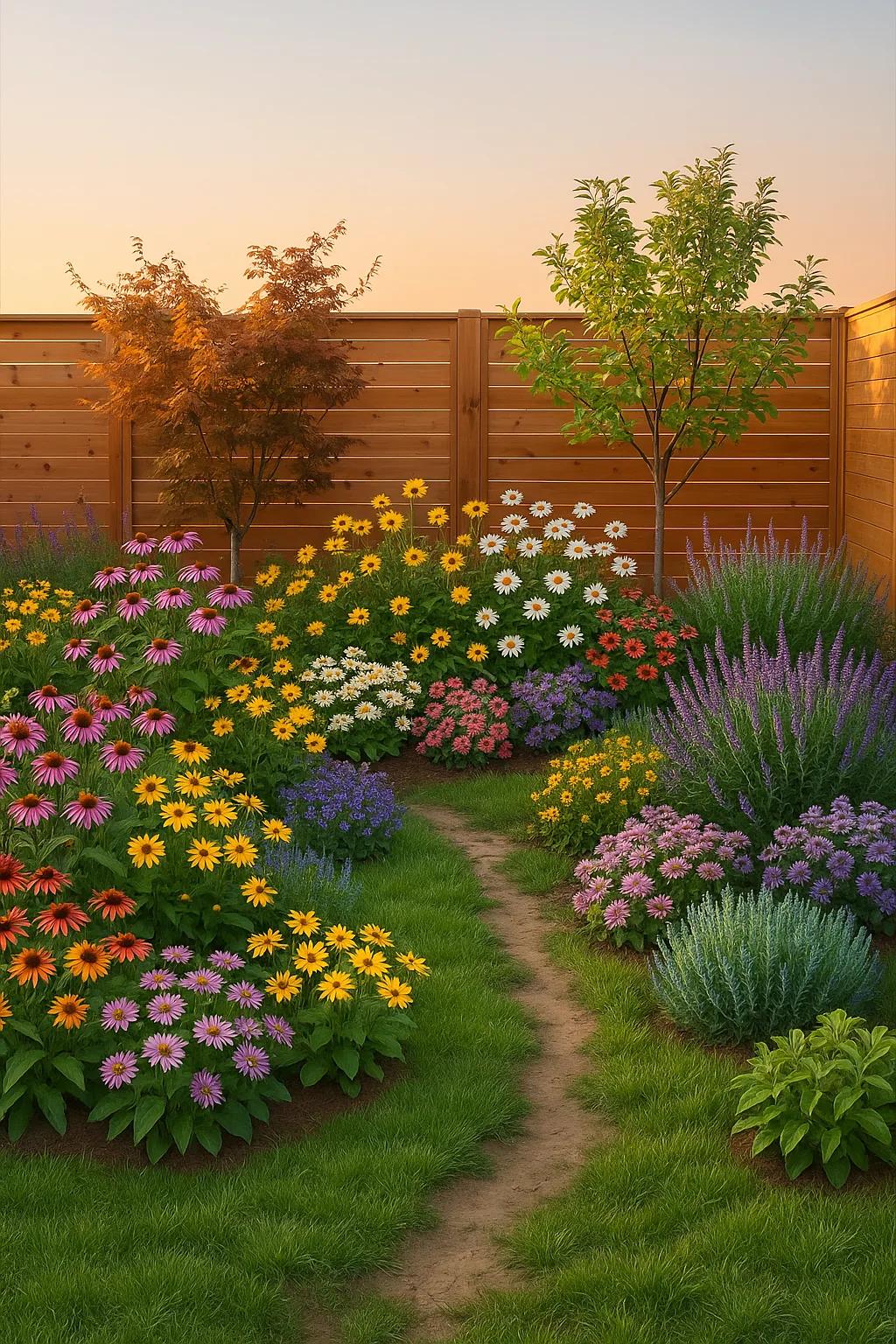
Nothing in the picture is labeled, so nothing tells you which shrub is the camellia and which is the holly. We also asked ChatGPT for a single bed along the fence in our backyard photo, keeping the lawn, and to name every plant. Flower beds came back across much of the lawn, and the picture has no plant names on it.
Can you move one plant in ChatGPT's design?
No. Asked to move one camellia and change nothing else, it redrew the whole scene. Asked the same thing twice, it drew two different gardens.
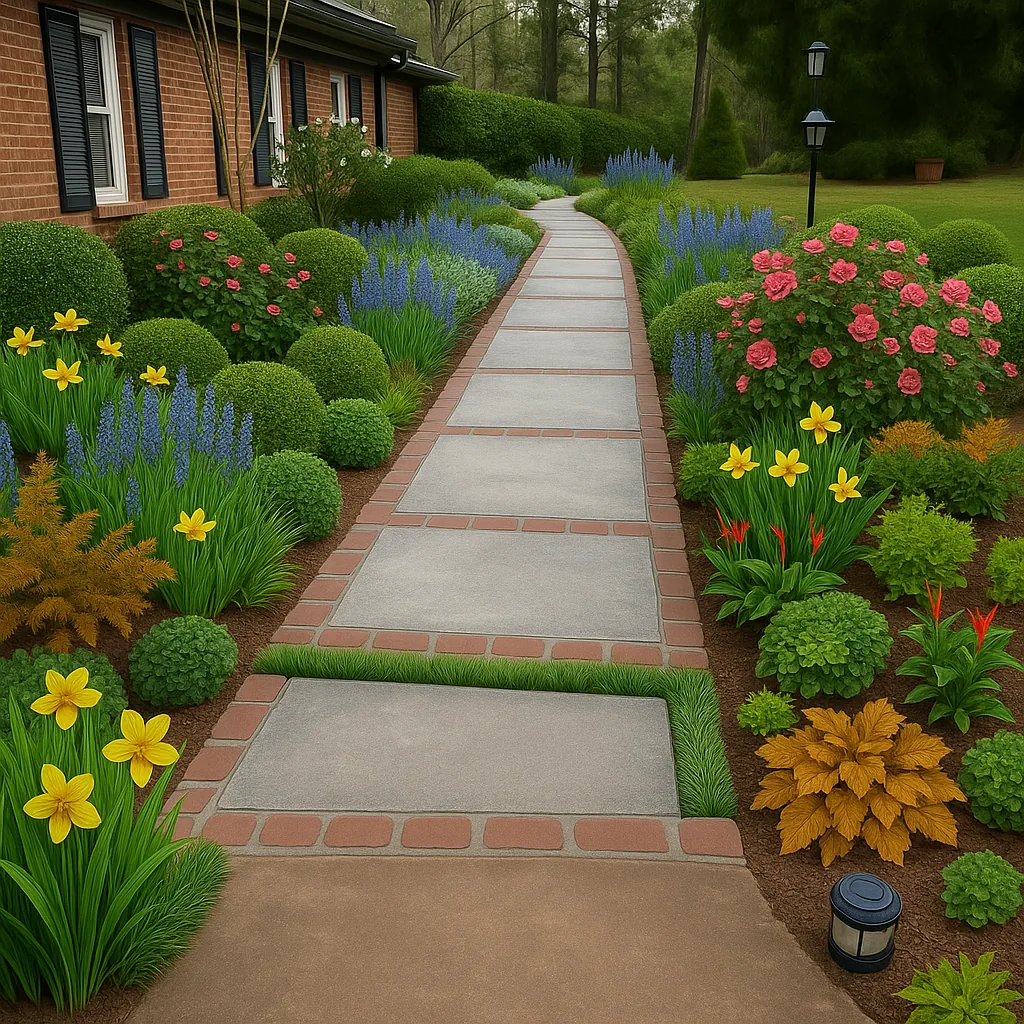
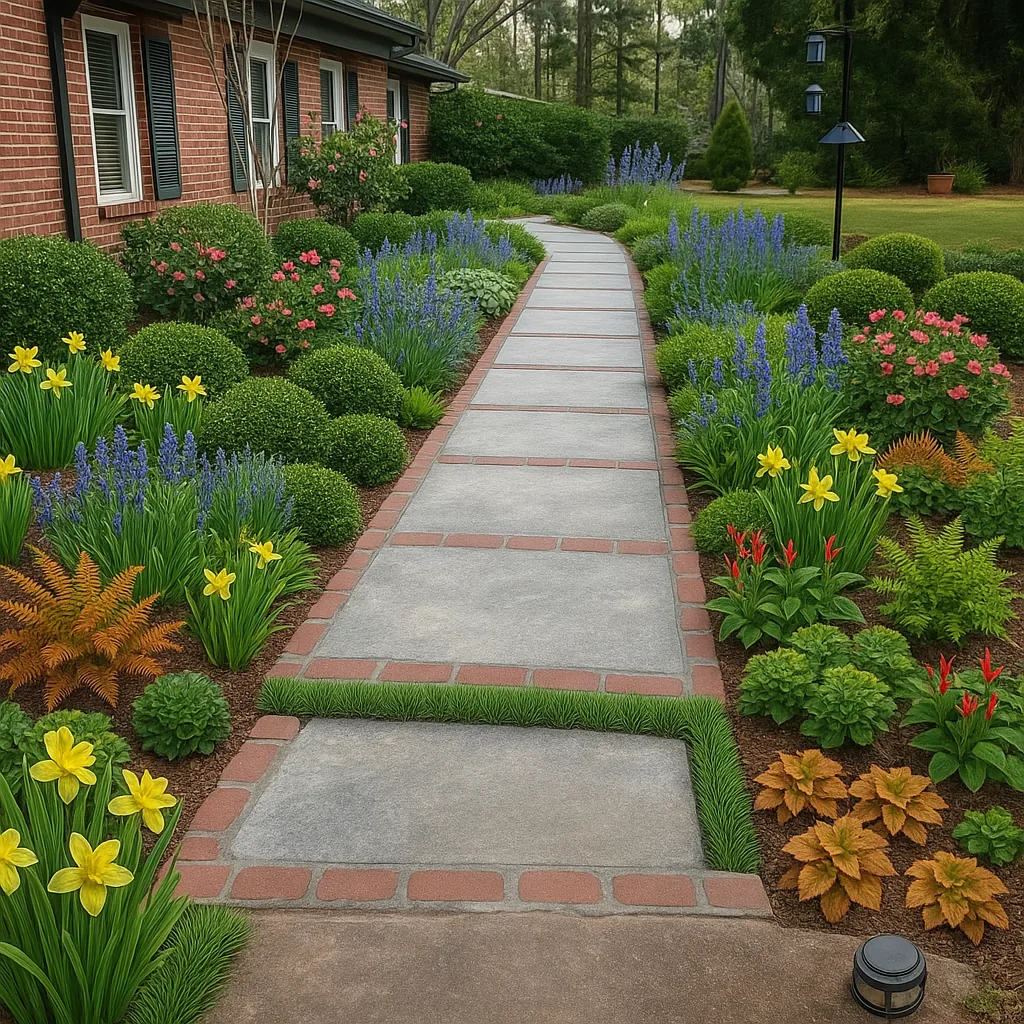
There is nothing to drag. To change a ChatGPT design you describe the change and it draws the scene again. We gave it its own picture and wrote: "Move the camellia that is on the left side of the walkway to the right side of the walkway. Change nothing else in the picture."
Drag the slider. The pink shrub on the right grew larger, and a pink shrub still stands on the left. Everything else moved too: the walkway took a new curve, the lamp post and the path light were replaced, the clump of copper heuchera at the bottom right became one large gold plant, and the daffodils and ferns on both sides shifted. One requested change came with many we did not ask for.
Then we sent the original request a second time, word for word. The second picture is a different garden, with different plants in different places and a different edge to the path. You cannot build on a design that comes out differently each time you ask for it.
Can ChatGPT draw a top-down planting plan?
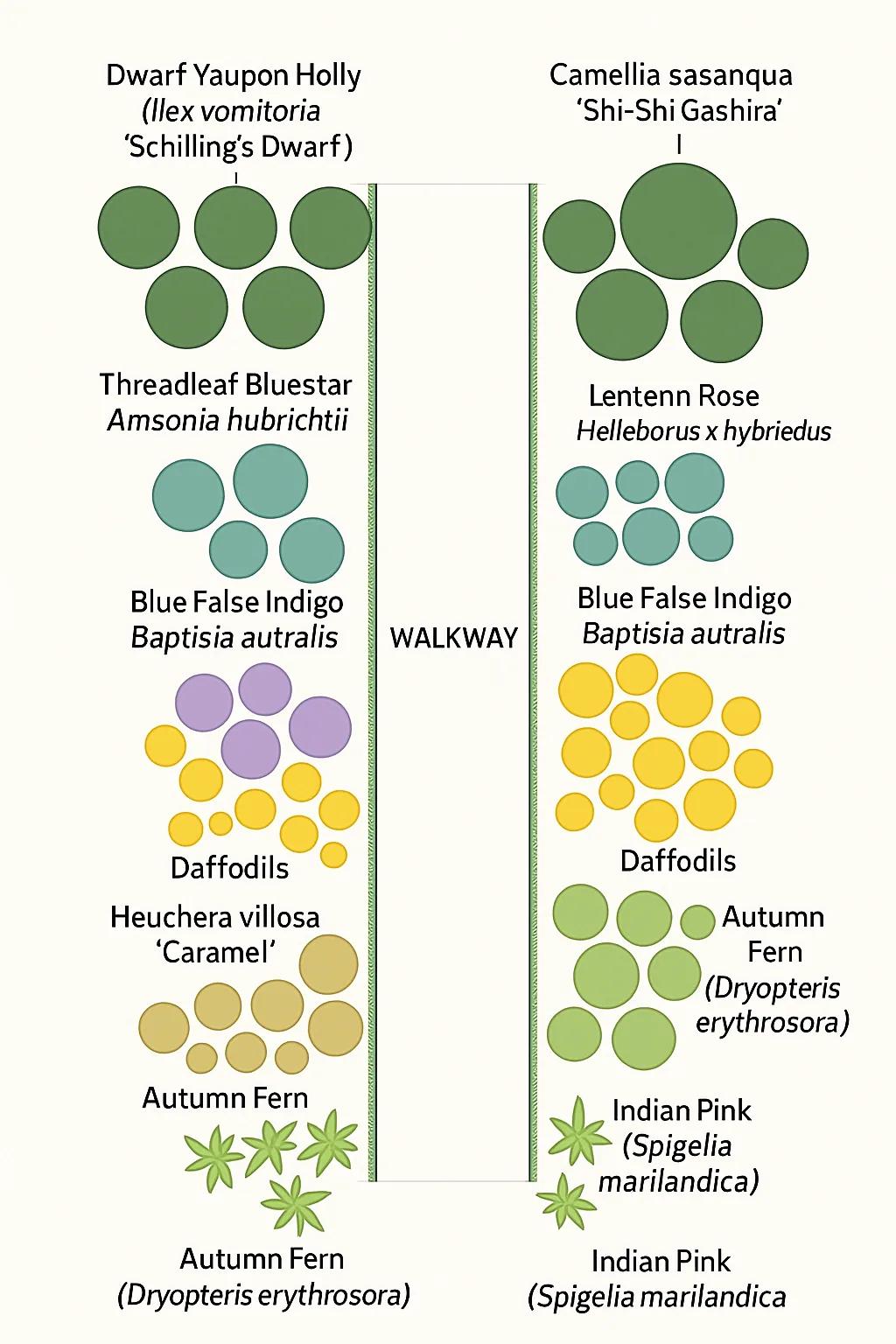
It drew a diagram, not a plan: no quantities, no scale, a straight walkway, three misspelled names and no daylilies.
We asked ChatGPT for a top-down planting plan of the two beds, to scale, with every plant labeled and the quantity of each, using its own list. It returned the diagram below in 48 seconds.
There is not a single quantity on it, and no scale or dimensions. The walkway is a straight strip, though ours curves. Three names are misspelled: "Lentenn Rose", "Helleborus x hybriedus" and "Baptisia autralis", the last one twice. The daylilies are missing and the mondo grass edge is not labeled. Autumn fern is labeled three times.
It drew five yaupon hollies where the list says six, and five circles under the camellia label where the list says four.
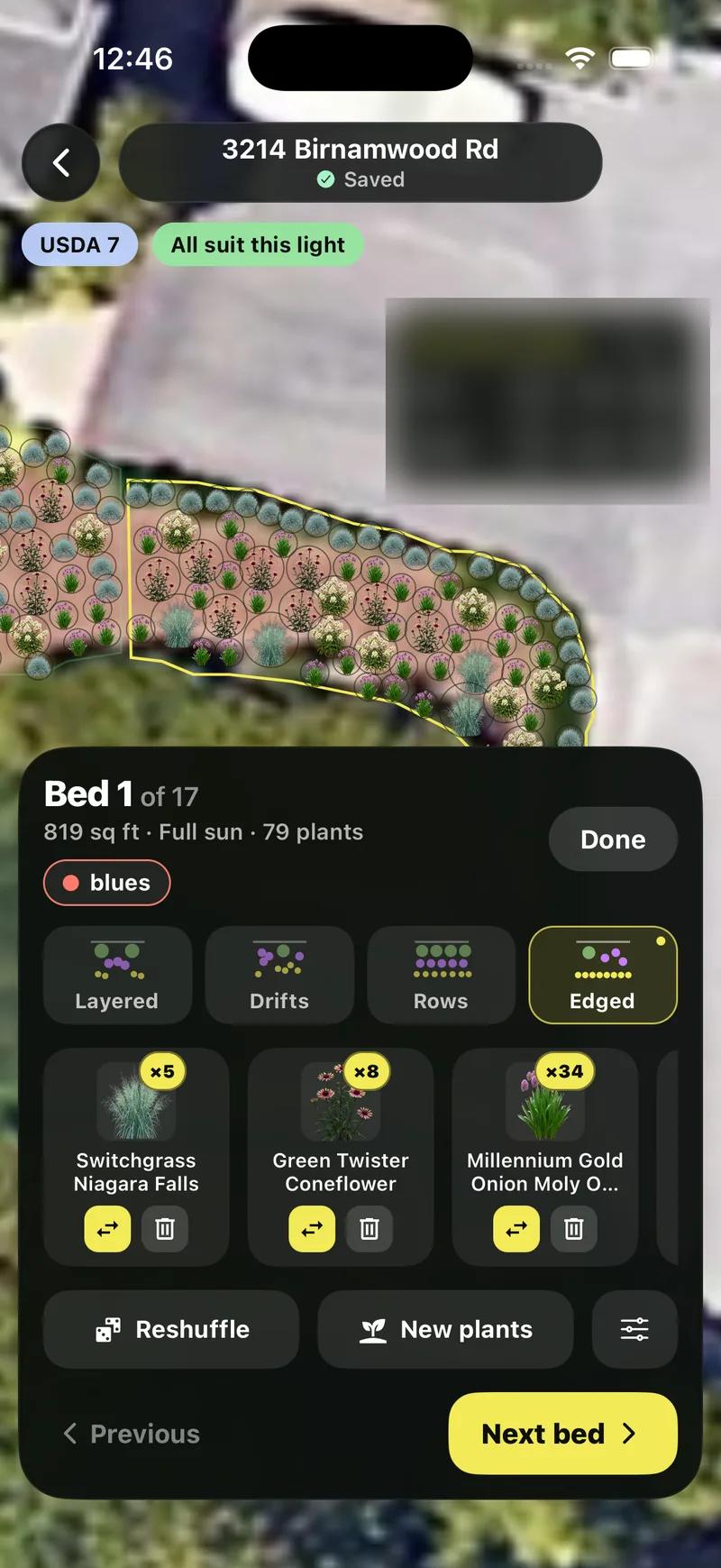
Compare that with what a planting plan has to hold: each bed's real size, every plant placed and counted, and a schedule of names, quantities and prices. In Sow, Planting Plans finds the beds on the satellite view of your property, gives each bed its area, sun and plant count, and prices the whole schedule before you export it.
What did ChatGPT get right?
The text: real species, a sensible structure, mature sizes, spacing and care notes.
A good deal, and it is worth being fair about it. Every plant on ChatGPT's list is a real species or cultivar with a correct botanical name. It used the zone and the sun hours we gave it, read "under pines" as dry acidic soil without being told, and organised the palette the way a planting designer would: evergreen structure, a groundcover edge, perennials for colour and bulbs for spring.
It gave a mature size and on-centre spacing for every plant, which neither Neighborbrite's free plant list nor Sow's web Shopping List PDF does, a cost estimate with a line per plant, and care notes for the first season. If what you wanted was a shortlist to take to a nursery, you have one.
Where does ChatGPT fall short of a landscape design app?
No plant library, no drag and drop, no real plan, no care after planting, and six more gaps we saw in our own tests.
Here is the list, from our tests, each with what Sow does instead. The tables below put ChatGPT, Sow and Neighborbrite side by side.
No plant library
ChatGPT names plants from what it learned in training. There is no catalog to browse, no photo of each plant, and no record of zone, sun or mature size to check its picks against; its own hedges, "Caramel (or Georgia Peach)", show it recalling rather than looking up. Sow designs from a library of 12,000+ outdoor plants, each with zone, sun, mature size, bloom and care data.
No drag and drop
You cannot pick up a plant and move it. Every change is a new picture, and in our test one change rewrote the scene. In Sow you tap a species to remove it, change how many, or swap it, and the Editor lets you drag plants, furniture, lighting and paving onto your photo by hand.
No top-down planting plan
Its plan had no quantities, no scale and misspelled names. Sow's Planting Plans finds your beds on the satellite view, fills each one with counted plants, and prices the schedule.
No care after planting
ChatGPT does not keep a record of what went in the ground or turn it into a care schedule. Sow gives every plant month-by-month care, and in the US its care tasks move with the local forecast.
It redraws your house
We asked it to keep the house and walkway exactly as they were, and the porch disappeared while the walkway changed shape. In our test Sow planted the same photo and kept the house, the porch, the curving walkway and the bird feeders where they were.
A different garden every time
The same request, sent twice, gave two different designs. A Sow design is saved, and you change it one plant at a time.
Unnamed plants
The picture carries no names, so you cannot point at a shrub and learn what it is. Every plant in a Sow design is named and opens its own page.
It guesses your bed size
ChatGPT assumed a 36-foot walkway with 5-foot beds, and every quantity followed from that guess. Sow measures each bed from the satellite view and counts plants from their mature spread.
Prices are estimates, not listings
"$42" for a dwarf yaupon has no nursery behind it. Sow checks the prices at 18 online nurseries every day and links each plant to where you can buy it.
No invasive-plant check
It put 12 Lenten roses in a Raleigh bed without noting that the North Carolina Invasive Plant Council's 2023 list includes hellebores. Sow's BloomBot on the web reviews your saved plants against your state's invasive plant lists.
| Feature | Sow | ChatGPT | Neighborbrite |
|---|---|---|---|
| Redesigns a photo of your own yard | Yes | Partly | Yes |
| Plants are real, named species | Yes | Partly | Yes |
| Checks hardiness zone or climate | Yes | No | Partly |
| Mature size and spacing data | Yes | Partly | Unverified |
| Move or swap individual plants after generation | Yes | No | Partly |
| Drag-and-drop editor for plants, objects and paving | Yes | No | Partly |
| Top-down planting plan or layout | Yes | No | No |
| Grid bed planner with companion planting | Yes | No | No |
| Plant list or shopping list | Yes | Partly | Yes |
| Live nursery prices | Yes | No | No |
| Care reminders after planting | Yes | No | No |
| Diagnoses a sick plant from a photo | Yes | Partly | No |
| Measures the sun a spot gets | Yes | No | No |
| Tool | Plants | Kinds of plants | Beyond plants | What each plant carries |
|---|---|---|---|---|
| Sow | 12,000+outdoor species and named cultivars |
| 150 objects in 12 groups (furniture, fire pits, fences, lighting, water features and more) and 93 surfaces (lawn, mulch, gravel, pavers, decking and more) | Zone, sun, mature height and width, bloom time, monthly care, native status, deer and drought tolerance, and a nursery price where one is listed |
| ChatGPT | No librarynames plants from what it learned in training | Nothing to browse | Draws objects into the picture; nothing to place or move | Whatever it writes in text; nothing checked against a plant database |
| Neighborbrite | 5,000+per its site | Not stated | Pergolas, fire pits, fencing, water features and more, per its site; placing them is a Pro feature | Common and botanical name, hardiness zone and sun, with a Nature Hills price; no mature size |
When is ChatGPT genuinely useful for landscape design?
Brainstorming, shortlists, explaining terms and sanity-checking someone else's plan.
Brainstorming. If you have a bare bed and no idea what a cottage border even contains, a reply like ours is a better starting point than most magazine articles, because it is about your conditions rather than a stock photo.
Shortlists. Ask for ten part-shade evergreens for zone 8a that stay under four feet, and you get a list to look up. Then look them up.
Explaining terms. Mature spread, on-centre spacing, drifts, why you cut Baptisia back in winter: it explains these patiently and in plain words, and it will answer the follow-up question you were embarrassed to ask.
Sanity-checking a plan from somewhere else. Paste in a plant list from an app or a nursery and ask what will outgrow the bed.
How do you use ChatGPT well for your yard?
Give it the facts it cannot see, measure the bed, ask for botanical names, and do the design somewhere you can edit it.
Our text reply was as good as it was because the brief was specific. Here is the recipe.
- Give it the facts it cannot see: city or zip code, USDA zone, hours of direct sun in that bed, what is overhead (pines, a north wall), and what must stay (the walkway, the fence).
- Measure the bed first and put the length and depth in the brief. Otherwise it will assume dimensions, as it did for us, and every quantity will be wrong by that factor.
- Ask for botanical names, quantities, mature size and spacing explicitly, then check each against the bed depth yourself.
- Look up any plant it suggests on your state's invasive plant list before you buy it.
- Treat the cost estimate as a budget shape, not a quote, and price the final list at a real nursery.
- Treat any picture it draws as a mood board, not a design: it will not keep your house, and it will not keep its own design when you ask for a change.
- Take the shortlist into a tool that checks zone, shows the plants on your photo and lets you change them one at a time before you buy anything.
What does a purpose-built tool add?
Your actual photo, planted with named species you can swap one by one, then a plan, prices and care.
The same photo, the same day, in Sow on an iPhone: a planted version of the actual walkway with the house, porch and bird feeders still in place, and a plant list of five species with botanical names and quantities (The Fairy Rose, Rosa x hybrida, x8; Foxglove Sugar Plum, Digitalis purpurea, x28; Hawera Daffodil x66; Anemone x14; and one more).
The sunlight came from the saved space (part sun, zone 8a). Tap any species and you get Remove, Fewer, More and Swap.
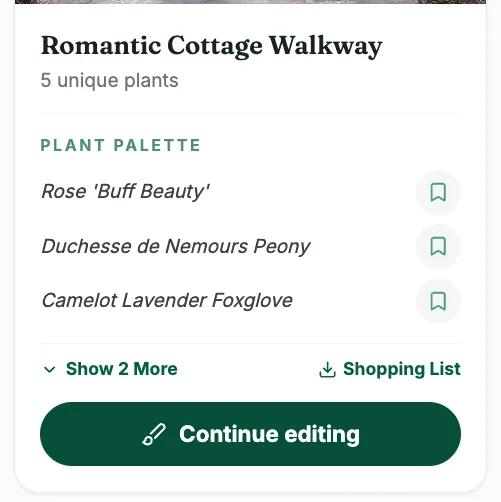
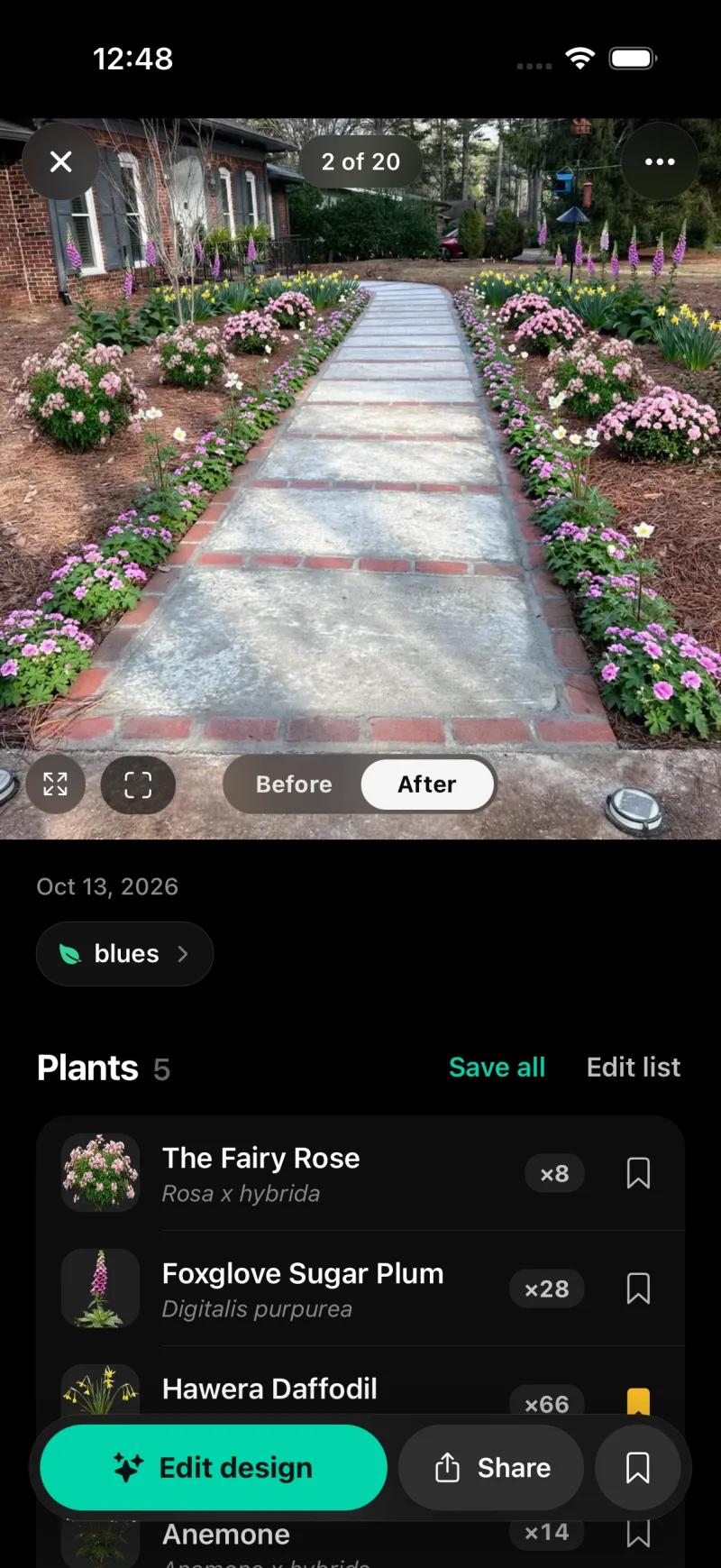
On the Sow website the same photo came back as "Romantic Cottage Walkway" with five named plants linked to catalog pages, each carrying zone, sun, mature size, bloom and care data. The web Shopping List PDF gives a quantity, a unit price and a line total per species with an estimated total, the unit price being the lowest listed across the online nurseries Sow tracks.
Neighborbrite, on its limited free tier, gave a five-cultivar palette in about 60 seconds, an image in about 33, and a plant list with quantities and nursery prices (41 plants, about $1,049) on the first design. No mature sizes, and edits are regenerations.
Sow is free to start; Pro from $39.99 a year on the web ($59.99 a year through the App Store); Pro+ $99.99 a year. Neighborbrite has a limited free tier with a watermark, Pro at $24.99 a month, and watermark removal only on Business at $49.99 a month. Prices checked October 2026. Sow has no AR, no 3D walkthrough and no hardscape CAD.
If you want a design of your yard, not a paragraph
Sow
Best for turning a ChatGPT shortlist into a design on your actual yardRedesigns your photo with real, zone-checked species you can remove, re-count or swap one at a time, then carries the list into a planting plan with quantities, nursery prices and care. 10 free designs to start, more for taking part.
Neighborbrite
Best for a quick picture of your yard with a plant listA limited free tier of four designs a day, named cultivars, and a priced plant list on the first design in our test. Watermark on free and Pro; no mature sizes; edits are regenerations.
Klora
Best for drawing a scaled plan from a ChatGPT plant listA browser tool that imports an aerial of your lot to scale and lets you draw beds and place real species from a 1,422-plant library. One free design, no account.
The bottom line
Can ChatGPT design a landscape? It can write one. The plant list ChatGPT wrote for our yard was a competent cottage border with real plants, sizes, spacing and a budget. When we asked it to show that design, it painted a garden on a house that had lost its porch, it rewrote the whole scene when we asked to move one plant, and its top-down plan had no quantities and misspelled names.
Use it for the brief and the shortlist. Use a purpose-built tool for the design: one that keeps your house, names every plant from a real library, lets you change one plant at a time, plans the beds to their real size, prices the list and carries it into care.
Questions people ask
Can ChatGPT design my garden?
It can write a design: it returned eleven named plants with quantities, spacing, mature sizes and a cost estimate for our front yard in 63 seconds. When we asked it to show the design on our photo, the porch disappeared and the walkway changed shape, no plant was named, and asking to move one plant redrew the whole scene.
Can ChatGPT do landscape design?
As a text consultant, yes: plant lists, spacing, a budget shape and plain-language explanations. As a design tool, no. It has no plant library, nothing you can drag or change one plant at a time, no top-down plan with real quantities, no live prices and no care after planting.
Can ChatGPT make a picture of my landscape design?
It can make a picture, but not of your yard as it is. In our test, ChatGPT kept the general scene but removed the porch, redrew the walkway and added a strip of grass across the path, even though we asked it to keep the house and walkway exactly as they were. The same request sent twice gave two different gardens.
Can ChatGPT see a photo of my yard?
ChatGPT accepted our photo and referred to the walkway and the pines, but it still assumed the walkway was about 36 feet long with 5-foot beds. It can look at a photo; it cannot measure one, so every quantity rests on its guess.
Can ChatGPT draw a planting plan?
It drew a diagram when we asked for a top-down plan to scale with every plant labeled and counted. The diagram had no quantities and no scale, misspelled three plant names, left out the daylilies and drew the walkway straight. A planting plan needs each bed's real size and a counted, priced schedule.
Is there a free AI for landscape design?
Yes. Neighborbrite gives four designs a day on its limited free tier, with named plants and a watermark. Sow gives 10 free designs to start and more for taking part. ChatGPT is free to ask, but gives you text and a new picture rather than a design on your photo that you can edit.
How do I use AI to landscape my yard?
Give any tool the facts it cannot see: location, zone, real sun hours, what is overhead, and what must stay. Measure the beds. Ask for botanical names, quantities, mature size and spacing. Then move the shortlist into a tool that places plants on your photo, checks zone and lets you change one plant at a time, and read the plant list before buying.
What is the difference between ChatGPT and an AI landscape design app?
ChatGPT writes, and when you ask for a picture it paints a new one. A landscape design app works on your photo and, in the better ones, names each plant from a library with zone and size data, keeps the design saved and editable plant by plant, and carries it into a plan, prices and care.
Keep comparing
Put the shortlist on your actual yard
Upload one photo. Sow keeps your house, places real plants that suit your zone and light, names every one, and lets you swap any species. Your first 10 designs are free.
We make SowTested October 13, 2026One written plan and five pictures from ChatGPT, shown uneditedHow we tested
How we tested
- Test subject: the same Raleigh front-walkway photo from our app bake-off: a brick ranch, zone 8a, bare pine-straw beds in part sun under pines, concrete and brick walkway to keep; plus the backyard photo for one picture.
- What we paid: usage fees only; no ChatGPT subscription.
- Sent ChatGPT the photo and this brief: "This is the front walkway of my house in Raleigh, North Carolina (USDA zone 8a). The beds on both sides of the walkway are bare pine straw and get partial sun (about 4 to 6 hours, under pines). Design a low-maintenance cottage-style planting for both sides of the walkway. Keep the walkway." We asked for a plant list with botanical names and quantities, where each goes, mature size and spacing, an estimated cost, and to show what it would look like. The reply took 63 seconds.
- Asked ChatGPT to picture the same photo planted with its eleven plants, keeping the walkway and house exactly as they are. Ran the same request twice.
- Gave it its own first picture and asked it to move the camellia on the left to the right and change nothing else.
- Asked for a top-down plan of both beds, to scale, with every plant labeled and counted.
- Asked for one bed along the fence in our backyard photo, keeping the lawn, and the name of every plant. Each picture took 46 to 63 seconds.
Read it the way you would read any maker's comparison
This page is written by the Sow team. We show our work in the screenshots and say where Sow is not the right answer.
Where Sow loses here
- ChatGPT answers any follow-up question in plain language and explains trade-offs; Sow is a design tool, not a general assistant
- ChatGPT wrote mature sizes, spacing and a line-by-line cost estimate in one reply; Sow's web Shopping List PDF prices each species at the lowest listed nursery price (often the smallest pot) and does not show mature size or spacing
- no AR view, no 3D walkthrough, no hardscape CAD or construction documents
Spotted a change? Email [email protected] and we will re-test and correct the page.