
How much does a landscape designer cost?
It varies too much to quote honestly. Ask for a fee schedule, and know which of four fee models you are offered.
We do not know, and we are not going to pretend. Fees for human designers vary by region, by experience, by whether the designer also builds, and by how much of the job they take on, and we have not collected enough verified quotes to publish a range.
Any page that gives you a single national figure is averaging things that should not be averaged: a two-hour consultation in one city and a full set of construction documents in another.
What we can describe is the shape of the fee, because designers tend to charge in one of a few ways, and knowing which one you are being offered tells you more than the number does.
- Hourly: you pay for the designer's time, usually with an estimate of hours up front. Good for a consultation or a planting plan for one area; harder to budget for a whole yard.
- Flat concept fee: a fixed price for a design package with a defined set of deliverables (site plan, planting plan, renders) and a defined number of revisions. This is how online services such as Yardzen price, and it is the model that makes comparison easiest.
- Percentage of install: common with design-build firms, where the design is priced as a share of the construction cost or folded into it, sometimes with the design fee credited back if you build with them. Cheap or free design up front; the cost lives in the build.
- Hybrid: a flat fee for the concept, then hourly for construction documents, plant sourcing, or site visits during the build.
The one documented price on this page is Yardzen's. Its backyard packages were $995 for Essential, $1,395 for Classic, and $1,995 for Signature when we checked in October 2026, one-time, for a designer-made plan and renders with hardscape, permit-ready plans, and contractor matching; front-yard, full-yard and small-space packages are sold too, at prices we did not record.
We did not buy a package. Yardzen is useful as a reference point precisely because the price is published: a local designer's fee is a conversation, and that conversation should start with "could you send me your fee schedule".
Whatever the model, ask what the fee includes before you compare numbers: a site visit, a concept, how many revisions, a planting plan with species and quantities, construction documents, plant sourcing, and whether the designer will be on site during the build. Two quotes with the same number can be buying very different things.
What does a designer give you that an app cannot?
Grading, drainage, permits, construction documents, sourcing and someone standing in your yard.
This list is the reason designers exist, and an honest page from an app company should print it in full.
- Site grading and levels: a designer reads the slope, decides where the water goes, and draws the levels a builder works to.
- Drainage: French drains, swales, dry wells, downspout routing. Invisible when right, expensive when wrong.
- Permits: knowing what your municipality requires for a wall, a deck, a fence height, or a setback, and producing drawings that pass.
- Hardscape construction documents: dimensioned plans, sections, and material specifications, the documents a contractor prices and builds from. An app render is a picture; a construction document is an instruction.
- Plant sourcing relationships: trade nurseries, specimen sizes you cannot buy retail, substitutions when something is out of stock, and a tag on every plant when the truck arrives.
- Liability and responsibility: a professional who signs the drawings carries responsibility for them, and often oversees the build so that the plan is what actually gets built.
- Eyes on the site: the neighbor's tree, the soggy corner, the view from the kitchen window. A photo shows some of this; a person standing in the yard sees all of it.
| Feature | Sow | Yardzen |
|---|---|---|
| Redesigns a photo of your own yard | Yes | Yes |
| Plants are real, named species | Yes | Yes |
| Checks hardiness zone or climate | Yes | Yes |
| Mature size and spacing data | Yes | Yes |
| Move or swap individual plants after generation | Yes | No |
| Drag-and-drop editor for plants, objects and paving | Yes | No |
| Top-down planting plan or layout | Yes | Yes |
| Grid bed planner with companion planting | Yes | No |
| Plant list or shopping list | Yes | Yes |
| Live nursery prices | Yes | No |
| Care reminders after planting | Yes | No |
| Diagnoses a sick plant from a photo | Yes | No |
| Measures the sun a spot gets | Yes | No |
| Hardscape and construction tools | Partly | Yes |
| PDF export | Yes | Yes |
| Free tier | Yes | No |
| Works in a browser | Yes | Yes |
Sow does none of those. It places paving, mulch, gravel, fences, structures and water features as design elements on the photo, which helps you picture a layout, but it produces no CAD or construction documents, no grading, no drainage, and no permit drawings. The feature table shows this against Yardzen, the one designer-made service with published prices; the honest "No" cells on Sow's side are the ones above.
Is a landscape designer worth it?
Yes when the ground, structures or water change. Not yet when the project is planting.
Worth it when the project changes the ground, the structures, or the water. Grading, drainage, retaining walls, a patio or deck, an outdoor kitchen, large tree work, anything that needs a permit: these need someone who has done them before and will put their name on the drawings. The cost of getting drainage wrong is a wet basement, and no app will take that call for you.
Not worth it, or at least not yet, when the project is planting. Beds, borders, a front walkway, a foundation planting, a fence line: the hard questions here are what will live in your zone and light and how big it gets, and the better apps answer those with real species data for free or for $39.99 a year.
You can design the bed tonight, change your mind tomorrow, and plant it on the weekend.
The in-between case, planting with a little hardscape such as a gravel path or a stone edge, usually tips on whether a contractor needs a drawing or can work from a photo. For a path, a photo is often enough. For a wall, it is not.
- Worth it: grading, drainage, retaining walls, patios, decks, structures, permits, a site with slopes or water problems
- Worth it: you want someone to take responsibility for the plan and manage the builder
- Not worth it: beds, borders, walkways, foundation plantings, replacing what died
- Not worth it: you want to see several versions and change plants yourself
What does an app give you before a designer?
Free iteration, a plant palette to bring to the meeting, and the vocabulary to brief well.
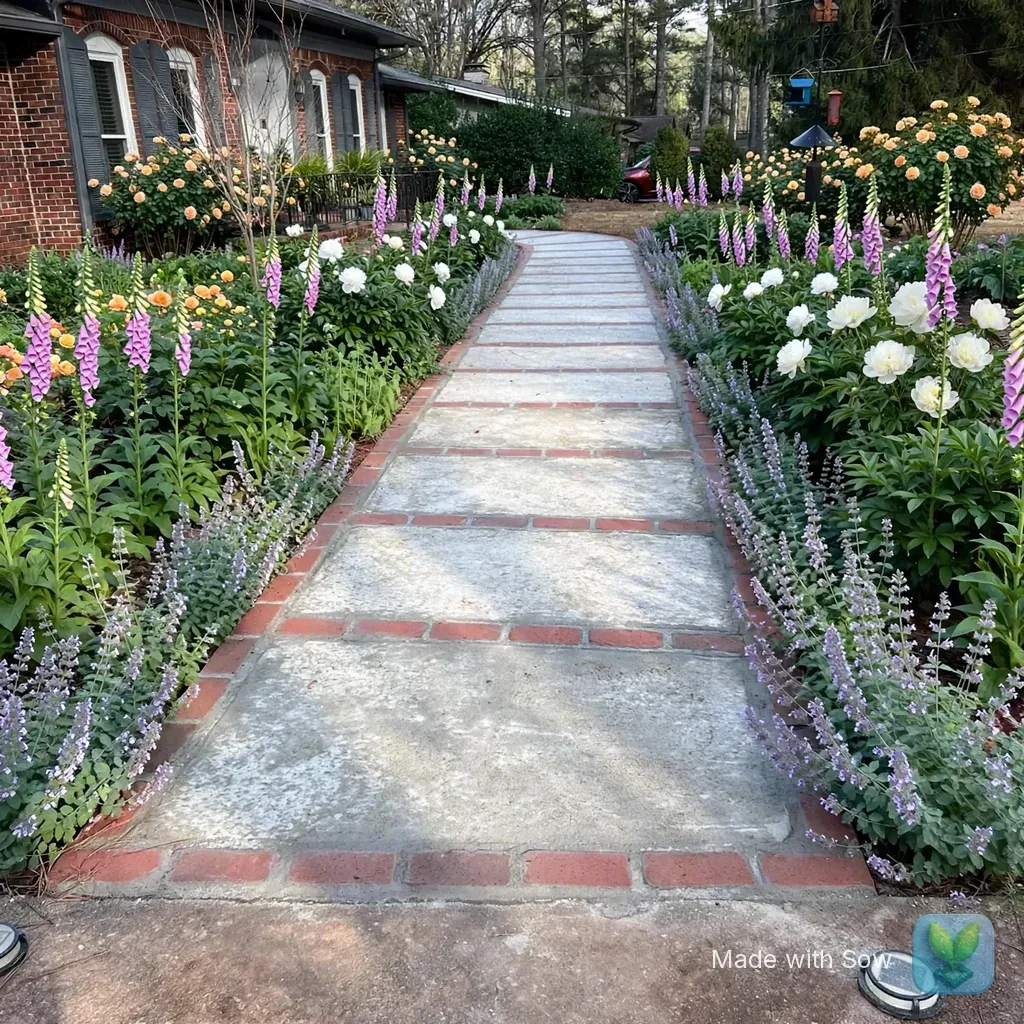
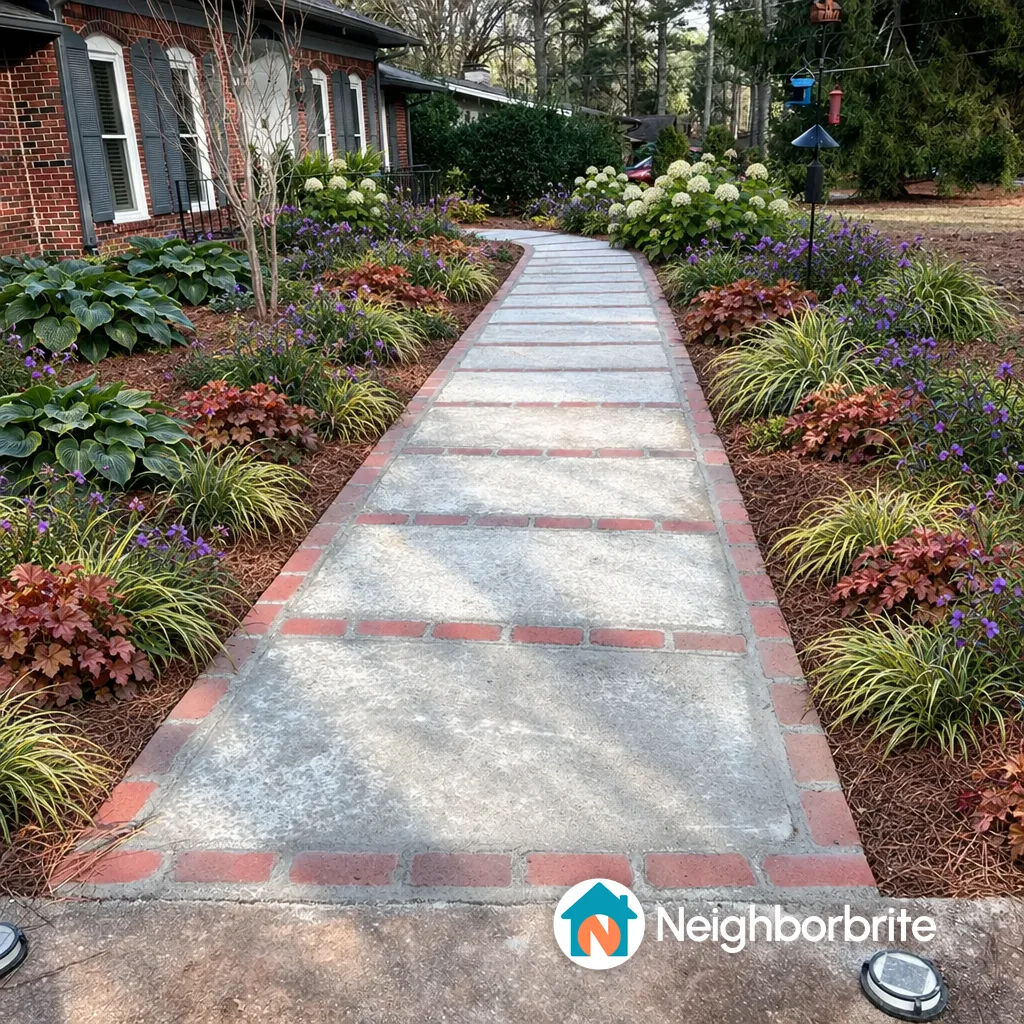
Three things, and the first is free. You can iterate. Run a photo of the yard through a design tool, see a planted version in a minute or two, decide you do not like it, try another style, and arrive at a look you want before anyone is billing by the hour.
We did this with a brick ranch front walkway in Raleigh, NC on October 13, 2026: Neighborbrite wrote a five-plant plan in about 60 seconds and drew the image in about 33, free, with a watermark; Sow's web render took under a minute and appeared in the gallery 90 to 150 seconds after submitting, also free, also watermarked.
Both are free to iterate in: Sow gives 10 designs to start and more for taking part, and Neighborbrite allows 4 a day.
Second, you arrive at the meeting with a plant palette. Both tools named real plants: Neighborbrite's plan listed five cultivars suited to part shade in zone 8a, and Sow's iPhone result listed five species with botanical names and quantities (The Fairy Rose x8, Foxglove Sugar Plum x28, Hawera Daffodil x66, Anemone x14, plus one more).
A designer who hears "I like these, I rejected those, and here is why" starts from a better place than one who receives a folder of magazine pages, and an hourly designer starts billing from a better place too.
Third, you learn the vocabulary. After an evening with a design tool you know what a layered border is, roughly how many plants a bed takes, and that the bed under the pines is part shade. That makes you a better client, and a harder one to oversell.
What does an app give you after the designer leaves?
A plan you can keep editing, with care reminders and replacement prices.
A designer's involvement usually ends at install. The plan is built, the invoice is paid, and the yard begins the part of its life nobody drew: the first dry August, the shrub that outgrows its spot, the perennial that needs dividing in year three. A tool that keeps the plan alive is useful here in a way the original drawings are not.
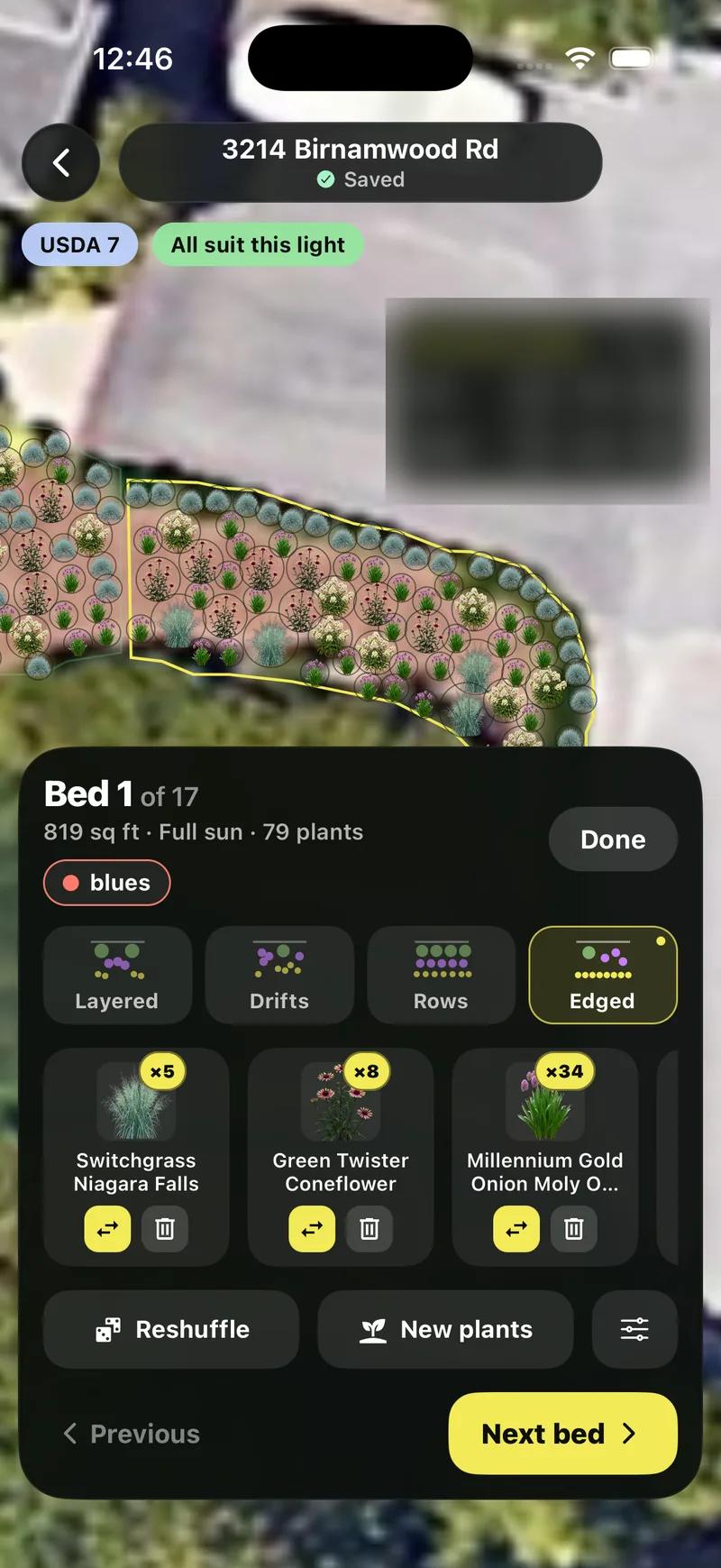
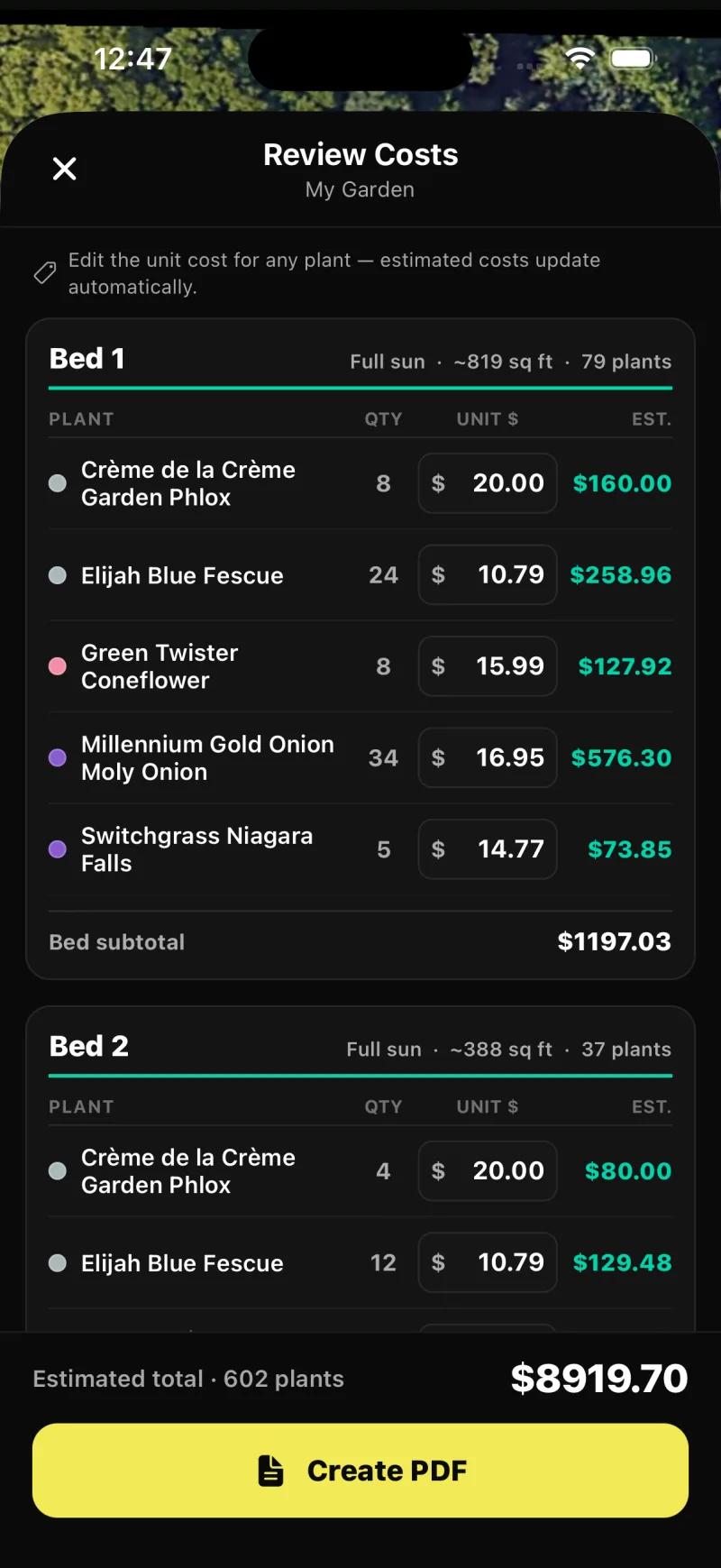
In Sow, a planted design becomes a planting plan with every species listed per bed, with quantities and an editable unit price, so when something dies you know what it was and what a replacement costs.
Care reminders follow the plants in the plan, with weather-aware timing in the US (the weather model is US-only; zone matching covers the US, Canada, the UK and Australia).
And the plan stays editable: on mobile, every generated species can be removed, counted up or down, or swapped, and the Plant Editor lets you drag in plants, furniture, lighting and paving by hand, on a generated design or a plain photo; on the web, Design Studio places plants and objects over the render.
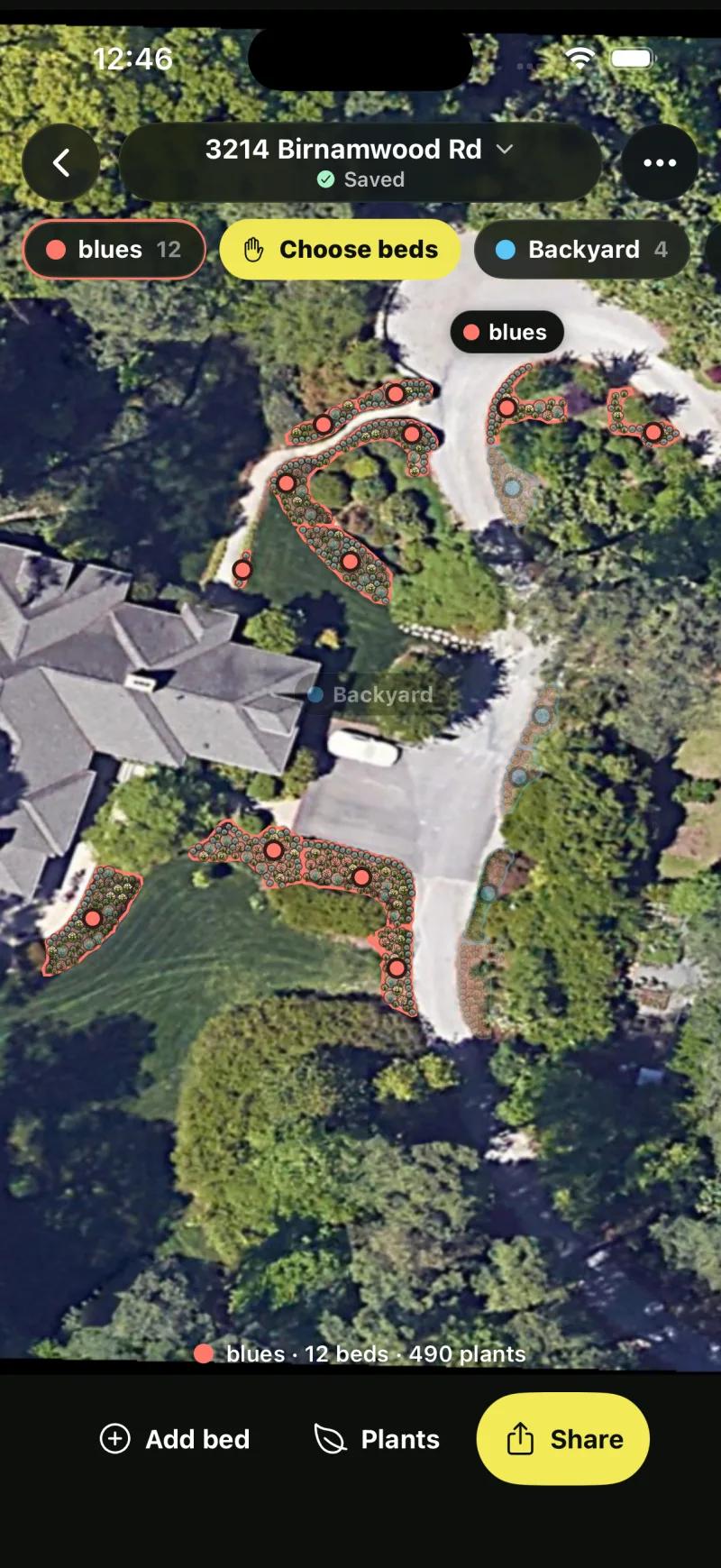
Two honest limits. Sow handles outdoor plants only, and the web design "Shopping List" PDF prices each species at the lowest listed nursery price (often the smallest pot) and does not show mature size or spacing; the per-bed schedule with an editable unit price is in Planting Plans on the mobile app.
Our test plan ran to 17 beds across its spaces, and the cost review listed 602 plants at an estimated $8,919.70, each unit price editable.
What is the least expensive way to landscape?
Plants first, in phases, designed with a free tool and planted yourself.
Plants first, in phases, designed for free. The cheapest landscape is one where the money goes into the ground rather than into drawings of it, so for a planting-led yard: design it with a free tool, buy the plants in the quantities the plan says, plant them yourself over a few weekends, and leave the hardscape for a later phase or a later budget.
For the design step, Neighborbrite's free tier gives 4 photo redesigns a day, watermarked, with a plant list with quantities and nursery prices on the first design; our front-yard test came to 41 plants at about $1,049 at its partner's prices.
Klora lets you draw a scaled planting plan over aerial imagery of your address with no account and 1,422 species. Sow's free plan covers 10 designs to start, and more for taking part, with named, zone-checked plants, and $39.99 a year on the web buys the planting plan with quantities and prices. Prices checked October 2026.
What this approach cannot do cheaply is anything structural. If the yard needs grading or drainage, doing it twice costs more than doing it once with a designer, and that is the case where the least expensive route runs through a professional.
A decision checklist: designer, app, or both?
The first yes that points to a designer usually decides it. Often the answer is both.
Answer these in order. The first "yes" that points at a designer is usually decisive.
- Does water pool anywhere, or does the ground slope toward the house? Designer, for drainage and grading.
- Will anything need a permit: a wall over a certain height, a deck, a structure, a fence at the property line? Designer, for drawings that pass.
- Is there a patio, wall, or outdoor kitchen to build? Designer, or at least a design-build contractor, for construction documents.
- Is the project mostly plants, in existing or simple new beds? App first; a designer only if you still want one after seeing the results.
- Do you want to see several versions before choosing? App first, free.
- Do you want someone to manage the builder and take responsibility for the outcome? Designer.
- Will you be the one caring for the plants afterwards? A tool that keeps the plan and care alive, whatever you decided above.
- Is the whole project budget large enough that a design fee is a small share of it? A designer is easy to justify. If the design fee would be most of the budget, start with the app.
The combination is often the right answer. Iterate for free, bring the palette to a designer for the structural work, then keep the finished plan in the app for care, replacements, and prices. Nothing about that costs more than hiring a designer cold, and the designer will usually tell you it made their job easier.
Four ways to get a design, from free to full service
Neighborbrite
Best for seeing a planted version of your yard tonight for nothingThe free first look. 4 designs a day with a watermark, a written plan with named cultivars in about 60 seconds, an image in about 33, and a priced plant list on the first design. Plants are not individually editable objects, and only Business at $49.99 a month removes the watermark.
Sow
Best for designing the beds yourself and keeping the plan alive after installThe planting-first tool for before and after. A photo redesign with real, zone-checked species from a 12,000+ catalog, editable species by species on mobile, then a planting plan with quantities and prices, and care reminders once it is in the ground. Free to start; Pro from $39.99 a year on the web. No grading, drainage, permits, or construction documents.
Yardzen
Best for a person-made, permit-ready plan at a published priceThe documented online design service: $995, $1,395 or $1,995 for a backyard package, one-time, for a designer-made plan and renders with hardscape, permit-ready plans, and contractor matching.
A local designer through the APLD directory
Best for grading, drainage, permits, and any project where someone should stand in the yardThe Association of Professional Landscape Designers keeps a searchable member directory. A local designer can walk your site, see the drainage and the neighbor's tree, and often oversee the build, which no app or online service does. Fees vary by designer and region; ask for a fee schedule before the first meeting.
The bottom line
We cannot tell you what a landscape designer costs, and we would rather say so than print a number we did not verify. We can tell you that the shape of the fee matters more than the figure: hourly, flat concept fee, or a share of the build. The only published design price we checked is Yardzen's, $995 to $1,995 for a backyard package, before any build.
Hire a designer for the ground, the structures, and the water. Use an app for the plants, and use it first, because iterating is free and arriving with a palette makes the designer's hours count for more. Then keep the plan in the app after install, which is the part of a landscape's life nobody else is paid to think about.
Questions people ask
Is a landscape designer worth it?
For grading, drainage, retaining walls, patios, decks, structures, or anything that needs a permit, yes: you are paying for construction documents, site judgment, and someone who takes responsibility for the plan. For planting beds, borders, and walkways, usually not, because an app can design them from a photo with real, zone-checked plants for free or $39.99 a year, and you can change them yourself.
How much does a landscape designer cost?
We have no verified market data, so we do not publish a figure. Designers charge hourly, as a flat concept fee, as a percentage of the install, or a hybrid, and the fee covers very different scopes from a consultation to full construction documents. Ask for a fee schedule and what it includes. The one published design price we checked is Yardzen's, $995 to $1,995 for a backyard package in October 2026, design only.
What is the least expensive way to landscape?
Plants first, in phases, designed with a free tool and planted yourself. Neighborbrite's free tier gives 4 watermarked designs a day with a priced plant list on the first, Klora lets you draw a scaled planting plan free with no account, and Sow's free plan covers 10 designs to start, and more for taking part, with named, zone-checked plants. Leave hardscape for a later phase, and hire a designer only where the ground or the water needs one.
Can an app replace a landscape designer?
For planting, often. For grading, drainage, permits, hardscape construction documents, plant sourcing at trade nurseries, and someone carrying responsibility for the plan, no. Sow, for example, places paths and structures on a photo as design elements but produces no CAD or construction documents and never visits your site. The honest answer is that an app replaces the designer for the beds and complements the designer for everything else.
What is the average cost of a backyard makeover?
We do not publish an average because we have no verified figure, and the honest answer depends on whether the makeover is plants or construction. The one design price we can document is Yardzen's, $995 to $1,995 for a backyard package, before any build. For a planting-only project the plant cost is what the schedule says: our front-yard test on Neighborbrite priced 41 plants at about $1,049, and Sow's Planting Plans prices each bed from the quantities you set.
Should I use an app before hiring a designer?
Yes. Iterating is free, you arrive at the first meeting with a plant palette and the looks you rejected, and you learn enough vocabulary to be a better client. Our test produced a planted version of a front yard in about 33 seconds on Neighborbrite and under a minute on Sow, both free. A designer billing hourly starts from a better place when the client already knows what they want.
What should I bring to a first meeting with a landscape designer?
Photos of the yard from every side, a rough measurement of the area, notes on where water collects and where the sun falls through the day, a list of plants you like and dislike with reasons, your hardiness zone, and a budget range for the whole project, not just the design. If you ran the yard through an app first, bring the result and the plant list; it saves the designer an hour of guessing.
Keep comparing
Design the beds yourself before you book a designer
Upload one photo. Sow places real plants that suit your zone and light, names every one with quantities, and keeps the plan alive through care and prices. Free to start.
We make SowTested October 13, 2026Same yard photos for every tool we ranWe paid nothing for the testsHow we tested
How we tested
- Test subject: a brick ranch front walkway in Raleigh, NC (zone 8a, part sun) and a fenced backyard; the same two photos went to both apps.
- What we paid: nothing. Neighborbrite ran on its free tier and Sow on a free web account plus the iPhone app. No designer was hired and no Yardzen package was bought; Yardzen's prices are quoted from yardzen.com as of October 12, 2026.
- Ran the two photos through Neighborbrite free and Sow (web and iPhone) and recorded timings, plant names, quantities, and what each free tier allowed.
- Opened Sow's Planting Plans and cost review on the iPhone app to show what a plan looks like after install: species per bed, quantities, and editable unit prices.
- Read Yardzen's package pages and recorded the three backyard prices and the deliverables as described there. No other designer fees were collected or estimated; the pricing models described below are the general shapes of fee arrangements, not quotes.
Read it the way you would read any maker's comparison
This page is written by the Sow team. We show our work in the screenshots and say where Sow is not the right answer.
Where Sow loses here
- no site visit, grading, drainage, or permit documents
- no hardscape CAD or construction documents
- no professional carrying responsibility for the plan
Spotted a change? Email [email protected] and we will re-test and correct the page.