
What is planting plan software, and what is it not?
It places plants bed by bed and counts them. It is not industrial plant design, a vegetable planner or a photo redesign.
Planting plan software is any tool that produces a planting plan: a drawing or a map of where each plant goes, with a plant schedule that says how many of each. The plan is what the installer follows and the schedule is what the nursery fills. In the trade the words are precise.
A landscape plan covers everything on the site, including paths, walls, drainage and lighting; a planting plan covers the plants, bed by bed. Searchers also call it planting design software or planting scheme software, and in the UK a planting scheme is simply the plan plus the schedule.
Three things get mixed up with it in search results. The first is industrial plant design, the software engineers use to model a process plant, pipework and equipment; nothing on this page does that.
The second is the vegetable bed planner: most of the page one results for this term are square-foot vegetable planners, which are good at crop rotation and sowing dates and useless for a mixed border. The third is the photo redesign tool.
Neighborbrite, for example, gave us a priced plant list on our first free design, with 41 plants across 5 varieties, but no plan showing where any of them go. A plant list is not a planting plan.
Planner 5D is in the table below for the same reason. It ranks first for most landscape search terms and it will draw a 2D outdoor layout, but its plant objects are generic furniture-style items with no species, zone or climate data, so it cannot produce a schedule. It is not ranked here because of that. It is a good 3D home planner; it is not planting plan software.
What a planting plan must contain
A drawing for location and a schedule for quantity, with six columns from common name to price.
Extension services and design schools define a planting plan the same way, and no tool page shows it, so here it is. A planting plan has two parts. The drawing answers location: which bed each plant sits in and where in the bed. The schedule answers quantity: how many of each plant, so the order matches the drawing. The schedule is a table, and it needs six columns.
- Common name, so the client recognises the plant when they read the plan.
- Botanical name, so the nursery supplies the right plant and not a lookalike with the same common name.
- Quantity, per bed and in total, so the order and the drawing agree.
- Size, meaning the nursery size you are ordering (the pot or the caliper), which sets the price and how long the bed takes to fill in.
- Spread, the mature width of the plant, which is what the spacing on the drawing has to be based on. Planting at the size in the pot is how beds end up overgrown in year three.
- Price, a unit price and a line total, so the plan carries a number before anyone orders anything.
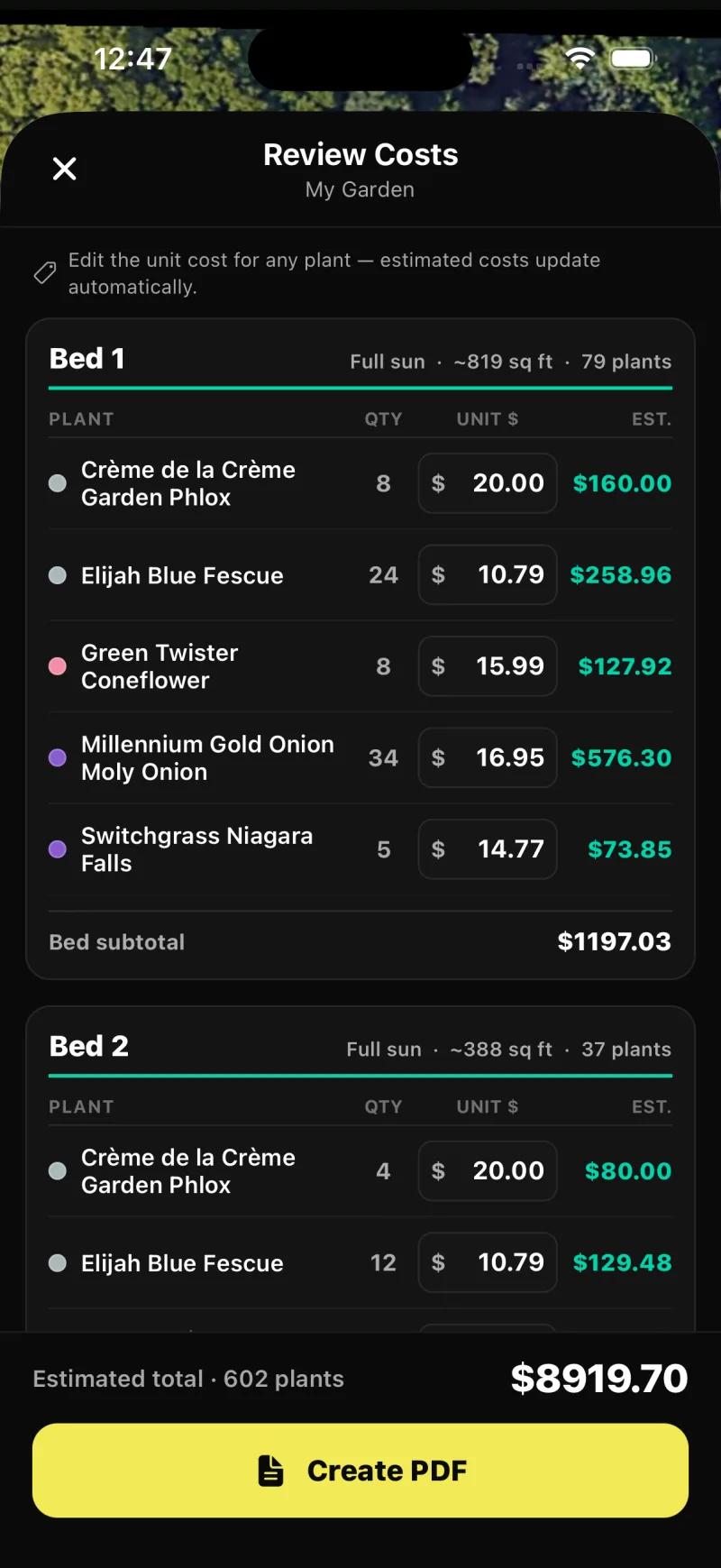
The Review Costs screen in Sow, shown in this section, is the closest thing to that table we saw in any tool we tested.
It lists each bed with its sun, square footage and plant count, then every species with its quantity, a unit price you can edit and the estimated line cost, with a subtotal per bed and a total for the plan: on our test property, 602 plants at an estimated $8,919.70. Two columns are not on that screen.
Size and mature spread live on each plant's record in the Sow catalog rather than as columns in the schedule, so if you want them on the printed page you add them. Every tool below is judged against the same six columns.
How we ranked them
The plan and the six schedule columns came first, then zone checks, mature size, prices, export and platform.
We scored each tool on whether it can produce the two parts of a plan and the six columns of the schedule, in that order of importance. A tool that places real species and tells you how many wins over a tool that draws a prettier picture.
After that we looked at whether the plants are checked against a hardiness zone and the bed's light, whether the plant records carry mature size, whether prices are attached, whether you can export a PDF, which platforms it runs on, and what the free tier actually gives you.
Two honest caveats. We only tested Sow and Klora hands-on, and we did not place a full plan in Klora on the test yard, so we could not confirm what its exported plan and plant list look like.
The pro CAD suites are judged from their official pages and they are plainly the right answer for a different job: construction documents, grading and 3D. If that is your job, skip to that section.
Which software is best for plant design? The comparison table
Sow is the only tool we tested that places zone-checked plants and prices the schedule.
The rows are the ones a planting plan needs. Tap or hover any cell for the note behind it.
Works in a browser. Yes for Sow, whose web app holds the same project, but Planting Plans itself is in the iPhone and Android app.
| Feature | Sow | Klora | Hadaa | PRO Landscape (Drafix) | Realtime Landscaping (Idea Spectrum) | SketchUp | Planner 5D |
|---|---|---|---|---|---|---|---|
| Plants are real, named species | Yes | Yes | Yes | Yes | Yes | No | No |
| Checks hardiness zone or climate | Yes | Yes | Yes | Partly | Partly | No | No |
| Mature size and spacing data | Yes | Yes | Unverified | Partly | Partly | No | No |
| Drag-and-drop editor for plants, objects and paving | Yes | Yes | No | Yes | Yes | Yes | Yes |
| Top-down planting plan or layout | Yes | Yes | Yes | Yes | Yes | Partly | Partly |
| Grid bed planner with companion planting | Yes | No | No | No | No | No | No |
| Plant list or shopping list | Yes | Yes | Yes | Yes | Yes | No | No |
| Live nursery prices | Yes | No | No | No | No | No | No |
| Diagnoses a sick plant from a photo | Yes | No | No | No | No | No | No |
| Measures the sun a spot gets | Yes | No | No | No | No | No | No |
| PDF export | Yes | Unverified | Yes | Yes | Yes | Yes | Yes |
| Free tier | Yes | Yes | No | Partly | No | Yes | Yes |
| Works in a browser | Yes | Yes | Yes | No | No | Yes | Yes |
| Tool | Plants | Kinds of plants | Beyond plants | What each plant carries |
|---|---|---|---|---|
| Sow | 12,000+outdoor species and named cultivars |
| 150 objects in 12 groups (furniture, fire pits, fences, lighting, water features and more) and 93 surfaces (lawn, mulch, gravel, pavers, decking and more) | Zone, sun, mature height and width, bloom time, monthly care, native status, deer and drought tolerance, and a nursery price where one is listed |
| Klora | 1,422species and cultivars |
| Generic concept shapes with mature footprints, plus the beds, paths and structures you draw | Botanical name, sun, deer resistance, pollinator value, flower color, bloom time and mature size |
| Hadaa | Not stated | Not stated | Not stated | Filtered to species that survive your climate, by USDA zone, water and sun, per its site |
| PRO Landscape (Drafix) | 19,000+images of plants and materials together, per its site | Not stated | Grass, mulch and hardscape images, plus CAD symbols for pavers, walls and irrigation | Common and botanical name search, with climate-zone filtering |
| Realtime Landscaping (Idea Spectrum) | 5,900 to 8,000by edition, Plus to Architect, per its site |
| 19,400 to 25,300 objects in all, including pools, rockery, furniture, gazebos and sheds, with about 1,600 3D plant models | Common and botanical name, planting zones and size |
| SketchUp | No named speciesgeneric 3D models | Not stated | 3D Warehouse, a shared library of free 3D models | No species, zone or climate data |
| Planner 5D | No named speciesgeneric plant symbols | Not stated | 10K+ catalog items, mostly furniture and decor, plus patios and decks; half the furniture catalog on free | No species, zone or climate data |
Sow: beds found on the satellite view, four layouts per bed, a priced schedule
It finds your beds, fills each one for its light and zone, and prices every plant before the PDF.
Planting Plans is one of the tools on the Create tab of the Sow app, next to Auto Design, Plant Designer, Editor, Maps, Plant Doctor and the Sunlight Meter. Maps puts your yard on a satellite view where you place and drag plants yourself, and the Garden Planner lays out a grid bed with companion-planting suggestions.
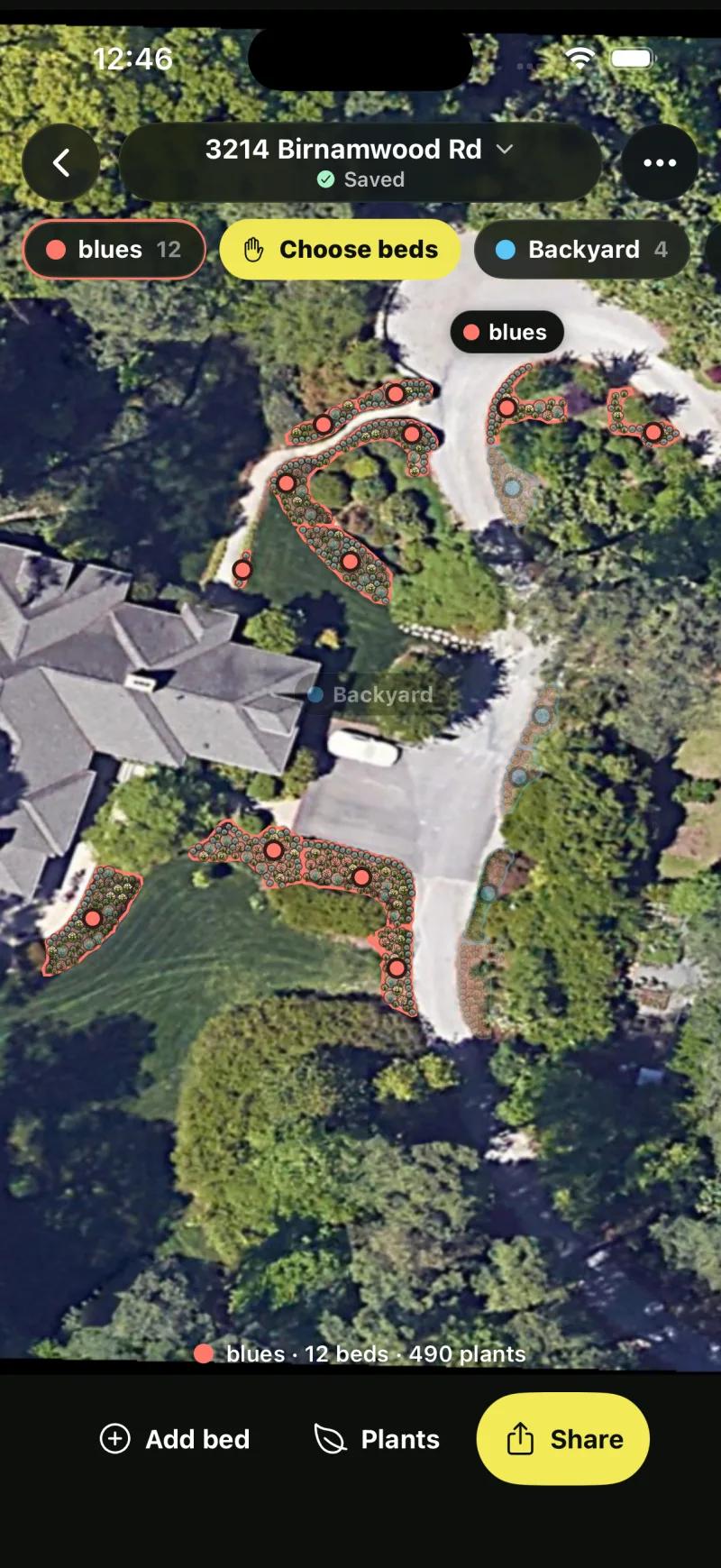
It works from a saved address. It pulls the satellite view of the property, outlines the planting beds it finds, and fills each bed with species that suit that bed's light and the property's USDA zone. On our test account the plan ran to 17 beds across its spaces; one space alone read 12 beds and 490 plants.
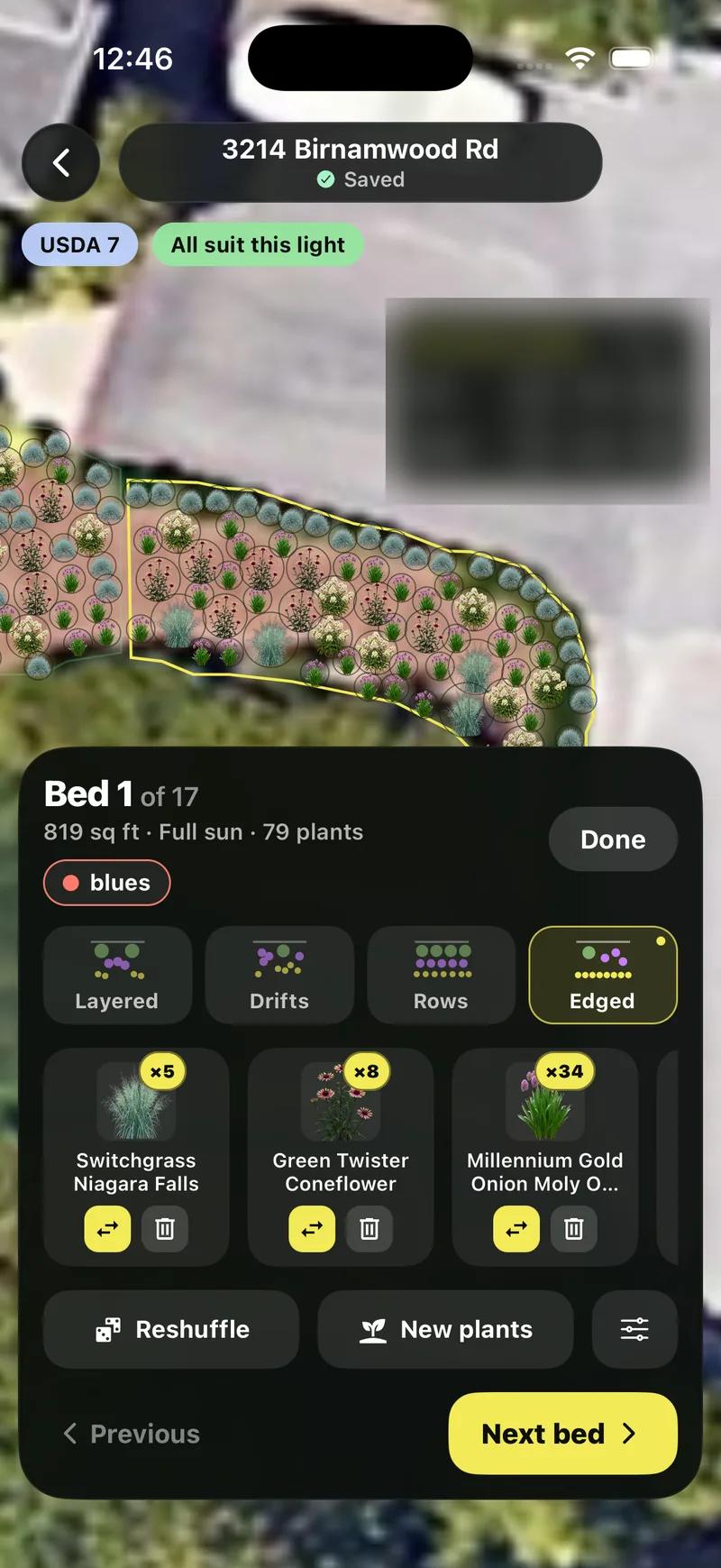
Open a bed and you get its area, its sun, its plant count and four layout styles: Layered, Drifts, Rows and Edged. Bed 1 of 17 on our test was 819 square feet in full sun with 79 plants. Each species in the bed is a chip with its count.
Tap it to swap it for another plant or remove it; Reshuffle redraws the bed with the same palette, and New plants picks a fresh set. The editor shows the USDA zone and confirms that all the plants suit this light, so a swap stays within the bed's conditions rather than dropping a shade plant into full sun.
The schedule comes from Share, then Whole plan, then Save PDF, which opens Review Costs before it builds the document. That screen is the one in the section above: plant, quantity, editable unit price and estimated cost, per bed, with subtotals and a total.
Because the unit price is editable, you can overwrite the catalog price with your own supplier's quote and the total updates. Create PDF then produces the file.
Every plant in a Sow plan is a real species or cultivar from a catalog of 12,000+ outdoor plants, each with zone, sun, mature size, bloom and care data. Sow has 95,000+ designs made by 40,000+ gardeners,.
Sow is free to start; Pro, which includes Planting Plans, is from $39.99 a year on the web ($59.99 a year through the App Store), and Pro+ at $99.99 a year adds the client tools: boards, briefs, proposals with live pricing, presentations and approvals.
Three honest limits. The planting plan tool is in the phone app, so if you only work in a browser, the per-bed schedule with an editable unit price is not available to you there; the web design Shopping List PDF gives you one row per species with its quantity, the lowest listed nursery price (usually for the smallest pot) and a line total, plus an estimated total, without the bed breakdown, mature size or spacing.
There is no CAD drawing, no construction documents and no 3D. And the free tier does not include Planting Plans at all: free gets you 10 designs to start and more for taking part.
Sow: what works
- Ten free designs for everyone to start, and unlimited more for taking part in the app (posting, referrals, challenges), with real plants in every one
- Every plant in a design is a real species with zone, sun, mature size, bloom, and care data (12,000+ catalog)
- Designs stay editable plant by plant instead of being a one-shot image
- A drag-and-drop Editor for placing plants, furniture and paving by hand, from a blank photo or on top of a generated design
- A grid bed planner, a top-down map of your yard, Plant Doctor and a sunlight meter in the same app
- Planting plans, care after planting, and live nursery prices in the same project
- Same project on iPhone, Android, and the web
Sow: what falls short
- No AR or 3D walkthrough
- No hardscape CAD or construction documents
- Outdoor plants only; weather-aware care is US-only
- Free designs beyond the first 10 are earned by taking part (posting, referrals, challenges)
- The web Shopping List PDF prices each species at the lowest listed nursery price (often the smallest pot) and does not show mature size or spacing
Klora: a free scaled drawing with 1,422 real species
The best free way to draw a scaled plan yourself. No prices and no generated layout.
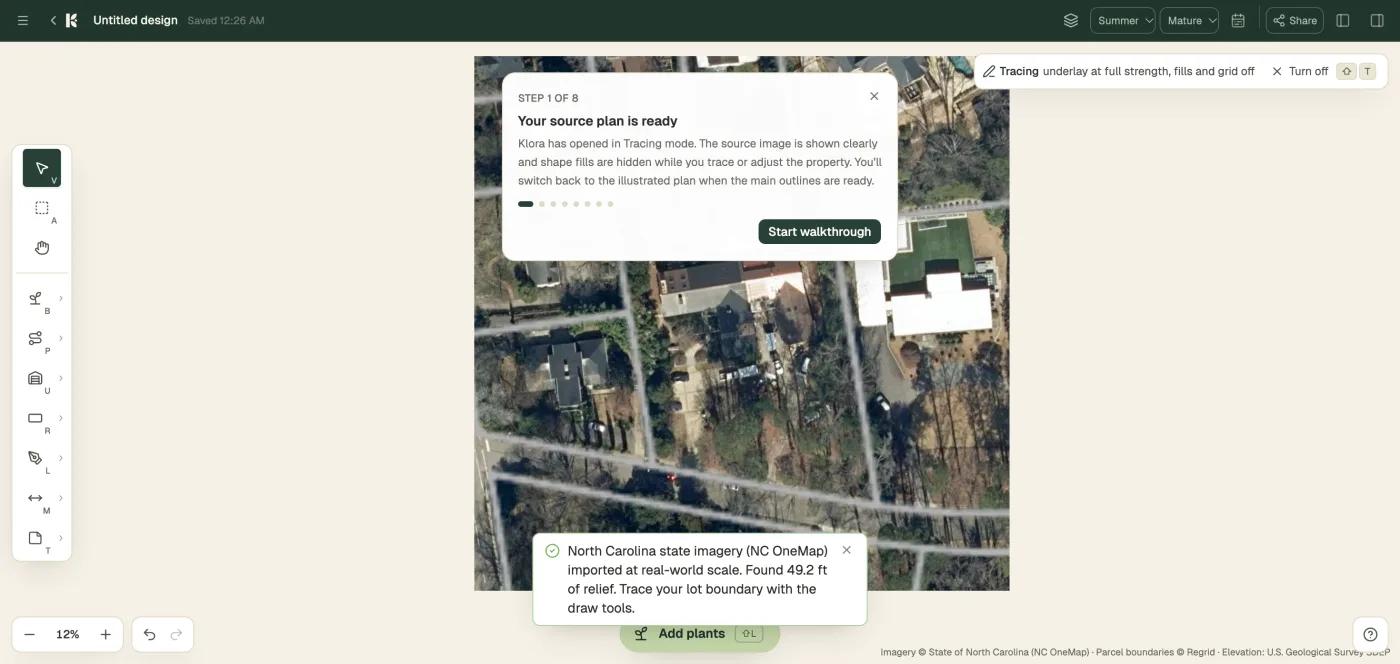
Klora is the tool to pick if you want to draw the plan yourself. You type an address, with no account, and it pulls aerial imagery with parcel lines and contours.
On our Raleigh address the import took about 30 seconds and locked the image to real scale at 5.5 inches per pixel, using state imagery; it looked for lidar heights and building outlines for its sun model and found none at this address, so the sun and shade step was skipped.
The editor gives you beds, paths, structures, a lot boundary, a measure tool and notes, a season view from spring to winter, a growth view at year 1, 5, 10 and mature, and a bloom timeline.
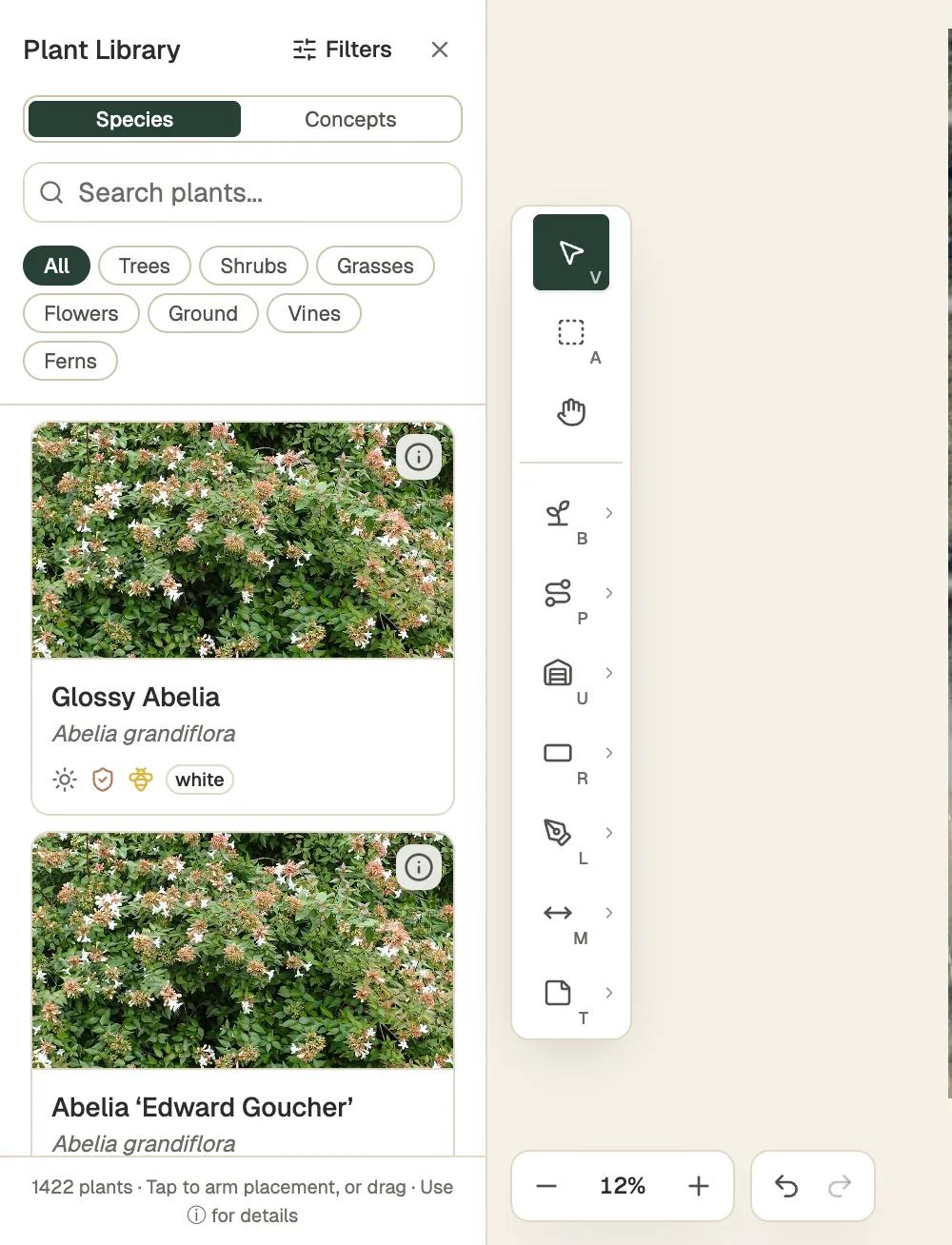
The plant library has two tabs. Concepts are generic shapes with mature footprints, a shade tree at roughly 30 by 40 feet, an evergreen shrub at about 4 by 4, with bloom colour swatches, so you can block a bed out before you commit to species.
Species lists 1,422 real plants with a photo, botanical name and icons for sun, deer resistance, pollinators and bloom colour, filtered by trees, shrubs, grasses, flowers, ground covers, vines and ferns, with search and a filter button. Tap a plant to arm placement or drag it onto the plan.
Nothing is generated for you and there is no photo render; the output is a scaled plan plus a plant list. One complete design is free with no account. PDF export and a second design need Plus: a $24 pass for 90 days and one project, or $69 a year (also sold at $8 a month).
There are no prices in the library and no care reminders after planting. We did not place a complete plan on the test yard, so the look of the exported plan and plant list is the one thing about Klora we could not confirm.
For a homeowner who wants to draw a real plan to scale for free, Klora was the best tool we tested. Its weak spots against a planting plan are spread and price: the concept footprints are helpful, but the plan does not cost itself, and 1,422 species is a smaller catalog than Sow's 12,000+.
Klora: what works
- Real planting-plan workflow for homeowners
- No account to start
- Zone and sun filters
Klora: what falls short
- No photo redesign
- Browser only
- 1,400 species
- No care reminders or prices
Hadaa: a zone-verified planting guide and a blueprint, paid per render
A zone-verified guide and blueprint for $12 a render. Changing one plant means paying again.
It sells designs one at a time with no subscription: $12 for a single render, or $9 each for three or more. Its site says every plant is verified against your USDA zone, and that each design comes with a plant list with quantities and a contractor blueprint showing plant placement, path widths and material volumes, exported as a PDF.
That is a fuller bill of quantities than any other tool here claims, and it is the reason Hadaa ranks third.
The things we could not confirm are the things that matter most for a plan you intend to revise. Hadaa's own description is of one-shot renders rather than a plan you edit plant by plant, so changing one species means another render and another $9 or $12. Mature size data is unverified.
It runs in a browser only; there is no iPhone app, and its site mentions a Play listing. Its claim of 250,000+ users is its own and unverified.
Hadaa: what works
- Zone-verified plant list with quantities
- Blueprint and bill of quantities
- No subscription
Hadaa: what falls short
- One-shot renders, not editable plant by plant
- Web only
- Per-project cost adds up when iterating
PRO Landscape, Realtime Landscaping and SketchUp: the CAD and 3D route
The right answer when the planting plan is one sheet in a construction set. Their prices are unverified.
If the planting plan is one sheet in a set of construction documents, none of the tools above will do, and these three will. All three are judged from their official pages, and their prices come from search snippets rather than a published pricing page, so treat every number in this section as approximate.
PRO Landscape (Drafix) is a Windows desktop suite covering photo imaging, CAD, 3D and proposals, with a companion app on iPad and a Home app for consumers. It is the established trade tool, and it produces a planting plan and a plant list from a real species database.
Its zone and mature size data are listed as partial because we could not confirm their depth. The price we found is about $90 a month, unverified; the learning curve is the usual one for a CAD product.
Realtime Landscaping (Idea Spectrum) is Windows only, with deep 3D, terrain and hardscape tools and a planting plan and plant list from named species. It is sold as a one-time purchase, which search snippets put at roughly $149 to $599 depending on the edition; we did not verify those figures. A separate Photo product overlays objects on a photograph. There is no mobile version.
SketchUp is general 3D modelling with a free browser tier and an iPad app. It has no plant intelligence at all: no species, no zone, no mature size, no schedule.
People do produce planting plans in it, with extensions and skill, which is why it is here, but out of the box it is a modelling tool rather than planting plan software. Paid tiers reportedly start at about $129 a year and run to about $399; unverified.
Planner 5D sits in the pricing table for completeness. It is free with half the catalog, and Premium is $59.99 a year, checked October 2026. It has no plant species and so it is not ranked.
| Tool | Free | Paid | Checked |
|---|---|---|---|
| Sow | Yes | Pro from $39.99 a year on the web ($59.99 through the App Store); Pro+ $99.99 a year | Oct 12, 2026 |
| Klora | Yes | $24 project pass or $69 a year | Oct 12, 2026 |
| Hadaa | No free tier | $12 per render, or $9 each for three or more | Oct 12, 2026 |
| PRO Landscape (Drafix) | No free tier | about $90 a month | Not verified |
| Realtime Landscaping (Idea Spectrum) | No free tier | $149 to $599 one-time | Not verified |
| SketchUp | Yes | From about $129 a year | Not verified |
| Planner 5D | Yes | Premium $19.99 a month or $59.99 a year; Professional $49.99 a month or $399.99 a year | Oct 12, 2026 |
What specialist planting plan software do landscape architects use?
Five CAD and plant-database tools built for professional drafting.
Five more names come up for this search, mostly from landscape architects. If you already draft in CAD, start with the first three.
- Land F/X: a planting and irrigation add-on for AutoCAD used by landscape architects.
- DynaSCAPE: design and business software aimed at landscape companies.
- Vectorworks Landmark: the landscape edition of the Vectorworks CAD and BIM suite.
- PlantMaster: a plant database and plan tool sold to professionals.
- Weatherstaff PlantingPlanner: garden planting design software that ranks on page one for this term.
Is there a free planting plan app?
Klora is the most generous: one full design with no account. Sow's Planting Plans need Pro.
Yes, with limits, and the limits are the whole story. Klora is the most generous: one complete property design, the full 1,422-species library, no account, no card. You pay only when you want a PDF or a second design. SketchUp Free runs in the browser and costs nothing, but you bring your own plant knowledge, because it has none.
Planner 5D has a free tier with half its catalog and no species data.
Sow is free to start, but Planting Plans is a Pro feature. The free plan gives you 10 designs to start and more for taking part. That is enough to see whether the species it picks for your zone and light are ones you would plant; it is not enough to produce the plan. Hadaa has no free tier.
Which of these is a planting plan app, on a phone?
Only Sow makes the plan on a phone, on iPhone and Android.
Only one of the tools we tested makes the plan on a phone. Sow runs on iPhone and Android, and Planting Plans lives in the app; the same project is also in the web app in a browser, where the design studio and the catalog are.
Klora and Hadaa are browser tools; we ran Klora in a desktop browser. PRO Landscape has a companion app on iPad alongside its Windows desktop core. SketchUp has an iPad app. Realtime Landscaping is Windows only.
Who should pick which
Homeowners: Sow or Klora. A one-off contractor handoff: Hadaa. A construction set: a CAD suite.
Match the tool to the job, not to the ranking.
Choose Sow if
- you want the beds found and filled for you from the satellite view, with every species checked against the zone and the bed's light
- you need a quantified, priced schedule as a PDF, with a unit price you can edit to match your supplier
- you want to swap or remove a species without redrawing the bed, and keep the whole plan on your phone and in a browser
Choose Klora if
- you want to draw a scaled plan by hand, for free, with no account
- you want to see the plan by season and by growth year before you buy anything
- you do not need prices, a photo render or care reminders
Choose Hadaa if
- you want one zone-verified planting guide and a contractor blueprint with quantities, and you would rather pay per design than subscribe
- you do not expect to revise the plan plant by plant afterwards
Choose PRO Landscape, Realtime Landscaping or SketchUp if
- the planting plan is one sheet in a construction set and you also need grading, hardscape, 3D or terrain
- you work on Windows, or on iPad with SketchUp or the PRO Landscape companion app
A plant schedule template you can copy
Bed, common name, botanical name, quantity, size, spread, unit price and line total.
Whatever tool you use, the schedule is the document that leaves your hands and goes to a nursery, so it is worth getting the columns right once and reusing them.
The template we recommend is the six columns above, with a bed column in front so the schedule can be sorted by where the plants go: bed, common name, botanical name, quantity, size, spread, unit price, line total, with a subtotal per bed and a total at the bottom.
The ranking
1. Sow
Best for a planting plan with real, zone-checked species, counts per bed and a priced schedule you can exportFinds the beds on the satellite view of a saved address and fills each one with species that suit its light and the zone; four layout styles per bed; swap or remove any species; Review Costs gives quantity, an editable unit price and a total before the PDF. In the phone app; the web app holds the same project. No CAD, no 3D.
2. Klora
Best for drawing a scaled plan by hand, with real species and a season and growth viewOne complete design free with no account; aerial import to real scale in about 30 seconds; 1,422 species with sun, deer and pollinator icons; concept shapes with mature footprints. PDF export and a second design need Plus. No prices, no photo render, no care reminders.
3. Hadaa
Best for one zone-verified planting guide with quantities and a contractor blueprint, without a subscriptionPay per render, $12 or $9 each for three or more. Its site promises a zone-verified plant list with quantities and a blueprint with plant placement, path widths and material volumes. One-shot renders rather than an editable plan; browser only.
4. PRO Landscape (Drafix)
Best for the full trade workflow on Windows: CAD, 3D, photo imaging and proposals, with an iPad companionThe established professional suite, with a planting plan and plant list from a real species database. Price is about $90 a month according to search snippets; steep learning curve.
5. Realtime Landscaping (Idea Spectrum)
Best for deep 3D, terrain and hardscape alongside the planting plan, bought onceWindows only, one-time purchase at roughly $149 to $599 by edition (unverified). Named species, a plant list and PDF export; no mobile version.
6. SketchUp
Best for full modelling control when you already know your plantsA free browser tier and an iPad app, with no plant data of any kind. Planting plans are possible with extensions and skill. Paid from about $129 a year (unverified).
7. Land F/X
Best for planting and irrigation plans inside AutoCADA planting and irrigation add-on for AutoCAD used by landscape architects.
8. DynaSCAPE
Best for landscape companies that want design and business tools from one vendorDesign and business software aimed at the landscape trade.
9. Vectorworks Landmark
Best for landscape architects working in BIMThe landscape edition of the Vectorworks CAD and BIM suite.
10. PlantMaster
Best for a professional plant database with plan outputA plant database and plan tool sold to professionals.
11. Weatherstaff PlantingPlanner
Best for garden planting design on a desktopGarden planting design software that ranks on page one for this term.
The bottom line
If you want a planting plan rather than a picture, the field is smaller than the search results suggest. Sow is the only tool we tested that finds the beds, fills them with species checked against the zone and the light, gives you a count per bed and produces a priced schedule as a PDF; it does not draw CAD. Klora is the best way to draw a scaled plan by hand, with one free design, with real species and a view of the plan by season and by growth year, and it stops short of prices.
Hadaa is worth a look if you want one zone-verified guide and a blueprint without a subscription and do not plan to revise it. The CAD suites are the right answer when the planting plan is one sheet in a construction set. Tested October 2026; prices and features will drift, and we will refresh this page quarterly.
Questions people ask
Which software is best for plant design?
For garden plant design, meaning choosing and laying out plants for real beds, the best software we tested in October 2026 is Sow, which fills the beds it finds on the satellite view with zone-checked species and produces a priced plant schedule, and Klora, which lets you draw a scaled plan by hand for free with 1,422 real species. If you need construction documents, PRO Landscape or Realtime Landscaping. If plant design means an industrial process plant, none of these tools apply.
What is a planting plan?
A planting plan is a scaled drawing that shows where every plant goes, bed by bed, together with a plant schedule that lists each plant by common and botanical name with its quantity, size, mature spread and price. The drawing gives the installer the location; the schedule gives the nursery the order. A landscape plan covers the whole site, including paths, walls and drainage; a planting plan covers the plants.
What should be in a plant schedule?
Six columns: common name, botanical name, quantity, size (the nursery size you are ordering), spread (the mature width, which sets the spacing) and price, with a unit price and a line total. Add a bed column so the schedule can be sorted by where the plants go, and subtotal per bed. Sow's Review Costs screen produces the name, quantity, unit price and line cost per bed with a total; size and spread sit on each plant's record.
Can a garden planner tell me when to plant?
Most planting plan software does not. Klora shows how the plan looks by season and by growth year but sends no reminders. Sow adds care after planting, with weather-aware reminders that use US forecasts, and publishes a month-by-month garden calendar; zone matching covers the US, Canada, the UK and Australia. The vegetable planners that rank for this term do schedule sowing dates, but they are built for crops rather than a mixed border.
Is there a free planting plan app?
Klora gives you one complete property design free in the browser with no account, with PDF export and a second design on a paid plan ($24 pass or $69 a year). SketchUp Free costs nothing but has no plant data. Sow is free to start, but Planting Plans is a Pro feature from $39.99 a year on the web; the free plan is 10 designs to start and more for taking part. Hadaa has no free tier.
What is the difference between a planting plan and a landscape plan?
A landscape plan covers everything on the site: grading, paths, walls, drainage, lighting, lawn and the planting. A planting plan is one part of that set, covering the plants only: where each one goes and how many. Sow, Klora and Hadaa produce planting plans; PRO Landscape, Realtime Landscaping and SketchUp are built for the full landscape plan and the construction documents behind it.
Does planting plan software include plant prices?
Rarely. Of the tools on this page, only Sow attaches a price to each plant in the schedule, with a unit price you can edit and a total for the plan; on our test property that was 602 plants at an estimated $8,919.70. Klora has no prices. Hadaa produces a bill of quantities; its site does not describe plant prices. The CAD suites leave pricing to the proposal tools around them.
Can I make a planting plan on my phone?
With Sow, yes: Planting Plans is in the iPhone and Android app, from a saved address, on a Pro plan, and the same project is in the web app in a browser. Klora and Hadaa run in a browser. PRO Landscape has a companion app on iPad, SketchUp has an iPad app, and Realtime Landscaping is Windows only.
Keep comparing
Plan the beds with plants that will live there
Start free on the web or in the app. Every plant Sow places is a real species checked against your zone and light, and Planting Plans turns the beds into a priced schedule you can export.
We make SowTested October 13, 2026Same yard photos for every tool we ranWe paid nothing for the testsHow we tested
How we tested
- Test subject: a Raleigh, NC test address in USDA zone 8a for the two map-based tools, plus the brick ranch front walkway photo (bare pine-straw beds, part sun) for the Sow design that fed the plan.
- What we paid: nothing. Klora ran free with no account. Sow ran in the iPhone app, a development build on an iPhone 17 Pro simulator, on an existing Pro+ test account.
- Klora: entered the test address, imported the aerial view, opened the editor and the plant library, and noted what the free tier allows and what needs Plus.
- Sow: opened Planting Plans for a saved address on the Create tab, opened a bed in the bed editor, then went Share, Whole plan, Save PDF to reach the Review Costs schedule.
- For every tool, we checked the same list: real species or generic shapes, a zone or climate check, mature size data, a plan with location and quantity, a schedule with quantities, prices, PDF export, platform, free tier and price.
- Prices for Klora, Hadaa, Planner 5D and Sow were read from each vendor's own pricing page or in-app billing on October 12 and 13, 2026. PRO Landscape, Realtime Landscaping and SketchUp prices came from search snippets and are marked unverified.
Read it the way you would read any maker's comparison
This page is written by the Sow team. We show our work in the screenshots and say where Sow is not the right answer.
Where Sow loses here
- the planting plan tool is in the Sow phone app and needs a Pro plan; the web Shopping List PDF prices each species at the lowest listed nursery price (often the smallest pot) and does not show mature size or spacing
- Klora lets you draw a scaled plan by hand for free, with concept shapes showing mature footprints; Sow does not have a hand-drawn scaled plan in the browser
- Hadaa's blueprint includes path widths and material volumes; Sow's plan covers plants only
- no CAD drawing, no construction documents, no 3D, which the pro suites all have
Spotted a change? Email [email protected] and we will re-test and correct the page.