
Which kind of landscape design software do you actually need?
There are four kinds: photo redesign, 2D plan, 3D model and CAD. Choose the kind before the brand.
Who does what
A tool is listed only where it does the job fully. Same checks as the table.
Redraws your photo
- Sow
- Neighborbrite
- Hadaa
Lets you place things by hand
- Sow
- Klora
- Planner 5D
- SketchUp
- Realtime Landscaping (Idea Spectrum)
- PRO Landscape (Drafix)
- iScape
Plans the beds from above
- Sow
- Klora
- Realtime Landscaping (Idea Spectrum)
- PRO Landscape (Drafix)
- Hadaa
Hands you a plant list
- Sow
- Neighborbrite
- Klora
- Realtime Landscaping (Idea Spectrum)
- PRO Landscape (Drafix)
- iScape
- Hadaa
Helps after planting
- Sow
AR, 3D or construction
- Planner 5D
- SketchUp
- Realtime Landscaping (Idea Spectrum)
- PRO Landscape (Drafix)
- iScape
Most disappointment with landscape design software comes from buying the wrong kind, because the search term covers four products that share almost nothing. The first kind reads a photo of your yard and draws a new version of it with plants named.
The second draws a flat plan to scale, from an aerial or a survey, with beds, paths and a plant list. The third builds a 3D model you can walk through, usually from a floor-plan style editor, with hardscape and structures as objects.
The fourth is CAD for the trade: grading, drainage, dimensioned drawings, material take-offs, proposals, and the documents a contractor or a permit office will accept.
Pick the kind first. A homeowner deciding what to plant along a walkway does not need CAD, and a designer producing a bid does not need a pretty picture with no quantities. Here is the router, and then the rest of the page takes each kind in turn.
Choose photo redesign software if
- You want to see your own yard replanted, with the house and walkway kept, in minutes
- You want the plants to be real species checked against your zone and light (Sow, Hadaa; Neighborbrite partly)
- You will decide what to buy from the result, so you want names and quantities, not just a picture
Choose 2D planting plan software if
- You want a plan drawn to scale over your actual property (Klora or Sow's Planting Plans)
- You care about spacing and mature size more than about a rendered picture
- You want a plant schedule a nursery or a client can read
Choose 3D modelling software if
- Patios, pergolas, walls and levels are the project, and the plants are set dressing (Planner 5D, SketchUp, Realtime Landscaping)
- You want to walk a client or yourself through the space before it is built
- You do not need the software to know what a plant is
Choose CAD and construction-document software if
- You need dimensioned drawings, grading, material volumes and a proposal (PRO Landscape, Realtime Landscaping)
- You work on Windows and have time for a desktop learning curve
- You are a professional billing for the drawings, not a homeowner planning a weekend
How does the software compare at a glance?
Photo tools know plants and CAD tools know walls. Almost nothing here does both.
Tap or hover any cell for the note behind it. Then read the rows for the kind you chose above.
- Photo redesign: the first three rows and the two editing rows.
- Planting plans: mature size, planting plan, grid planner and plant list.
- 3D and CAD: 3D, hardscape and client proposals. The suites draw a wall to the inch; the photo tools know a hydrangea will not take full sun in zone 8a.
| Feature | Sow | Neighborbrite | Klora | Planner 5D | SketchUp | Realtime Landscaping (Idea Spectrum) | PRO Landscape (Drafix) | iScape | Hadaa |
|---|---|---|---|---|---|---|---|---|---|
| Redesigns a photo of your own yard | Yes | Yes | No | Partly | No | Partly | Partly | Partly | Yes |
| Plants are real, named species | Yes | Yes | Yes | No | No | Yes | Yes | Partly | Yes |
| Checks hardiness zone or climate | Yes | Partly | Yes | No | No | Partly | Partly | No | Yes |
| Mature size and spacing data | Yes | Unverified | Yes | No | No | Partly | Partly | Unverified | Unverified |
| Move or swap individual plants after generation | Yes | Partly | Yes | Yes | Yes | Yes | Yes | Yes | No |
| Drag-and-drop editor for plants, objects and paving | Yes | Partly | Yes | Yes | Yes | Yes | Yes | Yes | No |
| Top-down planting plan or layout | Yes | No | Yes | Partly | Partly | Yes | Yes | Partly | Yes |
| Grid bed planner with companion planting | Yes | No | No | No | No | No | No | No | No |
| Plant list or shopping list | Yes | Yes | Yes | No | No | Yes | Yes | Yes | Yes |
| Care reminders after planting | Yes | No | Partly | No | No | No | No | No | No |
| Diagnoses a sick plant from a photo | Yes | No | No | No | No | No | No | No | No |
| Measures the sun a spot gets | Yes | No | No | No | No | No | No | No | No |
| 3D model or walkthrough | No | No | No | Yes | Yes | Yes | Yes | Partly | No |
| Hardscape and construction tools | Partly | No | Partly | Yes | Yes | Yes | Yes | Yes | Partly |
| Client proposals and presentations | Yes | No | No | No | Partly | Partly | Yes | Yes | Partly |
| PDF export | Yes | Unverified | Unverified | Yes | Yes | Yes | Yes | Yes | Yes |
| Free tier | Yes | Yes | Yes | Yes | Yes | No | Partly | Yes | No |
| Works in a browser | Yes | Yes | Yes | Yes | Yes | No | No | No | Yes |
What is the best software to redesign a photo of your yard?
Sow for a design you will act on, Neighborbrite for a quick picture today.
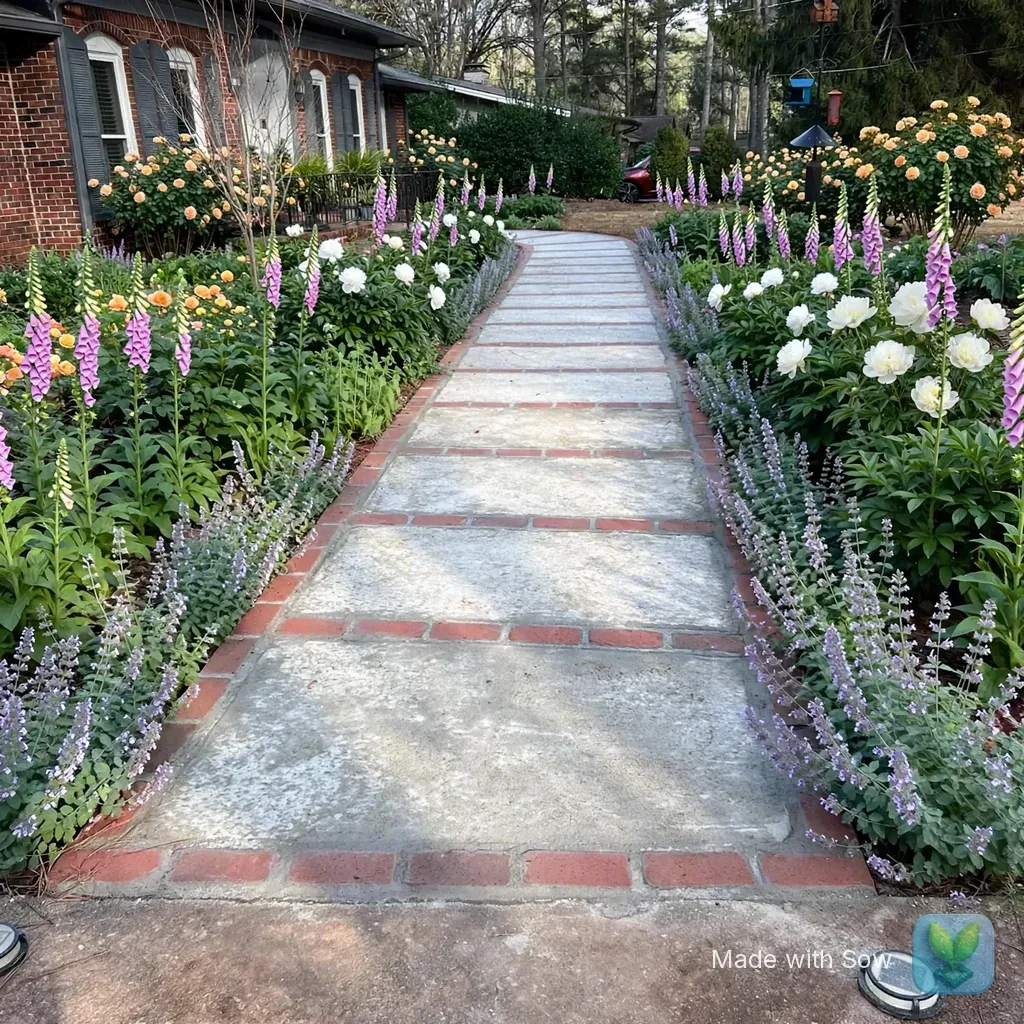
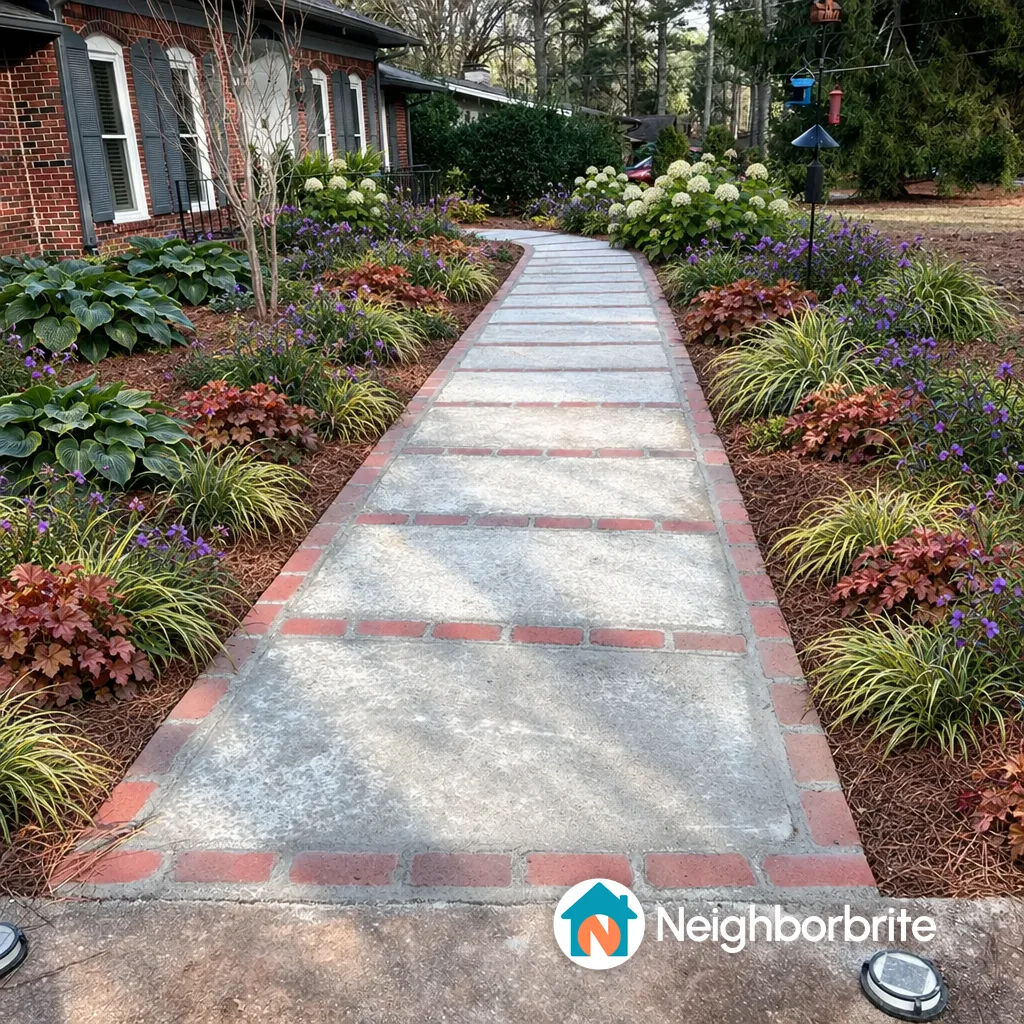
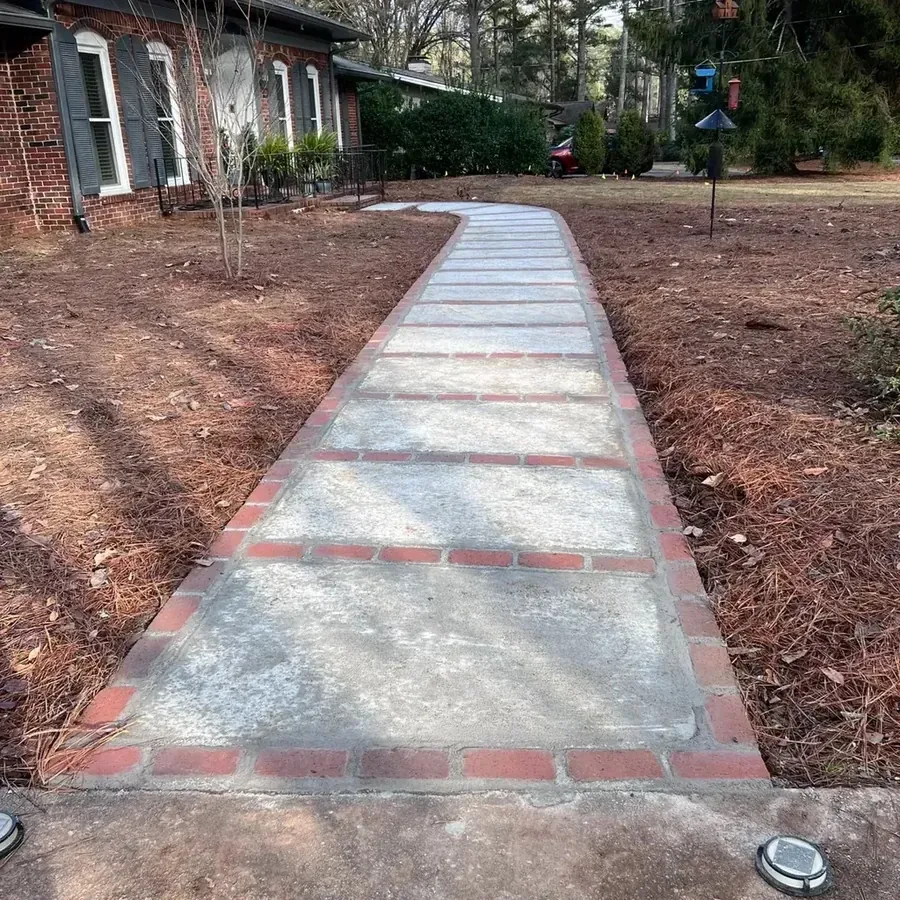
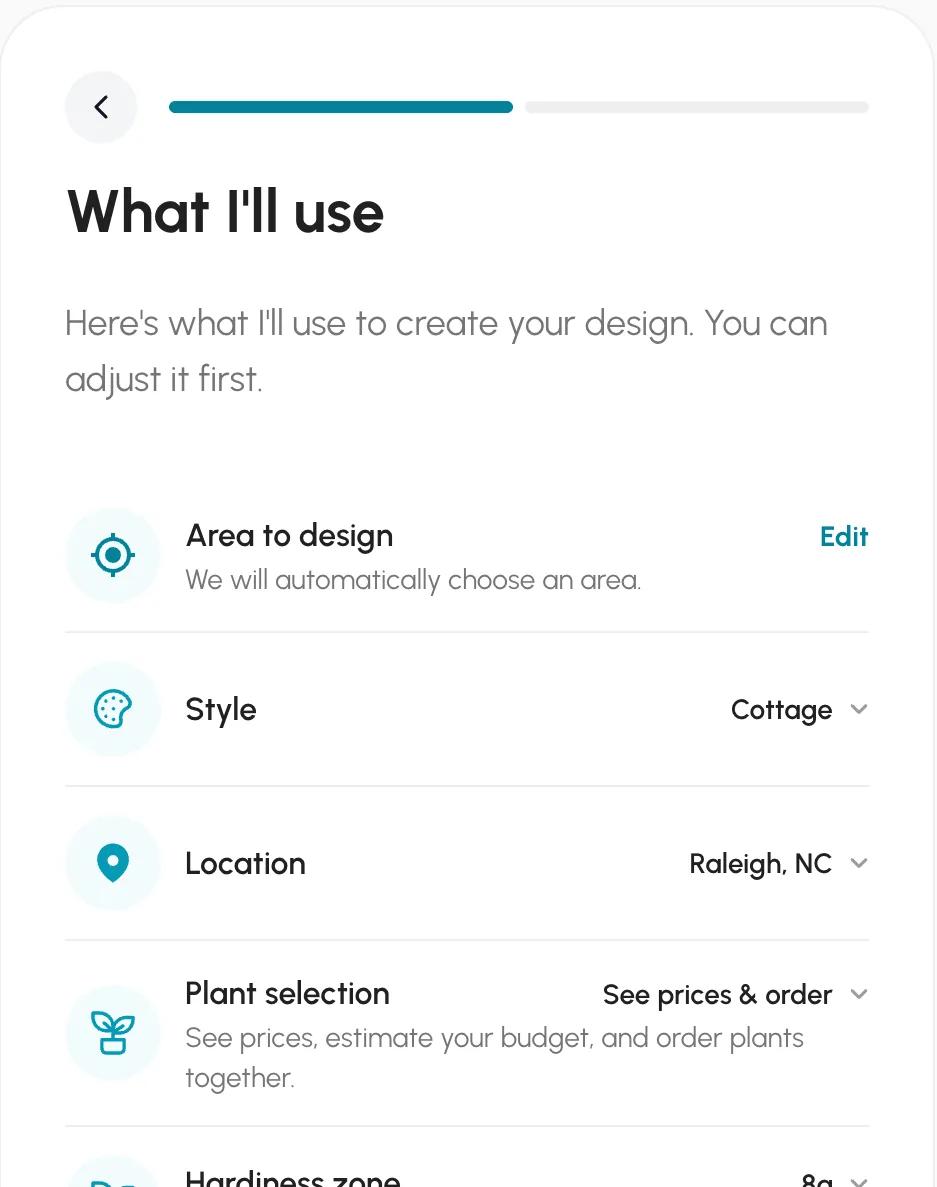
Sow, for a design you will act on; Neighborbrite, for a quick picture today. We ran both on the same front yard: a brick ranch with a concrete and brick walkway between two bare pine-straw beds, under pine trees, in Raleigh, zone 8a, cottage style, part sun, keep the walkway.
Neighborbrite's free result is on the left and Sow's free web result on the right, both 1024 by 1024 pixels, both watermarked bottom right, both with the house, walkway and bird feeder kept.
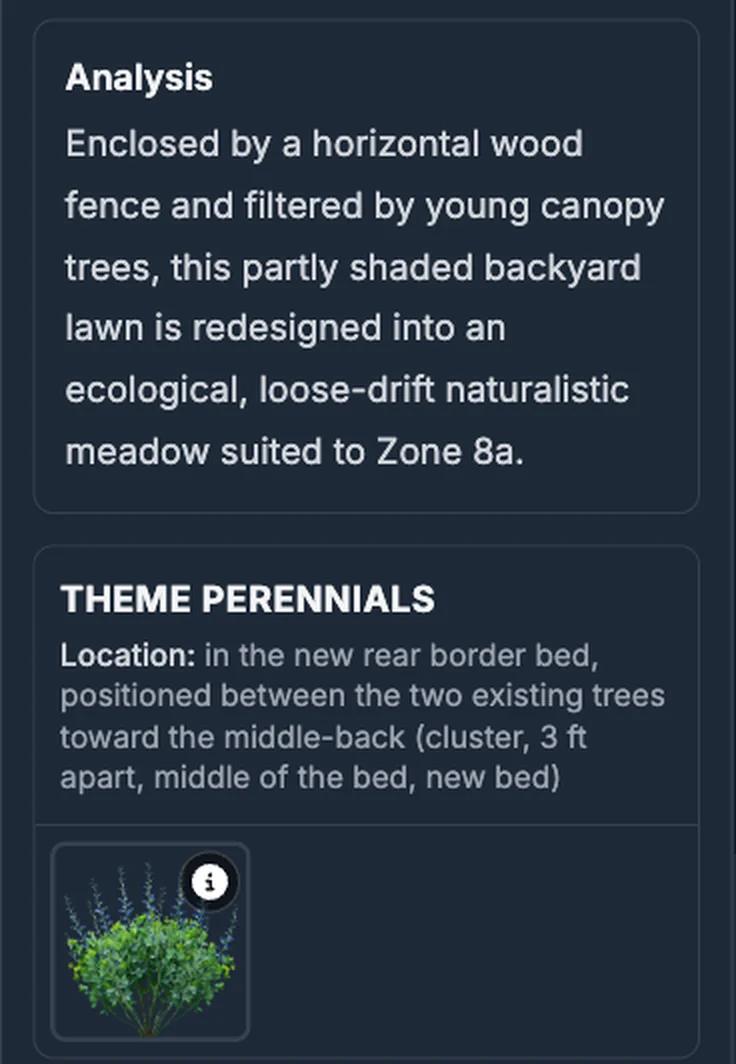
Neighborbrite inferred Raleigh, zone 8a and a flat slope, guessed full sun for a bed under pines (we changed it to partial), wrote a text plan in about 60 seconds with five named cultivars that fit part shade (Annabelle hydrangea, Concord Grape spiderwort, Northern Exposure Sienna coral bells, Evergold sedge, Big Daddy hosta), and drew the image in about 33 seconds.
The free tier allows 4 designs a day. The first design's plant list came with quantities and nursery prices, 41 plants for about $1,049; the in-place editing tools carry a Pro badge at $24.99 a month and the watermark only comes off on Business at $49.99 a month.
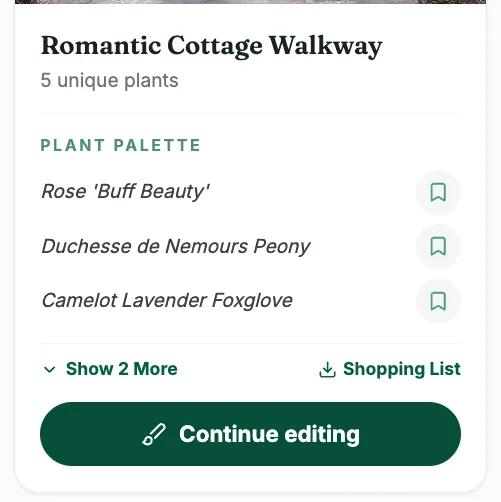
Sow on the web returned Romantic Cottage Walkway with five named plants linked to catalog pages (Buff Beauty rose, Duchesse de Nemours peony, Camelot Lavender foxglove, Baltic parsley, Snowflake catmint). The render took under a minute; the gallery showed it after 90 to 150 seconds.
The same photo on the phone, where the sun chip was pre-filled from the saved space, came back with foxglove, anemone and daffodil and quantities for each.
Hadaa is the third photo tool worth knowing. It charges $12 a render, or $9 each for three or more, with no subscription, and its site says every plant is verified against your USDA zone and that the output includes a plant list with quantities and a contractor blueprint with path widths and material volumes.
Renders are one-shot, and it is web only. OutdoorBrite ($29 to $149 a month, no free trial) and Gardenly ($54 or $84 a year) are the other photo subscriptions; both are described on our apps page.
What is the best software for a 2D planting plan drawn to scale?
Klora to draw it yourself for free. Sow's Planting Plans to have the beds found, filled and priced for you.
Klora, if you want to draw it yourself, with one free design; Sow's Planting Plans, if you want the beds found and filled for you with a priced schedule at the end; and the desktop suites if the plan is one sheet in a construction set.
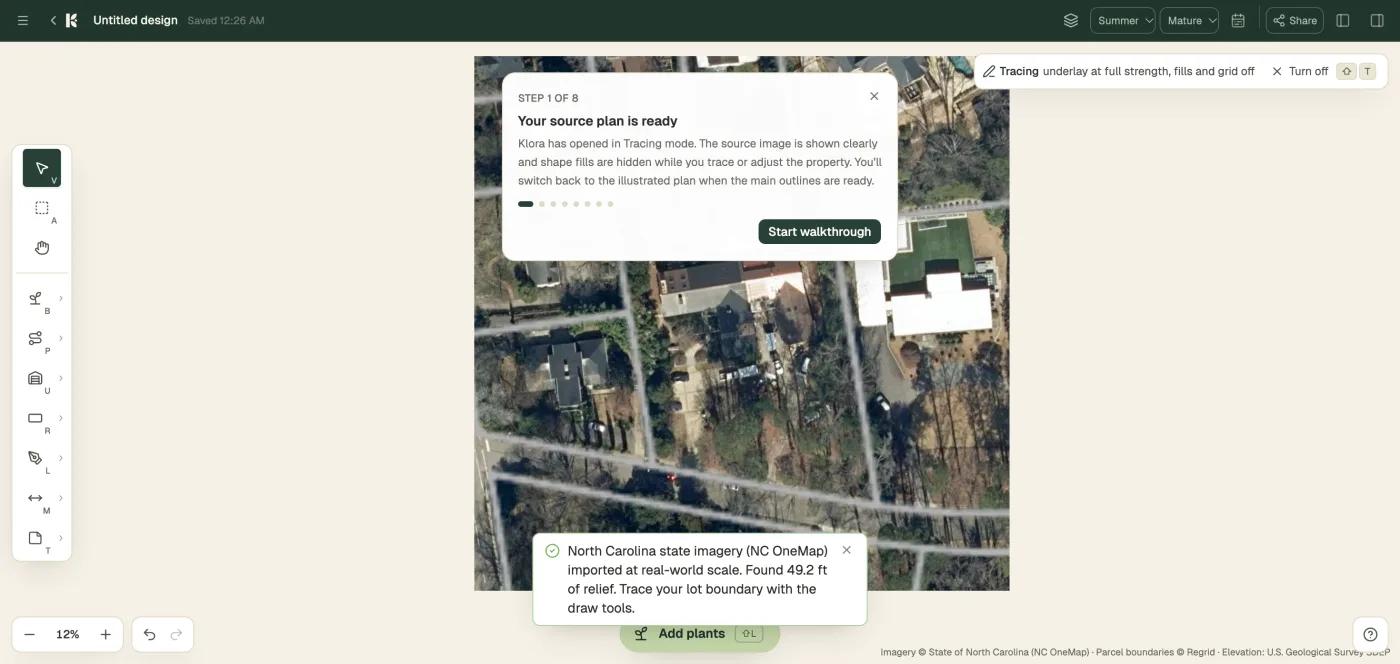
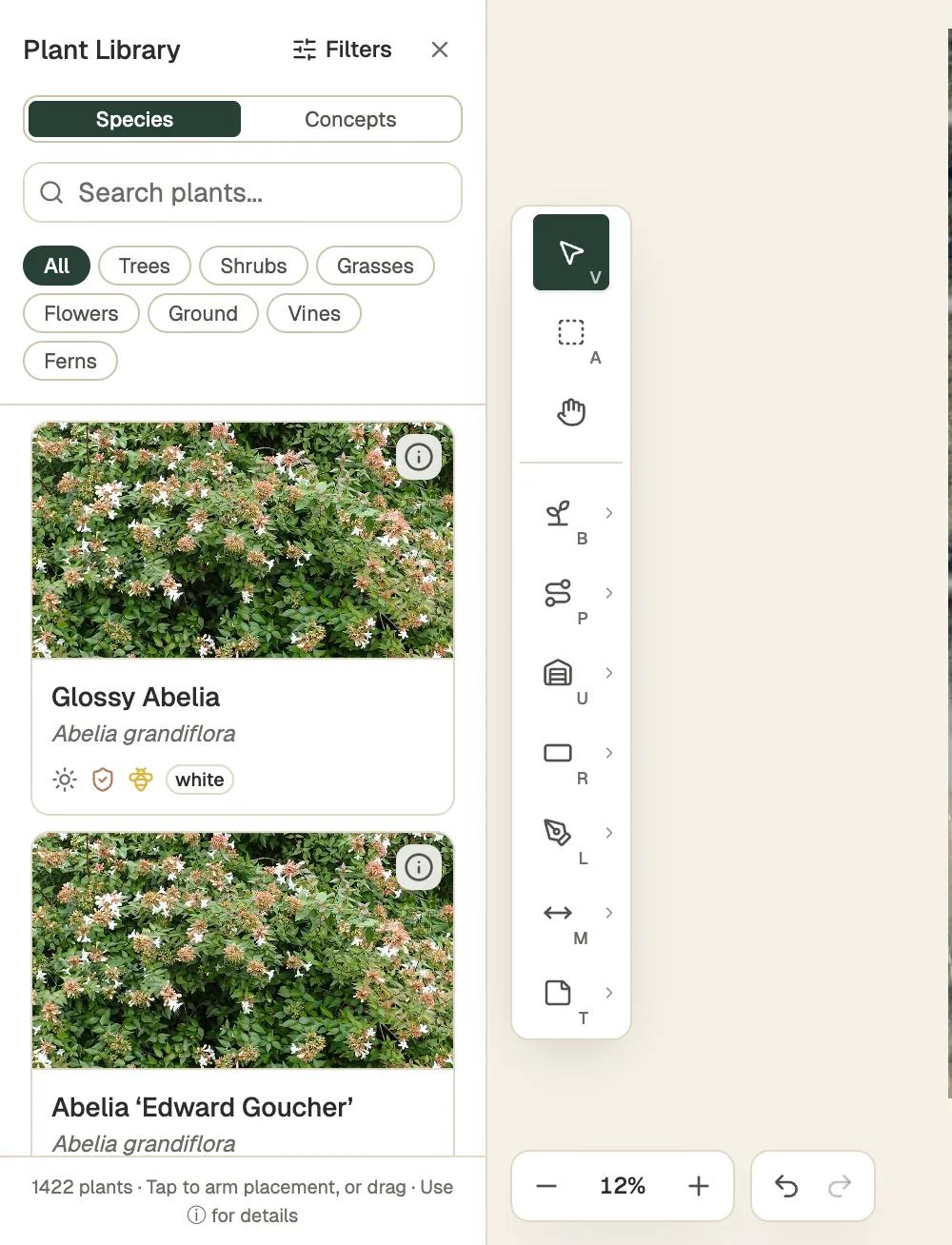
Klora is a browser tool with no account. We typed the test address and it imported aerial imagery at real scale (5.5 inches per pixel, from the state's imagery program), parcel lines and 5-foot contours in about 30 seconds, then offered a drawing toolbar for beds, paths, structures, lot boundary, measure and notes, with layers, season views from spring to winter, growth stages at Year 1, 5, 10 and Mature, and a bloom timeline.
Its library is 1,422 species with sun, deer-resistance and pollinator icons plus generic concept shapes with mature footprints. Nothing is generated; you draw every bed and place every plant. One design is free; a second and the PDF export need the $24 pass or $69 a year. Its sun model needs lidar heights, which our address did not have.
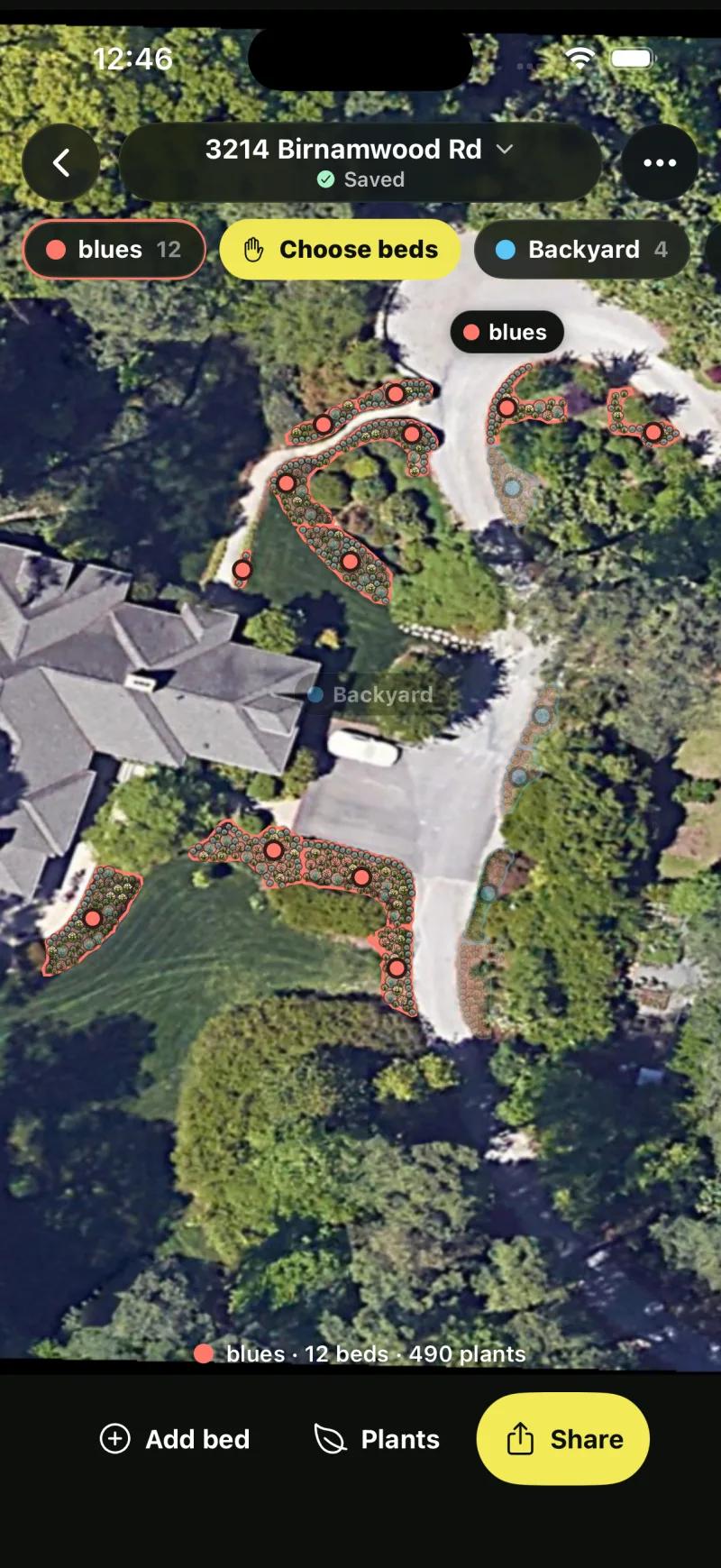
Sow's Planting Plans start from a saved address, find the beds on the satellite view and fill them. Our test property showed 17 beds across its spaces, one of them with 12 beds and 490 plants.
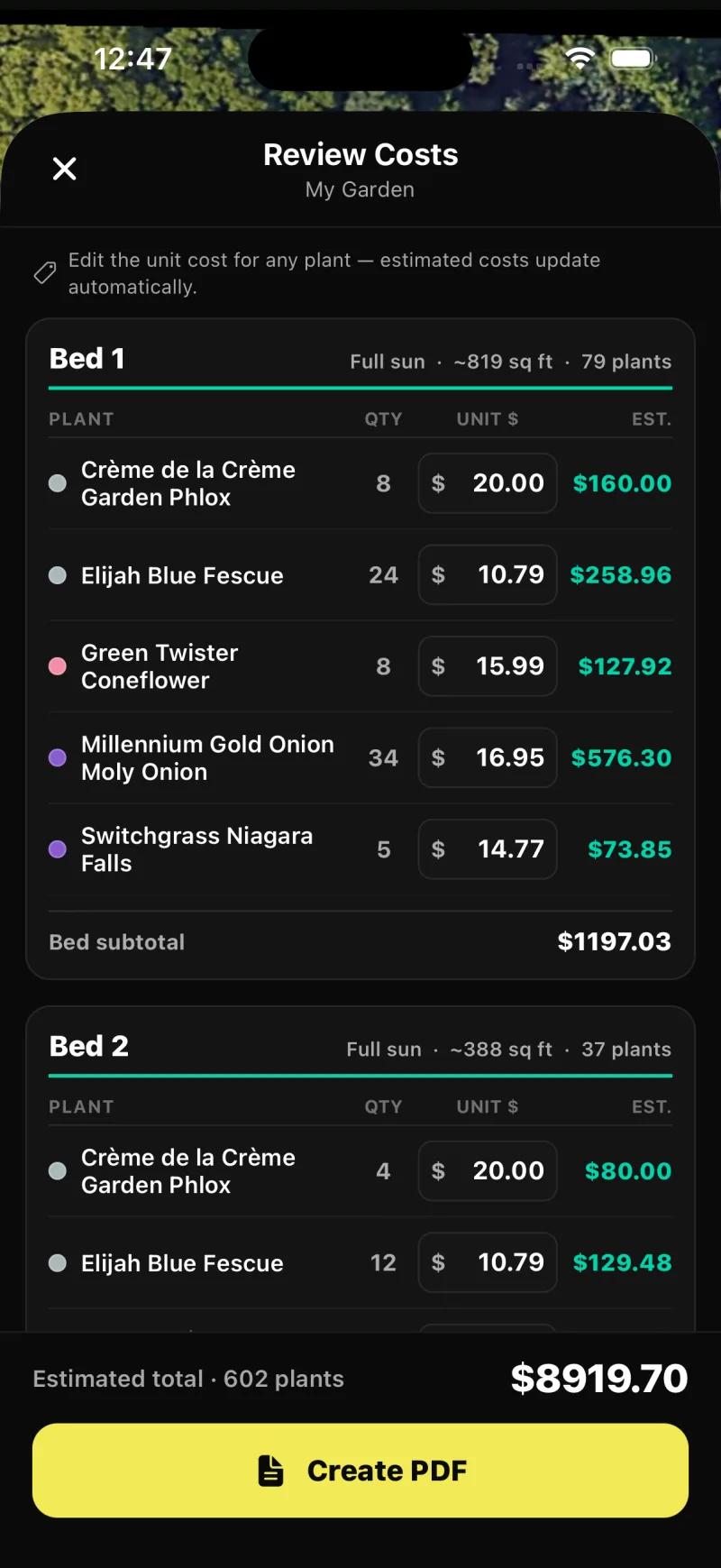
Each bed opens with its area, sun and plant count, four layout styles (Layered, Drifts, Rows, Edged), and the species as chips with counts, swap and remove, plus Reshuffle and New plants. The export runs through a Review Costs screen with quantity, an editable unit price and an estimated cost per species, bed subtotals and a total, before the PDF.
The plan is generated for you, which is the difference from Klora, and you can still change every species in every bed.
Realtime Landscaping and PRO Landscape both produce planting plans with real species and a plant list as part of a larger desktop package, described below. Planner 5D can draw a 2D outdoor layout, but without plant species or spacing data, so the plan is shapes. SketchUp can do the same with more precision and the same absence of plant knowledge.
What is the best 3D landscape design software?
Realtime Landscaping is the deepest, Planner 5D the easiest and SketchUp the most flexible.
Among the tools here, Realtime Landscaping is the deepest 3D for a yard, Planner 5D the easiest, and SketchUp the most flexible.
Realtime Landscaping, from Idea Spectrum, is Windows desktop software sold as a one-time purchase, with 3D, terrain and hardscape tools that the mobile tools do not attempt, real plant species, a planting plan and a plant list.
The editions are listed at $149 to $599 by tier in search results, a range we could not verify on the vendor's site, and a separate Photo product overlays objects on a photo rather than redrawing it. It is Windows only, with no mobile and a desktop learning curve.
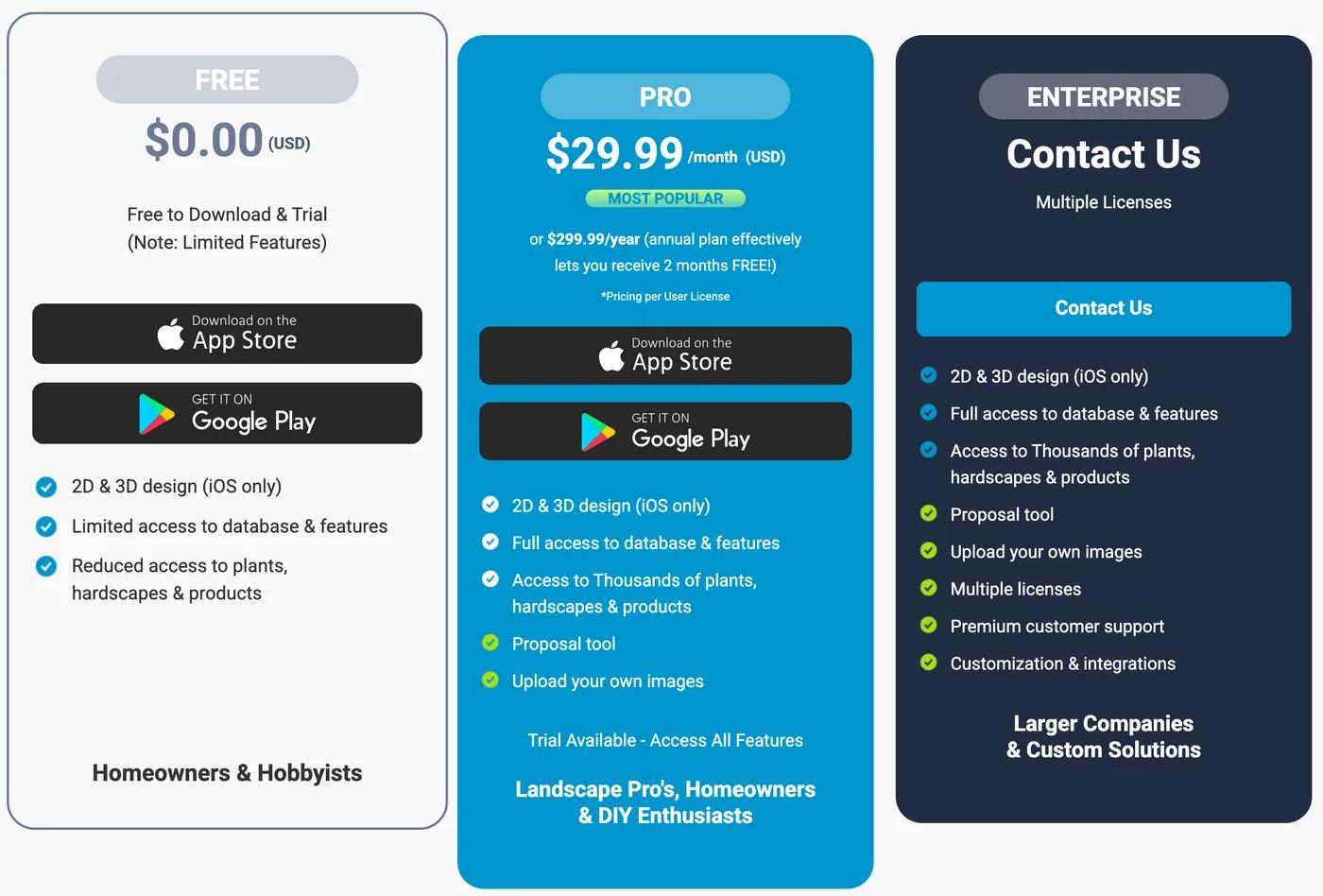
Planner 5D is a home and floor-plan tool with an outdoor catalog, available on web, iPhone, Android, Mac and Windows, with real 3D walkthroughs and a free tier of unlimited projects with half the catalog. Premium is $19.99 a month or $59.99 a year and Professional $49.99 a month or $399.99 a year for 4K renders.
Its catalog items are generic plant objects with no species, zone or climate data, its photo generator is built for interiors, and we could not confirm landscape output from a yard photo. It ranks first for many of these searches on the strength of its interior tool.
SketchUp is general 3D modelling with a free browser tier and a huge model warehouse. Landscape work in it needs extensions and skill, and it has no plant intelligence; paid tiers start at about $129 a year, unverified. iScape offers 2D and 3D design on iPhone only, marked iOS only on every tier of its pricing page, alongside AR placement; it is a mobile app rather than desktop software and we cover it on the apps page. PRO Landscape includes 3D in its suite, described next.
What software do landscape designers use for construction documents and client proposals?
Desktop suites for the drawings, and a plant-aware tool for the planting scheme and the client's approval.
Desktop suites, for the documents; and increasingly a phone or web tool for the planting and the client conversation. The two we list are the ones that come up most for a small firm.
PRO Landscape, from Drafix, is the established pro suite: photo imaging by placing objects, CAD, 3D and proposals, on a Windows desktop core with an iPad companion app and a Home app for consumers. Its site advertises a PRO Landscape+ feature with AI.
Pricing is about $90 a month according to search snippets; we could not verify that on prolandscape.com, and the table says so. Expect a steep learning curve and pro pricing.
Realtime Landscaping covers the design and plan side with deep 3D, terrain and hardscape tools and a one-time price, with client deliverables that its pages describe only in part. For dimensioned drawings and material volumes it is the stronger of the two on paper; for proposals, PRO Landscape is built around them.
Larger practices also use CAD-based suites such as Vectorworks Landmark, DynaSCAPE and Land F/X, which we have not evaluated and do not score here.
On the app side, iScape's Pro tier at $29.99 a month includes a proposal tool, and Sow's Pro+ tier at $99.99 a year adds client boards, briefs, proposals with live nursery pricing, presentations and approvals. Neither produces CAD or construction documents.
Hadaa's per-render blueprint, with plant placement, path widths and material volumes, is the closest a photo tool gets to a contractor handoff. A professional who needs a stamped drawing needs a desktop suite; one who needs a client to approve a planting scheme with quantities and prices by Thursday does not.
Does the software know what a plant is, and will it survive your zone?
Gardener tools carry species and zone data. Modelling tools carry shapes.
This is the row that splits the field into two halves that barely overlap. The photo and plan tools built for gardeners carry species data; the modelling and CAD tools carry objects, and the deeper suites carry plant libraries whose zone and size data we could not confirm.
Sow
Every plant in a design is a catalog entry with zone, sun, mature size, bloom and care data, from a 12,000+ plant catalog, and each saved space carries its own sun and zone. Zone matching covers the US, Canada, the UK and Australia; weather-aware care after planting uses US forecasts only.
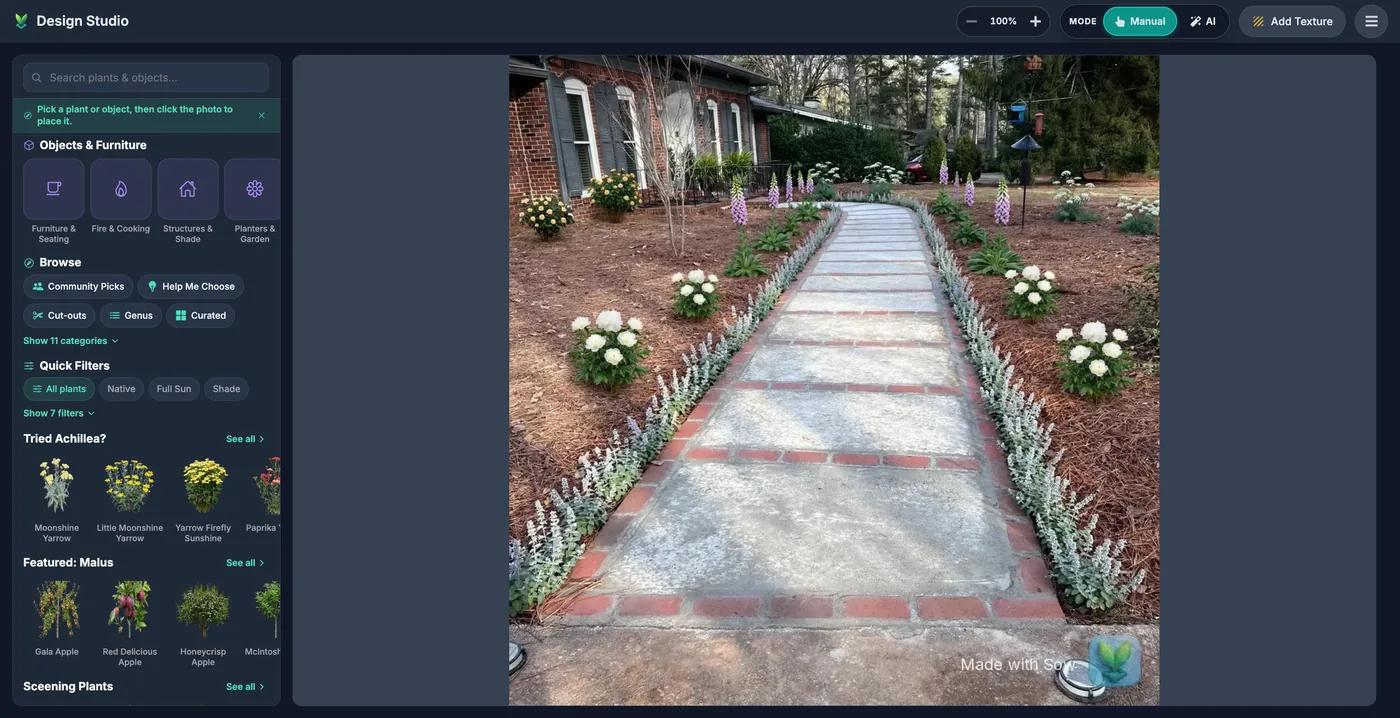
On the web, Design Studio's Help Me Choose panel takes a style, a zip code, plant roles and a sunlight preference and recommends from those.
Klora
1,422 species with sun, deer and pollinator icons, zone and sun filters, and mature footprints on its concept shapes. Neighborbrite: it inferred zone 8a correctly and chose a palette that fit part shade once we corrected the light, with zone and sun shown on the plant list but no mature size or spacing, and we could not confirm the depth of data behind each plant. Hadaa: its site says every plant is verified against your USDA zone.
Realtime Landscaping and PRO Landscape both use real species, and both carry zone and mature-size data that their pages describe only in part, so the table marks those cells partly. Planner 5D and SketchUp have no species, zone or climate data; their plants are furniture. iScape has a named plant library but no zone or climate check.
| Tool | Plants | Kinds of plants | Beyond plants | What each plant carries |
|---|---|---|---|---|
| Sow | 12,000+outdoor species and named cultivars |
| 150 objects in 12 groups (furniture, fire pits, fences, lighting, water features and more) and 93 surfaces (lawn, mulch, gravel, pavers, decking and more) | Zone, sun, mature height and width, bloom time, monthly care, native status, deer and drought tolerance, and a nursery price where one is listed |
| Neighborbrite | 5,000+per its site | Not stated | Pergolas, fire pits, fencing, water features and more, per its site; placing them is a Pro feature | Common and botanical name, hardiness zone and sun, with a Nature Hills price; no mature size |
| Klora | 1,422species and cultivars |
| Generic concept shapes with mature footprints, plus the beds, paths and structures you draw | Botanical name, sun, deer resistance, pollinator value, flower color, bloom time and mature size |
| Planner 5D | No named speciesgeneric plant symbols | Not stated | 10K+ catalog items, mostly furniture and decor, plus patios and decks; half the furniture catalog on free | No species, zone or climate data |
| SketchUp | No named speciesgeneric 3D models | Not stated | 3D Warehouse, a shared library of free 3D models | No species, zone or climate data |
| Realtime Landscaping (Idea Spectrum) | 5,900 to 8,000by edition, Plus to Architect, per its site |
| 19,400 to 25,300 objects in all, including pools, rockery, furniture, gazebos and sheds, with about 1,600 3D plant models | Common and botanical name, planting zones and size |
| PRO Landscape (Drafix) | 19,000+images of plants and materials together, per its site | Not stated | Grass, mulch and hardscape images, plus CAD symbols for pavers, walls and irrigation | Common and botanical name search, with climate-zone filtering |
| iScape | Thousandsof plants, hardscapes and products on Pro, per its pricing page; reduced access on free | Not stated | Pavers, furniture and other hardscape elements, in the same library | Plant names; no hardiness zone or climate check |
| Hadaa | Not stated | Not stated | Not stated | Filtered to species that survive your climate, by USDA zone, water and sun, per its site |
Can you change the design after the software draws it?
Drawing tools are editable by nature. Among photo tools, Sow edits one species at a time and the others regenerate.
In the drawing and modelling tools, always. You placed every object, so you can move every object. That covers Klora, Planner 5D, SketchUp, iScape, Realtime Landscaping and PRO Landscape, and Sow's Editor when you start from a plain photo. The interesting question is what happens in the photo tools, where the software drew the design for you.
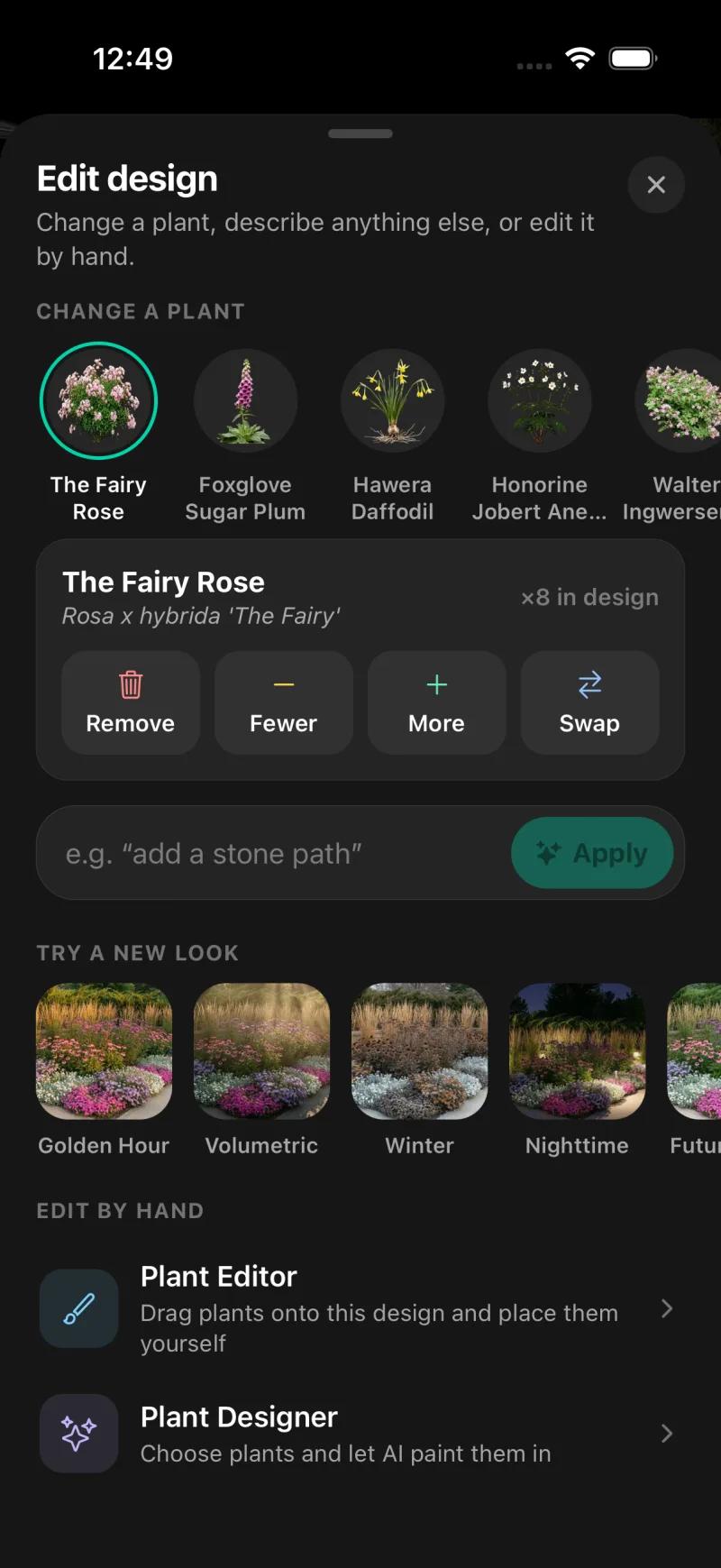
In Sow, on mobile, every generated species can be removed, counted up or down, or swapped, and the Plant Editor lets you drag in plants, furniture, lighting and paving by hand, on a generated design or a plain photo; on the web, Design Studio places plants and objects over the render.
Tapping The Fairy Rose in our iPhone result showed Remove, Fewer, More and Swap with the count of eight in this design and the botanical name.
The Edit design sheet also offers a change-a-plant chip for each species, a text box for an instruction such as adding a stone path, restyles (Golden Hour, Volumetric, Winter, Nighttime, Future growth), and a Plant Designer that paints plants you choose into the scene.
On the web, Continue editing opened the design in Design Studio with a plant and object library and quick filters for native, sun, shade and deer resistance.
In Neighborbrite, the tools that change a design in place (Add elements, Magic edit, Erase elements, Make changes) carry a Pro badge, and they edit the image rather than a plant object; on the free tier you regenerate, or change the palette in text at the plan step before the image is drawn. Hadaa's renders are one-shot. If you expect to iterate, that difference costs more than any subscription.
Which software gives you a plant schedule with quantities and prices?
Sow's Planting Plans give the fullest priced schedule we saw. Neighborbrite prices its first list.
A plant schedule is the list a nursery or a contractor actually works from: each species, how many, and ideally what they cost. Here is who produces one.
Sow's Planting Plans produce the most complete schedule we saw: for each bed, every species with its quantity, an editable unit price and an estimated cost, then bed subtotals and an estimated total. Our test plan ran to 602 plants and $8,919.70 across 17 beds before the PDF.
The iPhone photo-design result also lists quantities per species (The Fairy Rose x8, Foxglove Sugar Plum x28, Hawera Daffodil x66, Anemone x14).
The web design's Shopping List PDF is the simpler schedule: one row per species with its quantity, a unit price and a line total, plus an estimated total, the unit price being the lowest listed across the online nurseries Sow tracks (usually for the smallest pot) or a typical price for the plant type marked est. where nothing is listed; it does not show mature size or spacing, which are on each plant page.
Sow is also the only tool here that keeps pricing after the list: it checks 18 online nurseries every day for prices and deals, and links each plant straight to where you can buy it at the lowest price it found.
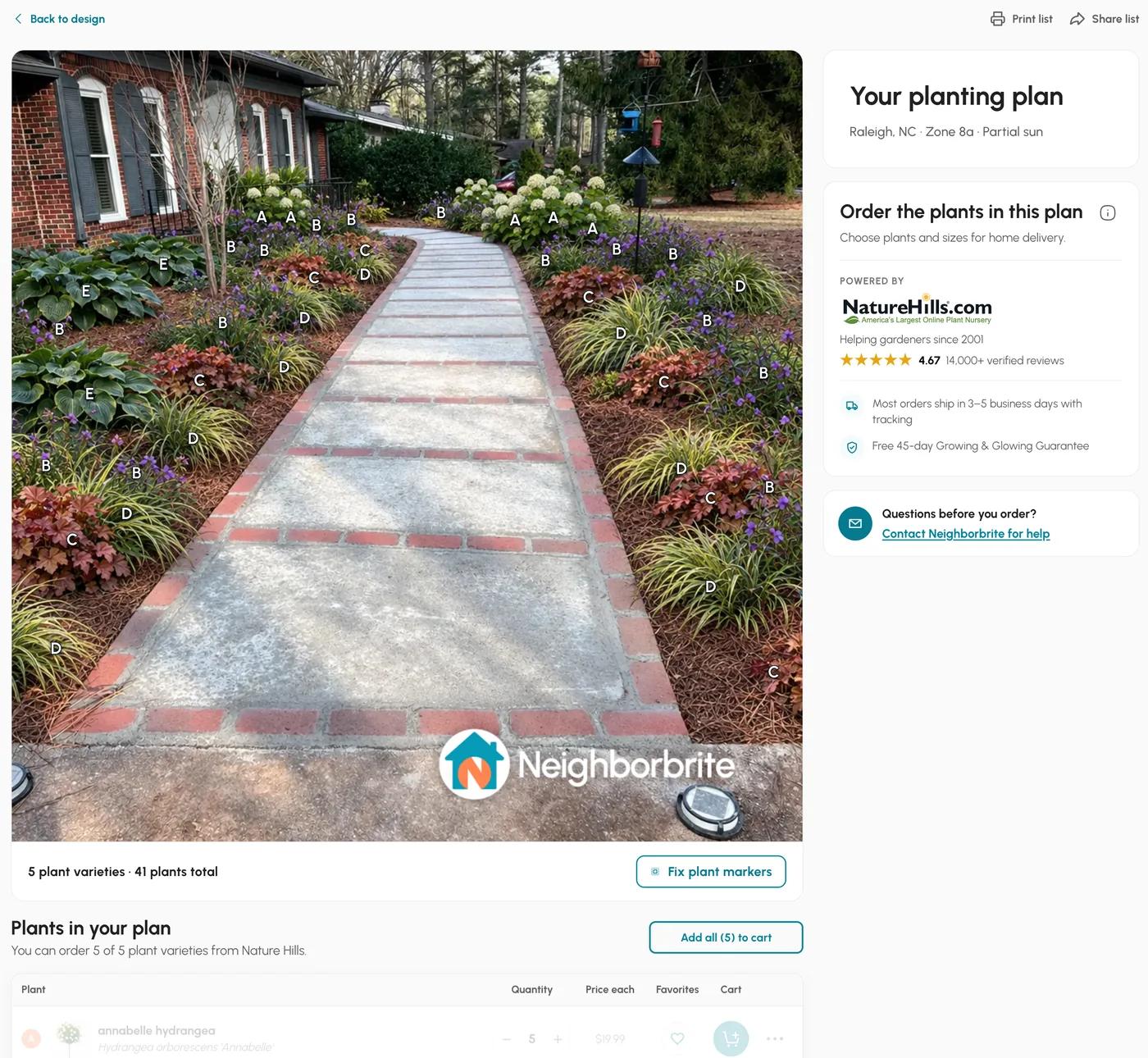
Neighborbrite's first free design opened a list of 5 varieties and 41 plants with botanical names, quantities and nursery prices, about $1,049 before shipping, with order, print and share buttons and no mature size or spacing. That button carried a Pro badge and we could not confirm whether later lists stay free.
Hadaa's site promises a plant list with quantities and a bill of quantities for materials. Realtime Landscaping and PRO Landscape produce plant lists as part of their plan output, and PRO Landscape's proposal tool is built to price them. Klora lists what you placed, with the PDF behind its paid tier. Planner 5D and SketchUp have no plant list because they have no plants.
How much does landscape design software cost?
From free to about $90 a month. Gardener tools sell cheap annual plans and desktop suites sell licences.
From free to about $90 a month, with two very different shapes: the desktop suites sell a licence or a pro subscription, and the gardener tools sell a cheap annual plan or a per-render fee.
Prices checked October 2026; the table carries the date each one was verified and a link to the source page, and the two desktop prices that we could only find in search snippets are marked as not verified.
- Free with limits: Neighborbrite (4 designs a day, watermarked), Klora (one design, no account), Planner 5D (unlimited projects, half the catalog), SketchUp Free (browser), and Sow (10 free designs to start and more for taking part).
- Cheap annual plans: Sow Pro from $39.99 a year on the web ($59.99 a year through the App Store) with a 7-day trial, or $9.99 a month; Klora at $24 for a 90-day pass or $69 a year; Planner 5D Premium at $59.99 a year.
- Per render: Hadaa at $12, or $9 each for three or more, with no subscription.
- Monthly subscriptions: Neighborbrite Pro $24.99 and Business $49.99; iScape Pro $29.99 a month or $299.99 a year; Planner 5D Professional $49.99 a month or $399.99 a year; Sow Pro+ $99.99 a year or $29.99 a month.
- Desktop: Realtime Landscaping at $149 to $599 one-time by edition, and PRO Landscape at about $90 a month, both from search snippets and not verified on the vendors' sites. SketchUp's paid tiers start at about $129 a year, also unverified.
| Tool | Free | Paid | Checked |
|---|---|---|---|
| Sow | Yes | Pro from $39.99 a year on the web ($59.99 through the App Store); Pro+ $99.99 a year | Oct 12, 2026 |
| Neighborbrite | Yes | Pro $24.99 a month; Business $49.99 a month | Oct 13, 2026 |
| Klora | Yes | $24 project pass or $69 a year | Oct 12, 2026 |
| Planner 5D | Yes | Premium $19.99 a month or $59.99 a year; Professional $49.99 a month or $399.99 a year | Oct 12, 2026 |
| SketchUp | Yes | From about $129 a year | Not verified |
| Realtime Landscaping (Idea Spectrum) | No free tier | $149 to $599 one-time | Not verified |
| PRO Landscape (Drafix) | No free tier | about $90 a month | Not verified |
| iScape | Yes | Pro $29.99 a month or $299.99 a year | Oct 12, 2026 |
| Hadaa | No free tier | $12 per render, or $9 each for three or more | Oct 12, 2026 |
Is there free landscape design software?
Yes, for three of the four kinds. There is no free CAD suite on this page.
Yes, and the free options cover three of the four kinds. For a free photo redesign, Sow gives you 10 free designs to start and more for taking part, with named catalog plants, and Neighborbrite's limited free tier gives 4 watermarked designs a day. For a free 2D plan, Klora gives you one complete design with no account.
For free 3D, Planner 5D's free tier and SketchUp Free both work and neither knows what a plant is. There is no free CAD suite on this page; Realtime Landscaping and PRO Landscape are paid, and the one no-cost option with real modelling control is SketchUp's browser version.
For free use we rank Sow first. 10 designs to start and more for taking part, each made of named, zone-checked plants with a priced list, against Neighborbrite's 4 a day and Klora's one scaled plan. We keep a separate page on exactly where each free tier stops being free, including ours.
Is there landscape design software for Mac, iPad or the web?
The desktop suites need Windows. Sow, Klora, Neighborbrite and Planner 5D all run in a browser.
Platform rules out more software than price does. Realtime Landscaping is Windows only. PRO Landscape has a Windows desktop core with an iPad companion app and an Android app. SketchUp runs on web, Mac, Windows and iPad. Planner 5D runs on all of those plus iPhone and Android.
Sow runs on iPhone, Android and the web with the same project in all three, and its Planting Plans are on the phone. Klora, Hadaa and OutdoorBrite are browser tools. Neighborbrite is web plus both app stores. iScape is both app stores, with 2D, 3D and AR on iPhone only.
So on a Mac, your choices are SketchUp, Planner 5D, and the browser tools (Sow, Klora, Neighborbrite, Hadaa); the two desktop suites need Windows. On an iPad, SketchUp, Planner 5D and PRO Landscape's companion app are the native options, with the browser tools in Safari. On the web alone, Sow, Klora, Neighborbrite, Planner 5D, SketchUp Free and Hadaa all work without an install.
Is software better than hiring a landscape designer?
Software wins for iterating on planting. A designer wins for grading, walls and permits, from $995.
It depends on what you need back. Yardzen, the best-known design service, sells backyard packages at $995, $1,395 and $1,995, with front-yard, full-yard and small-space packages also sold; a real designer makes the decisions from your photos and a survey, the higher tiers include photorealistic renders and a cost advisor, and the output can be permit-ready with contractor matching.
The trade-offs are weeks of turnaround, revisions limited to the package allowance, nothing you can iterate yourself after delivery, and no care or price tracking after install.
Software wins when you want to iterate, when the project is planting rather than construction, or when $995 is the plant budget rather than the design budget. A designer wins when the project involves grading, drainage, walls or permits, or when you simply do not want to make the decisions.
A sensible middle path is to use a photo tool to settle what you like and a planting plan to price it, then hand a designer or contractor a brief that is already half done.
Which should a professional landscape designer choose?
A desktop suite for the drawings, and Sow Pro+ for planting schemes, client boards and priced proposals.
For the drawings, a desktop suite; for the planting, the client conversation and the schedule, a tool that knows plants. Sow's Pro+ tier is built for the second job, and its weaknesses for the first are real, so here they are side by side.
Sow: what works
- Ten free designs for everyone to start, and unlimited more for taking part in the app (posting, referrals, challenges), with real plants in every one
- Every plant in a design is a real species with zone, sun, mature size, bloom, and care data (12,000+ catalog)
- Designs stay editable plant by plant instead of being a one-shot image
- A drag-and-drop Editor for placing plants, furniture and paving by hand, from a blank photo or on top of a generated design
- A grid bed planner, a top-down map of your yard, Plant Doctor and a sunlight meter in the same app
- Planting plans, care after planting, and live nursery prices in the same project
- Same project on iPhone, Android, and the web
Sow: what falls short
- No AR or 3D walkthrough
- No hardscape CAD or construction documents
- Outdoor plants only; weather-aware care is US-only
- Free designs beyond the first 10 are earned by taking part (posting, referrals, challenges)
- The web Shopping List PDF prices each species at the lowest listed nursery price (often the smallest pot) and does not show mature size or spacing
The ranking
1. Sow
Best for designing your real yard from a photo and ending with a priced planting planFirst for the homeowner's job and for the planting side of a professional's: a photo redesign with real, zone-checked species you can remove, re-count or swap on the phone, and Planting Plans that fill the beds on a satellite view and produce a schedule with quantities and prices. Not a 3D modeller and not CAD; for those, see the next two.
2. Realtime Landscaping (Idea Spectrum)
Best for a serious 3D model and site plan on a Windows desktopThe deepest 3D, terrain and hardscape tools on this page, with real species, a planting plan and a plant list, sold as a one-time purchase for Windows. Edition prices of $149 to $599 come from search snippets and are unverified. Described from its official pages.
3. PRO Landscape (Drafix)
Best for a firm that needs CAD drawings and proposals from one packageThe established pro suite: photo imaging, CAD, 3D and proposals on Windows with an iPad companion. About $90 a month according to search snippets, which we could not verify. Steep learning curve and pro pricing; the one here that produces proposals and construction documents as a matter of course.
4. Neighborbrite
Best for a quick picture of your yard todayThe best free photo redesign: a correct zone inference, a sensible palette in about 60 seconds, an image about 33 seconds later, and a priced 41-plant list on the first design, 4 times a day. Edits are regenerations or Pro tools and the watermark only comes off at $49.99 a month.
5. Planner 5D
Best for an easy 3D model of patios, paths and structures on any deviceEasy 3D with walkthroughs and a generous free tier on every platform, and no plant species, zone or climate data. It ranks first for many of these searches because of its interior tool, and a garden drawn in it is shapes, not plants. Described from its official pages.
6. SketchUp
Best for precise 3D for someone who already modelsMaximum modelling control, a free browser tier with no watermark, and a huge model warehouse. No plant intelligence, a steep learning curve for a yard, and not a landscape tool out of the box; paid tiers from about $129 a year, unverified. Described from its official pages.
7. Klora
Best for drawing your own planting plan to scaleThe best free 2D planting plan tool we have tested: no account, aerial imagery of your address at real scale in about 30 seconds, 1,422 species with sun and zone filters, season and growth-stage views. Entirely manual, no photo render; the PDF and a second design need $24 or $69 a year.
8. iScape
Best for AR placement of plants and hardscape on an iPhoneA mobile placement app rather than desktop software: a large object and hardscape library, AR, 2D and 3D on iPhone only, and a proposal tool on Pro at $29.99 a month or $299.99 a year. You place everything yourself. Described from its official pages.
9. Hadaa
Best for one priced, contractor-ready plan without a subscriptionPay per render, $12 or $9 each for three or more, with a zone-verified plant list with quantities and a contractor blueprint with path widths and material volumes. One-shot renders, web only. Described from its site.
The bottom line
Decide the kind first. If you want your own yard redesigned with plants you can buy and keep alive, and a schedule with quantities and prices at the end, Sow is the best landscape design software we tested, and its free tier lets you see the first design before paying. Set the sunlight before you generate, and know that there is no 3D view.
If the project is a patio, a pergola or levels, use a modeller: Planner 5D for ease and reach, SketchUp for control, Realtime Landscaping for depth on Windows. If the output has to be a drawing a contractor or a permit office will accept, use PRO Landscape or Realtime Landscaping and budget for the learning curve.
If you want a plan to scale, Klora is the best drawing tool on this page, with one free design and no account needed. If you want a quick picture, Neighborbrite's limited free tier will show you one. And if you want someone else to decide, Yardzen starts at $995. We will re-run the test and update this page as the tools change.
Questions people ask
What is the best landscape design software?
It depends on the kind you need. For a photo redesign of your own yard with real, zone-checked, editable plants and a priced planting plan, Sow. For 3D, Realtime Landscaping on Windows or Planner 5D on anything. For construction documents and proposals, PRO Landscape. For a free scaled plan, Klora.
What software do landscape designers use?
For drawings and proposals, desktop suites such as PRO Landscape and Realtime Landscaping, and in larger practices CAD-based suites such as Vectorworks Landmark, DynaSCAPE and Land F/X, which we have not evaluated. For planting schemes, client boards and priced plant schedules, tools that know plants, such as Sow's Pro+ tier. iScape's Pro tier includes a proposal tool on mobile.
What is the best 3D landscape design software available?
Realtime Landscaping has the deepest 3D, terrain and hardscape tools, as a one-time purchase for Windows. Planner 5D is the easiest, with a free tier and apps on every platform, but no plant data. SketchUp is the most flexible and has a free browser tier. Sow has no 3D view.
Is there free landscape design software?
Yes. Neighborbrite redesigns a photo free, 4 designs a day with a watermark. Klora draws one complete scaled plan free with no account. Planner 5D's free tier and SketchUp Free cover 3D without plant data. Sow gives 10 free designs to start and more for taking part. There is no free CAD suite on this page.
What software do landscape designers use for free?
SketchUp Free, its browser version, is the no-cost option with real modelling control, and it has no plant intelligence. Klora gives one free scaled plan with 1,422 species, then $24 or $69 a year. Sow's free tier shows a first design with named plants. The desktop suites, PRO Landscape and Realtime Landscaping, are paid.
Is there landscape design software for Mac?
SketchUp and Planner 5D run natively on Mac, and the browser tools (Sow, Klora, Neighborbrite, Hadaa) work in any browser. Realtime Landscaping is Windows only and PRO Landscape's desktop core is Windows, so neither desktop suite runs on a Mac.
Is there landscape design software for iPad?
SketchUp and Planner 5D have iPad apps, PRO Landscape has an iPad companion app to its Windows desktop, and iScape runs on iPad with 2D, 3D and AR on iOS. Sow, Klora and Neighborbrite work in Safari on an iPad, and Sow's iPhone app covers the planting-plan tools.
What is the difference between an AI landscape design app and regular landscape design software?
A photo redesign app reads a picture of your yard and draws a planted version of it for you, in about a minute, and the good ones name real species and check your zone. Regular design software is a drawing board: 2D plans, 3D models or CAD, where you place every object and the software draws nothing on its own. The first is faster to a picture; the second is precise and produces documents. Some tools now do both: Sow draws the first version and then lets you place every plant and paver by hand.
Can ChatGPT do landscape design?
It can draft a plant shortlist and draw a picture or a diagram. In our test the top-down plan we asked for, to scale with every plant counted, came back with no quantities, no scale and three misspelled plant names, and its picture of our yard removed the porch. The software on this page exists to plan to scale and keep a design editable. Our ChatGPT page has the full test.
How much does landscape design software cost compared with a landscape designer?
Software runs from free to about $90 a month: Sow Pro is from $39.99 a year on the web, Klora $69 a year, Planner 5D Premium $59.99 a year, Hadaa $12 a render, iScape Pro $29.99 a month, and the desktop suites from $149 one-time (Realtime Landscaping, unverified) to about $90 a month (PRO Landscape, unverified). Yardzen's human design packages are $995 to $1,995 per backyard.
What app do professional landscapers use?
On a phone, iScape (AR and a proposal tool on Pro at $29.99 a month) and Sow Pro+ ($99.99 a year, with client boards, proposals with live pricing, presentations and approvals, and priced planting plans). For construction documents, a Windows desktop suite such as PRO Landscape, with its iPad companion app on site.
Does Sow do 3D or CAD?
No. Sow has no 3D model, no AR view and no CAD or construction documents. Its hardscape is paving, mulch, gravel, fences, structures and water features placed as design elements on the photo. It does photo redesign with real, zone-checked, editable plants, planting plans with a priced schedule on the phone, care after planting (weather-aware in the US), and live nursery prices.
Keep comparing
- Ranked and testedBest landscape design appsRead
- Free tiers, testedBest free landscape design appsRead
- Best ofBest planting plan softwareRead
- Honest reviewPlanner 5D for landscape designRead
- Straight answerLandscape designer cost vs an appRead
- Tested roundupBest AI landscape design appsRead
- HubAll comparisonsBrowse
Design your yard from a photo, free
Upload one photo. Sow names every plant it places, checks it against your zone and light, and lets you swap or remove any species. Go to Pro when you want the planting plan priced.
We make SowTested October 13, 2026Same yard photos for every tool we ranWe paid nothing for the testsHow we tested
How we tested
- Test subject: a brick ranch front walkway with bare pine-straw beds on both sides, and a fenced backyard with two young trees and a patchy lawn, both in Raleigh, North Carolina (zone 8a, part sun); the same two photos, or the same address for the plan tools, went to every tool we ran.
- What we paid: nothing; Neighborbrite's free tier, Klora with no account, a fresh free Sow account on the web, and an existing Sow Pro+ test account on an iPhone for the planting-plan and editing screens.
- The brief for every tool was the same: cottage style, low maintenance, part sun, keep the walkway and the fence.
- We timed each step from upload to output, wrote down every plant each tool named, checked those plants against the light in the photo, and then tried to change one plant without starting over.
- Realtime Landscaping, PRO Landscape, SketchUp, Planner 5D, iScape and Hadaa are described from their official pricing and feature pages. The Realtime Landscaping and PRO Landscape prices come from search snippets and are marked unverified in the table.
- Every screenshot is our own capture from the test, or a vendor's public page captured as-is and captioned as such.
Read it the way you would read any maker's comparison
This page is written by the Sow team. We show our work in the screenshots and say where Sow is not the right answer.
Where Sow loses here
- no 3D model or walkthrough (Planner 5D, SketchUp and Realtime Landscaping have one)
- no AR view (iScape on iPhone)
- no hardscape CAD, grading or construction documents (PRO Landscape, Realtime Landscaping)
- weather-aware care is US-only
- the web Shopping List PDF prices each species at the lowest listed nursery price (often the smallest pot) and does not show mature size or spacing
Spotted a change? Email [email protected] and we will re-test and correct the page.