
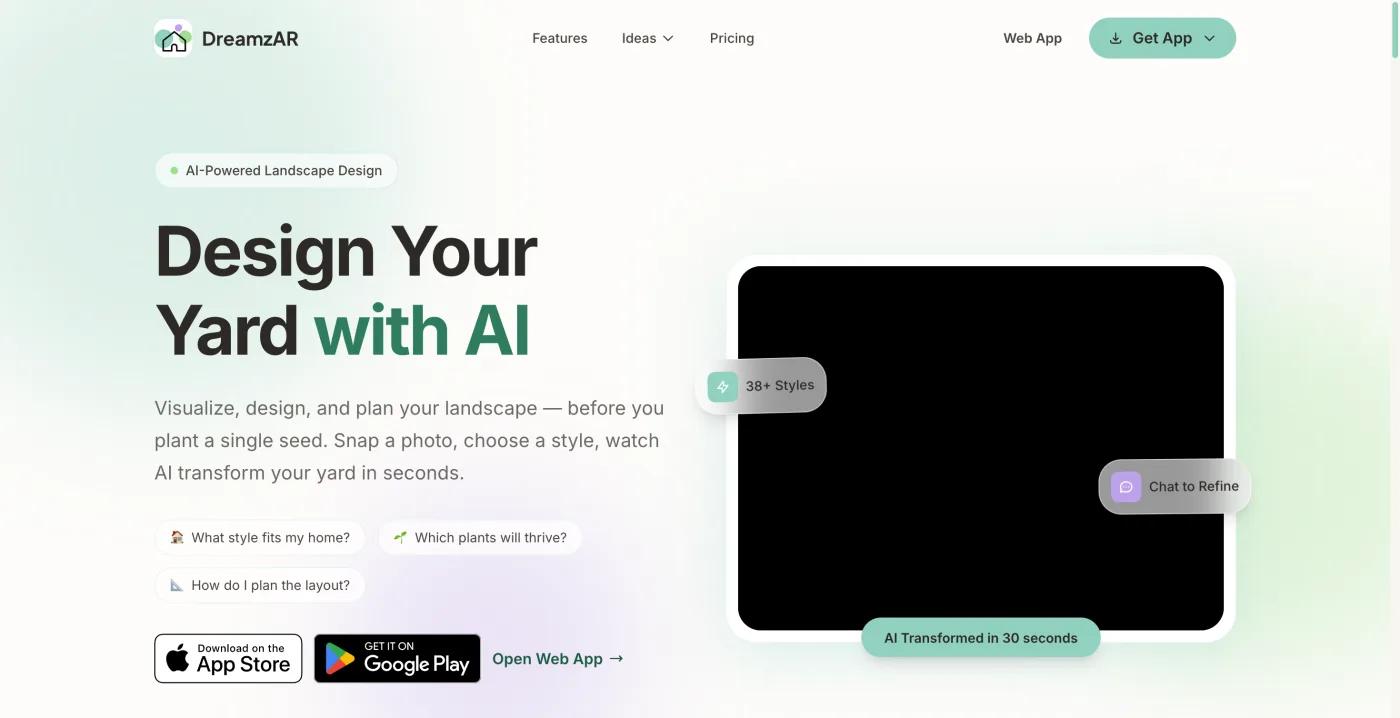
What is DreamzAR?
A photo redesign, a 2D editor on the photo and an AR walkthrough in one app.
DreamzAR is a landscape design app that combines three things its site is careful to list together: a photo redesign, where you upload a picture of your yard and get a redesigned version back; a 2D editor, where you drag plants and features onto the photo yourself; and a 3D AR walkthrough, where you see the design in your actual yard through the camera.
It is on iOS, Android and the web. The site claims 2,000+ plants and garden features, 38+ styles and 10,000+ yards transformed. Those are the vendor's own numbers, and we could not verify them.
We want that at the top rather than in a footnote. DreamzAR has no free tier on its site and we have not yet paid for it, so there are no DreamzAR renders of our test yard here; the home page at the top of this page is what we captured.
What makes it worth a page is the combination. Most photo-redesign tools give you an image. Most AR tools make you place everything by hand. DreamzAR's pitch is that you get the generated design, then edit it on the photo, then walk through it in AR, on Android and in a browser as well as on iPhone.
If that holds up, it is a different offer from iScape (AR but no generated design, 3D on iOS only), from Neighborbrite (generated design, no editor, no AR) and from Sow (generated design plus a hand editor and a planting plan, no AR).
How much does DreamzAR cost?
$19.99 a month or $199 a year. Cheaper than iScape, more than Sow, with no free way in.
$19.99 a month or $199 a year. The site notes that the annual plan works out to $16.60 a month. There is no free tier listed; the pricing we captured goes straight to the two paid options. We could not confirm whether a free trial exists; look for one on the signup screen and do not assume it.
For context, all checked the same week. IScape Pro is $29.99 a month or $299.99 a year; Neighborbrite is $24.99 a month for Pro and $49.99 a month for Business, with a limited free tier of 4 designs a day; Planner 5D Premium is $59.99 a year; Hadaa is $12 a render with no subscription; Sow is free to start, with Pro from $39.99 a year on the web ($59.99 a year through the App Store) and Pro+ at $99.99 a year. DreamzAR sits in the middle: cheaper than iScape, more than Sow, no free way in.
If you have one yard and one spring, $19.99 for a month or two may be the sensible buy; if you will keep designing through the year, the annual plan is the one the site steers you to.
Is there a free version of DreamzAR?
Not that its site shows. Sow and Neighborbrite are both free to try.
Not that its site shows. The pricing on dreamzar.app lists Monthly and Annual and nothing at $0. Google attaches the question of whether there is a free app for this at all to searches for DreamzAR reviews, and the answer is not DreamzAR. Neighborbrite has a limited free tier of 4 watermarked designs a day, and we tested it. Sow gives 10 free designs to start and more for taking part. For AR that is also free, we have not found one to recommend.
What does DreamzAR say it does?
Redesign, 2D editing, chat edits and AR on three platforms. No plan, list, prices or care are described.
Taken from its official pages. We are describing claims, not confirming them.
- Photo redesign. Upload a photo, choose from 38+ styles (site claim), and get a redesigned version of your yard back.
- A drag-and-drop 2D editor on the photo. This separates it from most generators: the site describes moving plants and features around on the design after it is made. We have marked plants as individually editable on that basis; it is the first thing we would test.
- Chat-based refinement: describe changes in words and have the design updated. Sow's mobile Edit design sheet has a text box for the same job; we have not compared the two.
- A 3D AR walkthrough: see the design in your yard through the camera. Sow has nothing like this, and iScape's AR is iPhone only; DreamzAR lists iOS, Android and the web.
- A library of 2,000+ plants and garden features, where "every plant includes care information, growth data, and regional compatibility". We could not confirm the depth: whether "regional compatibility" means a hardiness-zone check against your location, and whether "growth data" includes mature spread and spacing. Both are marked Partly in the table. Care information on a plant entry is also not the same as reminders after you plant; the site describes the first and nothing about the second.
- All three platforms: iOS, Android and the web.
| Tool | Plants | Kinds of plants | Beyond plants | What each plant carries |
|---|---|---|---|---|
| Sow | 12,000+outdoor species and named cultivars |
| 150 objects in 12 groups (furniture, fire pits, fences, lighting, water features and more) and 93 surfaces (lawn, mulch, gravel, pavers, decking and more) | Zone, sun, mature height and width, bloom time, monthly care, native status, deer and drought tolerance, and a nursery price where one is listed |
| DreamzAR | 2,000+plants and garden features together, per its site |
| Outdoor furniture, pools, patios, walkways, pergolas, fences, fountains, planters, lighting and statues, plus 50+ paving patterns | Care, sunlight, water needs and growth, per its site; its FAQ says it does not know your USDA hardiness zone |
| Neighborbrite | 5,000+per its site | Not stated | Pergolas, fire pits, fencing, water features and more, per its site; placing them is a Pro feature | Common and botanical name, hardiness zone and sun, with a Nature Hills price; no mature size |
DreamzAR: what works
- AR walkthrough
- Drag-and-drop 2D editor on the photo
- Chat-based refinement
- All three platforms
DreamzAR: what falls short
- No free tier
- $199 a year
- 2,000 plants versus 12,000
- No planting plan, care, or prices
What the pages do not describe, and we have therefore marked No or Unverified: a top-down planting plan, a shopping list or PDF export, live nursery prices, care reminders after planting, plant identification by camera, and client proposal tools.
What should you verify before paying for DreamzAR?
Zone data, mature size, a plant list you can export, and whether the editor moves the generated plants.
Here is the checklist to run on day one of a subscription.
- Is there a free trial, and does the monthly plan cancel cleanly? The site shows no free tier and we could not confirm a trial.
- Does the plant data include your hardiness zone, and does the app warn you when a plant does not suit it? "Regional compatibility" could mean either.
- Does each plant show mature height and spread, and does the 2D editor respect them? If not, a convincing picture can still be a bed of plants that will not fit.
- Can you get a plant list out, with quantities, and export it as a PDF? Neither is described on the pages we read. Without a list you have a picture and nothing to take to a nursery.
- Does the 2D editor move the generated plants, or only add new ones over a fixed image?
- Does the AR walkthrough work on your device, and is it the same on Android and the web as on iPhone? The site lists all three.
- How many designs do you get? The pages we captured do not state a cap or a credit system.
If DreamzAR passes that list, it is a strong tool at $199 a year. If it fails on plant data or on getting a list out, the AR walkthrough is a nice way to look at a design you cannot buy.
DreamzAR vs Sow: what does each actually do?
DreamzAR is about seeing the design in AR. Sow is about what is in it and what happens next.
Who does what
A tool is listed only where it does the job fully. Same checks as the table.
Redraws your photo
- Sow
- DreamzAR
- Neighborbrite
Lets you place things by hand
- Sow
- DreamzAR
Plans the beds from above
- Sow
Hands you a plant list
- Sow
- Neighborbrite
Helps after planting
- Sow
AR, 3D or construction
- DreamzAR
Both DreamzAR and Sow take a photo and draw a planted version. From there they emphasise different halves of the job. DreamzAR, per its site, is about looking at the design: a 2D editor on the photo, chat edits, and the AR walkthrough.
Sow is about what is in it and what happens next: a catalog of 12,000+ plants with zone, sun, mature size, bloom and care data behind every plant, plant-by-plant editing and a drag-and-drop Editor on mobile, planting plans with quantities and prices, and weather-aware care in the US.
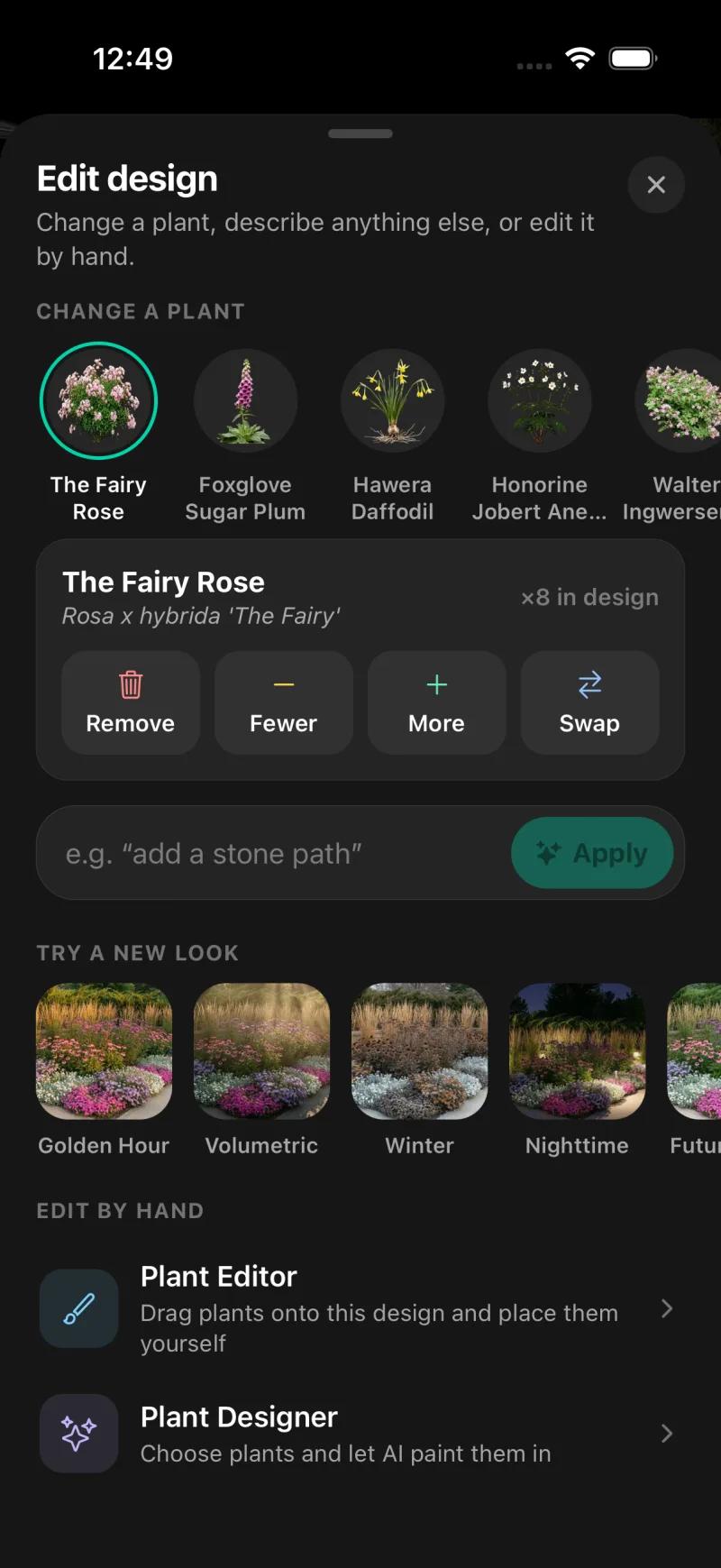
Here is Sow on the test yard. The iPhone app was given the front-walkway photo with Cottage style and part sun. It returned both borders planted and a list of five species with botanical names and quantities: The Fairy Rose x8, Foxglove Sugar Plum x28, Hawera Daffodil x66, Anemone x14 and one more.
On mobile, every generated species can be removed, counted up or down, or swapped, and the Plant Editor lets you drag in plants, furniture, lighting and paving by hand, on a generated design or a plain photo; on the web, Design Studio places plants and objects over the render.
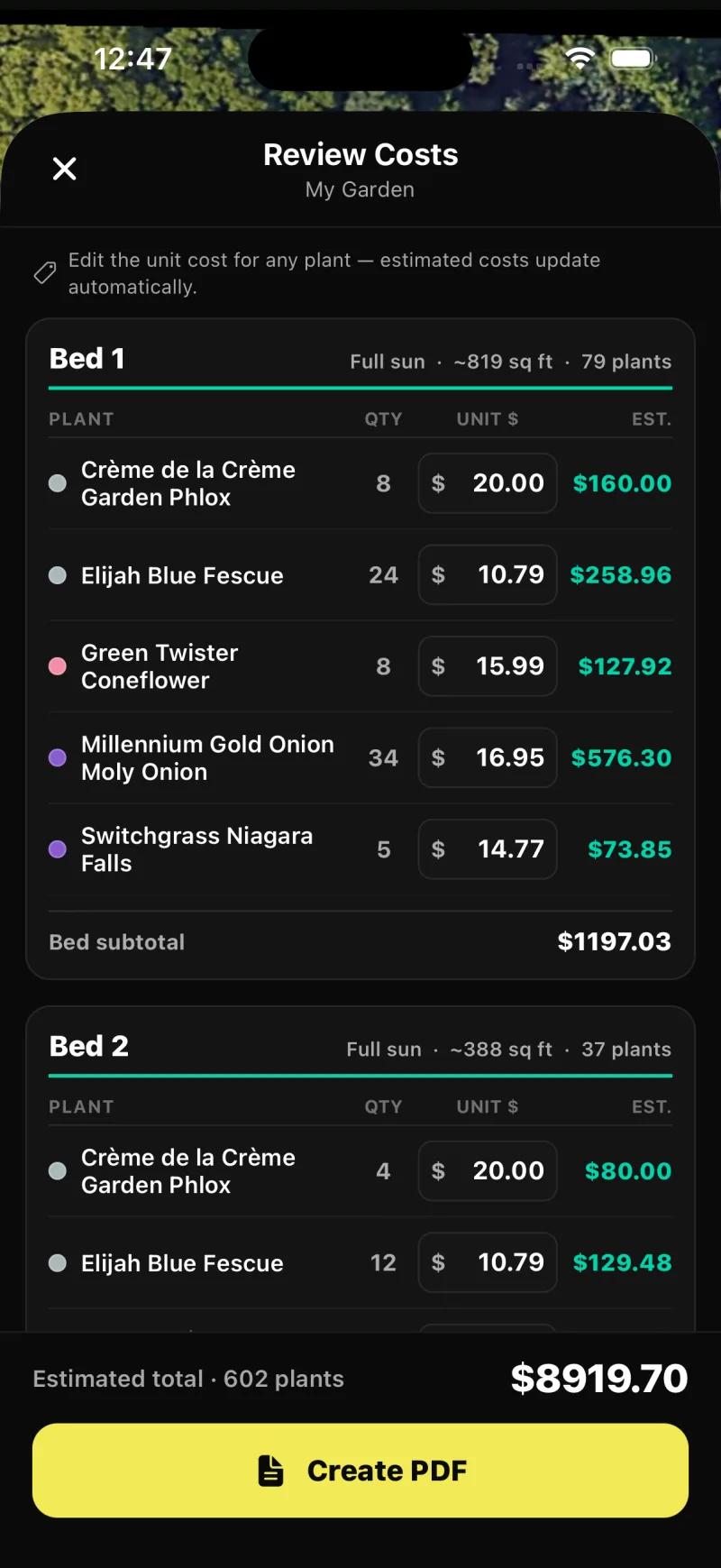
Planting Plans produced a priced schedule from the satellite view of a saved address: 602 plants at an estimated $8,919.70 in the plan we captured, with an editable unit price per species.
And what Sow does not have, which on this page is the headline: no AR walkthrough and no 3D. If walking through the design in your yard is what you want, DreamzAR describes it and Sow does not have it.
Sow also has no hardscape CAD or construction documents; weather-aware care is US-only; outdoor plants only; the web design Shopping List PDF prices each species at the lowest listed nursery price (often the smallest pot) and does not show mature size or spacing.
Catalog size is 2,000+ for DreamzAR (site claim) and 12,000+ for Sow. A bigger catalog only helps if the data behind each plant is good, so judge that on the zone and size questions above, not the count.
| Feature | Sow | DreamzAR | Neighborbrite |
|---|---|---|---|
| Redesigns a photo of your own yard | Yes | Yes | Yes |
| Plants are real, named species | Yes | Yes | Yes |
| Checks hardiness zone or climate | Yes | Partly | Partly |
| Mature size and spacing data | Yes | Partly | Unverified |
| Move or swap individual plants after generation | Yes | Yes | Partly |
| Drag-and-drop editor for plants, objects and paving | Yes | Yes | Partly |
| Top-down planting plan or layout | Yes | No | No |
| Grid bed planner with companion planting | Yes | No | No |
| Plant list or shopping list | Yes | Unverified | Yes |
| Live nursery prices | Yes | No | No |
| Care reminders after planting | Yes | No | No |
| Plant identification by camera | Yes | No | Yes |
| Diagnoses a sick plant from a photo | Yes | No | No |
| Measures the sun a spot gets | Yes | No | No |
| AR view | No | Yes | No |
| 3D model or walkthrough | No | Partly | No |
| Hardscape and construction tools | Partly | Partly | No |
| Client proposals and presentations | Yes | Unverified | No |
| PDF export | Yes | Unverified | Unverified |
| Free tier | Yes | No | Yes |
| Watermark on free output | Yes | Unverified | Unverified |
| Works in a browser | Yes | Yes | Yes |
| iPhone app | Yes | Yes | Yes |
| Android app | Yes | Yes | Yes |
Neighborbrite is in the table as the reference point we tested; its full review is linked below.
DreamzAR vs Sow: what does a year cost?
DreamzAR is $199 a year with no free tier. Sow is free to start and $39.99 a year on the web.
DreamzAR
$19.99 a month or $199 a year, no free tier shown. Sow: free to start; Pro from $39.99 a year on the web ($59.99 a year through the App Store); Pro+ $99.99 a year. Sow prices in the table are web prices.
Sow's free tier, for the record
10 free designs to start and more for taking part (posting a design earns 25 credits, a referral 100). It is enough to see whether the tool reads your yard well before you pay. DreamzAR's pages give you no equivalent way to find out.
| Tool | Free | Paid | Checked |
|---|---|---|---|
| Sow | Yes | Pro from $39.99 a year on the web ($59.99 through the App Store); Pro+ $99.99 a year | Oct 12, 2026 |
| DreamzAR | No free tier | $19.99 a month or $199 a year | Oct 12, 2026 |
| Neighborbrite | Yes | Pro $24.99 a month; Business $49.99 a month | Oct 13, 2026 |
Choose DreamzAR if
- The AR walkthrough is the feature you want, and you want it on Android or in a browser as well as on iPhone.
- You want to generate a design and then move things around on the photo yourself in a 2D editor.
- You are comfortable paying $19.99 a month or $199 a year without a free tier, and you will test the plant data on day one.
Choose Sow if
- You want to try it on your own yard free before paying.
- You want every plant checked against your zone and light, with mature size, from a catalog of 12,000+ plants.
- You want to swap, recount or hand-place individual plants on mobile after the design is made.
- You want the design to become a planting plan with quantities and prices, and care after planting (US weather-aware).
- You do not need AR or 3D.
DreamzAR alternatives worth a look
Sow
Best for designing your real yard with plants that will livePhoto redesign with real, zone-checked plants from a catalog of 12,000+, editable one by one on mobile, with planting plans, care and prices. No AR or 3D. Free to start; Pro from $39.99 a year on the web.
Neighborbrite
Best for a quick first look at your yard, plantedThe free one, and we tested it: 4 designs a day with a watermark, a text plan in about 60 seconds and an image in about 33, real named cultivars, zone and sun shown, and a priced plant list on the first design. Pro $24.99 a month; the watermark only comes off on Business at $49.99 a month. No AR.
iScape
Best for hand-placed mockups with AR on iPhoneThe established placement tool: no generated design, you drag plants and objects onto your photo, with AR and 2D and 3D design on iPhone only. $29.99 a month or $299.99 a year, with a limited Free tier.
Hadaa
Best for one paid render with a blueprint, no subscriptionWeb only, $12 per render or $9 each for three or more, no subscription. Its site describes a zone-verified plant list with quantities and a contractor blueprint. One-shot renders, not editable plant by plant.
Klora
Best for drawing a real plan to scale yourselfFree browser planting-plan tool we tested: aerial imagery and parcel lines for your address, then you draw beds and place real species from a 1,422-plant library with sun and zone data. No photo render, no AR, nothing generated. Free for one design; $24 pass or $69 a year.
Planner 5D
Best for 3D walkthroughs and layoutsA 3D home and floor-plan tool with an outdoor catalog, walkthroughs and a free tier on every platform. No plant species or climate data. If 3D rather than AR is the draw, this is the fuller 3D tool.
The bottom line
On paper DreamzAR is the most complete package of the photo-redesign apps: a generated design, a 2D editor on the photo, chat edits and an AR walkthrough, on iOS, Android and the web, for $19.99 a month or $199 a year.
What we would check before paying is what decides whether a yard design is usable: zone data, mature size, a plant list with quantities, and whether the editor moves the generated plants or only paints over them. The site describes care, growth and regional data on 2,000+ plants without the detail to answer any of those, and shows no free tier to find out with.
If AR is the point, DreamzAR is the one to try, and Sow is not an alternative for that. If the point is knowing what to plant and keeping it alive, Sow does that from one photo with a catalog of 12,000+ plants, editable plants, planting plans and care, from $39.99 a year on the web, and you can try it on your own yard free first.
Questions people ask
Is DreamzAR free?
Not according to its site, which lists only a Monthly plan at $19.99 and an Annual plan at $199. We could not confirm whether a free trial exists. Ways to try a generated design for free are Sow's free plan (10 designs to start and more for taking part); neither has AR.
How much does DreamzAR cost?
$19.99 a month or $199 a year, which the site describes as $16.60 a month. Prices checked October 2026 on dreamzar.app.
Does DreamzAR have a free trial?
We could not confirm one. The pricing we captured shows the two paid plans and no trial language; check the signup screen before assuming.
What platforms is DreamzAR on?
iOS, Android and the web, per its site, including the AR walkthrough on all three; we have not verified feature parity between platforms.
Does DreamzAR use real plants with care and zone information?
Its site says 2,000+ plants and garden features, and that every plant includes care information, growth data and regional compatibility. We could not confirm whether that means a hardiness-zone check against your location, or mature size and spacing. Treat it as a claim to test.
Does DreamzAR have an AR walkthrough?
Yes, by its own description: a 3D AR walkthrough that shows the design in your yard through the camera, on iOS, Android and the web. Sow does not offer AR; iScape offers it on iPhone only.
Can you edit a DreamzAR design?
The site describes a drag-and-drop 2D editor on the photo and chat-based refinement. Whether the editor moves the plants the app generated, or only adds elements over a fixed image, is the first thing we would test.
Is DreamzAR worth $199 a year?
If the AR walkthrough and the on-photo editor work as described and the plant data includes your zone and mature sizes, it is a fair price against iScape at $299.99 a year. If you mainly want to know what to plant, Sow is $39.99 a year on the web with a catalog of 12,000+ plants and 10 free designs to start, and Neighborbrite has a limited free tier before Pro at $24.99 a month.
Is there a free AI app for landscaping?
Yes, but not DreamzAR. Neighborbrite gave us 4 designs a day free with a watermark and a priced plant list on the first design. Sow's free plan gives 10 designs to start and more for taking part. Klora gives one free scaled planting plan with no account, though it generates nothing.
What are the best DreamzAR alternatives?
For a generated design with zone-checked, editable plants and a planting plan: Sow. For free: Neighborbrite. For AR on iPhone with hand placement: iScape. For a pay-per-render blueprint: Hadaa. For a scaled plan you draw: Klora. For full 3D: Planner 5D.
Keep comparing
Try it on your own yard first, free
Upload one photo. Sow draws it planted with real species that suit your zone and light, names every one, and lets you change any of them before you spend at the nursery.
We make SowDreamzAR described from its own pagesWe paid nothing for the testsHow we tested
How we tested
- Test subject: Sow only: a brick ranch front walkway in Raleigh, NC (zone 8a, part sun) and a fenced backyard. DreamzAR was not installed, so it did not receive the photos.
- What we paid: nothing; a free Sow web account and a Sow iPhone test account.
- Everything about DreamzAR on this page comes from its official home and pricing pages, captured on October 13, 2026.
- Sow was tested on October 13, 2026: a fresh free account on the web (Auto Designs, Style Design, Cottage) and the iPhone app (Auto Design, Edit design, Planting Plans) with the same two photos.
- The feature table marks anything DreamzAR's pages do not state as Unverified, and anything they state loosely as Partly.
Read it the way you would read any maker's comparison
This page is written by the Sow team. We show our work in the screenshots and say where Sow is not the right answer.
Where Sow loses here
- no AR walkthrough and no 3D view
- no hardscape CAD or construction documents
Spotted a change? Email [email protected] and we will re-test and correct the page.