
What is Planner 5D, and why does it rank first for landscape design?
A large, interior-first 3D home tool with an outdoor catalog. It ranks on search strength, not plant knowledge.
Planner 5D is a 2D and 3D home design tool. You draw a floor plan, furnish it from a catalog, and view the result in 3D, including walkthroughs. It runs in a browser and as apps for iPhone, Android, Mac and Windows, and its free tier allows unlimited projects with 50% of the catalog.
ScreensDesign estimated its revenue at about $750,000 a month in September 2026, so it is a large, established product, built for interiors first and extended outdoors with an outdoor catalog.
On Google it is the strongest SEO competitor in this category. When we pulled the live results on October 12, 2026, Planner 5D ranked first for "landscape design app free" with a listicle, held the top five results for "planner 5d landscape" with its own landing pages, and its image generator page ranked second for "ai garden design".
If you searched for landscape design software and landed on Planner 5D, that is why.
None of that is a criticism. Ranking well and designing yards well are different skills, and this page is about the second one. Everything about Planner 5D here comes from its official pricing and feature pages as of October 12, 2026.
Can you design a landscape in Planner 5D?
Yes, as a layout: patios, paths and structures in 2D and 3D, with a walkthrough.
Yes, as a layout. Planner 5D lets you draw an outdoor area in 2D, lay out hardscape such as patios, paths and structures, drop in objects from its outdoor catalog, and view the whole thing in 3D with a walkthrough.
For deciding where the patio goes, how wide the path should be, and whether the pergola blocks the view from the kitchen, it is a capable tool, and it exports to PDF. Objects stay individually movable, so a layout is never a one-shot image.
Two things we could not confirm from its pages. Planner 5D has an image generator for interiors; whether it produces a landscape design from a photo of your yard is unverified, so the feature table marks photo redesign as "Partly". Its pages also mention AR, but we could not establish the scope, so that is "Partly" as well.
Whether free exports carry a watermark is not stated in a way we could verify, so the table shows it as unverified rather than guessing.
What it does not do is the subject of the next section, and it is the part that matters once the patio is placed and the question becomes what to plant around it.
Does Planner 5D have real plants, hardiness zones, or climate data?
We found none. A green shrub object could be a four-foot boxwood or a fifteen-foot viburnum.
We found none. Planner 5D's catalog items are generic furniture and plant objects: a tree, a shrub, a flower bed, sized and styled to look right in a render. We found no plant species, no hardiness zone data, no climate data, and no mature size or spacing data on its site.
You can draw a bed, but nothing in the tool knows whether what you put in it will live where you live.
Here is what that means in practice, using our own test yard. A brick ranch in Raleigh, NC sits in USDA zone 8a, and its front beds are in part sun under pine trees. A plant that thrives there is a different plant from one that thrives in full sun in the desert or in a cold northern zone.
The three facts that decide whether a planting works are hardiness zone, light, and mature size, and a design tool without them can only draw shapes. A green object labeled "shrub" in a 3D render might stand for a four-foot boxwood or a fifteen-foot viburnum; the render looks the same either way, and the yard does not.
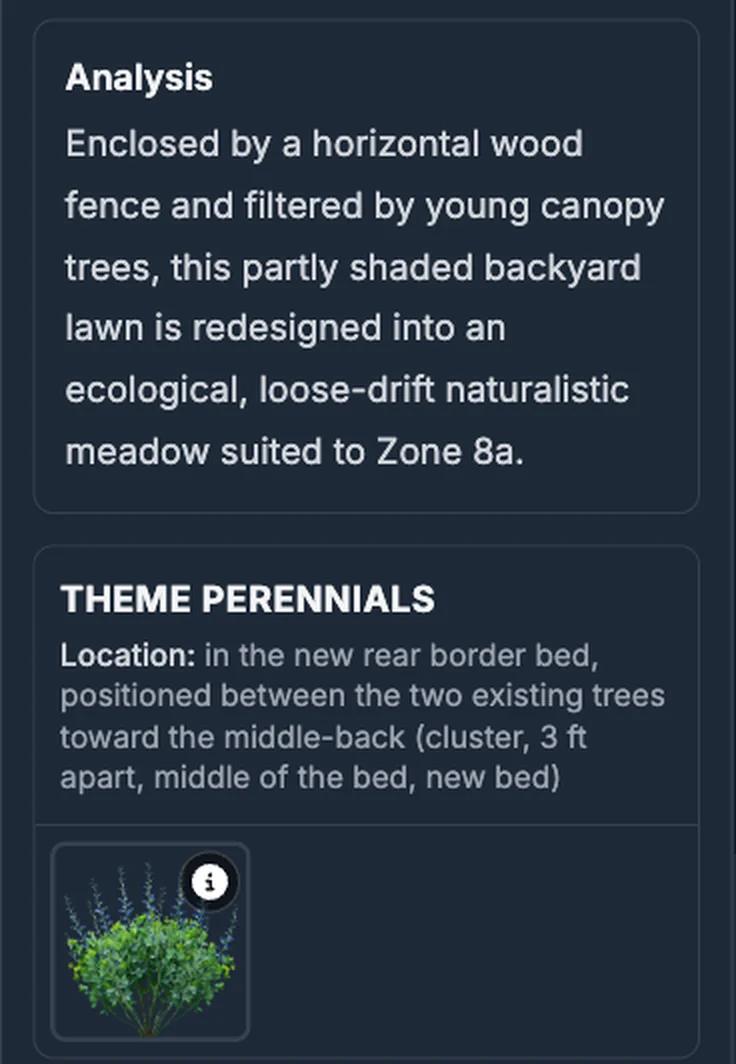
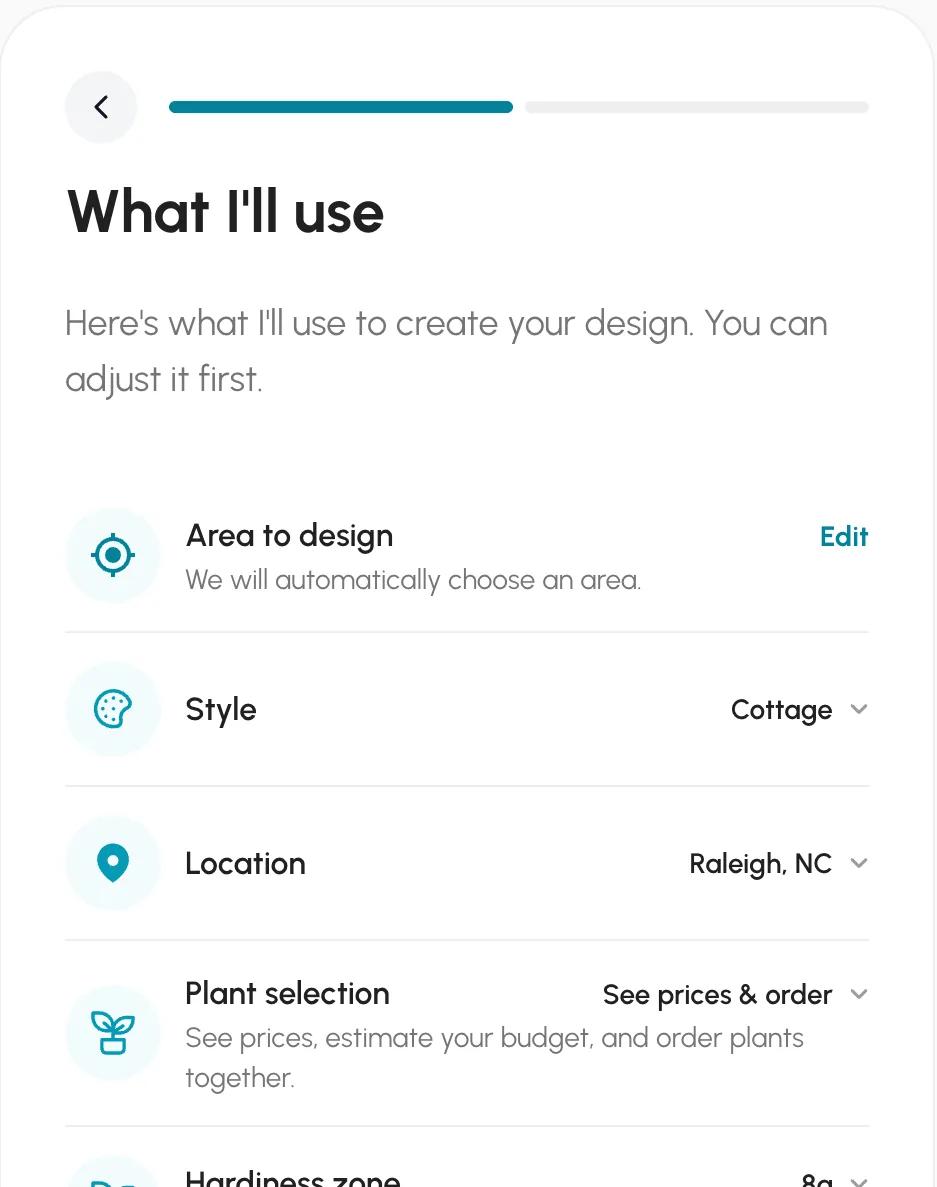
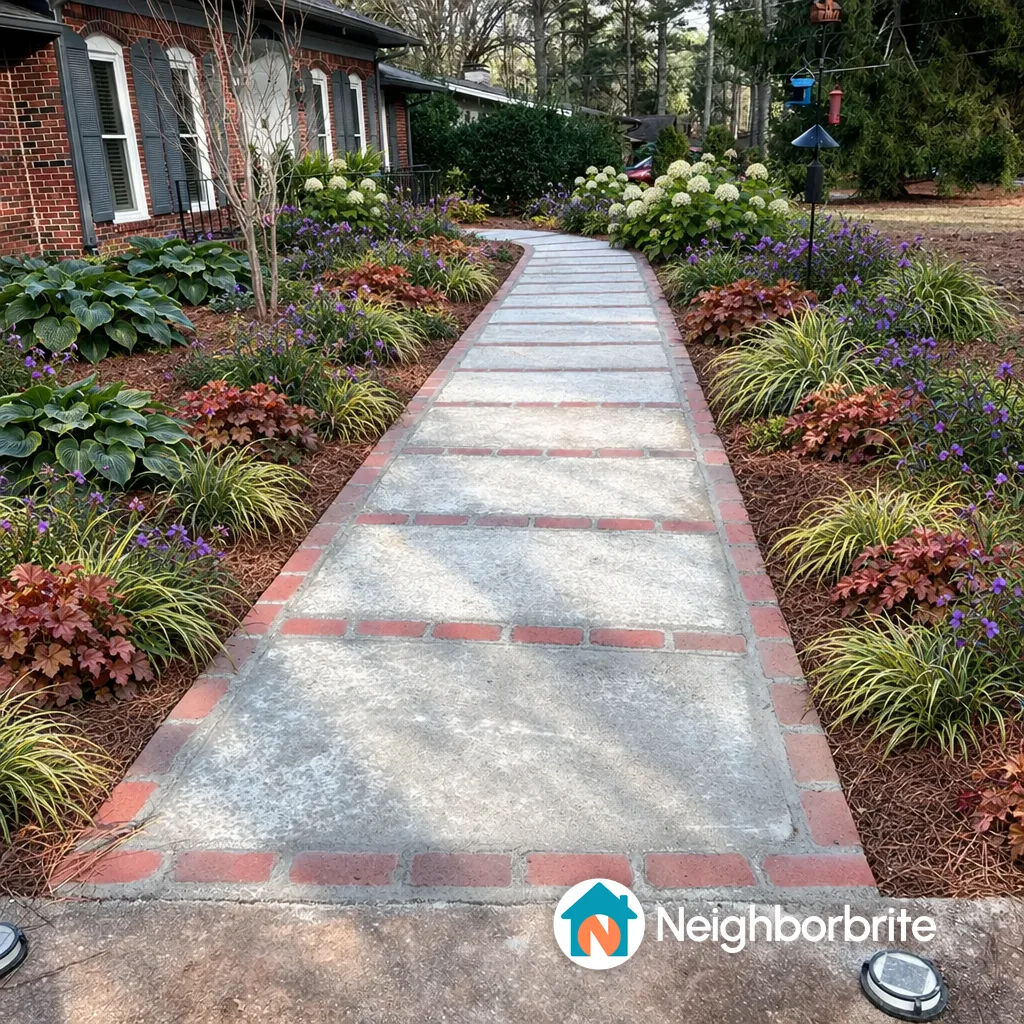
The planting-first tools handle this in different ways. Neighborbrite inferred our location, set zone 8a, and guessed full sun for the pine-shaded bed, which we corrected to partial sun before it generated; its plan then named five real cultivars sensible for part shade in 8a.
Sow's iPhone app carries sun and zone on each saved space ("part sun, zone 8a") and pre-fills them before you pick a photo, and every plant it places is a catalog species with zone, sun, mature size, bloom and care data.
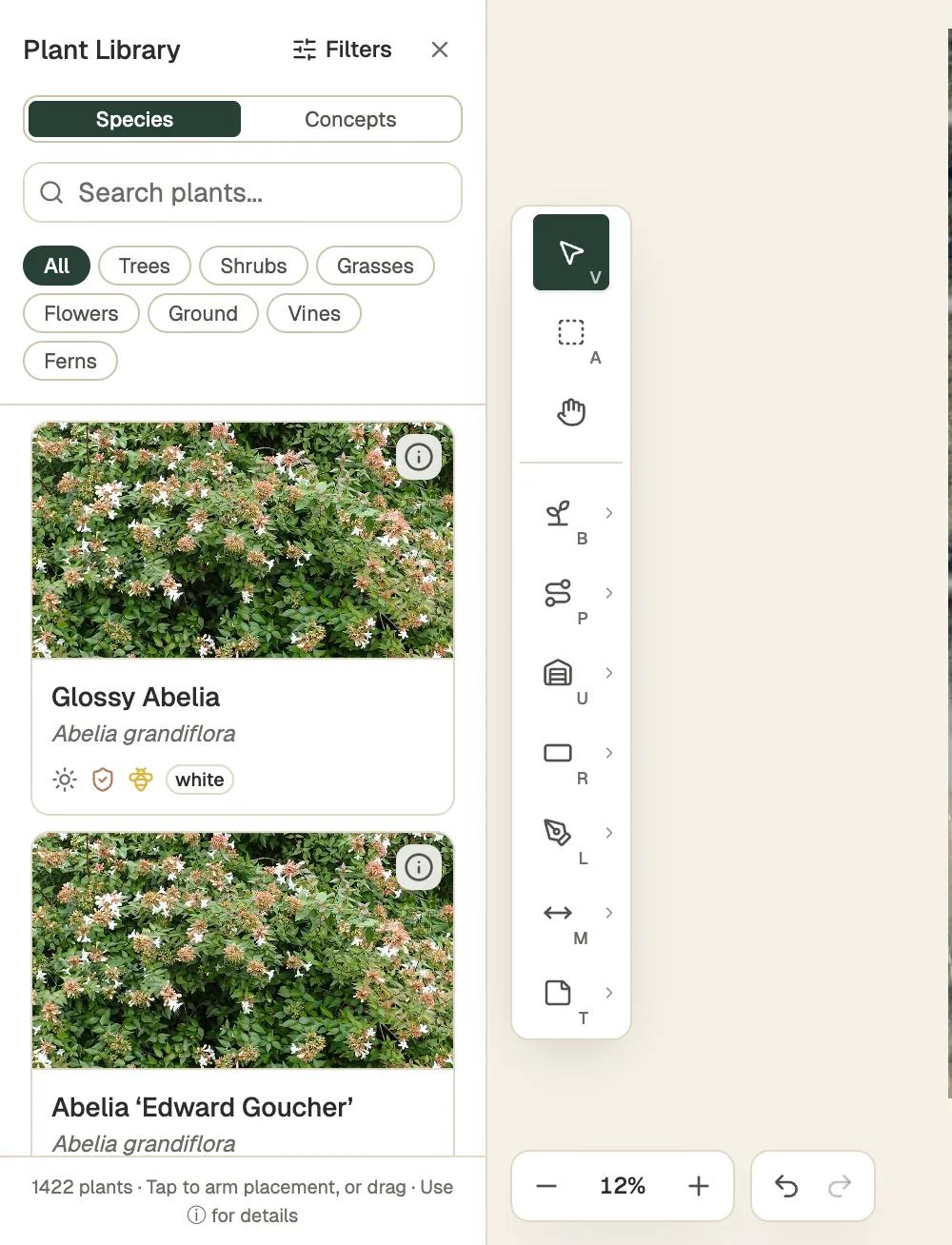
Klora, a free browser planting-plan tool, lists 1,422 species with sun, deer and pollinator icons and shows the plan at year 1, 5, 10 and mature, so you can see what the shrub becomes.
None of those three is a 3D modeler. That is the trade: Planner 5D gives you the walkthrough and skips the plants; the plant tools give you the plants and skip the walkthrough. The screenshots in this section show what plant data looks like when a tool has it.
| Tool | Plants | Kinds of plants | Beyond plants | What each plant carries |
|---|---|---|---|---|
| Sow | 12,000+outdoor species and named cultivars |
| 150 objects in 12 groups (furniture, fire pits, fences, lighting, water features and more) and 93 surfaces (lawn, mulch, gravel, pavers, decking and more) | Zone, sun, mature height and width, bloom time, monthly care, native status, deer and drought tolerance, and a nursery price where one is listed |
| Planner 5D | No named speciesgeneric plant symbols | Not stated | 10K+ catalog items, mostly furniture and decor, plus patios and decks; half the furniture catalog on free | No species, zone or climate data |
What does Planner 5D cost?
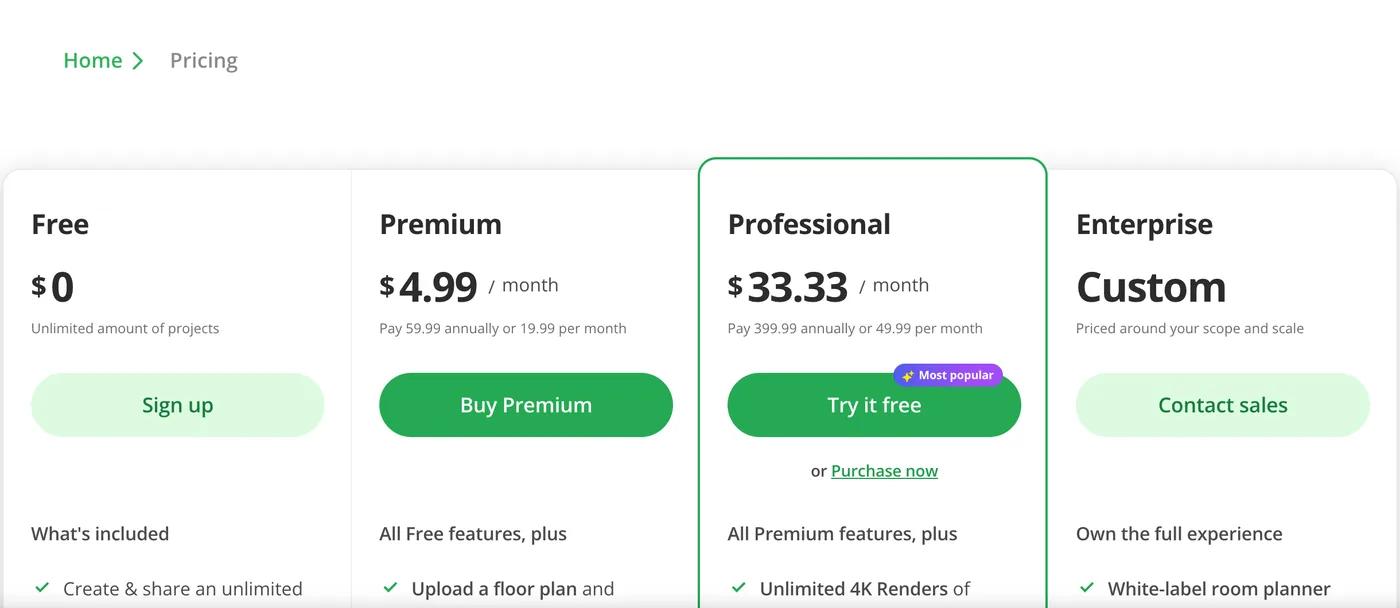
Free with half the catalog, $59.99 a year for Premium and $399.99 for Professional.
Planner 5D has a free tier with unlimited projects and 50% of the catalog. Premium is $19.99 a month or $59.99 a year and includes credits for its image generator (its pricing page lists 100 or 1,200 credits, depending on the plan). Professional is $49.99 a month or $399.99 a year and adds 4K renders. Prices checked October 2026 on planner5d.com.
For comparison, Sow is free to start and Pro is $39.99 a year on the web ($59.99 a year through the App Store), with Pro+ at $99.99 a year.
A year of Planner 5D Premium is $20.00 more than a year of Sow Pro on the web, and the two buy different things: Premium buys more catalog and generator credits, Pro buys planting plans, the satellite map editor, and the priced plant schedule.
Planner 5D's free tier gives unlimited projects that you draw yourself; Sow's gives 10 generated designs to start and more for taking part.
If you only need a layout, Planner 5D's free tier may be all you ever pay. If you need plants, no Planner 5D tier adds them, so the money would go to a different tool regardless.
| Tool | Free | Paid | Checked |
|---|---|---|---|
| Sow | Yes | Pro from $39.99 a year on the web ($59.99 through the App Store); Pro+ $99.99 a year | Oct 12, 2026 |
| Planner 5D | Yes | Premium $19.99 a month or $59.99 a year; Professional $49.99 a month or $399.99 a year | Oct 12, 2026 |
Planner 5D vs Sow: which should you use?
Where does the patio go? Planner 5D. What do I plant, and will it live? Sow.
Who does what
A tool is listed only where it does the job fully. Same checks as the table.
Redraws your photo
- Sow
Lets you place things by hand
- Sow
- Planner 5D
Plans the beds from above
- Sow
Hands you a plant list
- Sow
Helps after planting
- Sow
AR, 3D or construction
- Planner 5D
Sow starts from a photo and is built around plants. Upload a photo of your yard and it returns a design with real, named species that suit your zone and light, from a catalog of 12,000+ plants.
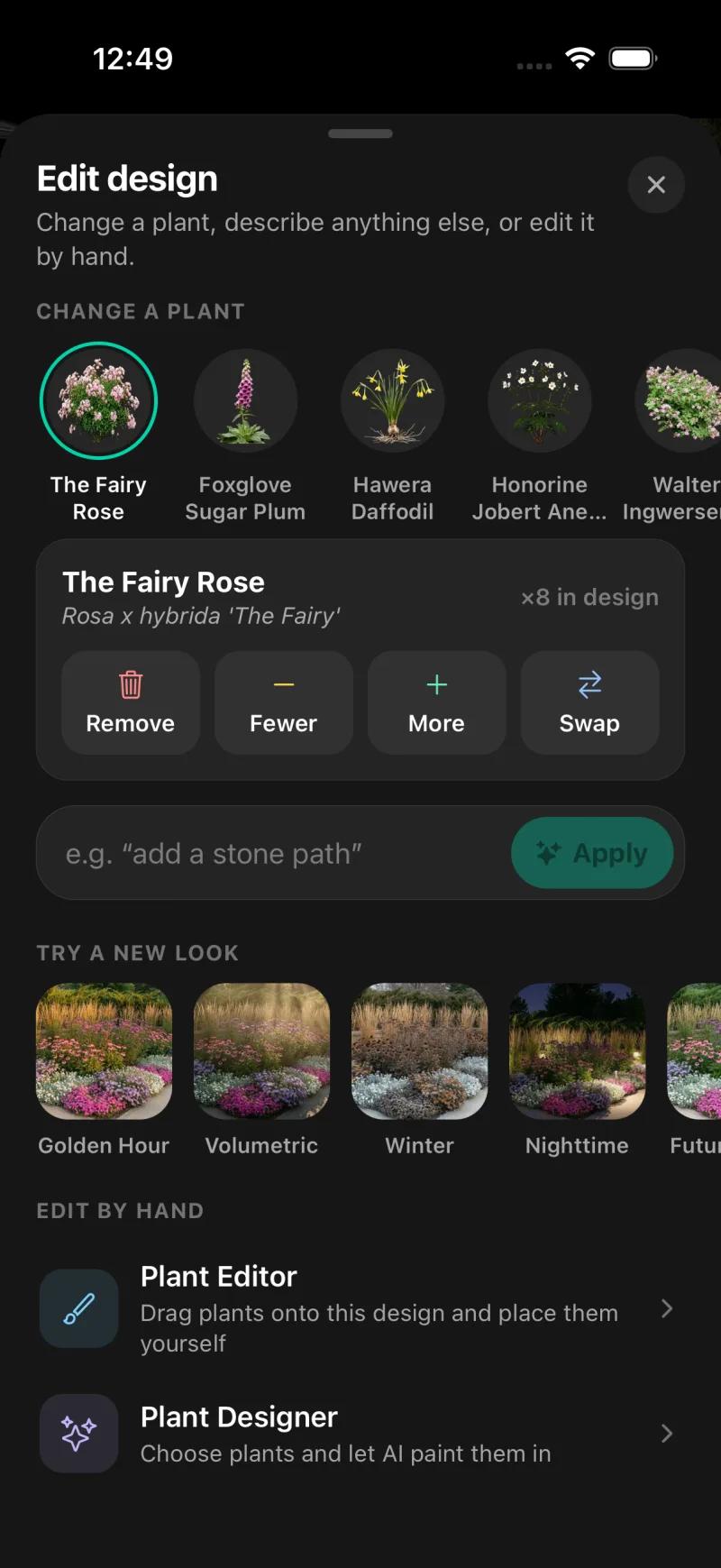
On mobile, every generated species can be removed, counted up or down, or swapped, and the Plant Editor lets you drag in plants, furniture, lighting and paving by hand, on a generated design or a plain photo; on the web, Design Studio places plants and objects over the render.
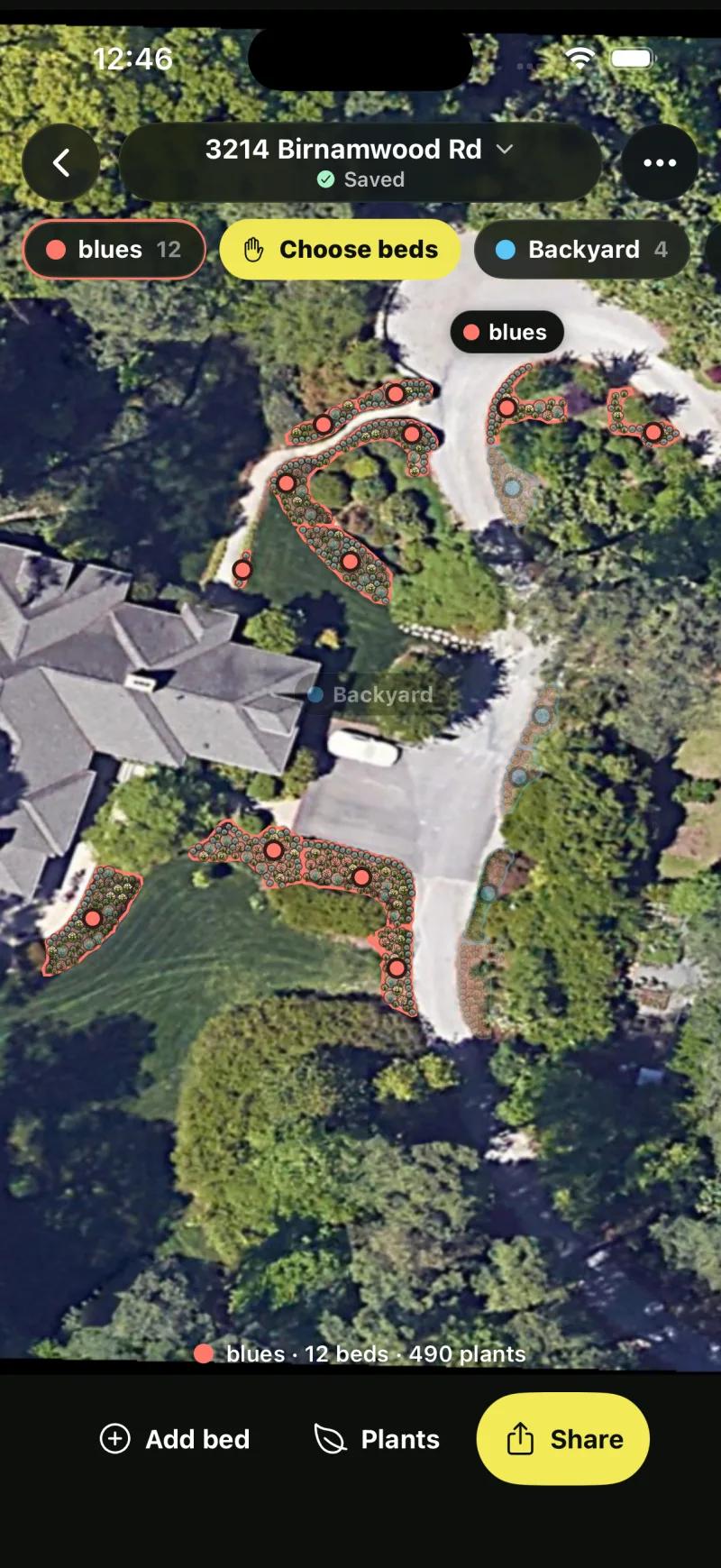
Its Editor lets you lay out plants, furniture and paving by hand on a plain photo, Garden Planner lays out a grid bed, and Pro adds planting plans on a satellite view, with quantities and prices per bed, and care after planting. It runs on iPhone, Android and the web, with the same project on all three.
What Sow does not do, and Planner 5D does: no 3D model or walkthrough, no AR, no floor plans, no hardscape CAD or construction documents, and no Mac or Windows desktop app. Sow places paving, mulch, gravel, fences, structures and water features as design elements on the photo, which is a picture, not a drawing.
Other Sow limits worth knowing: outdoor plants only; weather-aware care is US-only; the web design "Shopping List" PDF prices each species at the lowest listed nursery price (often the smallest pot) and does not show mature size or spacing.
The feature table is lopsided in both directions, which is the honest picture. If your question is "where does the patio go", Planner 5D. If your question is "what do I plant, and will it live", Sow.
| Feature | Sow | Planner 5D |
|---|---|---|
| Redesigns a photo of your own yard | Yes | Partly |
| Plants are real, named species | Yes | No |
| Checks hardiness zone or climate | Yes | No |
| Mature size and spacing data | Yes | No |
| Move or swap individual plants after generation | Yes | Yes |
| Drag-and-drop editor for plants, objects and paving | Yes | Yes |
| Top-down planting plan or layout | Yes | Partly |
| Grid bed planner with companion planting | Yes | No |
| Plant list or shopping list | Yes | No |
| Live nursery prices | Yes | No |
| Care reminders after planting | Yes | No |
| Diagnoses a sick plant from a photo | Yes | No |
| Measures the sun a spot gets | Yes | No |
| AR view | No | Partly |
| 3D model or walkthrough | No | Yes |
| Hardscape and construction tools | Partly | Yes |
| PDF export | Yes | Yes |
| Free tier | Yes | Yes |
| Watermark on free output | Yes | Unverified |
| Works in a browser | Yes | Yes |
| iPhone app | Yes | Yes |
| Android app | Yes | Yes |
Choose Planner 5D if
- You need a floor plan or a scaled layout of hard surfaces, structures, and levels
- You want to walk through the design in 3D before building
- You work on a Mac or Windows desktop and want the same project on your phone
- You already use it for the house and want the yard in the same model
Choose Sow if
- The job is choosing and placing plants that will live in your zone and light
- You want a design from a photo of your own yard, with every plant named and changeable
- You want a planting plan with quantities and prices, and care reminders after planting
- You want to start free and pay $39.99 a year on the web if it earns it
What app is better than Planner 5D for a yard?
For 3D, only SketchUp. For plants, a planting-first tool like Sow, Neighborbrite or Klora.
It depends on which half of the job you mean. For 3D modeling, nothing on this page beats Planner 5D except SketchUp, which gives more control at the cost of a much steeper learning curve and no plant intelligence of any kind.
For hardscape mockups on a photo with AR, iScape is the long-running choice on iOS, though Pro is $29.99 a month or $299.99 a year and its 2D and 3D design is iOS only. For plants, the answer is one of the planting-first tools below.
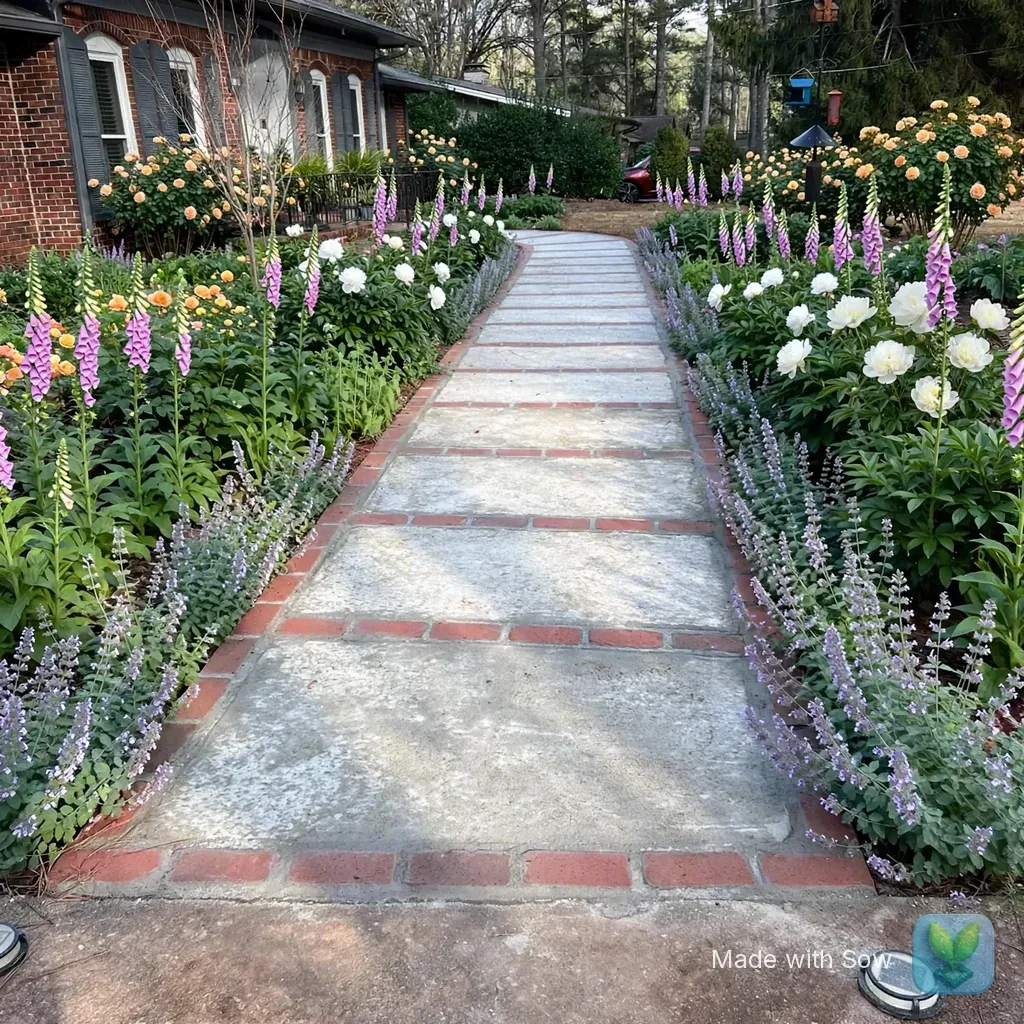
We can show the difference rather than describe it. The same front-yard photo went through Neighborbrite and Sow on their free tiers on October 13, 2026.
Neighborbrite produced a plan with five named cultivars in about 60 seconds and the image in about 33; Sow's web render took under a minute and appeared in the gallery 90 to 150 seconds after submitting. Both kept the house and walkway, and both watermarked the free image.
Neither is a 3D model, and Planner 5D could not have told us the plant names.
On Sow's iPhone app the same yard came back with five species carrying botanical names and quantities (The Fairy Rose x8, Foxglove Sugar Plum x28, Hawera Daffodil x66, Anemone x14, plus one more), and tapping any species offers Remove, Fewer, More, or Swap. That is the thing a generic "shrub" object cannot give you: a name you can take to a nursery and a count to buy.
Can you use Planner 5D and a plant tool together?
Yes. Lay out the structure in Planner 5D, then plan the beds in Klora or Sow.
Yes, and for a project with both a patio and planting it is a sensible split. Use Planner 5D for the structure: where the hard surfaces go, how the levels work, what the view looks like from the house in 3D. Then take the bed shapes to a tool that knows plants. Expect to redraw the beds in the plant tool rather than import them.
Two ways to do the planting half. Klora lets you draw the beds to scale over aerial imagery of your address and place real species by hand; for our test address it imported state aerial imagery at 5.5 inches per pixel with parcel lines in about 30 seconds, free, with no account, though PDF export and a second design need the $24 pass or $69 a year.
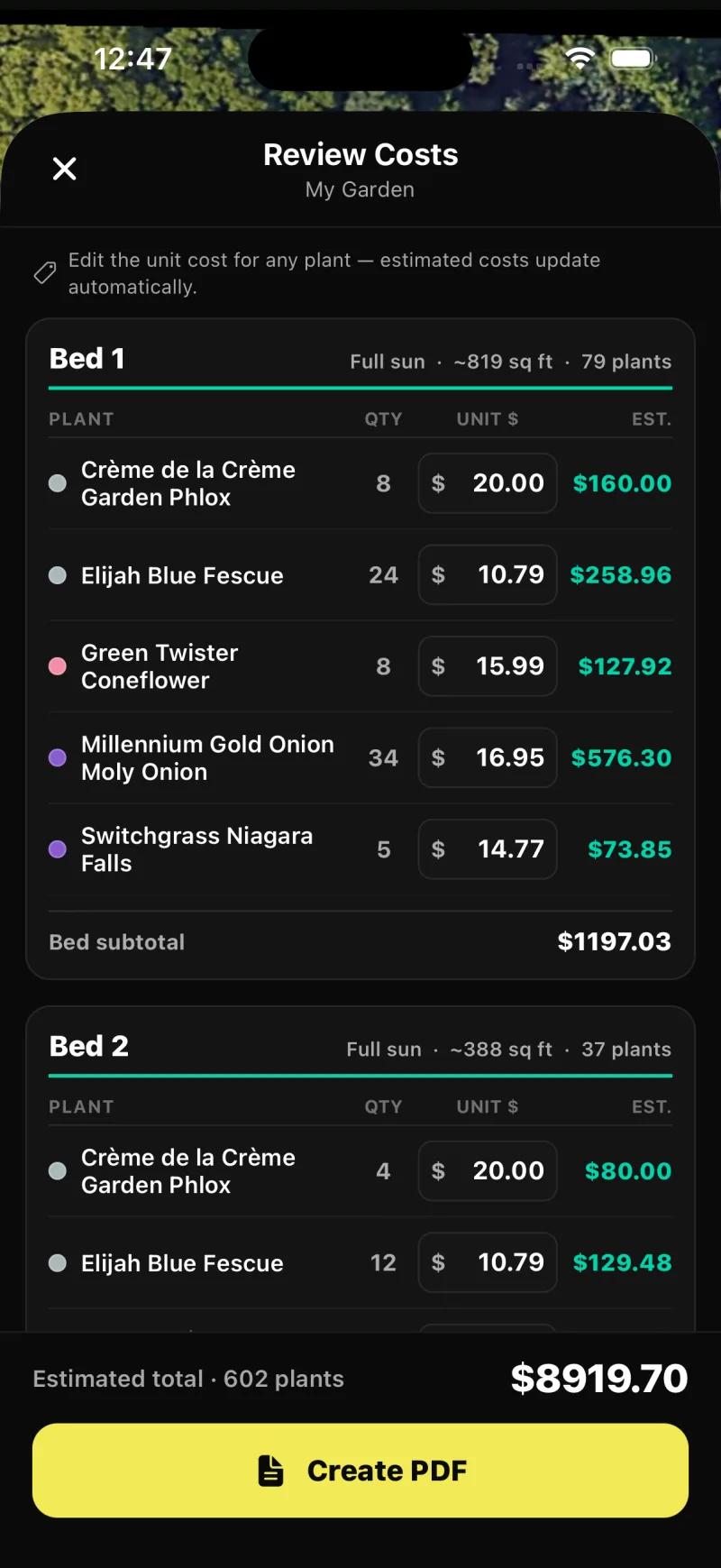
Sow's Planting Plans finds beds on the satellite view and fills them with species for the zone and light, with four layout styles per bed (Layered, Drifts, Rows, Edged) and a priced schedule; our test plan ran to 17 beds across its spaces, and the cost review listed 602 plants at an estimated $8,919.70, every unit price editable.
Alternatives to Planner 5D for landscape work
Sow
Best for designing the planting from a photo and keeping the plan alive after installPhoto redesign with real, zone-checked species from a 12,000+ catalog, editable species by species on mobile, then planting plans with quantities and prices and care after planting, on iPhone, Android and the web. Free to start; Pro from $39.99 a year on the web. No 3D, no AR, no CAD.
Neighborbrite
Best for a quick first look at your yard with plants that fit the zoneA free tier of 4 photo redesigns a day with a watermark, a written plan with named cultivars in about 60 seconds, and a priced plant list on the first design. Plants are not individually editable objects, and only Business at $49.99 a month removes the watermark.
Klora
Best for a scaled planting plan you draw yourselfA free, no-account browser tool that pulls aerial imagery and parcel lines for your address and lets you draw beds and place 1,422 real species to scale, with season and growth-stage views. Nothing is generated and there is no photo render; it is the closest planting-first equivalent to Planner 5D's 2D layout. PDF export needs the $24 pass or $69 a year.
Hadaa
Best for a priced, zone-checked plan to hand a contractor without a subscriptionPay per render, $12 for one or $9 each for three or more, with a plant list verified against your USDA zone and a contractor blueprint listing plant placement, path widths and material volumes. One-shot renders, web only.
iScape
Best for hardscape mockups and AR on an iPhoneThe long-running mobile landscape app: drag objects, hardscape and plants onto a photo of your yard, with AR on iOS and a proposal tool for pros. Pro is $29.99 a month or $299.99 a year, 2D and 3D design is iOS only, and the depth of zone and size data in its plant library is unverified.
SketchUp
Best for full 3D control over structures and terrain when you already modelGeneral 3D modeling with a free browser tier and a huge model warehouse. More control than Planner 5D for someone willing to learn it, and no plant intelligence at all; landscape work needs extensions and skill. Paid tiers from about $129 a year.
The bottom line
Planner 5D is a good tool that ranks for a job it only half does. For floor plans, hardscape layout, and a 3D walkthrough of a yard, on every platform, with a generous free tier, it earns its position, and Premium at $59.99 a year is fair for that. For planting, we found no plant species, hardiness, or climate data on its site, which means it cannot tell you what will survive in your yard, and that is most of what a garden is.
If you came to Planner 5D for a landscape and the plants are the point, start with a tool that knows them: Neighborbrite for a quick first look on its limited free tier, Klora for a scaled plan you draw yourself, with one free design, or Sow for a photo redesign with real, zone-checked species you can change one by one and carry through to a priced planting plan and care, free to start and $39.99 a year on the web. Keep Planner 5D for the patio.
Questions people ask
What app is better than Planner 5D?
For plants, Sow, Neighborbrite, or Klora, because each works with real species and your hardiness zone, which Planner 5D does not. For 3D modeling, SketchUp offers more control at a steeper learning curve. For AR hardscape mockups on an iPhone, iScape. No single app beats Planner 5D at everything; it is better at layout and 3D than any planting tool, and worse at plants than all of them.
Is Planner 5D good for landscape design?
For the layout half, yes: 2D outdoor plans, hardscape, structures, and a 3D walkthrough, on web, iPhone, Android, Mac and Windows, with a free tier that allows unlimited projects. For the planting half, no: we found no plant species, hardiness, or climate data on its site, so it cannot tell you what will grow in your yard.
Is Planner 5D free?
Yes, to start. The free tier allows unlimited projects with 50% of the catalog. Premium is $19.99 a month or $59.99 a year and Professional is $49.99 a month or $399.99 a year, as published in October 2026. Whether free exports carry a watermark is something we could not verify.
Does Planner 5D have real plants or hardiness zones?
Not that we could find. Its catalog holds generic plant objects for rendering, without species names, hardiness zones, climate data, mature sizes, or spacing. Tools that do carry that data include Sow (12,000+ species with zone, sun, mature size, bloom and care), Klora (1,422 species with sun and bloom data), and Neighborbrite (named cultivars matched to your zone).
What is the best app for landscape plan design?
For a scaled plan of hard surfaces and structures in 3D, Planner 5D. For a planting plan with real species, Sow's Planting Plans on mobile lays beds out on a satellite view with quantities and prices, and Klora lets you draw one free in a browser over aerial imagery of your address. Which is "best" depends on whether the plan is for a builder or for a nursery trip.
What is the 3-5-7 rule in landscaping?
It is a planting rule of thumb: group plants in odd numbers, threes, fives and sevens, because odd groups read as natural drifts rather than rows or pairs. It is a habit, not a law, and no tool enforces it. Sow's bed editor offers Layered, Drifts, Rows and Edged layouts and shows the count of each species in a bed, which is the easiest way to apply it in practice.
How do I create a landscape layout?
Start with the fixed things: house, property lines, existing trees, paths you will keep. Add hard surfaces and structures next, then the bed shapes, then the plants, chosen for the zone and light of each bed and spaced for their mature size. Planner 5D handles the first three steps well in 2D and 3D. Klora handles all four as a drawing over aerial imagery with real species. Sow starts from a photo or a satellite view and fills the beds with zone-checked species you can then adjust.
Can Planner 5D design my yard from a photo?
We could not confirm it. Planner 5D has an image generator, built for interiors first. Tools we did test from a photo are Neighborbrite (free, about 33 seconds for the image) and Sow (free to start, under a minute for the render), both of which name real plants.
Keep comparing
- Software guideBest landscape design softwareRead
- Ranked and testedBest landscape design appsRead
- Free tiers, testedBest free landscape design appsRead
- Honest reviewiScape review: is it free?Read
- Hands-on reviewNeighborbrite review (2026)Read
- Best ofBest planting plan softwareRead
- HubAll comparisonsBrowse
Keep Planner 5D for the patio. Design the planting here, free
Upload one photo. Sow places real plants that suit your zone and light, names every one, and keeps the design editable plant by plant.
We make SowTested October 13, 2026Planner 5D described from its own pagesWe paid nothing for the testsHow we tested
How we tested
- Test subject: a brick ranch front walkway in Raleigh, NC (zone 8a, part sun) and a fenced backyard; the same two photos went to every tool we ran hands-on.
- What we paid: nothing. Planner 5D was not signed up for or tested; its prices and features are quoted from planner5d.com as of October 12, 2026. Neighborbrite and Klora ran on their free tiers and Sow on a free web account plus the iPhone app.
- Read Planner 5D's pricing and feature pages and recorded the tiers, the free-tier limits, and what the catalog contains. Searched its pages for plant species, hardiness, and climate data and found none; that absence is reported as "we found none", not as a tested result.
- Pulled the live Google results for "planner 5d landscape" and related terms on October 12, 2026 to record where Planner 5D ranks and which questions people ask alongside it.
- Ran the two photos through Neighborbrite free and Sow (web and iPhone), and the test address through Klora free, to show what species, zone and sun data look like in tools that have them.
- Compared prices as published only. No Planner 5D renders, exports, or generator output were produced, so watermarking and photo-to-landscape output remain unverified.
Read it the way you would read any maker's comparison
This page is written by the Sow team. We show our work in the screenshots and say where Sow is not the right answer.
Where Sow loses here
- no 3D model or walkthrough
- no AR
- no floor plans or hardscape CAD
- no Mac or Windows desktop app
Spotted a change? Email [email protected] and we will re-test and correct the page.