
How to design a garden bed in Sow
Create a space for the bed
Install Sow from the App Store or Google Play, or sign up at usesow.com. Add a space and give it its sun and zone, for example part sun, zone 8a.
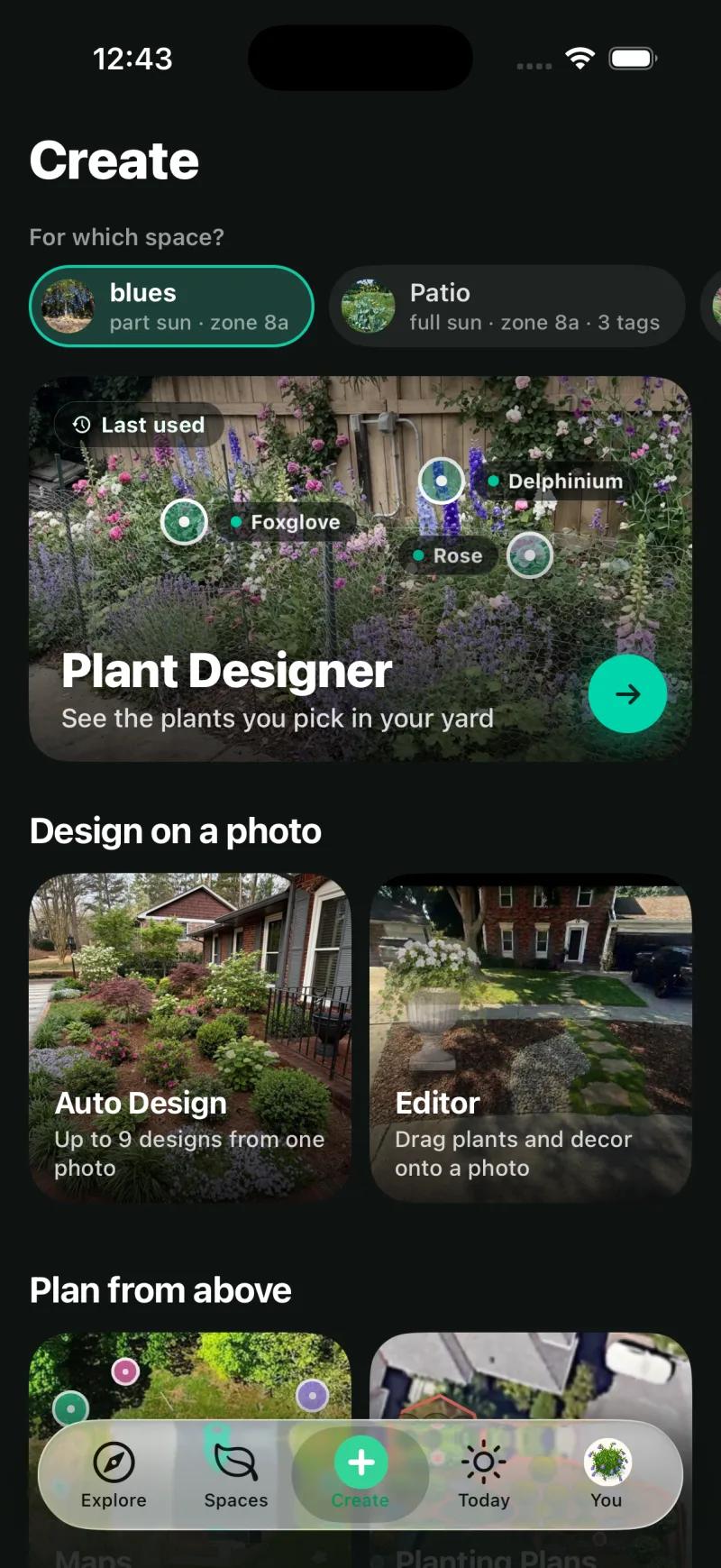
Open Create and choose Auto Design
Auto Design makes up to 9 designs from one photo. The Make it yours chips set Style, sunlight (pre-filled from the space) and Must-haves.
Photograph the bed and crop to it
Take a photo, use one from the space, or pick from your library. Single planting beds or borders work best, so crop out the rest of the yard.
Check the Plants list
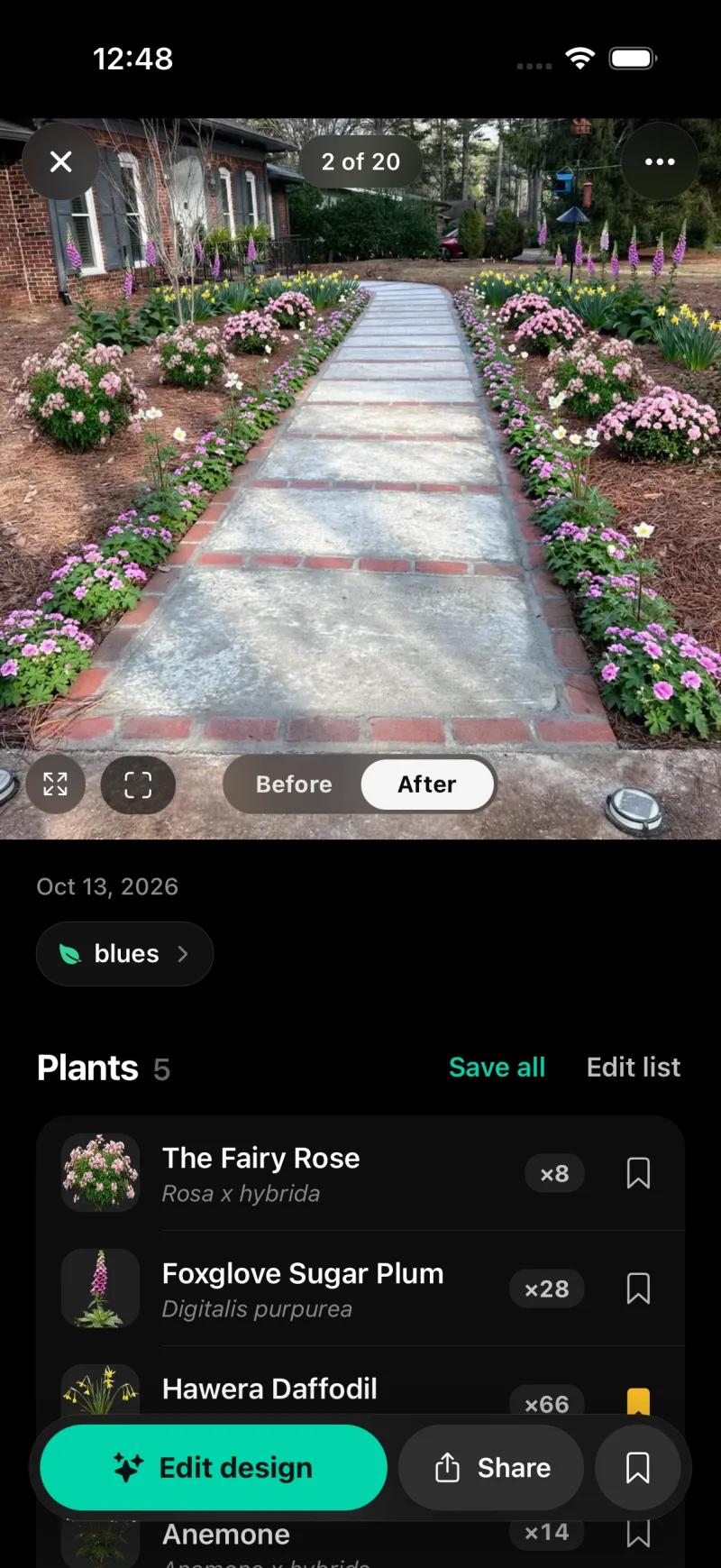
The finished design shows a Before and After toggle and every species with its botanical name and quantity. Save all adds them to your library.
Edit the planting
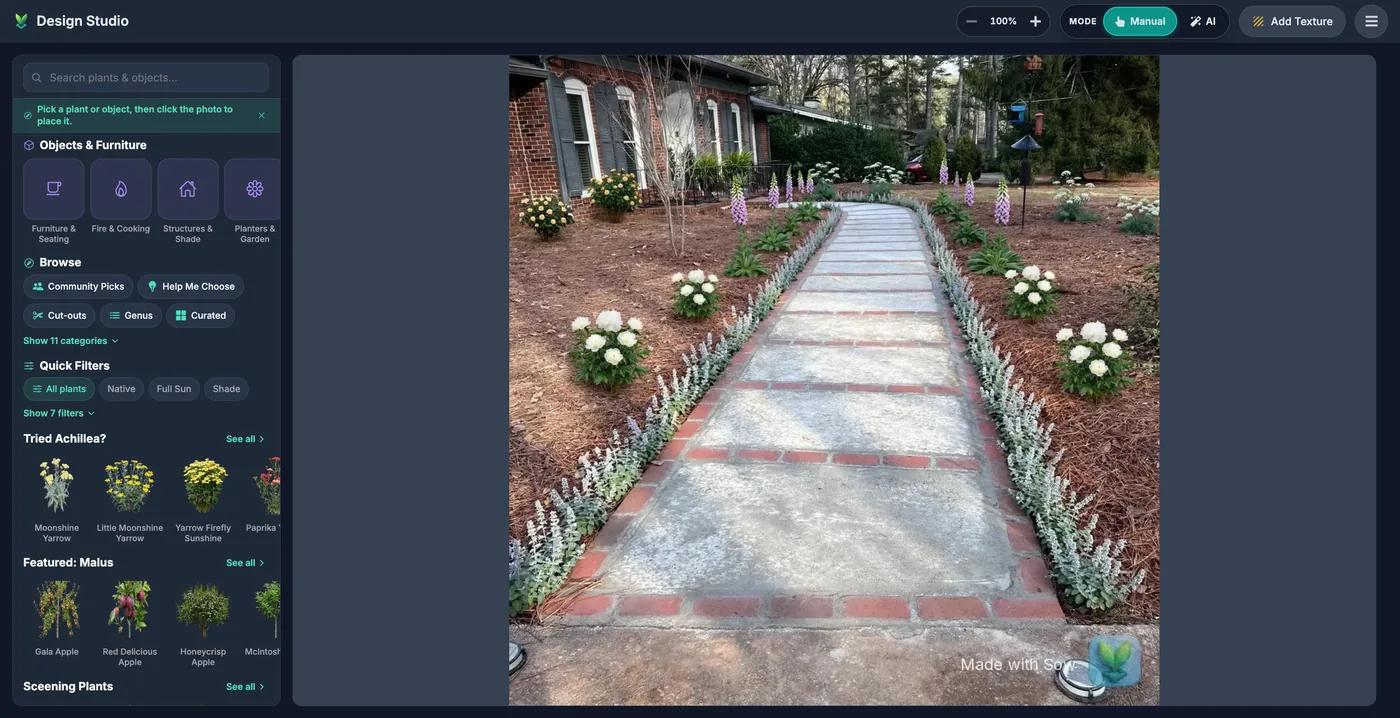
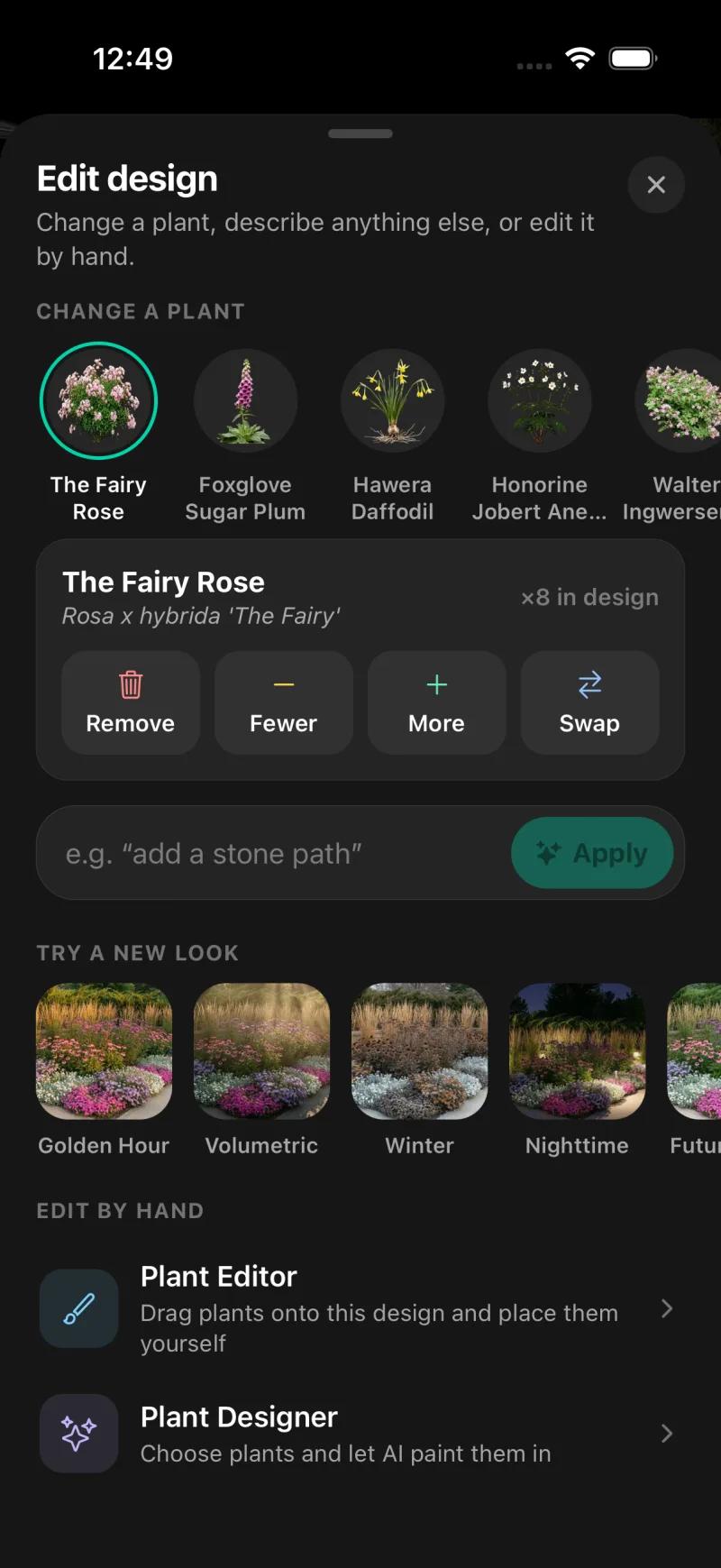
Tap a species for Remove, Fewer, More or Swap, type a change such as "add a stone path", try a new look, or drag plants by hand in the Plant Editor.
Plan the whole garden
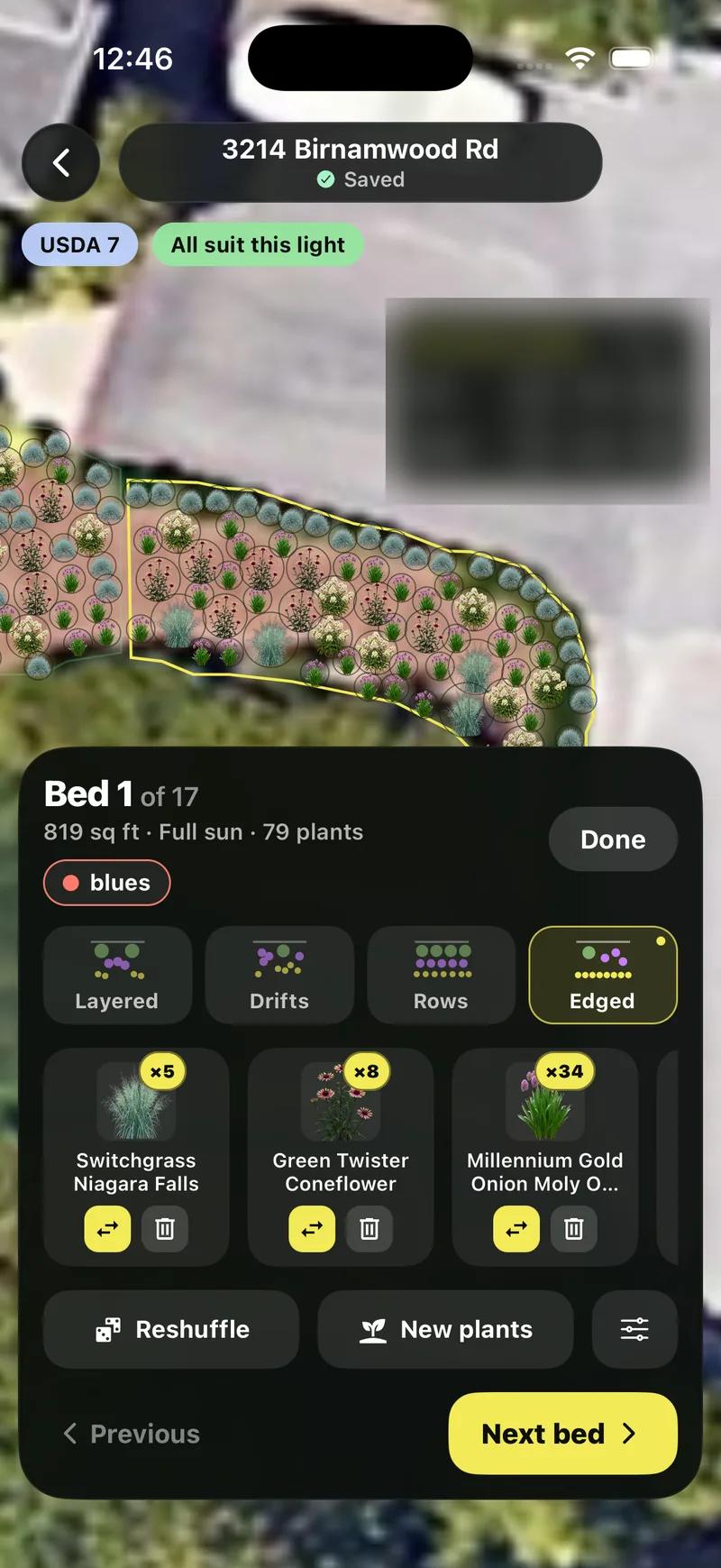
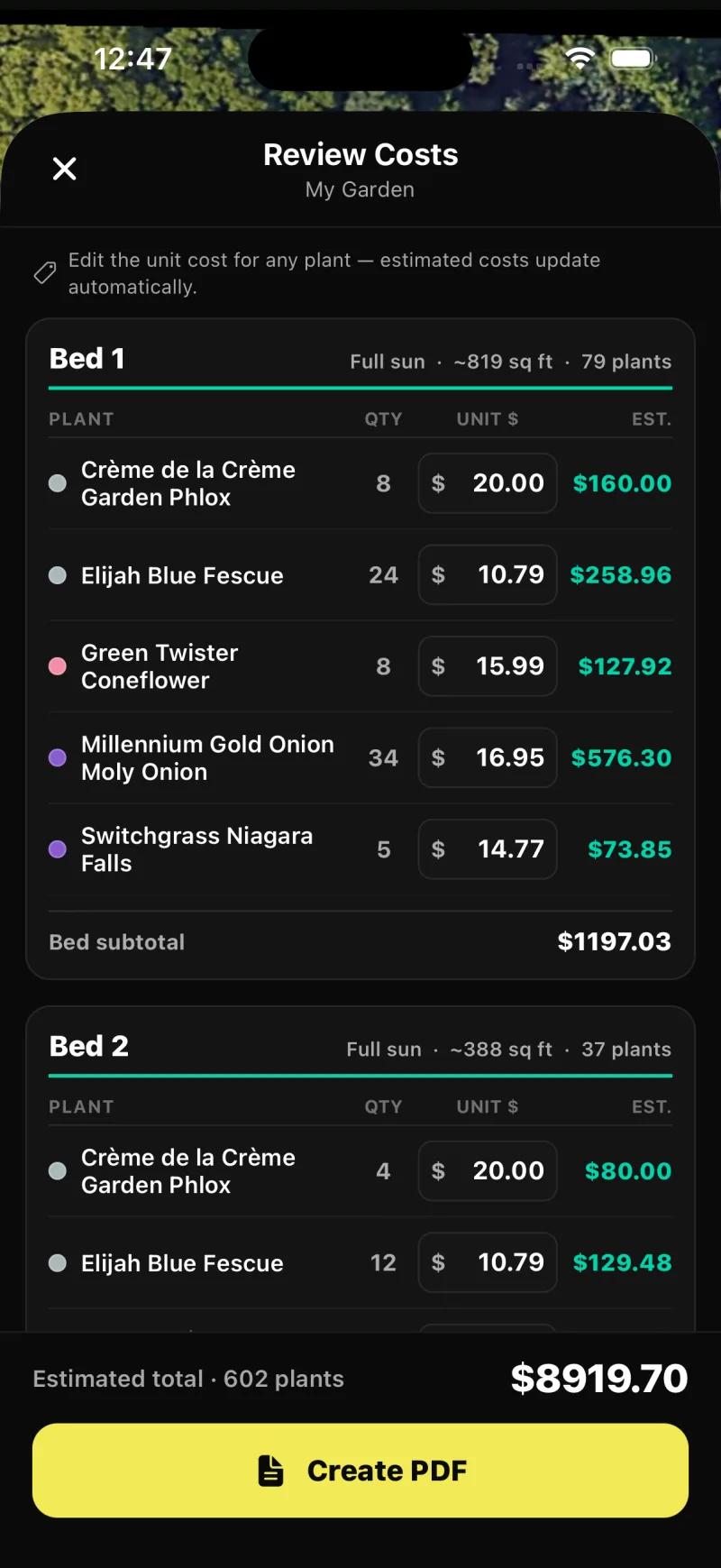
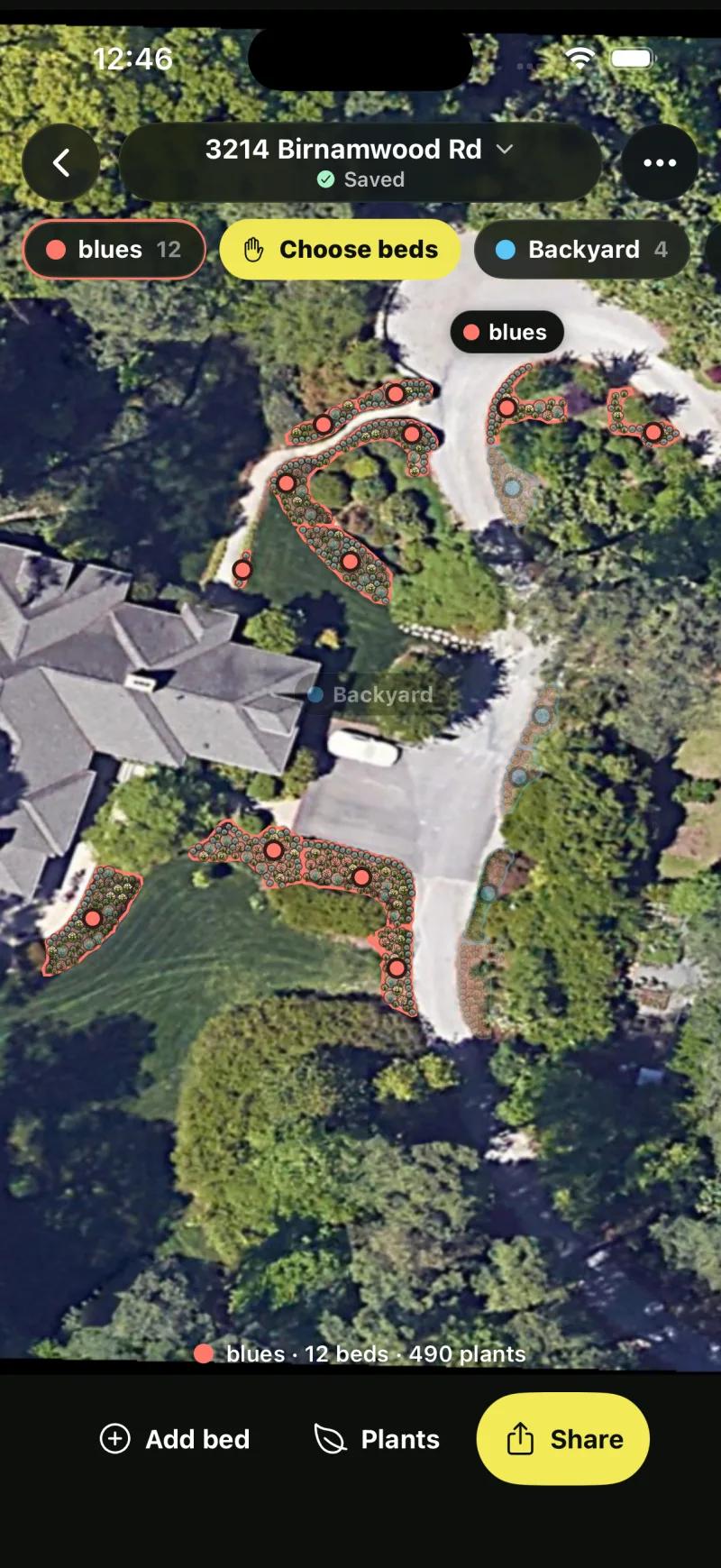
Open Planting Plans to lay out every bed on a satellite view, then Share, Whole plan, Save PDF for Review Costs with quantities and prices.
What should a garden design app get right?
The plants: real names, your zone and light, mature size and easy changes.
The plants. A garden app that draws a lovely picture and cannot tell you what is in it has done the easy half. The hard half is knowing that the plants are real, that they survive your winters, that they suit the light in that bed, how big they get, and what they cost. Sow is built around that half.
This is not a mood board or a stock photo. It is your space, replanted with species that survive your winters, sized to what they actually grow into, and every plant in it can be moved, swapped or removed.
The flower-bed evidence: one walkway, both borders
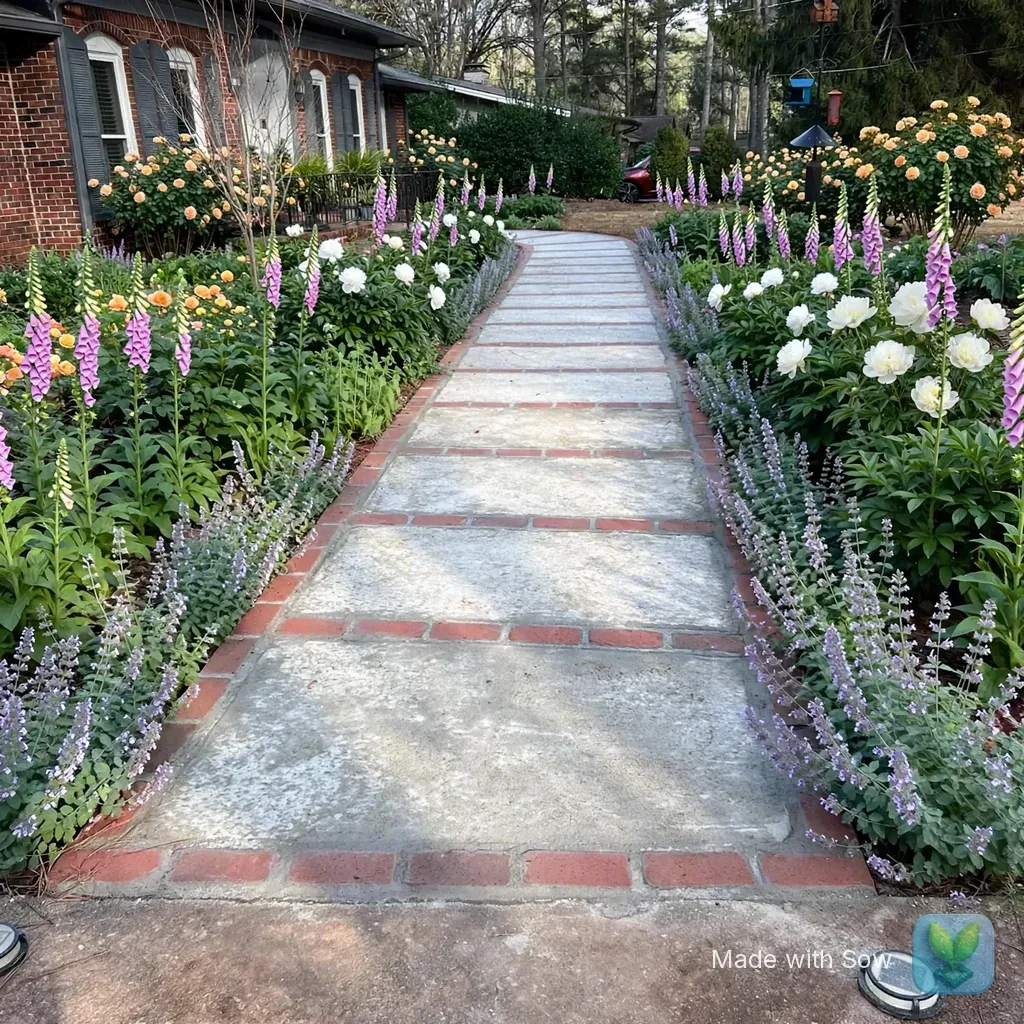
Both borders planted with part-sun picks and counts, because the app asked about the light first.
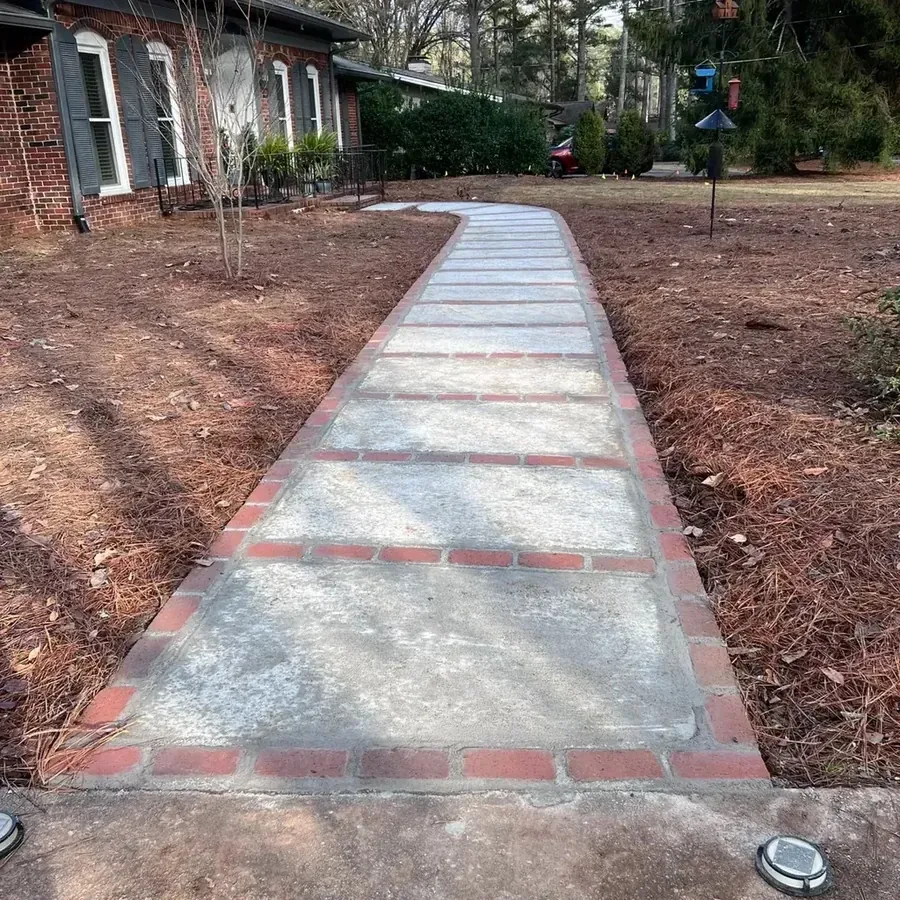
We gave Sow a photo of a brick ranch front walkway with bare pine-straw beds on both sides, in Raleigh, North Carolina, zone 8a, part sun under pines.
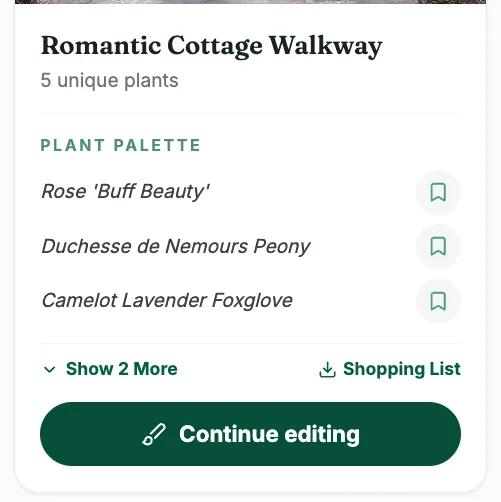
On the iPhone app, with the sunlight chip set to part sun and Cottage as the style, the design came back with both borders planted and a Plants list of five species with botanical names and quantities: The Fairy Rose x8, Foxglove Sugar Plum x28, Hawera daffodil x66, anemone x14 and one more.
Those are part-sun picks, because the app asked about light before it drew.
Does it work in the UK and Australia?
Yes for zone-checked plants and every design tool. Forecast-based care is US only.
Zone matching covers the US, Canada, the UK and Australia, so a garden in any of those gets zone-checked plants, the full plant library and every design tool.
The honest caveat is care. The weather-aware reminders, the water budget and the frost, heat and dry-spell warnings run on US forecasts, so outside the US you get the design and the plant data but not the forecast-driven reminders. Outdoor plants only, everywhere.
From one bed to the whole garden: planting plans
Planting Plans finds every bed on your satellite view and fills it, with a priced schedule.
A single bed from a photo is where most people start. Planting Plans is for the whole garden. Sow finds the beds on a satellite view of your address, fills each one, and shows its zone and "All suit this light" above the plant chips, with Reshuffle and New plants beside them.
Share, Whole plan, Save PDF opens Review Costs: plant, quantity, editable unit price and estimated cost per species, with bed subtotals and a total. Our test plan ran to 17 beds and 602 plants at $8,919.70.
The web design Shopping List PDF gives each species a quantity, a unit price and a line total with an estimated total, the unit price being the lowest listed across the online nurseries Sow tracks (usually the smallest pot), without mature size or spacing; the per-bed plan with an editable unit price is a phone feature today.
An online garden design tool for iPad, Mac and Windows
usesow.com runs in any browser, with the same project as the phone.
Sow also runs in a browser at usesow.com, with nothing to install, so "garden design app for iPad" and "garden design software for Mac" both resolve to the same place. Signup is an email and a password, and in our test the dashboard opened in about 10 seconds.
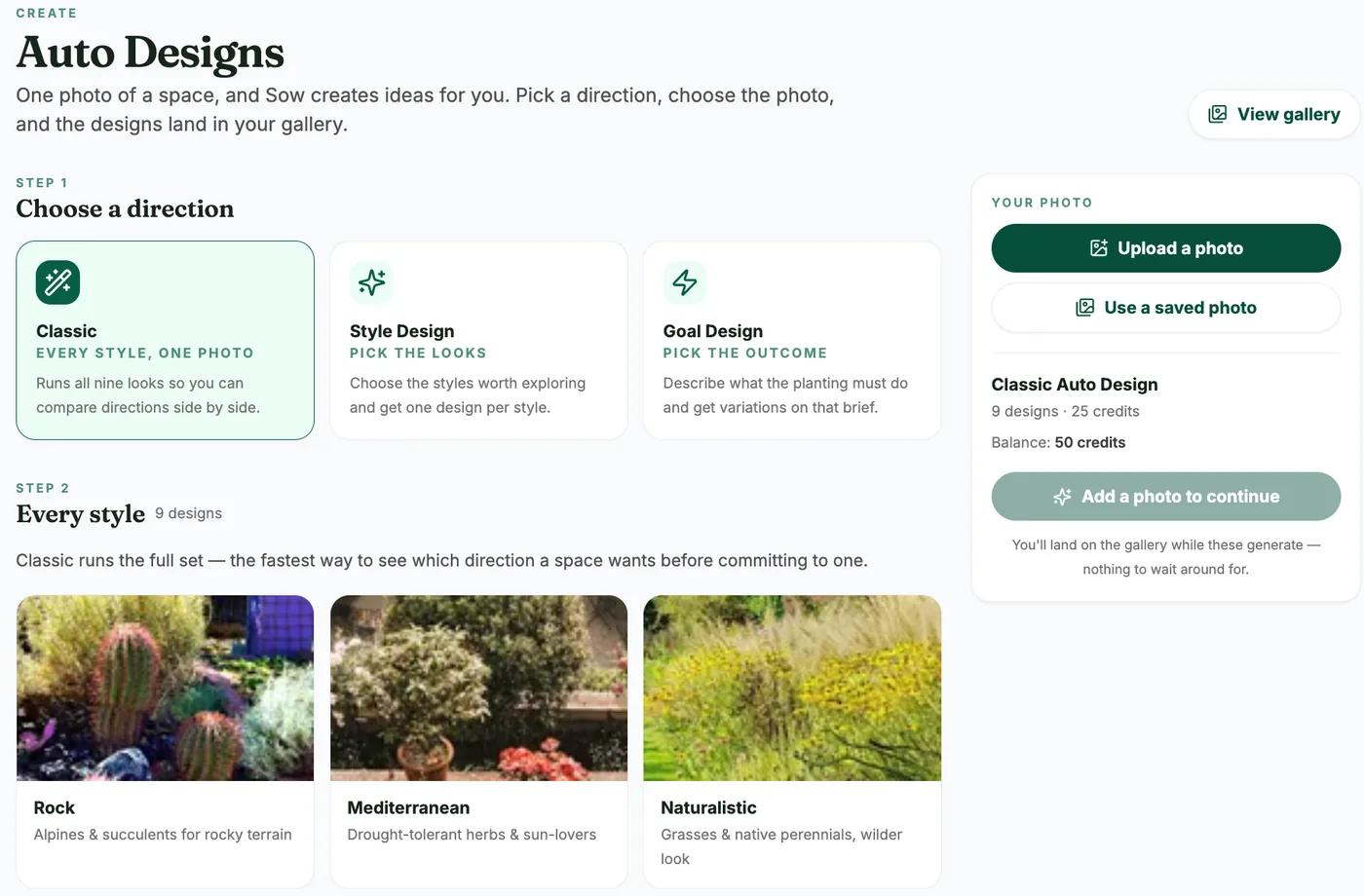
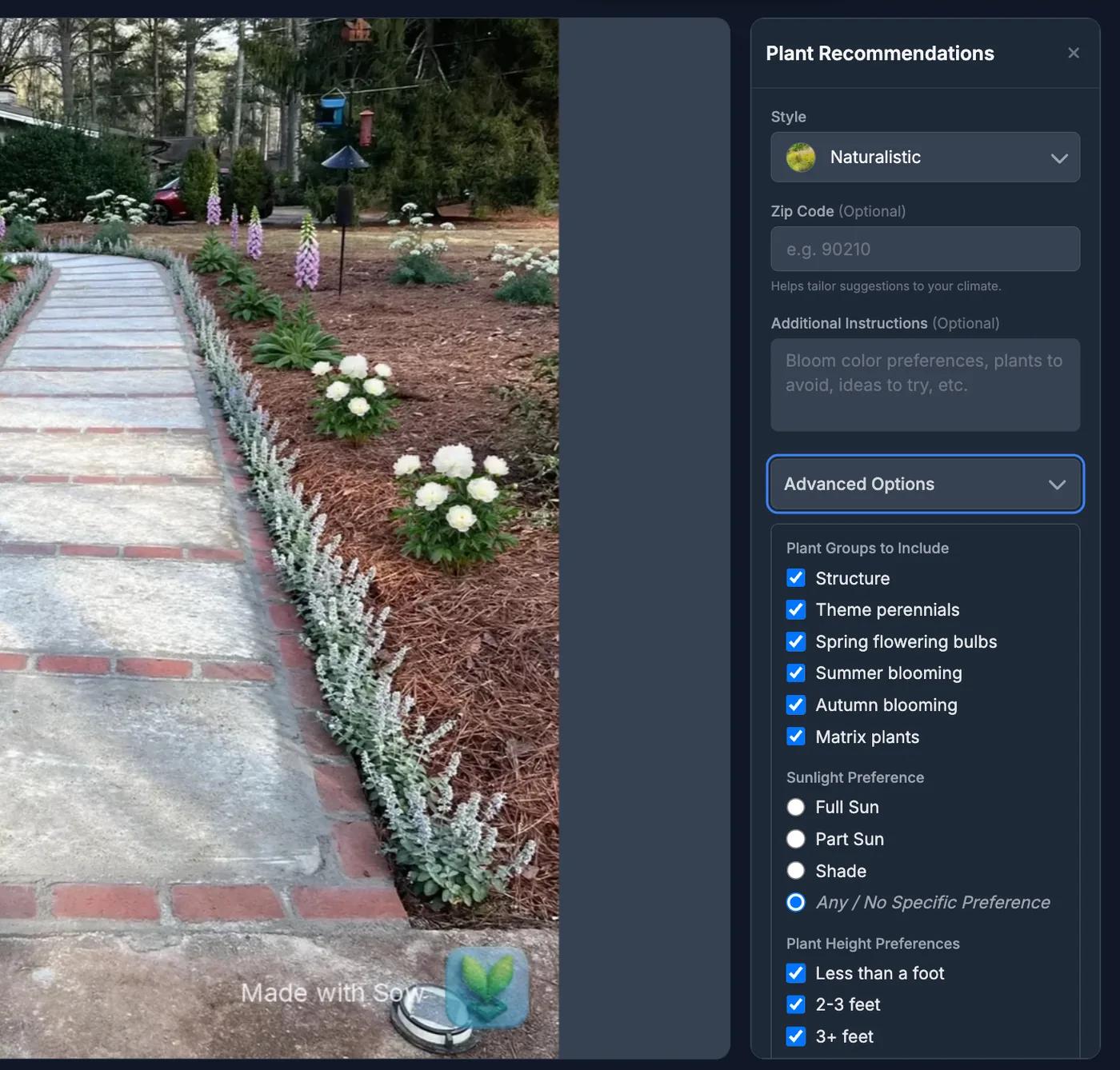
On the web, Auto Designs offers Classic (all 9 styles, 25 credits), Style Design (5 credits per design) and Goal Design (describe the outcome). Continue editing opens the result in Design Studio for hand placement, and Help Me Choose recommends species by style, zip code, plant roles and sunlight. The same account and projects open in the phone app.
How much is free?
10 free designs to start, more for taking part, and no card.
Everyone gets 10 free designs to start, and more free designs for taking part: posting a design earns 25 credits (five designs), a referral 100, and challenges and helpful answers earn credits too. Pro adds Planting Plans and the satellite map editor; web Pro has a 7-day trial or costs $9.99 a month, and the App Store subscription is $59.99 a year.
What free includes, and what Sow does not do
What free includes
- A free account on iPhone, Android or the web: email and password, no card
- 10 free designs to start, and unlimited more for taking part: posting a design earns 25 credits, a referral 100
- Every species named with its quantity, Before and After and Edit design on the phone; catalog links and Continue editing on the web
- Upgrading: Pro adds Planting Plans and the satellite map editor; Pro+ adds client tools
- Free to start; Pro from $39.99 a year on the web ($59.99 a year through the App Store); Pro+ $99.99 a year
Pro from $39.99 a year on the web ($59.99 a year via the App Store). Pro+ $99.99 a year. Prices checked October 2026.
What Sow does not do
- No AR view and no 3D walkthrough
- No hardscape CAD or construction documents; paving, mulch, gravel, fences, structures and water features are design elements on the photo
- Weather-aware care uses US forecasts; zone matching covers the US, Canada, the UK and Australia
- Outdoor plants only
- The web Shopping List PDF prices each species at the lowest listed nursery price (often the smallest pot) and does not show mature size or spacing
- Planting Plans is a Pro feature and lives in the phone app


Questions people ask
Is there a free app to design my garden?
Sow is free to start on iPhone, Android and the web. Everyone gets 10 free designs to start and more for taking part (posting a design earns 25 credits, a referral 100). Our roundup of free apps compares the free plans side by side.
What is the best free program to design a garden?
For a planted picture of your own bed with real species, Sow's free tier. For a scaled plan you draw yourself at no cost, a browser drawing tool with a plant library. Our garden app roundup and our free apps roundup rank the rest with the same two yard photos.
Is there a garden design program that shows my own garden, not a template?
Yes. Sow works from a photo of your actual bed and keeps what is already there: in our tests the house, walkway, bird feeder and pine straw stayed in the front yard, and the fence and both trees stayed in the back.
Does the garden design app work in the UK or Australia?
Zone matching covers the US, Canada, the UK and Australia, so you get zone-checked plants, the plant library and all of the design tools. Weather-aware care uses US forecasts, so outside the US you will not get the forecast-driven watering and frost reminders.
Can I use the garden design app on an iPad?
Open usesow.com in the iPad's browser. There is nothing to install, and you get Auto Designs, the gallery, Design Studio for placing plants by hand, Help Me Choose and every catalog page, on the same account as the phone app, which holds Planting Plans and the priced schedule.
Do I need to know plant names to use it?
No. Auto Design picks the species for the bed from your style, zone and light, and names each one with its botanical name. If you want to choose yourself, Help Me Choose on the web asks for style, zip code, plant roles and sunlight and recommends species, and the library filters by Native, Full Sun, Shade, Deer, Drought and Pollinators.
Can ChatGPT design my garden?
It can talk through ideas and suggest plants. Asked to draw a design on our test photo, ChatGPT removed the porch and named none of the plants, and asking it to move one plant redrew the scene. In the same test Sow kept the house, named every plant, and let us swap them one at a time. Our separate page on that question is linked below.
How much does the garden design app cost after the free design?
Free to start; Pro from $39.99 a year on the web ($59.99 a year through the App Store); Pro+ $99.99 a year. Web Pro has a 7-day trial or $9.99 a month; Pro+ has a 3-day trial or $29.99 a month and adds client tools. On the free plan each design uses 5 credits; paid plans use no credits at all.
Keep reading
Design your first bed, free
Photograph one bed and see it planted with real species for your zone. Your first 10 designs are free, and every plant in them can be changed.